
News
#ShotoniPhone: iPhone Photography Tips
Plus, exclusive sessions at Apple to hone your photography and videography skills

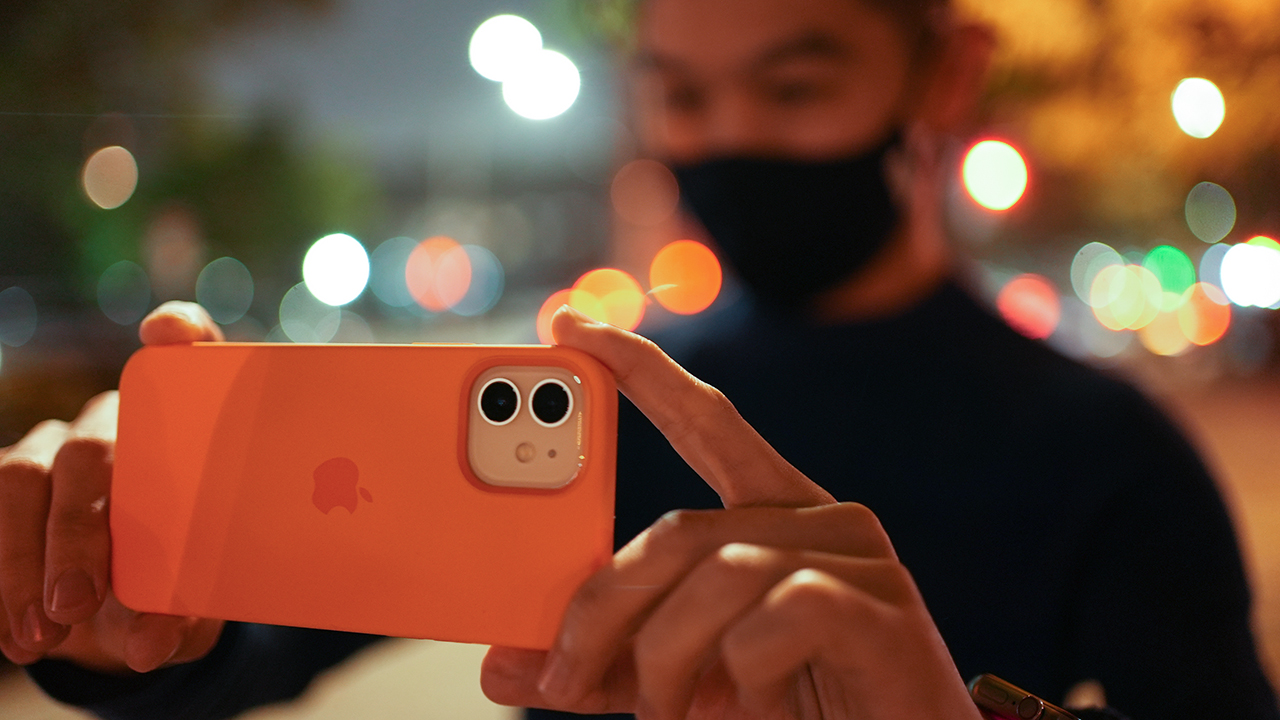
Taking photos and videos on an iPhone? Scott Woodward, a Singaporean-based photographer, shares some of his tips for taking the perfect shot on an iPhone. Take advantage of these tips which you might find indispensable when shooting on the go.
1. Use the Rule of Thirds
The Rule of Thirds is perhaps the most well-known “rule” of photographic composition. Imagine your image is divided into 9 equal rectangles by 2 vertical lines and 2 horizontal lines. The Rule of Thirds dictates that you should position the most important elements in your scene along these lines, or at the points where they intersect, for more well balanced and interesting photos. This asymmetry makes photos more appealing to a viewer because it causes visual tension.
Turn on your grid in your iPhone settings to assist with guiding your composition.
2. Add life to landscapes
Beautiful landscape shots can be breathtaking, but if you’ve ever been subjected to a friend of a family member’s holiday snaps, you know how dull they can become after you’ve looked at dozens of them in a row. Try adding people to your landscape photographs – living elements tend to evoke stronger emotions in viewers.
Even if they occupy just a little bit of space within your frame, human touch helps make a more powerful photograph: it gives scale to an image, offers perspective, and adds drama.
3. Take advantage of the Golden Hour
The most critical ingredient in all great photographs is lighting. The best images always make interesting, powerful use of light. The sun’s angle significantly affects the warmth, contrast.
Practice understanding how light works, reflects, and warms. As often as possible, shoot in the warm “golden hours” of early morning and late afternoon (one hour after sunrise or one to two hours before sunset; this is when the sun is low and the light is soft and yellow/orange).
4. Take photos and videos during the Blue Hour (Night Mode)
Blue Hour is that magical time when the sun has already set, but there’s still some light left in the sky. This twilight period — typically about 20 minutes after sunset — is special because, for a few fleeting moments, the sky takes on a predominantly blue shade.
Night Mode on iPhone 12 makes it even more dramatic. Night Mode automatically turns on when the camera detects a low-light environment and, using a combination of hardware and software, helps bring out the detail in the dark areas of your image while preserving the night time feeling.
5. Take some risks
An iPhone is much easier to handle than a DSLR — it is lighter and more compact, which means that you can use it to effortlessly make more interesting photographs. You can use this to your advantage: be on the lookout for dynamic and creative angles, and experiment and push yourself outside your comfort zone.
Shoot without looking at the screen. Track a moving subject with your camera. Get on the ground and shoot up or get on a balcony and shoot down. Keenly observe your surroundings for natural frames, symmetry, reflection, patterns, and textures.
The more creative you get, the more you’ll learn about what works and what doesn’t. Your photographs will be better or maybe you’ll just get lucky and make a beautiful accident.
#ShotoniPhone, Today at Apple sessions, Apple Music hits
On a related note, Apple is also showcasing its #ShotoniPhone movie — Nian — which is directed by Lulu Wang. The movie is a reimagining of a Chinese New Year legend as a contemporary coming-of-age story. The team shot the whole movie using an iPhone 12 Max. You can view the film here.

For those wanting to level up their photography and videography game, there is also Today at Apple sessions starting this February until March 14. During the sessions, you can connect with various photographers and videographers and learn the tools of their trade.
Virtual Studio: Picture This with Scott A. Woodward (14 February, 3:00 pm)
As part of the Joyful Perspectives series, join award-winning photographer Scott A. Woodward online as he inspires you to reframe your every day using your iPhone. He’ll share his pro tips on everything from cool composition to capturing the magic of the golden hour. You’ll explore night mode, portrait mode, and more to take striking photos in all situations. You will also get editing tips to make your pictures pop.
Sign up for the session here.
Virtual Studio: Celebrations in Slow-mo with Chai Yee Wei (20 February, 3:00 pm)
Capture celebratory moments in slow motion using your iPhone in this virtual session with filmmaker Chai Yee Wei. He’ll share how memories are best-appreciated frame by frame and how he stretches time to amplify them in his work. You’ll explore Slo-mo, Timelapse, and more to record fun videos at home with the Camera app. Join more sessions to push your creativity in the Joyful Perspectives series.
Sign up for the session here.
Virtual Studio: Crafting Stories in Film with Ang Geck Geck (27 February, 3:00 pm)
Discover how to shoot and edit emotive stories using your iPhone with filmmaker Ang Geck Geck. As part of the Joyful Perspectives series, she’ll introduce you to her visual language and share tips on framing your shots using the ultra-wide and telephoto cameras. You’ll explore the creative power of editing in iMovie to craft your own compelling narrative. Sign up for the session here.
Meanwhile, Apple Music has also collaborated with 10 top C-Pop artists such as E.SO, Miriam Yeung, Shi Shi, and Nathan Hartono to curate a playlist based on the theme “Recharge, Review, Remember”.
You can access these playlists with the following links:
- E.SO’s exclusive playlist
- Miriam Yeung’s exclusive playlist
- Shi Shi’s exclusive playlist
- Nathan Hartono’s exclusive playlist
App Store and Apple TV deals
To celebrate the Chinese New Year, special deals on design and editing apps will be available at the Apple App Store. There will also be limited-time in-app purchases from select games such as Genshin Impact, League of Legends: Wild Rift, and Clash of Clans.
Meanwhile, Apple TV subscribers can get family-friendly hits such as Frozen II, Onwards, and Sonic the Hedgehog at unmissable prices from February 11 onwards. Classic Chinese movies such as God of Gamblers, A Better Tomorrow, and Once Upon a Time in China will also be available in 4K.






Lifestyle
Sticker season is back, and so is the planner your ~friends~ might fill in for you
Starbucks Traditions turns 24 with five pieces in the 2027 collection!


There are two kinds of people during the holidays: those who start planning their Christmas shopping early and those who hear the word merienda and immediately calculate how many Starbucks drinks stand between them and a new planner.
If you belong to the latter, consider this your annual reminder. Starbucks Traditions returns to the Philippines on November 3 for its 24th year, bringing a bigger collection with five pieces this time around. And suddenly, your afternoon coffee plans have acquired a very specific financial objective.
The 2026 collection carries the theme “Wrapped in Joy,” celebrating the little surprises that make the holidays feel special.
Think thoughtful gestures, unexpected visits, and friends who actually follow through on plans. You know, the rarest Christmas miracle of all.
Finally, someone is making plans for the planner
Starbucks is giving this year’s campaign a little emotional backstory with “Kami Naman,” a holiday film about Mara, the friend who somehow became the designated organizer of every barkada gathering.
You know her. She’s the one who starts the group chat, finds the restaurant, checks everyone’s availability, and sends the follow-up message when nobody responds.
This time, her friends decide she’s had enough administrative duties for one lifetime. They surprise her at Starbucks with a planner already filled with gatherings they’ve organized for her throughout the year.
Set to Eraserheads’ “With a Smile,” the film is a sweet reminder that the friend who makes everyone else’s holidays special deserves a little magic herself. The song will also be playing in Starbucks stores from November 3 to January 4.
You can watch the full film on Starbucks Philippines’ social media channels. Consider forwarding it to your group chat, particularly if you have been carrying the entire social calendar on your back.
Why your current coffee accessories suddenly feel inadequate
This year’s collection looks ready to be wrapped and placed under the Christmas tree, with copper, ivory, and black setting the mood. Each piece has its own appeal, which makes choosing a favorite a rather complicated exercise in holiday budgeting.
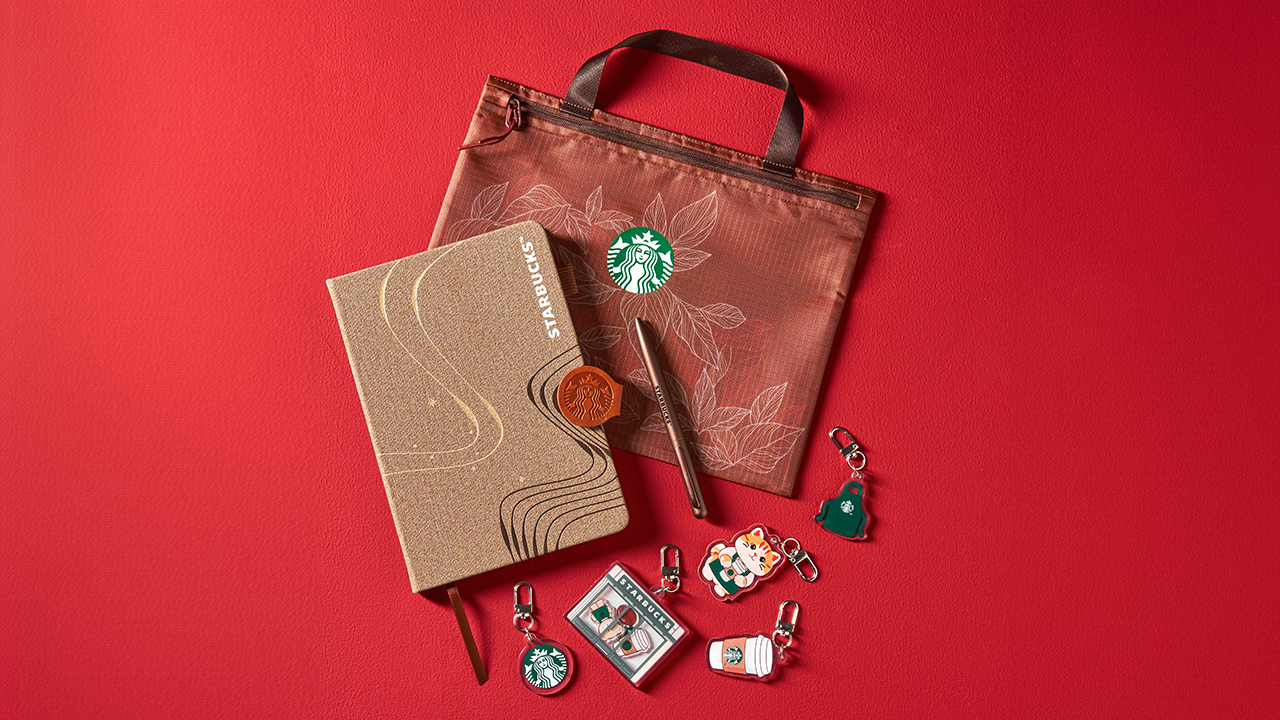
The Siren Planner with Pouch is for the organized one who has approximately 47 things to remember and would prefer to make that 48 with a beautiful planner. It also comes with a surprise keychain in one of five designs, giving you another tiny mystery to obsess over.

The Travel Case with Towel makes its debut in the collection, and suddenly, the idea of booking a little getaway sounds very reasonable. You may have nowhere to go yet, but at least your travel essentials will be beautifully organized when the opportunity presents itself.
For your everyday caffeine arrangements, there’s the 20oz Stainless Steel Tumbler and the 24oz Cold Cup. Both are practical additions to your daily rotation, although you may find yourself explaining why you need another drinking vessel when your kitchen cabinet is already staging a protest.
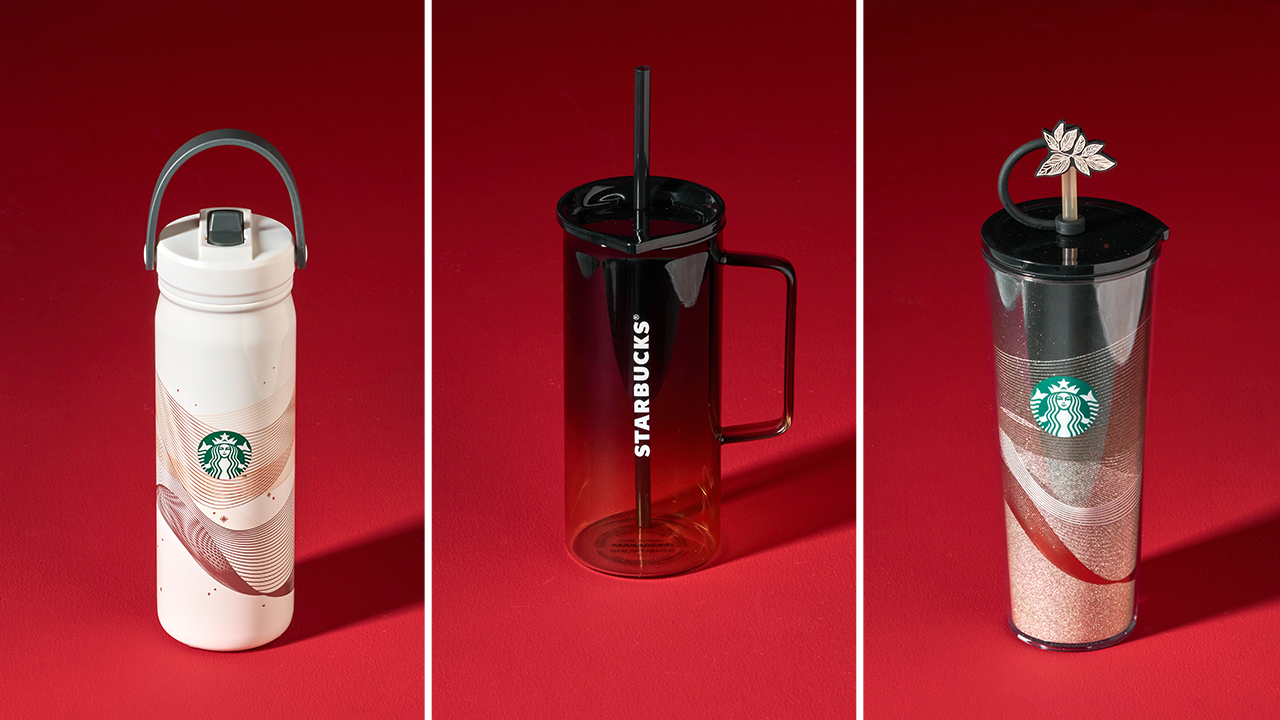
Then there’s the 20oz Glass Mug, which is arguably the most emotionally persuasive purchase of the bunch.
You don’t necessarily need another mug. You simply deserve one that makes your morning coffee feel a little more special. That’s a perfectly respectable argument, as far as your holiday shopping budget is concerned.
The 19-sticker strategy
Now comes the part that requires a little planning. From November 3, 2026 to January 4, 2027, every Tall, Grande, or Venti handcrafted beverage earns you one e-sticker. You can collect them through the Starbucks PH App or a QR Promo Card.
Reach 19 e-stickers and you can redeem one piece from the 2027 Starbucks Traditions collection until March 5, 2027.
The strategy is fairly straightforward. You order your usual handcrafted beverage, invite your friends for merienda, and let the stickers accumulate. Suddenly, that afternoon coffee with your best friend has a second purpose, and your usual catch-up session feels a little more productive.
Before committing to a particular piece, take a look at the full collection at starbuckstraditions.ph. You might already have your eye on the planner, or you could find yourself unexpectedly falling for the glass mug. Either way, knowing what you’re collecting for makes the sticker-counting considerably more exciting.
Since its Philippine debut in 2004, Starbucks Traditions has become one of those holiday rituals that people look forward to every year. It’s the season of comparing sticker counts, coordinating coffee runs, and celebrating the little rewards that make an ordinary afternoon feel festive.


It’s been a while since the last time we got a FromSoftware game. Elden Ring Nightreign felt like an age ago, even if it was launched just last year. Plus, the title isn’t even a new one, technically, since it’s just building off of Elden Ring. Unfortunately, our wait for a new FromSoftware game has to go on for a little bit longer. FromSoftware has delayed the launch of The Duskbloods to 2027.
The Duskbloods is an interesting addition to the FromSoftware oeuvre. Compared to the usual fare, the Switch-exclusive title is a multiplayer extraction game with a distinctly Bloodborne-like feel. If you’re used to FromSoftware’s usual formula, The Duskbloods represents a huge change.
But it’s a welcome one, nonetheless. If the recently released Elden Ring port of the Switch 2 is any indication, FromSoftware does have a handle of what performance looks like on the console.
Sadly, the new title needs a bit more time in the oven. Citing “final adjustments to game rules and balancing,” FromSoftware is delaying the launch of the game to 2027. According to the studio, this is in response to the successful network test a while back.
The delay shouldn’t come off as a surprise. Though the studio promised a 2026 launch for the title, most of the year has passed without a definite launch date. That was already a telltale sign that a delay was coming.
At the very least, the delay comes with the benefit of launching the game farther away from Grand Theft Auto VI and the Ocarina of Time remake, which will surely dominate holiday gaming this year.

The launch of the new MacBook Pro is a polarizing one, to say the least. The notebook introduces a new touchscreen feature that isn’t really an automatic hit for fans. Some have even pointed out how Steve Jobs once said that touchscreen MacBooks were a bad idea. If you’re a part of this group, a new discovery might alleviate your worries a little bit. Apparently, you can turn off the new MacBook Pro’s touchscreen functionalities.
According to MacStories’s Federico Viticci, the new MacBook Pro with Touch includes accessibility features that can turn off the touchscreen entirely. Other early testers have also corroborated this option.
A touchscreen notebook isn’t the most popular type of laptop. Though this particular display has been available for quite a while, it hasn’t really taken off. Case in point, Apple’s announcement hasn’t been met with the warmest of fanfare.
It’s also telling that Apple baked in a way to turn this setting off. At the very least, we didn’t have to wait a while. The hullabaloo is reminiscent of the reception to Liquid Glass, another polarizing feature that Apple eventually made configurable for detractors.
Also, this isn’t the first time that Apple tried experimenting with the MacBook. Do you remember the short-lived Touch Bar?
Strangely, it’s such a strong contrast to the MacBook Neo launched earlier this year. Whereas that particular model debuted to applause, the new MacBook Pro attracted more raised eyebrows.
SEE ALSO: What the MacBook should touch on instead


ROG G700 review: The best prebuilt PC you can get off the shelf
This PC will make you stop worrying about specs.


HP OMEN Max 16 review: Gamer-maxxing in deep black
Peripherals deemed necessary to max this out


vivo V80 review: Good phone, tough sell
A capable travel companion

Sticker season is back, and so is the planner your ~friends~ might fill in for you

FromSoftware’s The Duskbloods delayed to 2027

Yes, you can turn off the MacBook Pro’s touchscreen display

Demon Slayer: The Hinokami Chronicles 2 launches on Switch 2

What the MacBook should touch on instead

vivo X Fold6 makes global debut with 200MP camera and 6900mAh battery

OPPO Find X10 Series launches globally October 21

Sony teams up with Hello Kitty for exclusive limited-edition collection

Bambu Lab opens first Authorized Store in the Philippines

Nike’s new race-day system, explained


-
Reviews2 weeks ago
vivo V80 review: Good phone, tough sell
-

 News1 week ago
OPPO Find X10 Series: Price, availability in the Philippines
-

 Cameras1 week ago
DJI Osmo Pocket 4P Pearl White now available globally
-

 News1 week ago
OPPO Find X10 Series: Price, availability
-
 News2 weeks ago
Sony unveils three premium Walkman music players
-

 Entertainment1 week ago
Cyberpunk: Edgerunners 2 now streaming, Cyberpunk 2077 update coming
-
Gaming1 week ago
HP OMEN Max 16 review: Gamer-maxxing in deep black
-

 Laptops2 weeks ago
Lenovo expands Yoga lineup with new AI PCs and tablets