
Gaming
Microsoft introduces a 1TB model for the Xbox Series S
Available in Carbon Black


Games are getting bigger and bigger. If you’re an avid gamer, a 512GB SSD is no longer enough, unless you’re fine with uninstalling and reinstalling everything over and over. Marking how the world is changing, Microsoft has released a new Xbox Series S with 1TB of storage.
Before today, the Xbox Series S shipped out with only 512GB of storage. A quick look at Microsoft’s gallery of games can tell you that that’s not enough. For example, the new Starfield — a title exclusive to the Xbox and the PC — is around 130GB in size. The Call of Duty franchise, owned by Microsoft’s Activision Blizzard, is notorious for eating up a ton of hard drive space.
Now, the Xbox Series S is the generation’s all-digital option. Hard drive space is much more of an issue. The new model expands this to 1TB of storage. In the new model, the console will come in Carbon Black. Formerly, the model only came in Robot White. It will also have the matte texture found in the more premium Xbox Series X. The package will come with a Wireless Controller.
For gamers trying to upgrade, the Carbon Black model will not be much more expensive than the regular model. Whereas the 512GB model costs US$ 299.99, the 1TB model will ship for US$ 349.99. It is now available wherever consoles are sold.






Annually, The Game Awards have become a sort of second Christmas for gamers. Besides a celebration of the past year in the world of videogames, the event hosts trailers for games of the upcoming year and beyond. Though it’s already free on several platforms, viewers can now tune in to Disney+ to watch this year’s Game Awards.
Hosted as always by Geoff Keighley, 2026’s The Game Awards will happen on December 10 at 7:30pm ET. Most of the event will award the best titles of various categories for the year. Several publishers and developers also use the event to announce their upcoming titles. It’s for these reasons that a lot of gamers catch the event every year.
This year, The Game Awards is streaming live on Disney+. This is in addition to its usual platforms including Twitch and YouTube. The Disney+ stream will be available in the United States and select territories internationally.
For now, gamers can also vote on their picks for various categories via the event’s website.
On the other hand, Disney+ has been pushing live events more adamantly. In the Philippines, for example, the platform is the home for live NBA coverage. Though it’s not as strong as Netflix’s gaming push with its assortment of free games, Disney+’s addition of the annual awards show is a worthy go for gamers.
SEE ALSO: Here are all the big trailers from The Game Awards 2025
Accessories
Secretlab brings Pikachu, Gengar, and Eevee to its Pokémon gaming chair collection
Pokémon-themed gaming chairs

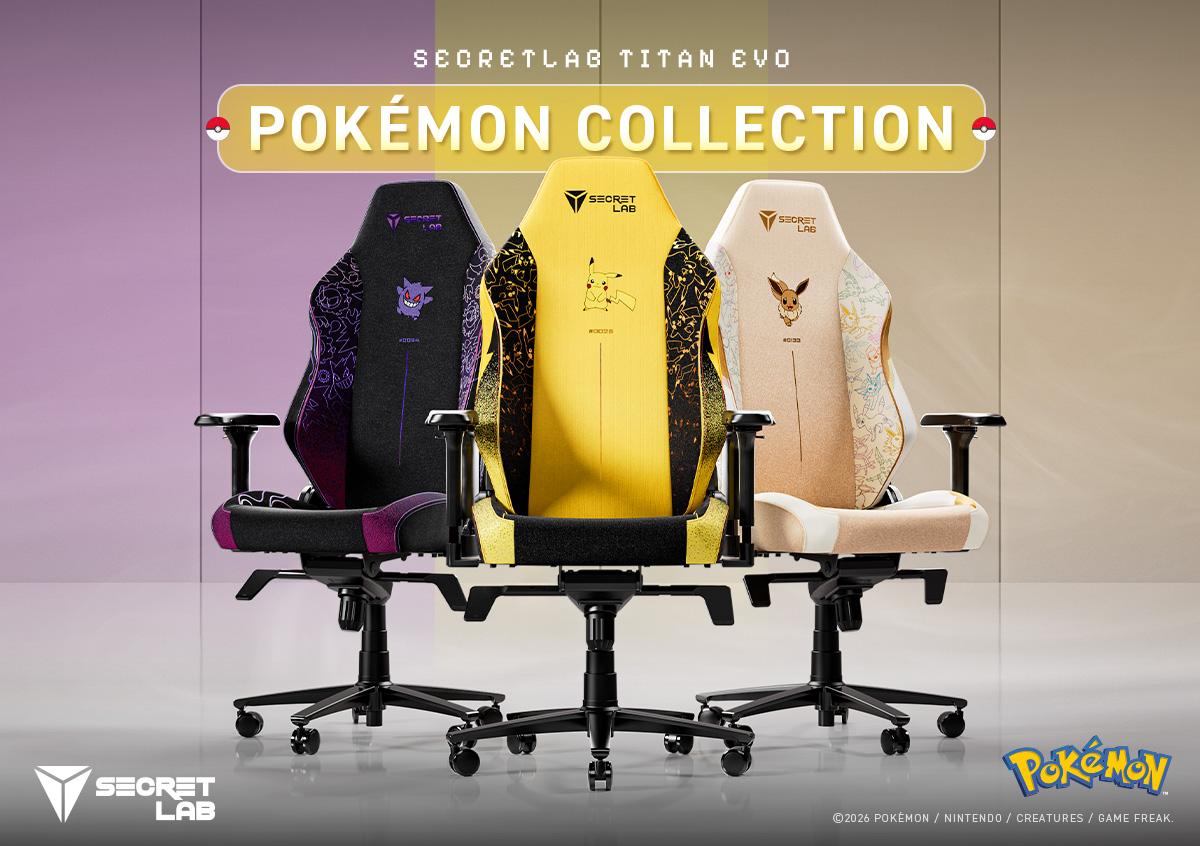
Secretlab is bringing some iconic Pokémon to your gaming setup. The Secretlab Pokémon Collection introduces three new TITAN Evo gaming chairs inspired by Pikachu, Gengar, and Eevee.
Each chair features distinct design elements inspired by its respective Pokémon. The collection also incorporates microsuede and velour detailing for added texture and depth.
Fans can find several hidden details throughout the designs. These include each Pokémon’s Type symbol and Pokédex number on the backrests. The collection also pays tribute to the original 151 Pokémon.
Three Pokémon, three distinct designs
The Secretlab TITAN Evo Pokémon Pikachu Edition puts everyone’s favorite Electric-type Pokémon front and center.
Pikachu appears in plush velour detailing against bold Electric-type symbols. The chair features 11 unique Pikachu motifs across its side wings. A black-to-yellow gradient completes its overall design.
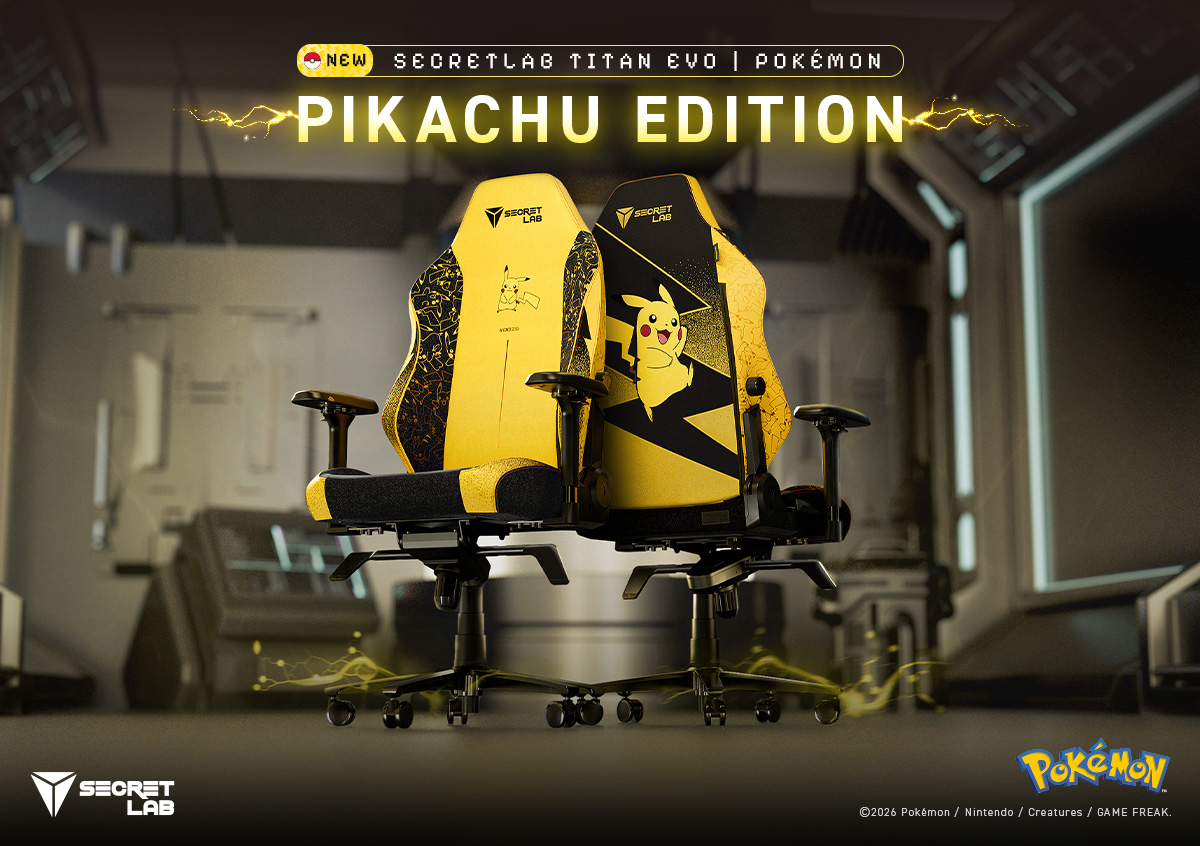
Fans can also spot the differences between male and female Pikachu.
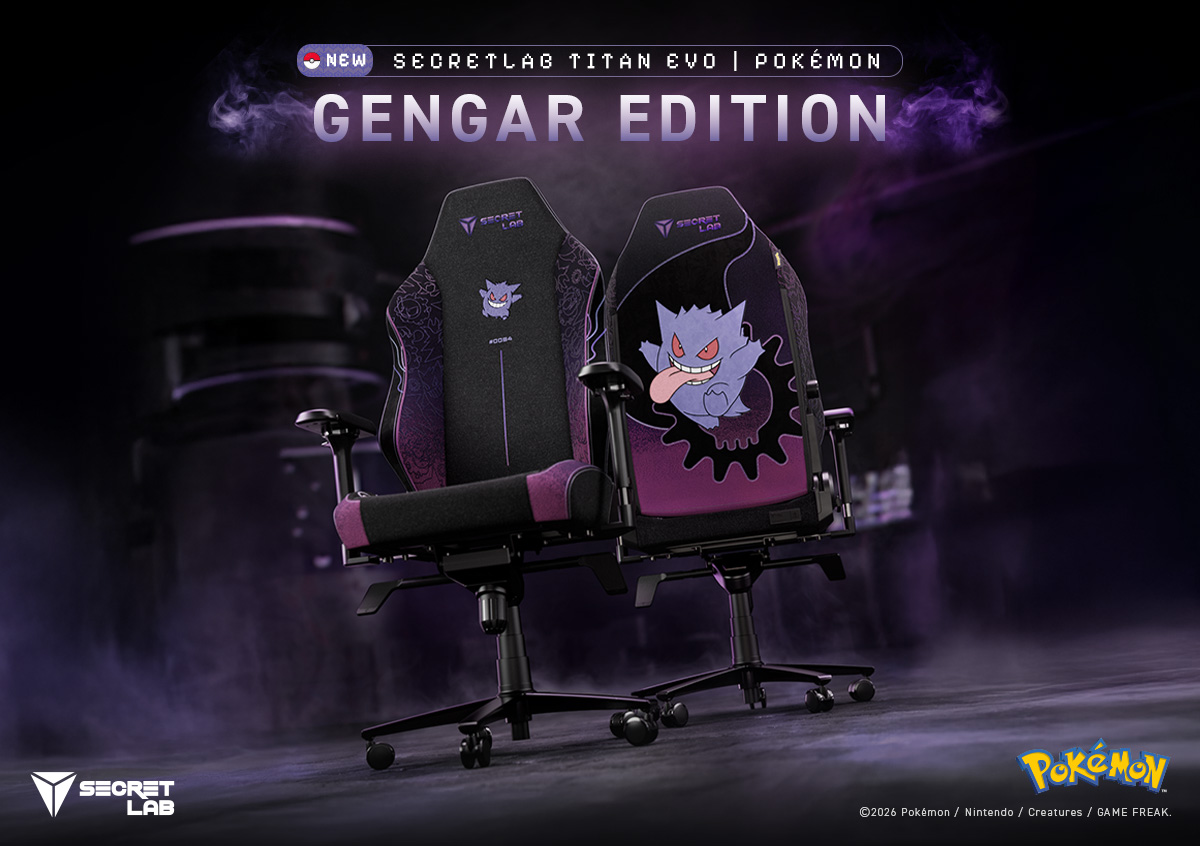
Meanwhile, the Secretlab TITAN Evo Pokémon Gengar Edition embraces a darker aesthetic. Gengar takes center stage on the backrest alongside Ghost- and Poison-type symbols.
Gastly and Haunter also appear across the side wings. A spectral purple gradient ties the entire design together.
Finally, the Secretlab TITAN Evo Pokémon Eevee Edition celebrates Eevee and its eight evolutions.
Eevee appears on the backrest with plush velour detailing. The chair features warm cream-and-brown gradients and a Normal-type symbol. Its design also incorporates all eight Eeveelutions, from Vaporeon to Sylveon.

The TITAN Evo experience
Beyond their Pokémon-inspired designs, all three chairs retain the Secretlab TITAN Evo’s ergonomic features.
The chair uses medium-firm, patent-pending cold-cure foam. This material contours to the body while providing weight distribution and pressure relief.
Its sculpted pebble seat base features gently sloping side wings. These guide users toward the middle while leaving room to switch sitting positions.
The TITAN Evo also features 4-way L-ADAPT lumbar support. It moves up, down, in, and out to accommodate the natural curvature of the lower back.
Secretlab’s SoftWeave Plus fabric provides a soft, breathable knit surface. Its construction also allows detailed Pokémon motifs to appear throughout the material.
Availability
The Secretlab Pokémon Collection features the Pikachu, Gengar, and Eevee Editions of the TITAN Evo.
Interested buyers can learn more about the collection through Secretlab’s official website, Shopee, and Lazada.
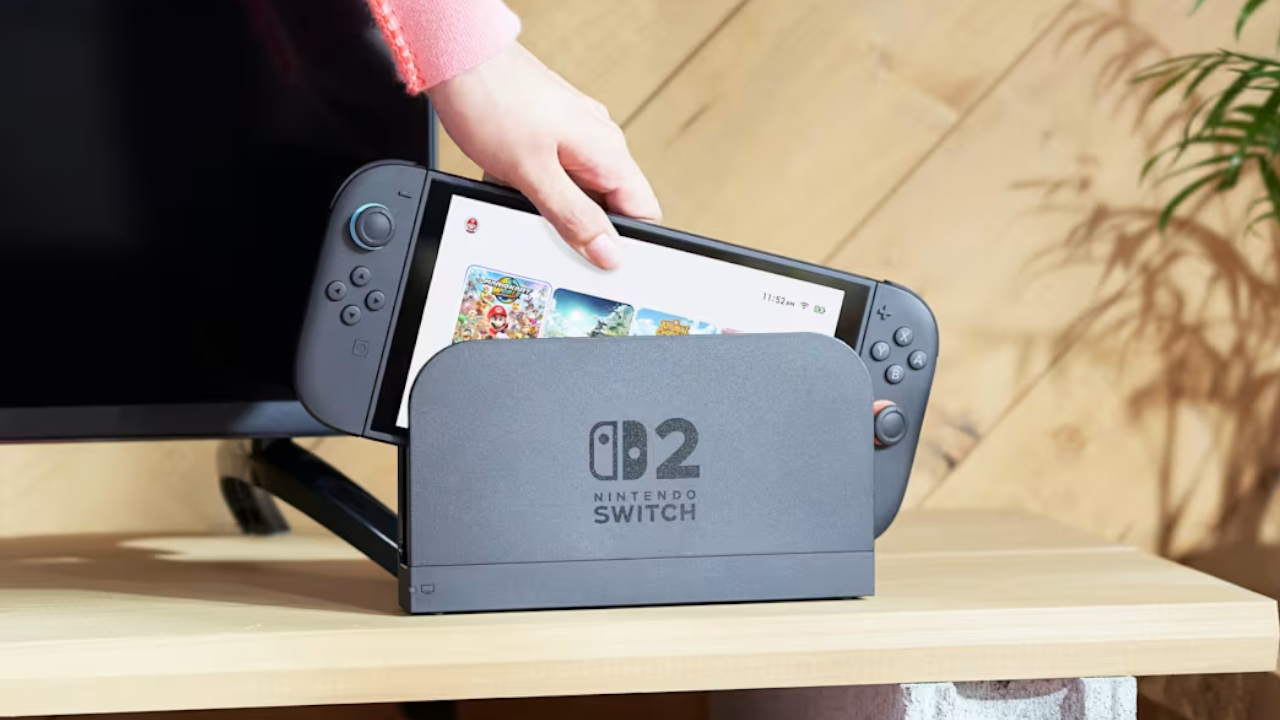
With Nintendo finally opening the eShop and Nintendo Switch Online in the Philippines, you might be wondering how you can switch your account’s region to the right country. After all, before today, you might have set your shop to the neighboring Singapore or other countries that aren’t named the Philippines. If you’re in the same boat, here’s a quick how-to, so you can enjoy paying for services in Philippine peso.
First, you need to log into your Nintendo Account. Take note: you can do this only through their website via a browser, so don’t fiddle around with your Switch or Switch 2 just yet.
Upon logging in, you’ll be redirected immediately to your profile’s information, including your country or region of residence. Just click Edit and select your desired country in the drop-down menu.
Nintendo will then present you a few notices regarding changing your region. The important bit is that you can’t carry over your account balance to the next region. So, if you have a hefty sum tucked away in your current region, it might be wise to spend it before switching. Likewise, your credit card might not work if it was issued from the current region.
Once you agree to the terms, everything’s set!
All you need to do is access the eShop on your console and sign in again. Afterwards, the corresponding services should be in your currency of choice.
For a list of detailed changes and prices, check out our coverage here.


Apple iPad mini OLED review
Has the mini gone PRO?!

ROG G700 review: The best prebuilt PC you can get off the shelf
This PC will make you stop worrying about specs.

HP OMEN Max 16 review: Gamer-maxxing in deep black
Peripherals deemed necessary to max this out

AMD, Meta deepen partnership for AI infrastructure

2026’s The Game Awards will stream live on Disney+

Secretlab brings Pikachu, Gengar, and Eevee to its Pokémon gaming chair collection

realme Christmas raffle: Win an XPENG EV, more

Avengers Endgame: Encore debuts on Disney+

Your coffee nook is getting a makeover with Starbucks’ holiday collections

vivo V80 debuts with ZEISS cameras

vivo V80 review: Good phone, tough sell

OPPO Find X10 Series: Price, availability in the Philippines

iPhone Duo Philippines: Prices, installments, and where to buy


-
 Lifestyle2 weeks ago
Your coffee nook is getting a makeover with Starbucks’ holiday collections
-

 Gaming2 weeks ago
Wild Rift Patch 7.3, celebrates K/DA comeback
-

 News1 week ago
Sony revives classic Walkman headphones with USB-C MDR-3R
-
 Features2 weeks ago
Inside Infinix’s first global concept store in Bali
-
Reviews1 week ago
Apple iPad mini OLED review
-

 Philippines1 week ago
Lazada kicks off 11.11 Biggest Sale of the Year ahead of holiday rush
-

 Philippines2 weeks ago
LG showcases its latest AI TVs in the Philippines
-

 Gaming4 days ago
Nintendo eShop launches in the Philippines