
News
Curry, with Vivo, wants to do big things in the Philippines


NBA All-Star Steph Curry might find himself back in the Philippines sooner than later, and Filipino fans can thank Chinese smartphone maker Vivo for it.
Stephen Wardell Curry is easily one of, if not the, most popular NBA player today.

He leads the league’s most popular jersey list.
Fans adore him.
Even Kobe’s kids love him!
So when Vivo landed him as an endorser, you could say they struck gold. ?

Speaking to media before game four of their best-of-seven NBA Western Conference Finals showdown against the San Antonio Spurs, the two-time MVP was asked about the partnership with Vivo and his massive fan base in the Philippines.
“It was an unbelievable experience. Just the support and feel for basketball that they have,” he said on his first Philippine visit back in 2015.
Curry, who carefully picks the brands he endorses as detailed in this ESPN piece said choosing Vivo had a lot to do with the people behind the brand.
“[It’s a] learning process, but basically just choosing the right people who’s running the company and that’s kind of how we partnered with them and hopefully do some big things with them.”
“Building that relationship, that was the first time that I’ve ever done anything in the Philippines directly,” elaborated the sweet-shooting point guard of the Golden State Warriors adding that, “It’s a place I wanna go back [to] and visit again. I know I have a lot of fans there.”
Curry was introduced as a Vivo brand ambassador in the Philippines back in November 2016. Aside from being one of basketball’s most recognizable stars, the company said he also shares their values: energy, professionalism, and pleasure.
So did this half of the Splash Brothers convince you to get a Vivo phone?
SEE ALSO: Vivo V5s launches in the Philippines, so what’s new?
[irp posts=”14256″ name=”Vivo V5s launches in the Philippines, so what’s new?”]





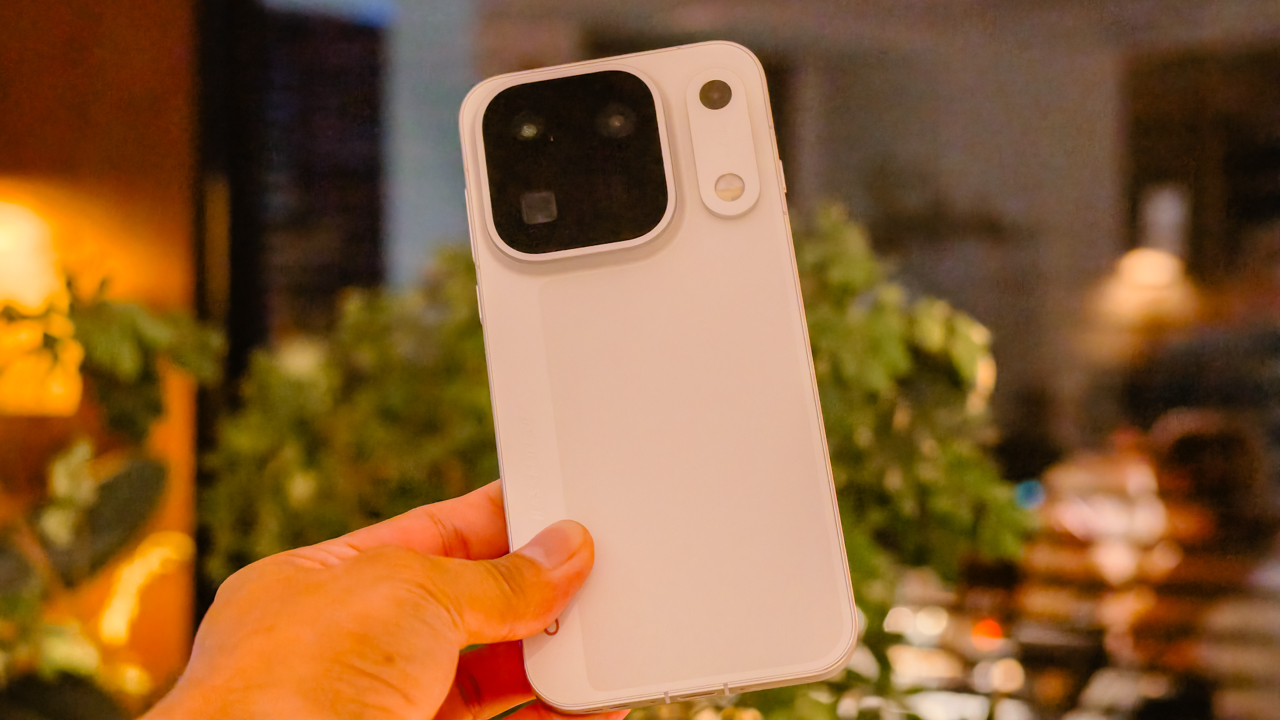
The OPPO Find X10 Series is now available in the Philippines, bringing Hasselblad-powered cameras and upgraded imaging features to the company’s flagship smartphone lineup.
The series consists of two models: the OPPO Find X10 and OPPO Find X10 Pro Max. Both feature OPPO’s LUMO True Image Engine for more natural-looking photos, an 8,000mAh silicon-carbon battery, and support for high-resolution video recording.
The OPPO Find X10 features a Dual 200MP Camera System, while the Find X10 Pro Max takes things further with three 200MP rear cameras.
Here’s how much the OPPO Find X10 Series costs in the Philippines, along with its specifications, availability, and pre-order offers.
OPPO Find X10 Series price in the Philippines
The OPPO Find X10 Series is available in the Philippines at the following suggested retail prices:
- OPPO Find X10 (12GB + 512GB): PHP 99,999
- OPPO Find X10 Pro Max (16GB + 512GB): PHP 129,999
The OPPO Find X10 comes in Glacier Blue, Glow Coral, and Mist Grey. The Find X10 Pro Max is available in Titanium Grey and Luna White.
The OPPO Hasselblad Teleconverter Kit for both models is also available exclusively through the OPPO Online Store for PHP 15,999.
OPPO Find X10 Series pre-order offers
Customers can take advantage of exclusive offers when they pre-order the OPPO Find X10 Series through participating channels until December 3, 2026. Freebies are available while supplies last.
OPPO Online Store
Customers who pre-order through the OPPO Online Store receive the following benefits:
- Free OPPO Enco X3s
- Free OPPO 5,000mAh Slim Magnetic Powerbank
- PHP 3,000 discount on participating Hasselblad Teleconverter Kits
- PHP 3,000 total discount on OPPO Bubble through stacked vouchers
- Two-year extended warranty
- Raffle entry for a chance to win a DJI Mini 5 Pro
Shopee
Shopee pre-orders come with the following perks:
- 10% discount voucher
- Free OPPO 5,000mAh Slim Magnetic Powerbank
- PHP 200 GCash cashback for eligible product reviews until December 7, 2026
- PHP 3,000 discount on participating Hasselblad Teleconverter Kits, redeemable on the OPPO Online Store
- PHP 3,000 total discount on OPPO Bubble through stacked vouchers, redeemable on the OPPO Online Store
- Two-year extended warranty
- Raffle entry for a chance to win a DJI Mini 5 Pro
OPPO Concept Stores
Customers who purchase the phones at OPPO Concept Stores can enjoy 24-month installment terms at 0% interest, alongside other perks:
- Free magnetic power bank
- Two-year extended warranty
- PHP 3,000 discounts on the Hasselblad Teleconverter and OPPO Bubble
- Raffle entry for a chance to win a DJI Mini 5 Pro
Globe
Starting November 20, both color options of the OPPO Find X10 with 12GB RAM and 512GB storage will be available through Globe under GPlan 2499, with a PHP 56,600 cash-out.
The first 20 customers will receive a free OPPO Hasselblad Teleconverter Kit. Customers will also qualify for a raffle entry for a chance to win a DJI Mini 5 Pro, subject to the promotion’s terms and conditions.
OPPO Find X10 Series specs
| Specification | OPPO Find X10 | OPPO Find X10 Pro Max |
|---|---|---|
| Display | 6.59-inch flat display | 6.78-inch flat display |
| Refresh rate | Up to 144Hz | Up to 144Hz |
| Processor | MediaTek Dimensity 9600M | MediaTek Dimensity 9600 Pro (2nm) |
| Rear cameras | 200MP main, 200MP telephoto, 50MP ultra-wide | 200MP main, 200MP ultra-wide, 200MP telephoto |
| Video recording | Up to 4K at 120fps and 8K at 30fps on its two 200MP cameras | Up to 4K at 120fps and 8K at 30fps across all three rear cameras |
| Battery | 8,000mAh silicon-carbon | 8,000mAh silicon-carbon |
| Operating system | ColorOS 17 | ColorOS 17 |
| Dust and water resistance | IP66, IP68, IP69 | IP66, IP68, IP69 |
| RAM and storage (Philippines) | 12GB + 512GB | 16GB + 512GB |
| Price | PHP 99,999 | PHP 129,999 |
Both phones also support Open Gate Capture, feature displays with BT.2020 wide color gamut support, and carry SGS Five-Star Drop Resistance Certification.
Dual 200MP and Triple 200MP camera systems
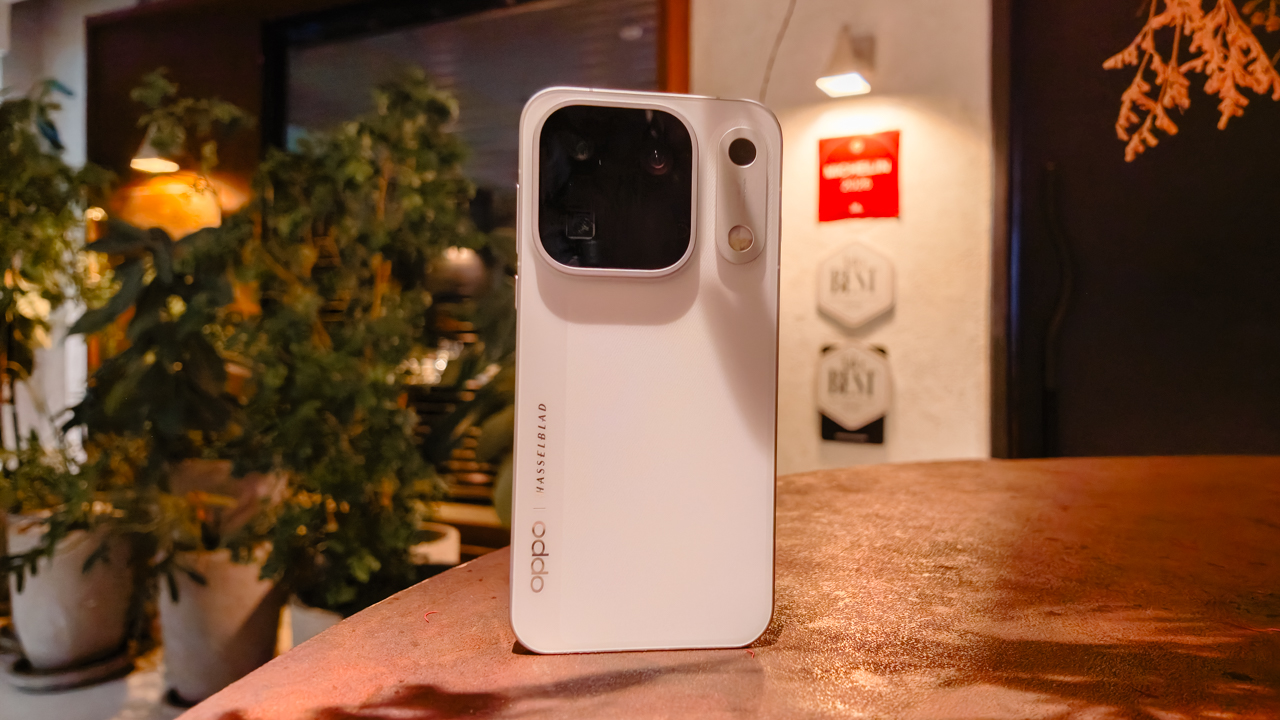
The OPPO Find X10 Series focuses on delivering high-resolution photography across different focal lengths.
The standard Find X10 combines a 200MP Ultra-Clear Main Camera and a 200MP Ultra-Sensing Telephoto Camera with a 50MP ultra-wide camera. This setup lets users capture detailed shots of everyday subjects, distant objects, and wider scenes.
The Find X10 Pro Max takes a different approach by equipping all three rear cameras with 200MP sensors. Its main camera uses a large 1/1.3-inch sensor, while its 124-degree ultra-wide camera supports autofocus for close-up macro photography. The telephoto camera is designed to capture distant subjects while retaining detail.
Both models also let users crop and reframe high-resolution photos, giving them more flexibility when composing images after taking them.
LUMO True Image Engine aims for natural-looking photos
OPPO’s LUMO True Image Engine is designed to reproduce colors, lighting, and textures more faithfully.
The system combines computational photography with OPPO’s True Color Camera and Hasselblad Master Mode. Its True Color Camera uses 24-channel multispectral capture and delivers 5.5 times the dynamic range of its predecessor, according to OPPO.
This helps the phones interpret colors across different lighting conditions and preserve details such as natural skin tones and subtle color variations.
The imaging system also aims to retain the balance between highlights and shadows. It takes a more restrained approach to sharpening and noise reduction to preserve textures in subjects such as skin, hair, fabrics, and architecture.
On the Find X10 Pro Max, DeepPix technology supports the custom 200MP ISOCELL HPC main camera sensor co-developed by OPPO and Samsung. OPPO says the system supports up to 17 stops of dynamic range to help retain details in scenes with bright highlights and deep shadows.
Hasselblad imaging and teleconverter support
The OPPO Find X10 Series continues the company’s collaboration with Hasselblad. The partnership influences the phones’ color reproduction, tonal balance, and Hasselblad Master Mode.
Both models also support dedicated Hasselblad Teleconverter accessories for users who want greater reach when photographing distant subjects.
With the accessory attached, the Find X10 Pro Max supports true 10x optical zoom, while the Find X10 delivers 11x optical zoom, according to OPPO. These accessories can be useful for photographing concerts, wildlife, and other subjects that are difficult to approach.
The Hasselblad Teleconverter Kit is sold separately for PHP 15,999 through the OPPO Online Store.

4K 120fps and 8K video recording
The Find X10 Series also offers high-resolution video recording for creators.
The Find X10 Pro Max supports 4K recording at up to 120fps and 8K recording at 30fps across all three rear cameras. On the Find X10, these recording options are available on its two 200MP cameras.
Both models introduce Open Gate Capture, which uses the sensor’s full imaging area to capture more of a scene. This gives creators more flexibility to crop and reframe footage for landscape, portrait, and other formats during post-production.
Up to 144Hz displays
The Find X10 features a 6.59-inch flat display, while the Find X10 Pro Max has a larger 6.78-inch flat display.
Both support adaptive refresh rates of up to 144Hz and the BT.2020 wide color gamut. These features are designed to deliver smooth interactions and vivid colors when browsing, gaming, watching videos, or reviewing photos.
8,000mAh battery and durability
Both phones pack an 8,000mAh silicon-carbon battery designed to support extended use.
The Find X10 Series also carries IP66, IP68, and IP69 dust and water resistance ratings. Both devices have SGS Five-Star Drop Resistance Certification, offering additional protection for everyday use.
ColorOS 17 and AI Mind Pilot
The OPPO Find X10 Series runs ColorOS 17, which introduces a refreshed interface called Living Flow Design.
The software also features AI Mind Pilot with Agent Mode. It connects agentic AI with files and photos stored on the phone, helping users handle more complex tasks through a single prompt.
For more information about the OPPO Find X10 Series, visit the official OPPO Philippines website, OPPO Online Store, or participating OPPO stores nationwide.
Lifestyle
MediCard’s MedGo app can scan your face for health risks
AI-powered Face Scan previews your vitals, cardiovascular risks, and mental wellbeing in one go.

Most people know when they should be looking after their health. The harder part is acting on it.
AIA Philippines’ 2026 Rethink Healthy study found that 70% of Filipinos reject a “bahala na” attitude toward their physical health, yet 83% only act after a personal or family crisis.
MediCard, the healthcare arm of AIA Philippines, is aiming at that gap with MedGo, its upgraded digital healthcare platform.
Two features stand out for anyone interested in getting ahead of a health concern: Face Scan and the EASE mental wellbeing program.
Face Scan reads your vitals from your face
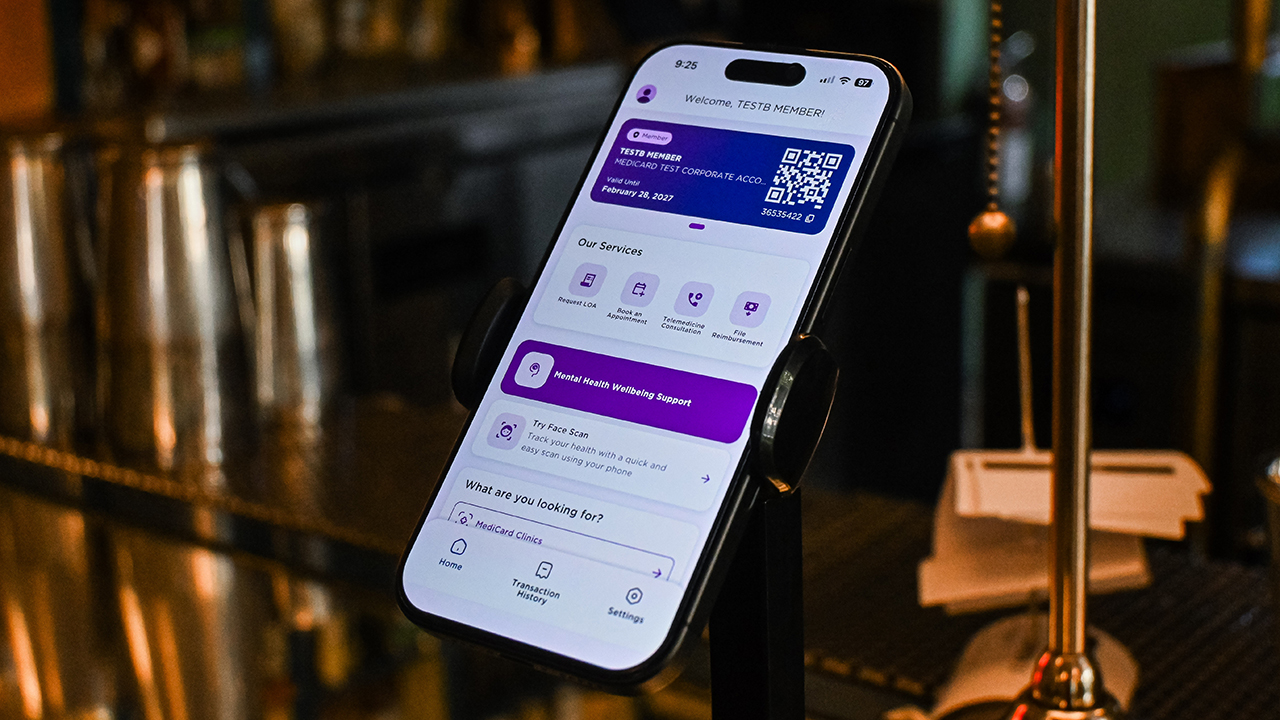
Face Scan uses AI to scan your face and pick up on the blood vessels beneath the skin, which works best with proper lighting. From there, it assesses your vitals, flags possible risks such as cardiovascular ones, and gives you a read on your mental wellbeing.
The results work as a preview of where your health might be heading, which makes the data useful even when the numbers look good.
Face Scan is a screening tool, though, and a good result is a reason to feel encouraged rather than a replacement for a regular check-up.
If a result raises questions, the feature includes a link to a teleconsult, so you can talk to a professional right after seeing your data. Face Scan is currently available for select accounts only.
EASE puts mental health support a few taps away
EASE is MediCard’s mental health and wellbeing program. It lets members quickly talk to a mental health professional, a dietitian, or a fitness coach.
It also comes with resources on mental health and wellbeing, so you can read up on your own before or after a conversation.

In photo: MediCard CEO Julian Mengual
The answer to the usual healthcare headache
MedGo also covers the everyday tasks of being a MediCard member. You can pull up your Digital ID, check your benefits and coverage, request a Letter of Authorization (LOA), book appointments, and search for MediCard clinics, doctors, hospitals, and other accredited providers. Online consultation services are available as well.
Reimbursements follow a simpler path. Members can file a claim, upload the required documents, and follow the status of the request in the app. MediCard says this works through automated case creation and better tracking.
MediCard also says the redesign responds to common healthcare app complaints like downtime, login trouble, and slow performance.
On speed, the company says applicable automated LOA submissions now get a response in under three seconds. That figure comes from MediCard and covers only the submissions that qualify for automation.
Built around your existing doctors
MedGo works alongside the clinics, doctors, and hospitals members already use. MediCard’s physical clinics and nationwide provider network remain central to the experience, and the app is a more convenient way to reach them.
The platform was also built for easier integration with third-party partners, and MediCard says a dedicated team will keep expanding services through regular updates shaped by member feedback.
The launch is part of MediCard’s evolution since AIA Philippines acquired it in 2023.


DJI has announced the global availability of the Osmo Pocket 4P Pearl White, a new color option for its dual-lens gimbal camera. The new edition retains the camera’s 1-inch CMOS sensor, 17 stops of dynamic range, 10-bit HDR video recording, and dual-lens system.
The Pearl White finish uses mica-infused pearlescent pigments and a multilayer spray coating that creates subtle changes in appearance under different lighting conditions. DJI designed the new colorway for creators who want a camera that complements lifestyle photography, travel vlogging, and everyday video production.
DJI Osmo Pocket 4P Pearl White features

The Osmo Pocket 4P Pearl White features two lenses with different focal lengths. Its primary 20mm wide-angle lens has a 1-inch CMOS sensor and an f/2.0 aperture. It supports video recording at up to 4K at 240 frames per second, with LOFIC technology helping preserve highlight and shadow details in challenging lighting conditions.
The camera also supports up to 17 stops of dynamic range and a 10-bit D-Log 2 color profile. These features give creators greater flexibility when adjusting colors, exposure, and contrast during post-production.
For portraits and tighter compositions, the 60mm medium-telephoto lens has an f/1.8 aperture and supports 3x optical zoom and up to 12x zoom. The camera combines both lenses with gimbal stabilization in a compact body weighing approximately 230 grams.

Other creative features include:
- Slow-motion video: Record up to 4K at 240fps for slow-motion footage.
- High-resolution photos: Capture still images at up to 37 megapixels.
- 4K Live Photos: Record 1.5-second clips alongside photos.
- ActiveTrack 8.0: Track subjects such as people, vehicles, and pets.
- Fast file transfers: USB 3.1 support enables transfer speeds of up to 800MB/s.
- Extended battery life: Record for up to 210 minutes on a single charge.
- Fast charging: Reach 80% battery capacity in as little as 18 minutes.
- Automatic iOS transfers: Transfer newly captured footage to compatible iOS devices after powering off the camera.
Automatic media transfer works best with an iPhone 16 series device or later running iOS 26.4.1 or above, provided the camera battery is above 15%.
The camera also supports HDR 10-bit video recording for footage with a wider range of colors and greater flexibility during editing.
Compatible with DJI Osmo accessories

The Osmo Pocket 4P Pearl White works with DJI’s existing Osmo accessory ecosystem. Compatible accessories include the Osmo Pocket 4 Fill Light, ND and polarizing filters, wide-angle lens adapters, battery handle, and OsmoAudio microphones.
These accessories are sold separately, allowing creators to customize their setup for different shooting scenarios.
DJI Care Refresh coverage
DJI Care Refresh is available for the Osmo Pocket 4P Pearl White. The protection plan covers accidental damage, including collisions and water damage, through a replacement service for an additional fee.
The one-year plan includes up to two replacements, while the two-year plan includes up to four replacements. Other benefits include official warranty coverage, international warranty service, and free shipping, subject to DJI’s terms and conditions.
Pricing and availability
The DJI Osmo Pocket 4P Pearl White is now available globally. The Standard Combo is priced at £529 in the UK and €599 in Europe.
For more information, visit the official DJI Osmo Pocket 4P website.





OPPO Find X10 Series: Price, availability in the Philippines

MediCard’s MedGo app can scan your face for health risks

DJI Osmo Pocket 4P Pearl White now available globally

Cyberpunk: Edgerunners 2 now streaming, Cyberpunk 2077 update coming

ASUS ProArt P14, P16 laptops with NVIDIA RTX Spark now available

OPPO Find X10 Pro Max is the first phone with a triple 200MP camera system

TECNO CAMON Slim 5G: Price, availability in the Philippines

TECNO CAMON Slim 5G review: Slim on size, big on surprise

HONOR Magic9 Pro Max launches in China with ARRI-powered imaging

BYD says that way better EV batteries are coming next year


-

 News2 weeks ago
OPPO Find X10 Series launches globally October 21
-

 Wearables2 weeks ago
Garmin Enduro 4 promises up to 320 hours of battery life
-

 Gaming1 week ago
Dragon’s Dogma 2: Dark Arisen launches with new Official Pawns
-

 News6 days ago
vivo V80 debuts with ZEISS cameras
-

 Deals1 week ago
Score PhP 22,000 in guaranteed freebies when you pre-order the iPhone 18 Pro at Beyond the Box
-

 Wearables2 weeks ago
Garmin Approach S72 brings swing metrics, green reading to your wrist
-

 Philippines5 days ago
TECNO CAMON Slim 5G gets launch discounts, free MagBadge
-

 Laptops2 weeks ago
ASUS Zenbook 14 lineup expands with new colors and processors