
Accessories
These cute cubes charge your phone ~and~ back up everything
I found the tech that protects your memories while charging your phone!


I walked into COMPUTEX ready to be wowed by the usual suspects: gaming rigs, new laptops, and AI-powered everything.
Walking along TaiNex 2, I didn’t expect a backup cube to catch my eye. Yet somehow, here I am, raving about little tech blocks that might just save your memories, your data, and your peace of mind.
Let’s talk about Maktar, the tech company quietly turning everyday gadgets like chargers and flash drives into low-key lifesavers. I got a first look at their newest lineup and I think I’m hooked.
Qubii Power: When fast charger meets data backup
Looks like a charger. Works like a personal memory vault.
Qubii Power is that tiny cube you plug into the wall and forget, except this one’s busy auto-backing up your photos, videos, and contacts while juicing up your phone.
No wires, no pop-ups, and no prompts. All you have is seamless, behind-the-scenes backup while you charge. It works with iOS and Android and supports microSD cards up to 2TB. Yes, 2-freakin’-terabytes!

Oh, and it’s fast. Thanks to GaN tech, it can charge your phone from 20% to over 70% while you’re browsing your photos from a trip last year.
If you’re going on a trip abroad, Maktar’s got an adapter set so this tiny cube works in over 200 countries. It’s giving “back up your life, then catch your flight” realness.
Qubii EX & Qubii Duo: The power cubes with brains
If you want more control — say, backing up your Facebook photos, your 4K videos, or even your iCloud files — Qubii EX and Qubii Duo are your upgrade options.
These cubes go deeper than just saving your camera roll.
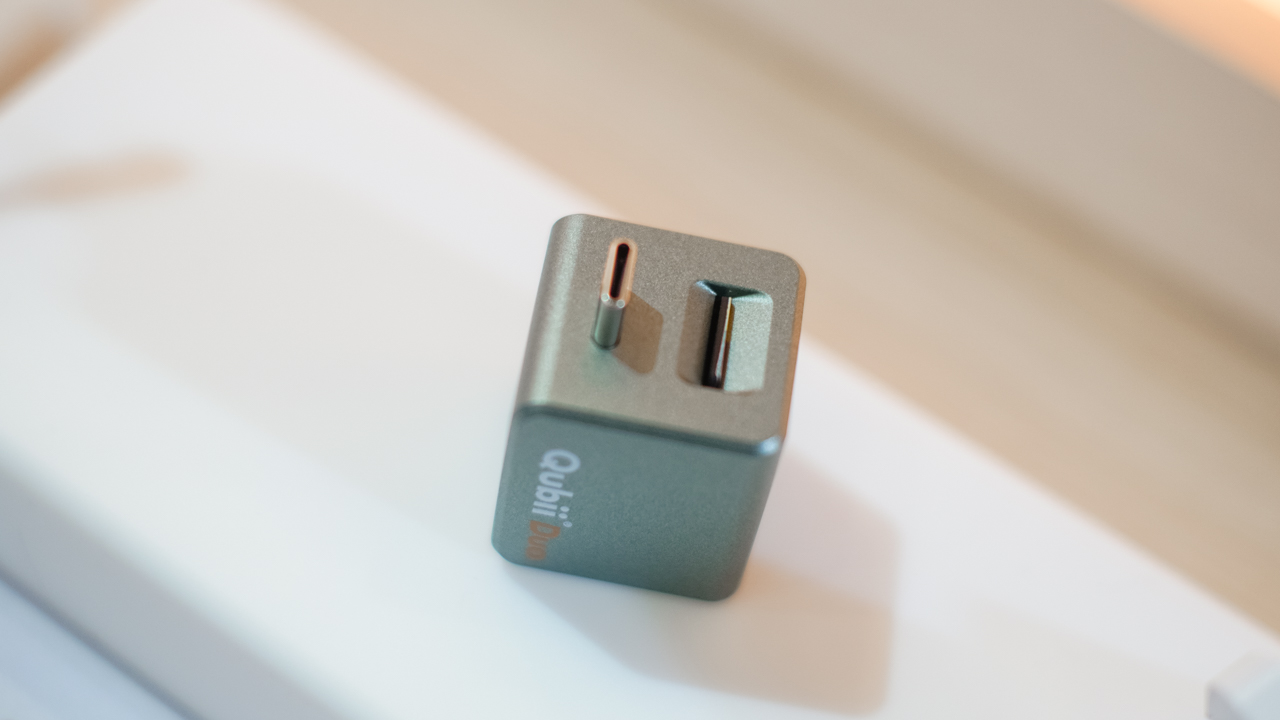
The Qubii Duo supports both USB-C and USB-A (perfect for bouncing between your phone and older laptops), and has password encryption, Face ID/Touch ID support, and even 2-factor authentication.
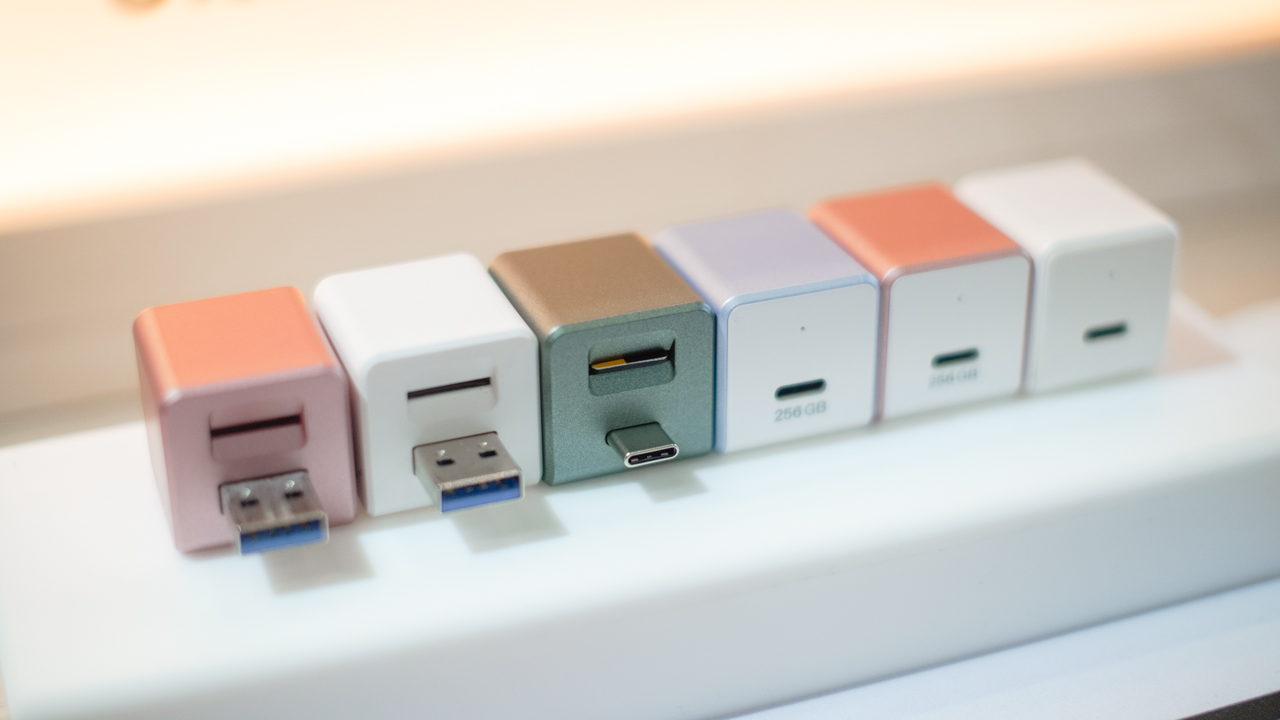
I tested it with my iPhone 13 and the OPPO Find X8, and it worked flawlessly on both. Plus, the backup is incremental.
Plug it in again and it picks up right where it left off.
Nukii: The smart flash drive that knows when to lock itself
This one genuinely surprised me.
Nukii looks like your regular flash drive until you unplug it. Then it automatically locks all your files. No one can open it until you tap your phone via NFC.
You don’t even need passwords. It’s like a secure handshake between your drive and your phone.

It even has a read-only mode to protect you from sketchy computers (you know the ones). And if you lose it, you can just do a Remote data wipe. Yes, you can nuke your Nukii from anywhere!
I know flash drives aren’t the sexiest gadget at a tech show, but this? This is brilliant.
Piconizer 4: The easiest way to free up your iPhone’s storage
You know that “Storage Almost Full” notification that haunts iPhone users? Piconizer 4 is the fix. It’s a flash drive that auto-sorts your photos by year, month, or day, lets you back up albums with one tap, and supports both iOS and Android.
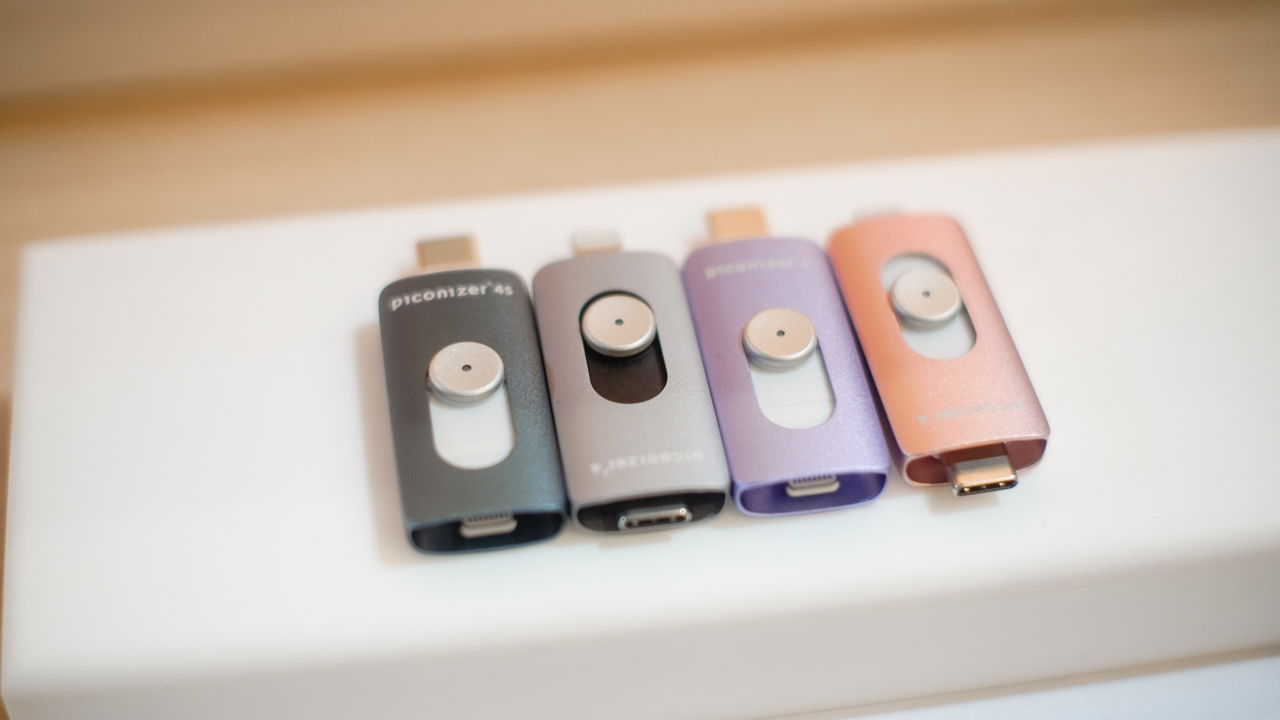
It’s light, fast, and even lets you password-protect your albums. At their booth, they showed me how to transfer a gig of 4K video from my phone to the Piconizer in minutes.
I wish I had this during that beach trip when I ran out of storage mid-sunset.
These might be your next must-have travel accessories
I came for the cool displays and crazy concept tech, but Maktar’s accessories were the kind of smart, travel-ready, everyday tools that actually solve problems.

These aren’t just “techie things to buy” as they’re memory-keepers, security guards, and stress relievers for digital life. And honestly? After getting hands-on with them, I kind of want one in every bag I own.








Acer is expanding its storage lineup with the PA100 Portable SSD. It’s a compact external drive designed for users who need faster storage across multiple devices.
The PA100 uses USB 3.2 Gen 1 connectivity. It reaches sequential read speeds of up to 560MB/s and write speeds of up to 430MB/s. This makes it suited for everyday tasks such as transferring large files, backing up content, managing documents, and moving media between devices.
Up to 2TB of portable storage
The PA100 comes in three capacities: 500GB, 1TB, and 2TB. This gives users options depending on whether they need extra space for documents and schoolwork or larger collections of photos, videos, and project files.
Acer also designed the drive with mobility in mind. The PA100 has a slim 9mm profile and a lightweight build, while its reinforced construction is designed to withstand everyday travel and handling.
The drive comes with a 2-in-1 USB-C to USB-C and USB-A cable. This allows it to connect to compatible PCs, tablets, smartphones, and other devices without requiring a separate adapter. It also supports major operating systems and USB-C mobile platforms.
Designed for everyday use
Power efficiency is another focus. Acer says the PA100 uses less than 3W during operation, while idle power consumption can drop to as low as 0.62W.
The drive also features an optimized thermal design to help maintain stable performance during extended transfers and daily workloads.
The Acer PA100 Portable SSD is backed by a three-year limited warranty. Pricing and availability may vary by market.
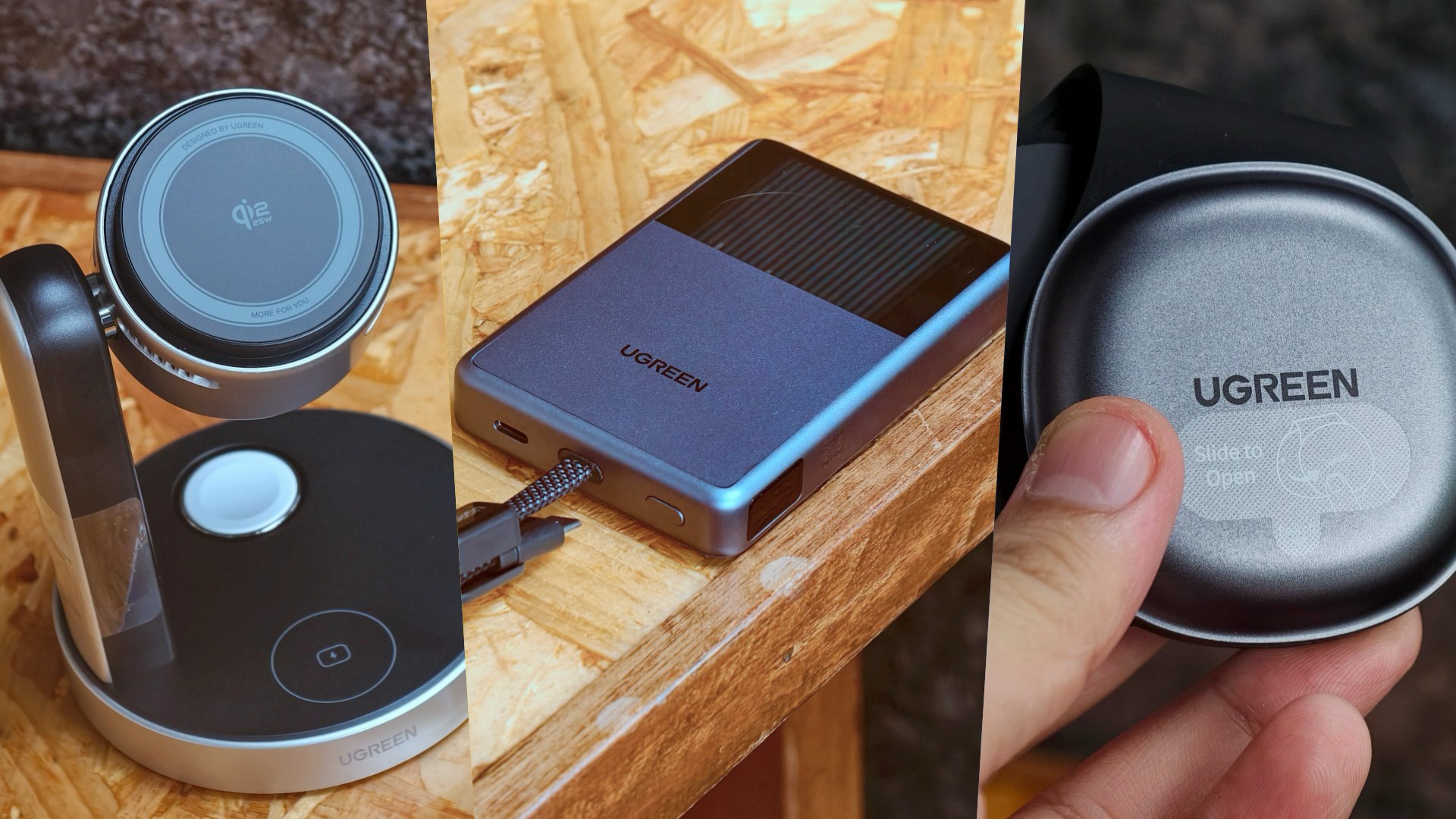
UGREEN has expanded its MagFlow lineup with three new wireless charging products. The range now covers portable power, desktop charging, and travel.
All three support Qi2 25W charging. UGREEN also focuses on thermal management to keep charging cooler and more consistent.
A cooler power bank
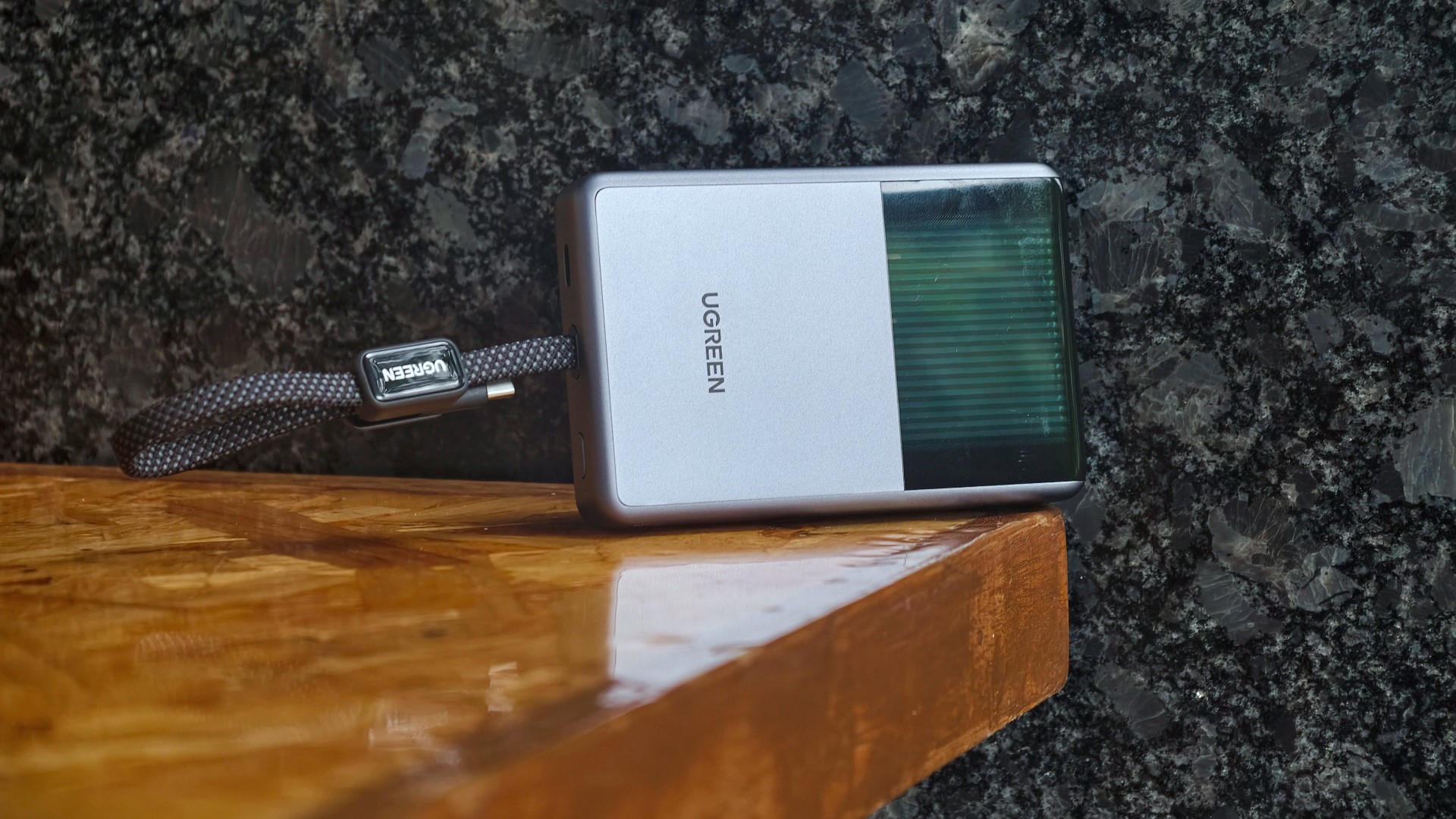
The highlight is the UGREEN MagFlow Pro Magnetic Power Bank 10000mAh 25W. UGREEN calls it the world’s first liquid-cooled Qi2 25W magnetic power bank.
It uses UGREEN’s CryoPulse technology. A micro-pump circulates coolant around key components to draw away heat. A Cyber Window also lets users see the cooling process in real time.
UGREEN says the system can keep peak temperatures up to 18°F below the industry benchmark. The power bank also uses Dymondcell 2.0 high-density ATL cells.
A built-in smart display shows charging power, battery level, cycle count, and cooling status. UGREEN says the power bank can charge an iPhone 17 Pro Max to 50 percent in 40 minutes.
Charging three devices at once
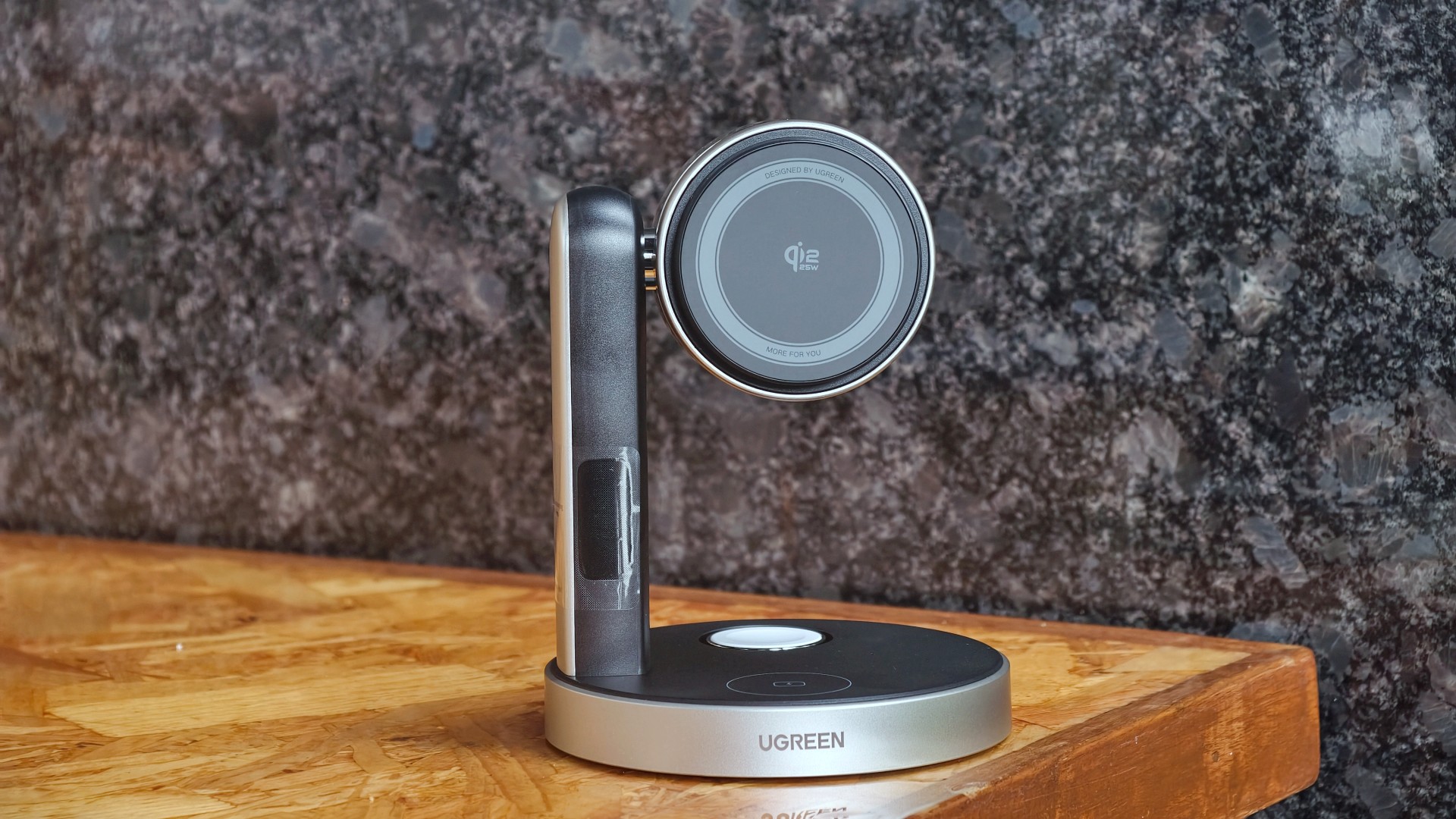
The UGREEN MagFlow Pro 3-in-1 Magnetic Wireless Charging Stand 25W targets desktop setups. It can charge an iPhone, Apple Watch, and AirPods at the same time.
The stand uses CryoPulse TEC active cooling and an ultra-quiet 15dB fan. Its thermoelectric cooling system draws heat away from the charging surface.
UGREEN says the center of the charging surface can reach temperatures as low as 51.8°F. It can also charge an iPhone 17 Pro Max to 50 percent in 26 minutes under its internal testing conditions.
The stand has an adjustable design for easier viewing. A smart display shows charging power and temperature.
A foldable charger for travel

The UGREEN MagFlow 2-in-1 Foldable Magnetic Wireless Charger 25W offers dual-device charging in a compact design.
It can also work as a magnetic phone stand. Users can set it up on a desk or bedside table, or bring it along while traveling.
When folded, the charger takes on a palm-sized clamshell design that fits into a pocket or bag.
All three MagFlow products are available now.
- The MagFlow Pro Magnetic Power Bank 10000mAh 25W costs USD 149.99.
- The MagFlow Pro 3-in-1 Magnetic Wireless Charging Stand 25W costs USD 159.99.
- The MagFlow 2-in-1 Foldable Magnetic Wireless Charger 25W is priced at USD 59.99.
UGREEN sells all three through its official store and Amazon.
Accessories
Acer announces 1st FHD 1000Hz gaming monitor: Predator XB253Q U1
Acer unveils new lineup of monitors across Predator, Acer Nitro, and Acer ProDesigner brands


Acer has announced a full lineup of monitors for high-powered gaming and content creation, headlined by the first FHD 1000Hz gaming monitor Predator XB253Q U1.
This offering leads various releases across the Predator, Acer Nitro, and Acer ProDesigner portfolios.
The Predator XB253Q U1 monitor is a premium gaming display designed for top-tier responsiveness for fast-paced titles and esports competitions.
It comes in an optimal 24.5-inch display size for esports environments and delivers ultrafast visual response, motion clarity, and consistent performance.
It features a 1000Hz refresh rate with FHD resolution, along with Acer’s Visual Response Boost (VRB) Pro technology to reduce motion blur and ghosting for fast-moving objects.
The monitor is VESA DisplayHDR400 certified and includes Circular Polarizer technology to reduce glare and eye strain during longer gaming sessions.
Furthermore, it also offers AMD FreeSync Premium and NVIDIA G-SYNC Compatible for tear-free gaming visuals.
Acer unveils new monitors
Acer also released the Predator X23 V3, which comes with a 31.5-inch QD-OLED Penta Tandem display. It has a UHD resolution with 180Hz refresh rate, VESA DisplayHDR True Black 400 certification, and 99% DCI-P3 color gamut.
For a versatile option for both gaming and creative work, there’s the 27-inch Predator XB273K V7. It comes with up to a 500Hz refresh rate, and a baseline UHD resolution at 160Hz.
Users can switch on up to FHD resolution at 500Hz for fast-paced gameplay. This option also offers AMD FreeSync Premium and NVIDIA G-SYNC compatibility. An Acer Smart Dial is also built-in for remote adjustments.
Moreover, Acer has launched the 27-inch Acer Nitro XV275X P, which offers 5K resolution, 2304-zone Mini LED backlighting, and a 0.5ms GTG response time.
This variant is also ideal for creative work with 99% Adobe RGB, 99% sRGB, 99% DCI-P3 color gamuts and Delta E<2 color accuracy.
Speaking of creatives, the Acer ProDesigner PE270X P monitor is built for professional creative work.
It delivers exceptional 5K clarity at a 5120 x 2880 resolution, alongside factory calibration Delta E<1 factory calibration.
More options
For curved display enthusiasts, there’s the Acer Nitro XZ340CKR P monitor. This curved 34-inch display offers up to a 5120 x 2160 resolution at 180Hz, and up to a 360Hz refresh rate at WFHD resolution.
Features include: 0.5ms GTG response time, AMD FreeSync Premium, HDR10 certification, and 90% DCI-P3 color gamut.
Rounding out the lineup are the Acer Nitro XV275U Z2 and Nitro XV270U Z3 monitors. These 27-inch displays are designed as a single display that caters to multiple needs of modern gamers.
They can handle AAA titles and competitive esports, while providing a balance between image quality and ultra-high refresh rates.
They also both support tri-mode DFR technology, allowing users to choose among three optimized visual experiences with one click.
Pricing availability
Predator XB253Q U1
- North America (Q1 2027): Starts at US$ 1,099.99
- EMEA (Q1 2027): Starts at EUR 1,099
- China (Q1 2027): Starts at RMB 7,999
Predator X32 V3
- North America (Q1 2027): Starts at US$ 899.99
- EMEA (Q1 2027): Starts at EUR 899
- Australia (Q2 2027): Starts at AUD 1,999
- China (Q1 2027): Starts at RMB 5,999
Predator XB273K V7
- North America (Q4 2026): Starts at US$ 449.99
- EMEA (Q4 2026): Starts at EUR 449
- Australia (Q2 2027): Starts at AUD 899
- China (Q4 2026): Starts at RMB 2,999
Acer Nitro XV275X P
- North America (Q1 2027): Starts at US$ 1,199.99
- EMEA (Q1 2027): Starts at EUR 1,199
- China (Q1 2027): Starts at RMB 9,999
Acer Nitro XZ340CKR P
- North America (Q4 2026): Starts at US$ 699.99
- EMEA (Q4 2026): Starts at EUR 699
- China (Q4 2026): Starts at RMB 4,999
Acer Nitro XV275U Z2
- North America (Q4 2026): Starts at US$ 329.99
- EMEA (Q4 2026): Starts at EUR 329
Acer Nitro XV270U Z3
- North America (Q1 2027): Starts at US$ 299.99
- EMEA (Q1 2027): Starts at EUR 299
- China (Q1 2027): Starts at RMB 1,999
Acer ProDesigner PE270X P
- North America (Q1 2027): Starts at US$ 1,299.99
- EMEA (Q1 2027): Starts at EUR 1,299






Disney+ is moving to a global app experience

Now Playing: Elden Ring Tarnished Edition

TECNO’s POVA 8 Pro gets a stealthy makeover

The original PlayStation gets the LEGO treatment

NBA 2K’s MyCAREER needs to play the long game

TECNO MEGAPAD 2 review: Eyes on the size

realme 16T 5G with 8000mAh battery, IP69 Pro rating launches in PH

REDMI Note 17 Series focuses on long-term reliability

realme 16T to come with 8,000mAh battery, 7-year battery health guarantee

HUAWEI Pura X View is 2026’s first WIDE slab-type smartphone


-
 Reviews2 weeks ago
TECNO MEGAPAD 2 review: Eyes on the size
-
 News6 days ago
realme 16T 5G with 8000mAh battery, IP69 Pro rating launches in PH
-

 Cameras2 weeks ago
30 days with the DJI Osmo Pocket 4P
-

 Singapore1 week ago
REDMI Note 17 Series: Price, availability in Singapore
-
 News1 week ago
REDMI reveals the refreshed Note 17 and Note 17 Pro series
-

 Cameras1 week ago
Insta360 Luna Ultra review: My new solo coverage camera
-

 Reviews1 week ago
REDMI Note 17 Pro review: What a rollercoaster ride!
-
 News2 weeks ago
HONOR Magic V6: Price, availability in the Philippines