
News
Apple Vision Pro repairs will cost US$ 2,399
A cracked screen is US$ 799


Around a year since the announcement, Apple finally opened preorders for the Vision Pro. If you’re thinking of becoming an early adopter, a potential charge might change your mind for now. As confirmed by the company itself, Apple is charging up to US$ 2,399 for repairs of the mixed-reality headset.
As with every new device, Apple posts a new support page to help those who might have issues. The Vision Pro is no different. If you, as a headset owner, find yourself in this page, the fees might shock you and your wallet.
Right now, there are only two repair options for the headset: replacing a cracked cover glass and “other damage”. The first one — replacing the glass — will already set you back by US$ 799. Since the glass is the most exposed (and most fragile) part of the device, replacing the screen will likely be the most common option for users.
However, if that’s not enough to bust your wallet, the “other damages” category might. Apple doesn’t really say what these damages include. Likely, these are more internal in nature. Regardless, it’s quite pricey. Apple estimates that this repair will cost a whopping US$ 2,399 — only a little more than US$ 1,000 from the device’s starting price.
Of note, these prices don’t include any potential shipping cost incurred from sending a broken device in. Also, Apple Care+ subscribers will get a much cheaper quote. The support page estimates a fee of only US$ 299.
Apple does have a more comprehensive self-repair program now. However, since the device is still new, the Vision Pro will likely take a while before entering the program. Repairs will continue to be financially painful for the time being.
SEE ALSO: Apple Vision Pro Hands-On: Connectedness, Solitude & The Future






Lifestyle
Sticker season is back, and so is the planner your ~friends~ might fill in for you
Starbucks Traditions turns 24 with five pieces in the 2027 collection!


There are two kinds of people during the holidays: those who start planning their Christmas shopping early and those who hear the word merienda and immediately calculate how many Starbucks drinks stand between them and a new planner.
If you belong to the latter, consider this your annual reminder. Starbucks Traditions returns to the Philippines on November 3 for its 24th year, bringing a bigger collection with five pieces this time around. And suddenly, your afternoon coffee plans have acquired a very specific financial objective.
The 2026 collection carries the theme “Wrapped in Joy,” celebrating the little surprises that make the holidays feel special.
Think thoughtful gestures, unexpected visits, and friends who actually follow through on plans. You know, the rarest Christmas miracle of all.
Finally, someone is making plans for the planner
Starbucks is giving this year’s campaign a little emotional backstory with “Kami Naman,” a holiday film about Mara, the friend who somehow became the designated organizer of every barkada gathering.
You know her. She’s the one who starts the group chat, finds the restaurant, checks everyone’s availability, and sends the follow-up message when nobody responds.
This time, her friends decide she’s had enough administrative duties for one lifetime. They surprise her at Starbucks with a planner already filled with gatherings they’ve organized for her throughout the year.
Set to Eraserheads’ “With a Smile,” the film is a sweet reminder that the friend who makes everyone else’s holidays special deserves a little magic herself. The song will also be playing in Starbucks stores from November 3 to January 4.
You can watch the full film on Starbucks Philippines’ social media channels. Consider forwarding it to your group chat, particularly if you have been carrying the entire social calendar on your back.
Why your current coffee accessories suddenly feel inadequate
This year’s collection looks ready to be wrapped and placed under the Christmas tree, with copper, ivory, and black setting the mood. Each piece has its own appeal, which makes choosing a favorite a rather complicated exercise in holiday budgeting.
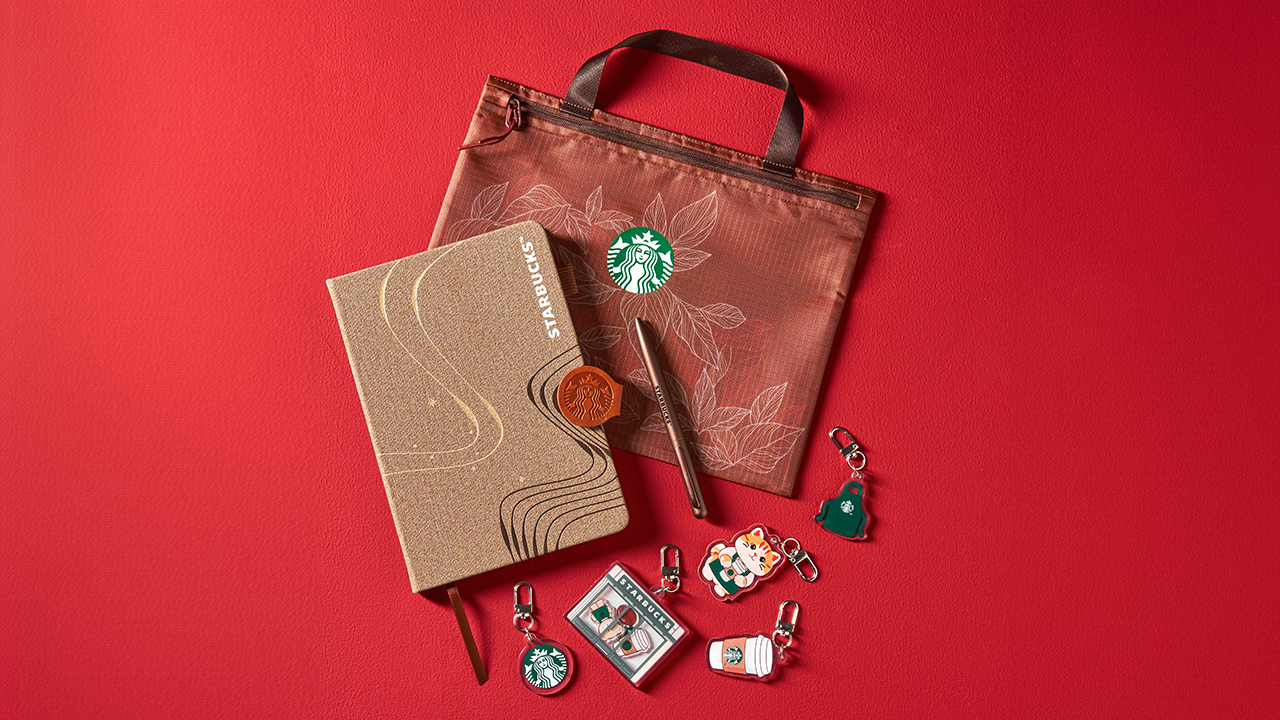
The Siren Planner with Pouch is for the organized one who has approximately 47 things to remember and would prefer to make that 48 with a beautiful planner. It also comes with a surprise keychain in one of five designs, giving you another tiny mystery to obsess over.
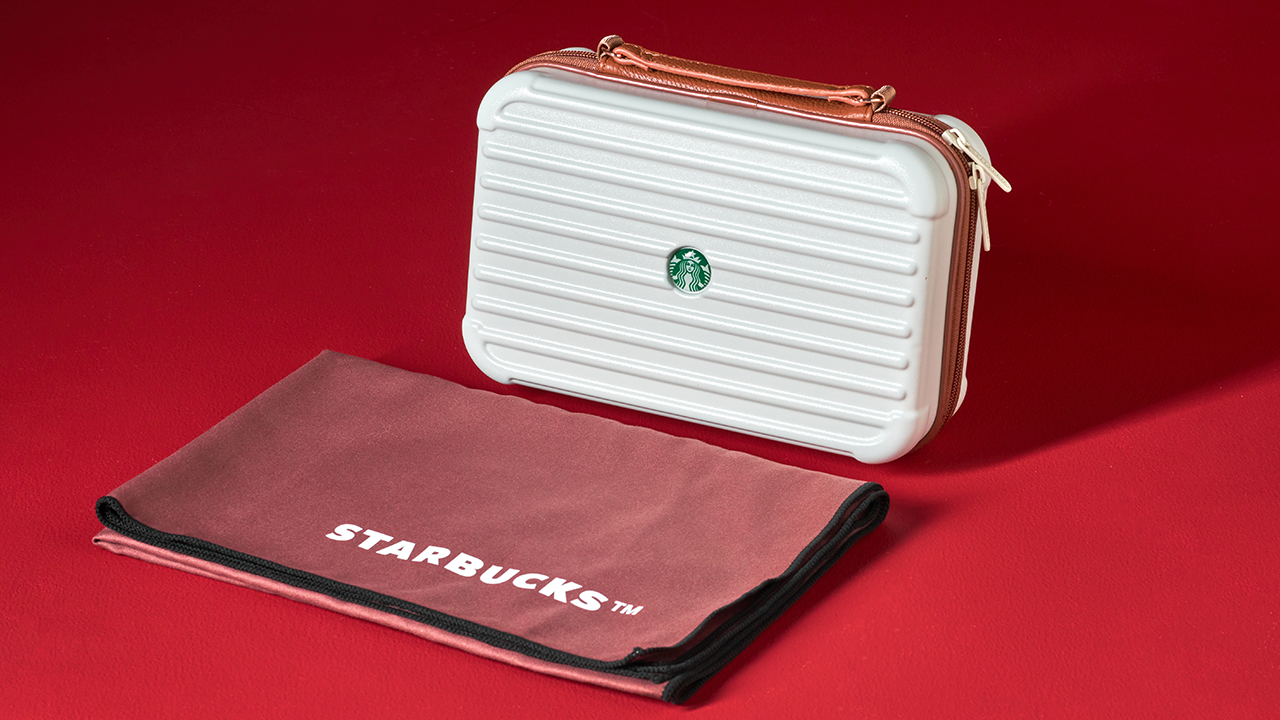
The Travel Case with Towel makes its debut in the collection, and suddenly, the idea of booking a little getaway sounds very reasonable. You may have nowhere to go yet, but at least your travel essentials will be beautifully organized when the opportunity presents itself.
For your everyday caffeine arrangements, there’s the 20oz Stainless Steel Tumbler and the 24oz Cold Cup. Both are practical additions to your daily rotation, although you may find yourself explaining why you need another drinking vessel when your kitchen cabinet is already staging a protest.
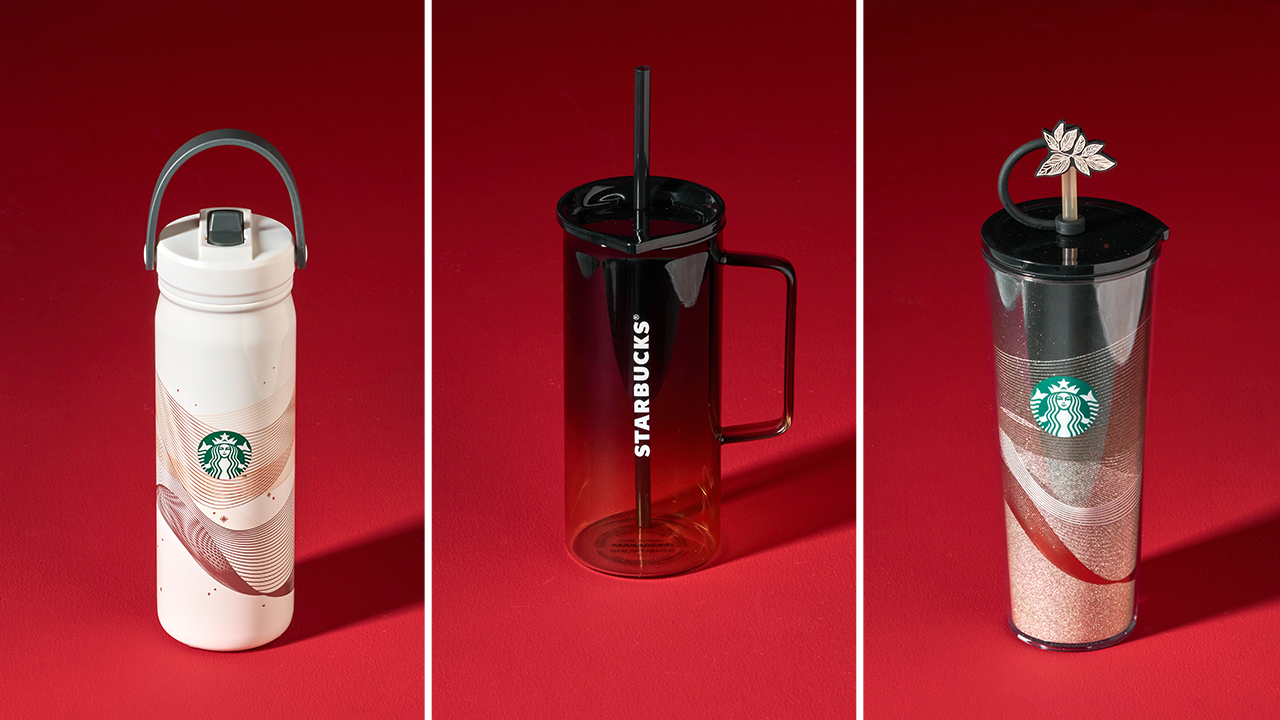
Then there’s the 20oz Glass Mug, which is arguably the most emotionally persuasive purchase of the bunch.
You don’t necessarily need another mug. You simply deserve one that makes your morning coffee feel a little more special. That’s a perfectly respectable argument, as far as your holiday shopping budget is concerned.
The 19-sticker strategy
Now comes the part that requires a little planning. From November 3, 2026 to January 4, 2027, every Tall, Grande, or Venti handcrafted beverage earns you one e-sticker. You can collect them through the Starbucks PH App or a QR Promo Card.
Reach 19 e-stickers and you can redeem one piece from the 2027 Starbucks Traditions collection until March 5, 2027.
The strategy is fairly straightforward. You order your usual handcrafted beverage, invite your friends for merienda, and let the stickers accumulate. Suddenly, that afternoon coffee with your best friend has a second purpose, and your usual catch-up session feels a little more productive.
Before committing to a particular piece, take a look at the full collection at starbuckstraditions.ph. You might already have your eye on the planner, or you could find yourself unexpectedly falling for the glass mug. Either way, knowing what you’re collecting for makes the sticker-counting considerably more exciting.
Since its Philippine debut in 2004, Starbucks Traditions has become one of those holiday rituals that people look forward to every year. It’s the season of comparing sticker counts, coordinating coffee runs, and celebrating the little rewards that make an ordinary afternoon feel festive.

It’s been a while since the last time we got a FromSoftware game. Elden Ring Nightreign felt like an age ago, even if it was launched just last year. Plus, the title isn’t even a new one, technically, since it’s just building off of Elden Ring. Unfortunately, our wait for a new FromSoftware game has to go on for a little bit longer. FromSoftware has delayed the launch of The Duskbloods to 2027.
The Duskbloods is an interesting addition to the FromSoftware oeuvre. Compared to the usual fare, the Switch-exclusive title is a multiplayer extraction game with a distinctly Bloodborne-like feel. If you’re used to FromSoftware’s usual formula, The Duskbloods represents a huge change.
But it’s a welcome one, nonetheless. If the recently released Elden Ring port of the Switch 2 is any indication, FromSoftware does have a handle of what performance looks like on the console.
Sadly, the new title needs a bit more time in the oven. Citing “final adjustments to game rules and balancing,” FromSoftware is delaying the launch of the game to 2027. According to the studio, this is in response to the successful network test a while back.
The delay shouldn’t come off as a surprise. Though the studio promised a 2026 launch for the title, most of the year has passed without a definite launch date. That was already a telltale sign that a delay was coming.
At the very least, the delay comes with the benefit of launching the game farther away from Grand Theft Auto VI and the Ocarina of Time remake, which will surely dominate holiday gaming this year.

The launch of the new MacBook Pro is a polarizing one, to say the least. The notebook introduces a new touchscreen feature that isn’t really an automatic hit for fans. Some have even pointed out how Steve Jobs once said that touchscreen MacBooks were a bad idea. If you’re a part of this group, a new discovery might alleviate your worries a little bit. Apparently, you can turn off the new MacBook Pro’s touchscreen functionalities.
According to MacStories’s Federico Viticci, the new MacBook Pro with Touch includes accessibility features that can turn off the touchscreen entirely. Other early testers have also corroborated this option.
A touchscreen notebook isn’t the most popular type of laptop. Though this particular display has been available for quite a while, it hasn’t really taken off. Case in point, Apple’s announcement hasn’t been met with the warmest of fanfare.
It’s also telling that Apple baked in a way to turn this setting off. At the very least, we didn’t have to wait a while. The hullabaloo is reminiscent of the reception to Liquid Glass, another polarizing feature that Apple eventually made configurable for detractors.
Also, this isn’t the first time that Apple tried experimenting with the MacBook. Do you remember the short-lived Touch Bar?
Strangely, it’s such a strong contrast to the MacBook Neo launched earlier this year. Whereas that particular model debuted to applause, the new MacBook Pro attracted more raised eyebrows.
SEE ALSO: What the MacBook should touch on instead


ROG G700 review: The best prebuilt PC you can get off the shelf
This PC will make you stop worrying about specs.


HP OMEN Max 16 review: Gamer-maxxing in deep black
Peripherals deemed necessary to max this out


vivo V80 review: Good phone, tough sell
A capable travel companion

Wild Rift Patch 7.3, celebrates K/DA comeback

LG showcases its latest AI TVs in the Philippines

Your coffee nook is getting a makeover with Starbucks’ holiday collections

Petit Planet launches December 4

This pop-up sauna brings the steam room experience into your home


-
Reviews2 weeks ago
vivo V80 review: Good phone, tough sell
-

 News2 weeks ago
OPPO Find X10 Series: Price, availability in the Philippines
-

 Cameras2 weeks ago
DJI Osmo Pocket 4P Pearl White now available globally
-

 News2 weeks ago
OPPO Find X10 Series: Price, availability
-

 Entertainment2 weeks ago
Cyberpunk: Edgerunners 2 now streaming, Cyberpunk 2077 update coming
-
Gaming1 week ago
HP OMEN Max 16 review: Gamer-maxxing in deep black
-
 Laptops2 weeks ago
Lenovo expands Yoga lineup with new AI PCs and tablets
-

 Laptops2 weeks ago
ASUS ProArt P14, P16 laptops with NVIDIA RTX Spark now available