
News
Samsung Galaxy S25 Series doubles down on AI
Plus some tweaks here and there


The Samsung Galaxy S25 series is coming in hot and with it comes additions and refinements to Galaxy AI along with other improvements in hardware and performance. Launched at San Jose, California, the series consists of the usual suspects: Galaxy S25 Ultra, Galaxy S25+, and Galaxy S25.
The Galaxy AI refinements come in multiple forms. They’re baked into beloved features like Circle to Search and other content creation tools. Meanwhile, they’re also introducing Now Brief and Now Bar which promises to be a Smart Assistant that’s actually smart.
Circle to Search upgraded
Circle to Search used to just let you choose a part of your screen to conduct a search on. Now, Circle to Search lets you do more than that. Apart from what we know it to be, the function has included two additional icons you can tap.
One is a note icon that lets your Galaxy S25 smartphone listen to the music in your surroundings and look-up that music for you. If you’re familiar with the app, Shazam, it functions exactly like that. This is a Google Search function that’s been around for a while. Instead of actual music, you can even hum the tune yourself and it’ll try its best to identify the song for you.
Next to the note icon is the translate icon. This makes translating so much more efficient. Whether it’s online content that you need to translate or something you can point your camera to while traveling, firing up Circle to Search and then hitting on translate will instantly translate what’s on screen for you.
It’s worth noting that this is a Google Cloud feature and that this particular version of Circle to Search has been available to a select number of smartphones prior to the Samsung Galaxy S25 Series.
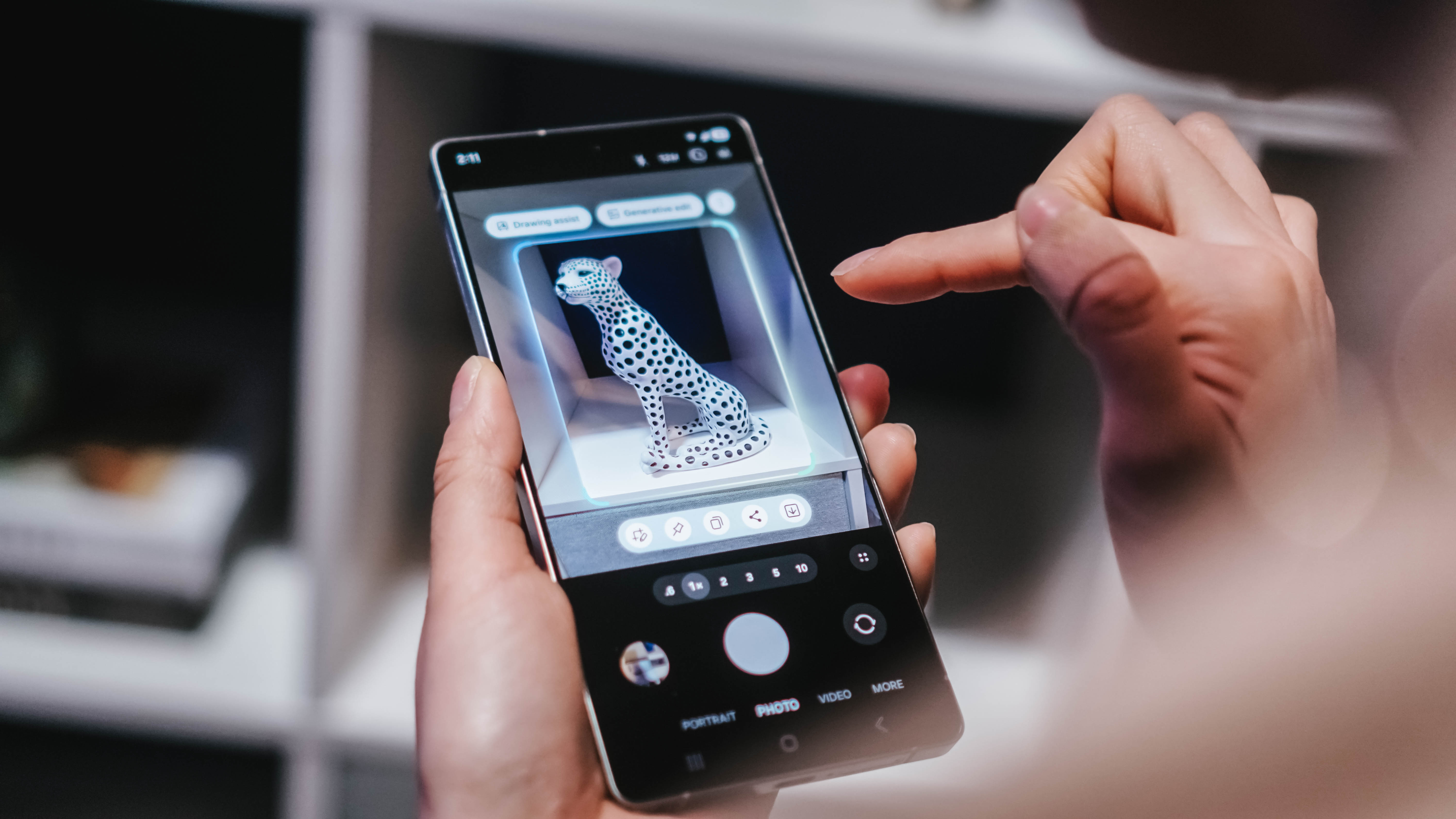
AI Select
This is another expansion of Circle to Search. After selecting the object/s on your screen that you want to look up, AI Select will attempt to “anticipate your needs” and offer actions you may take after making the selection.
The actions appear in the Edge Panel where you can drag the image to do a search or import it to any of the supported apps. At launch, this includes the usual Samsung Apps along with the usual social media apps.
HONOR has a similar implementation called Magic Portal. It stands to reason that something of the same ilk could come to other brands as well as this is, again, likely powered by Google Cloud.
Now Brief & Now Bar
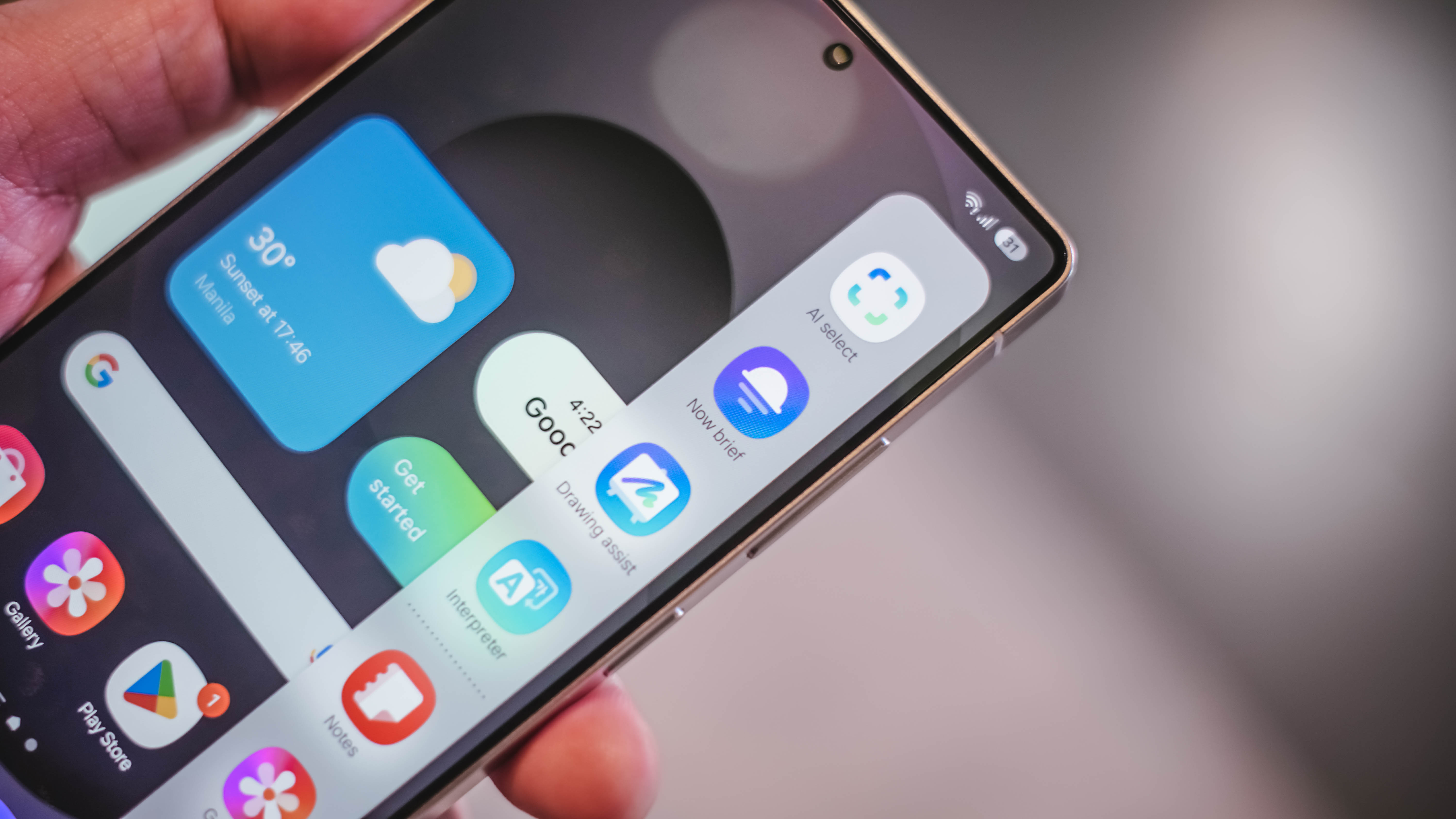
You’ve likely seen your fair share of sci-fi flicks. You know how in many of them, the main character has some form of Cyber Assistant they talk to summarizing their day, giving them suggestions, and in some instances exchanging in playful banter?
We’re probably a ways away from the playful banter type. But in terms of offering useful information as well as being conversational, that’s what Now Brief promises and it’ll be displayed through the Now Bar.
The Now Brief will work across the apps installed on your phone. It will learn your schedules, tendencies, priorities, and what not. You can then ask it to do things on your behalf.
In the demo that Samsung showed us, the person received an alert about a meeting the following day. This appeared in the Now Bar that’s a pill-shaped notification-like visual cue on the bottom of the lockscreen.
Without even opening the Galaxy S25, the person asked the phone to move the schedule to another time and it did so. The idea isn’t new and the jury is still out on the actual execution and implementation But it’s a promising tool – one that lets you be more present in your immediate environment.

Working across apps
It’s not just your schedule, too. It can do many things for you like provide or look for restaurant recommendations. Just tell it where to look and what you’re craving.
If you’d rather stay home and cook than eat out, you can take a quick snap of your fridge and it’ll suggest recipes given the ingredients you already have. If you’ve been following Smart Home tech over the years, some Smart Fridges have this function too. Now, your fridge doesn’t have to be that smart, you can just leave it to your Galaxy S25 smartphone.
Samsung said this will work with Google Apps, Galaxy native apps, and select third-party apps.
Now Bar
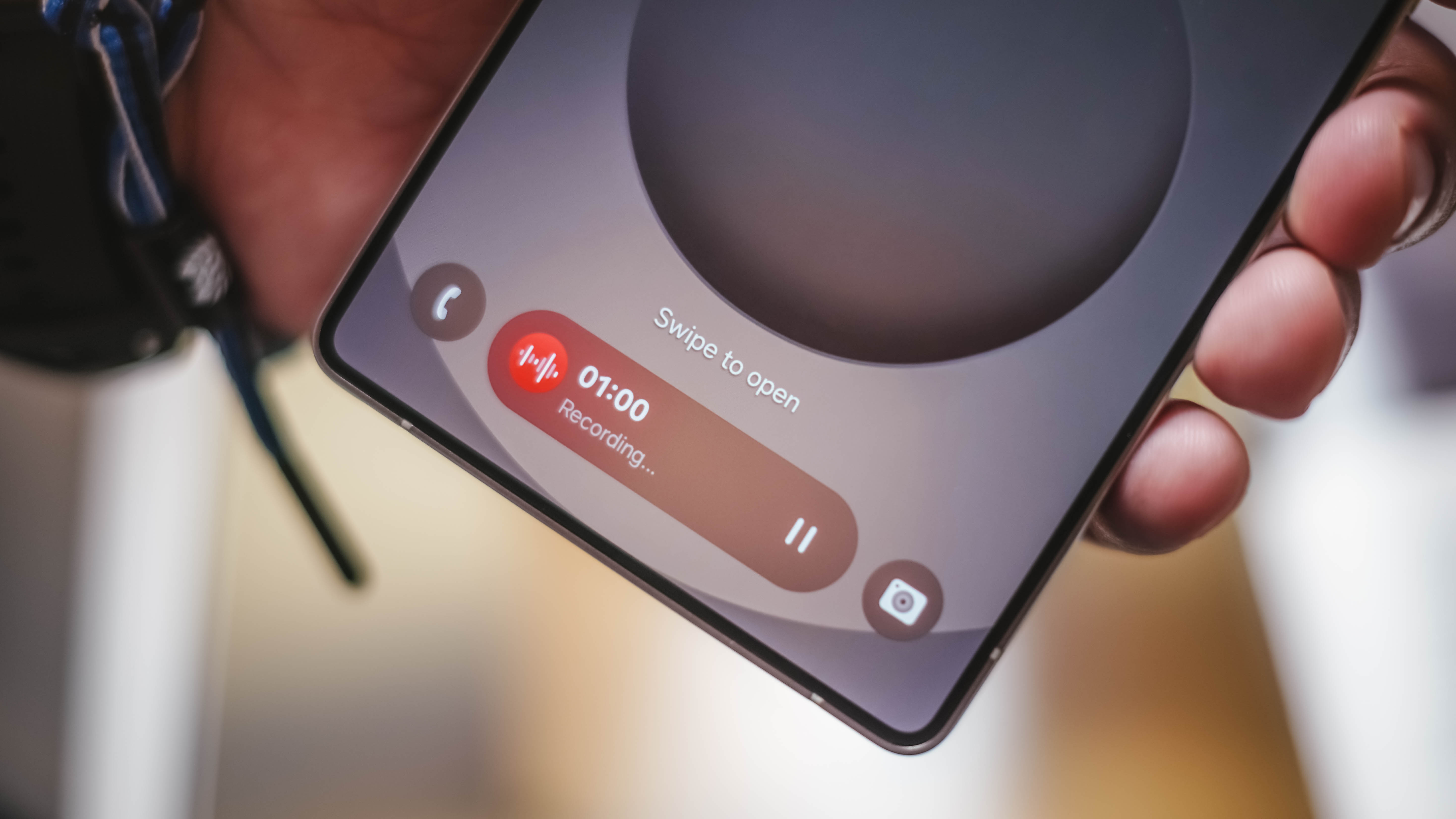
The Now Bar, available on your lockscreen, will display all of these and more. And you can take actions on supported apps based on what’s being shown.
These can be your schedules, sports scores, navigation, and what not. At first glance it looks like the Dynamic Island moved to the bottom. But that’s an oversimplification. And there’s plenty of AI baked into it to make our lives easier.
Samsung Security
Samsung foresees the security questions users may have given the amount of information that the smartphone learns about you to help aid you better.
The company promises both Cloud and On-device security to make sure all your data is protected.
Camera & Content Creation things

Camera and content creation capabilities are always a consideration when deciding which smartphones to buy. The Samsung Galaxy S25 series promises the same level of quality that you’ve seen in their most recent Galaxy S Series lines.
The line has garnered the de facto “concert buddy” reputation over the past couple of years. Look for the Galaxy S25 series to deliver more of the same but with some key additions.
New 50MP Ultra Wide camera
New on the Galaxy S25 series is the 50MP Ultra Wide camera. It promises increased resolution and brightness range, better performance under different lighting conditions, and four times better detail than the Galaxy S24 Series.
It’s also the same camera that Samsung utilizes for macro shots. Those are for when you want to get really up close to tinier subjects.
Nightography video
Gotta hand it to Samsung for sticking with “nightography.” Now, it extends to video performance. With their “Next Gen ProVisual Engine”, the Samsung Galaxy S25 series is able to capture better video in night and low light scenarios.
With it, they are promising less noise and more details. It performs double-analysis noise removal to make sure your low light videos come out as crisp as possible. This analysis happens in real-time.
There’s also what they call the Custom STF (Spatio-Temporal Filter) that distinguishes between moving and stationary objects and applies noise reduction as needed.
It even supports 10-bit HDR for a wider dynamic range for your videos.
Audio Eraser
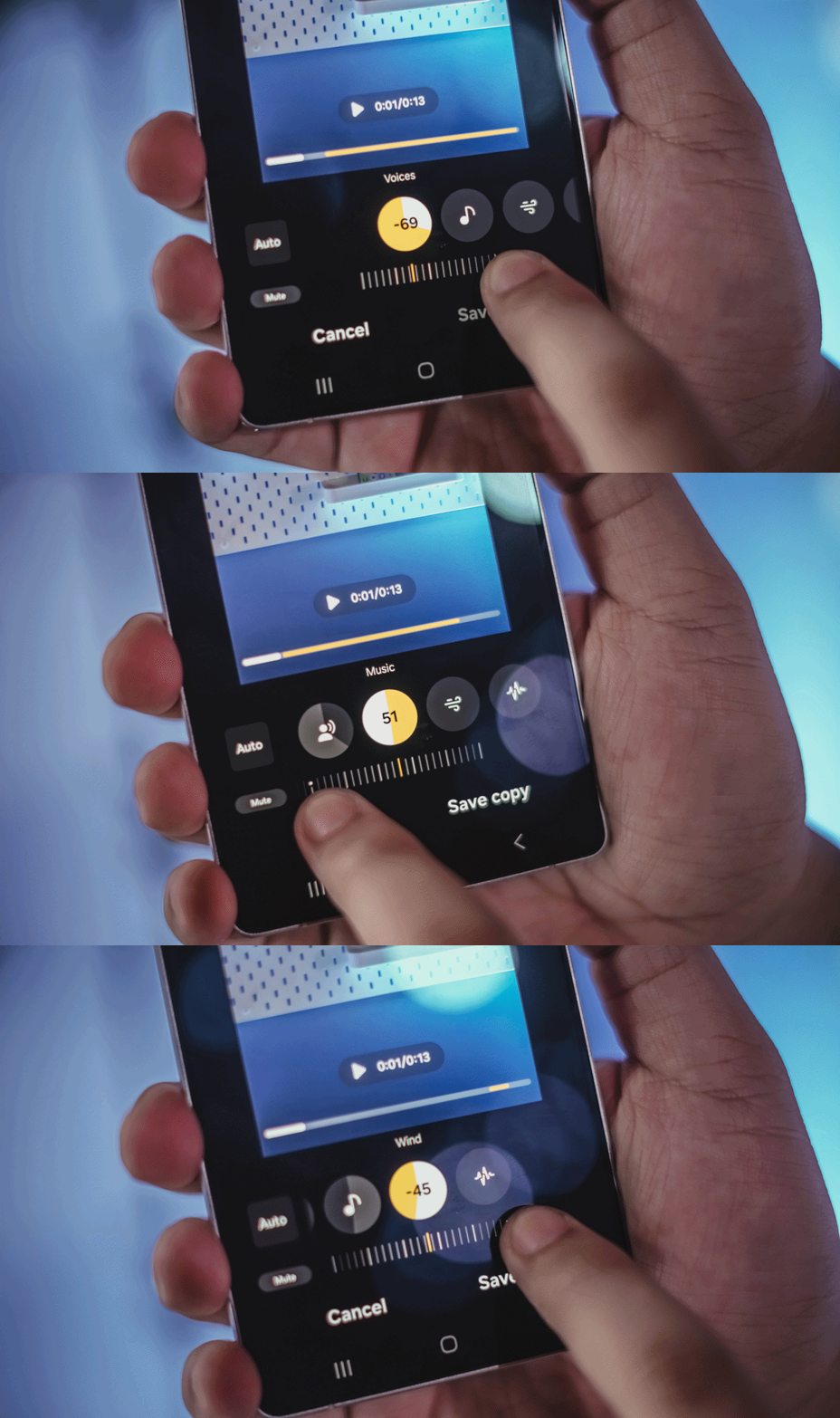
Perhaps one of the most impressive additions to the Galaxy S25 series’ content creation suite, Audio Eraser lets you take any of your videos and adjust the audio levels to your liking.
The tool doesn’t just reduce noise. It gives you a pretty granular control of the sound present in your video.
You can adjust the volume levels of Speaker, Music, Wind, Nature, and Crowd. This could prove to be one of their most useful and powerful tools for content creation.
Galaxy Log/ Virtual Aperture
Onto more shooting tools, the Galaxy S25 series has Galaxy Log and Virtual Aperture.
Galaxy Log will spot overexposed areas of your shot during preview. While recording, it promises to deliver Dynamic range for vibrant, true to life videos.
And while editing, you can apply color correction with exclusive LUTs (Look Up Tables) for control precision.
Visual Aperture, meanwhile, is an AI-powered tool that mimics the function of adjusting your aperture to adjust the look of your shot as you tinker with the aperture values presented. This helps in achieving what many call a “cinematic look” which is achieving some depth of field on your shot.
Generative Edit & Portrait Studio
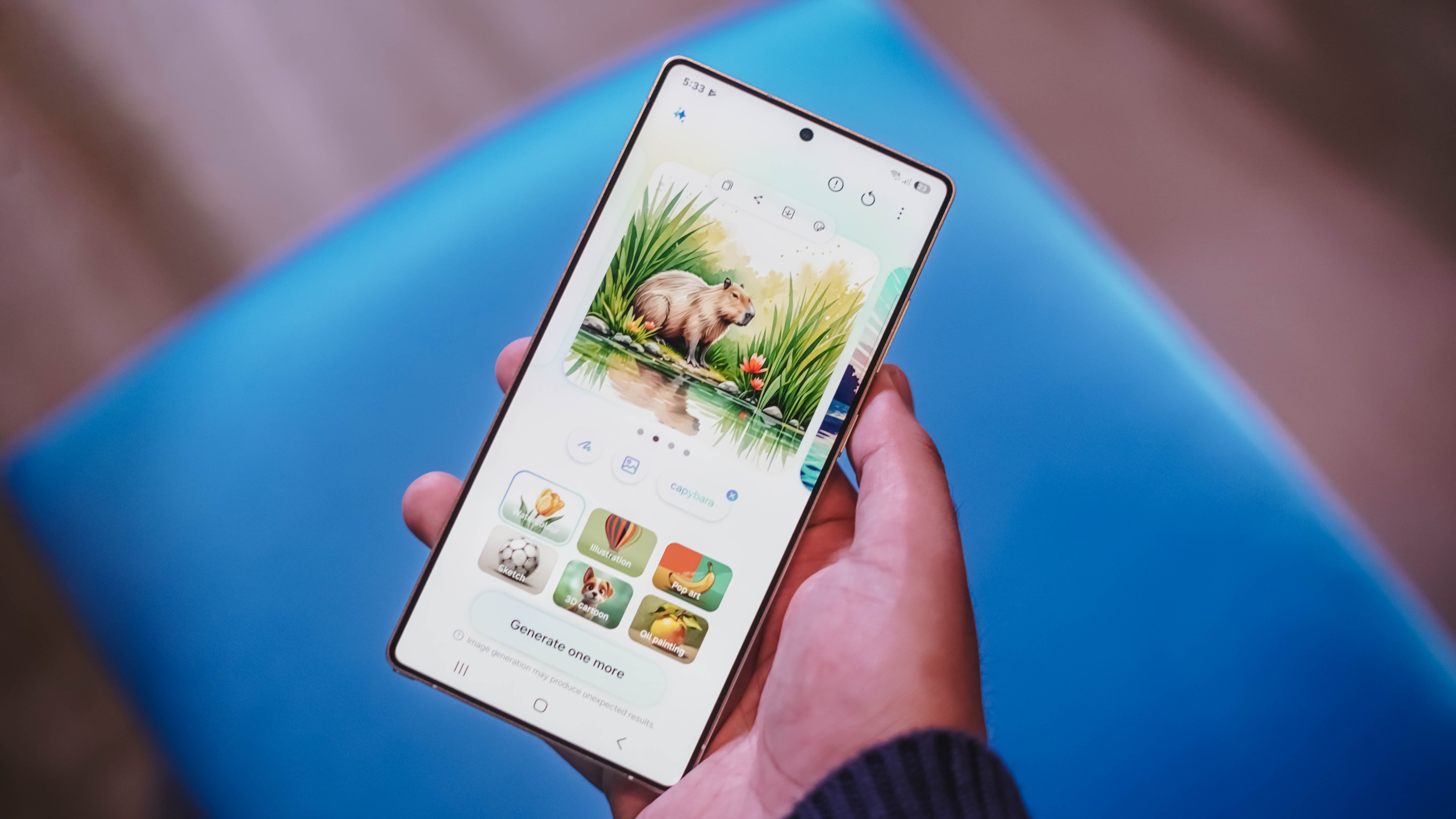
Generative edit and Portrait Studio are both features introduced in the Galaxy S24 series. For the Galaxy S25 series, they have been refined.
Generative edit is now more accurate whether that’s applying magic erase or extending your image.
Meanwhile, Portrait Studio will now provide more realistic portraits. They are promising accurate and natural tones along with true-to-life-facial expressions.
Hardware changes
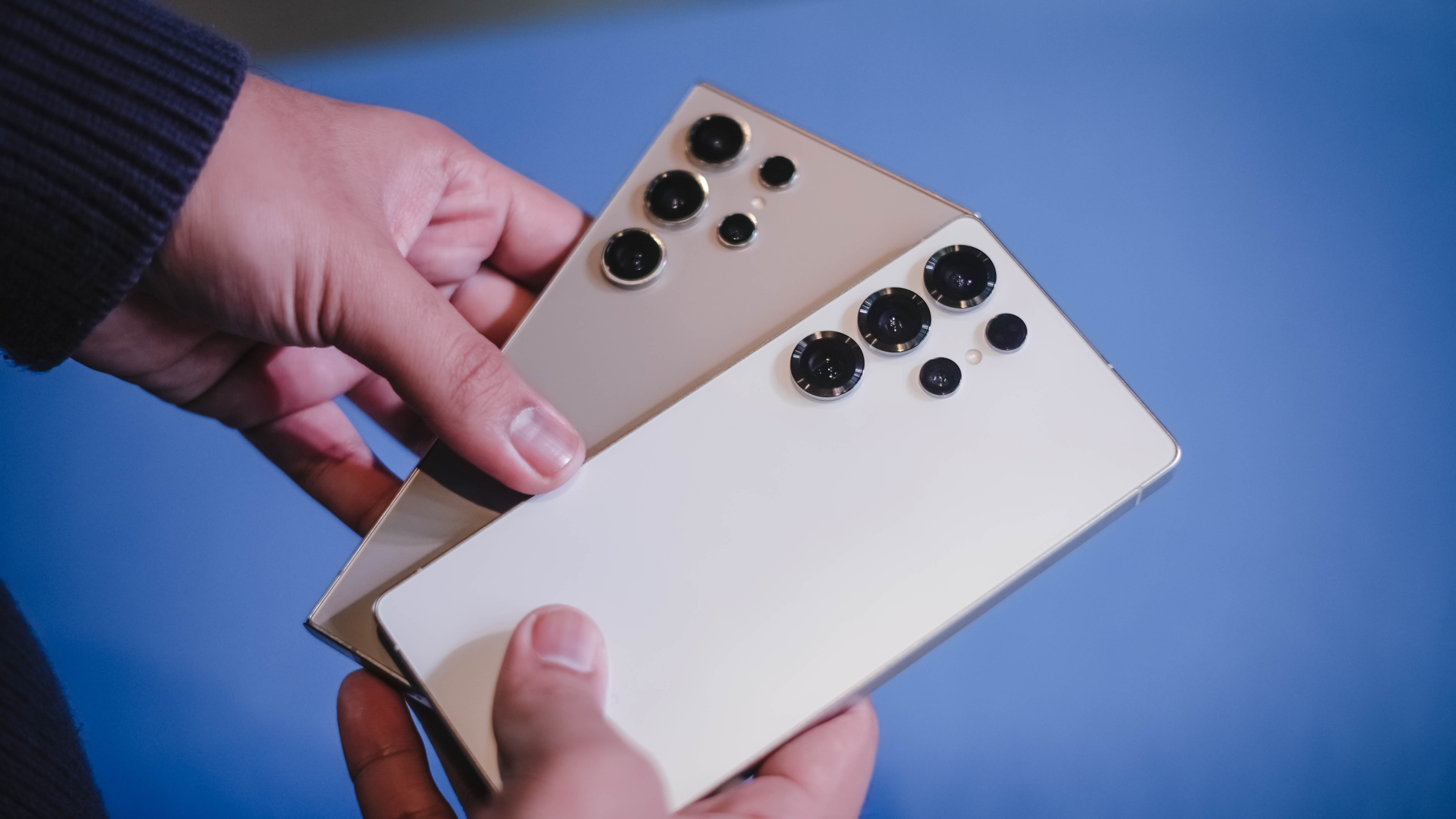
This isn’t something you’ll notice immediately unless you’re really comparing them side-by-side. But the Galaxy S25 series is now 15% slimmer and has a thinner bezel compared to its predecessor.
The edges have also been rounded, supposedly for an improved grip. And these changes all contribute to a lighter device.
Protecting the device is Corning Gorilla Armor 2 which promises drop protection, scratch resistance, and an anti-reflective surface. Samsung says its 20% more resistant to fractures and 60% less screen damage repair vs the previous series.
It also has an improved titanium build for enhanced durability.
Snapdragon 8 Elite for Galaxy
Nobody’s gonna cry about performance across the series as the entire Galaxy S25 line is equipped with the Qualcomm Snapdragon 8 Elite SoC that’s especially tuned for Galaxy.
Its NPU (Neural Processing Engine) is 40% better which, it should be, as this is the backbone of all the AI features.
The CPU is 37% better while the GPU will perform 30% higher.
All of that is promising a true flagship performance, no matter which Galaxy S25 smartphone you choose. It should be able to more than handle multi-tasking, gaming, and more.
Colorways

The Samsung Galaxy S25 Series come in various color options:
Samsung Galaxy S25 Ultra:
Titanium Silverblue, Titanium Whitesilver, Titanium Gray, Titanium Black. With online exclusives being the following: Titanium Blackgold, Titanium Jetblack, Titanium Jadegreen.
Meanwhile, the Galaxy S25+ and Galaxy S25 share the following color options:
Navy, Icyblue, Mint, and Silver Shadow. Online exclusives are: Blueblack, Coralred, and Pinkgold.
Galaxy S25 Series specs:
| Samsung Galaxy S25 Ultra | Galaxy S25+ | Galaxy S25 | |
| Display | 6.9-inch QHD+ Dynamic AMOLED 2X 1~120Hz Refresh Rate Vision Booster Adaptive Color Tone |
6.7-inch QHD+ Dynamic AMOLED 2X 1~120Hz Refresh Rate Vision Booster Adaptive Color Tone |
6.2-inch FHD+ Dynamic AMOLED 2X 1~120Hz Refresh Rate Vision Booster Adaptive Color Tone |
| Processor | Snapdragon 8 Elite for Galaxy | ||
| Camera | 200MP f/1.7 Main (Wide) 50MP f/1.9 120º Ultra-Wide 10MP f/2.4 3x Telephoto 50MP f/3.4 5x Periscope 12MP f/2.2 Front |
50MP f/1.8 Main (Wide) 50MP f/1.9 120º Ultra-Wide 10MP f/2.4 3x Telephoto — 12MP f/2.2 Front |
|
| Memory & Storage | 12GB + 1TB 12 + 512GB 12 + 256GB — |
— 12 + 512GB 12 + 256GB — |
— — 12 + 256GB 12 + 128GB |
| Battery | 5000mAh | 4900mAh | 4000mAh |
| Charging | 45W Super Fast Charging 2.0 (Up to 65% charge in around 30 mins) Fast Wireless Charging 2.0 Wireless PowerShare |
45W Super Fast Charging 2.0 (Up to 65% charge in around 30 mins) Fast Wireless Charging 2.0 Wireless PowerShare |
25W Super Fast Charging (Up to 50% charge in around 30 mins) Fast Wireless Charging 2.0 Wireless PowerShare |
| OS | Android 15 One UI 7 |
||
| Network and Connectivity | 5G, LTE Wi-Fi , Wi-Fi Direct Bluetooth 5.4 |
||
| IP Rating | IP68 | ||




Automotive
BYD says that way better EV batteries are coming next year
Solid-state batteries will debut with higher-end models in 2027.


With gas prices reaching the edges of believability, electric and hybrid vehicles are turning into worthy upgrades. That said, the more casual consumer still has a lot of questions about going electric, primarily about the durability of the battery and range anxiety. Well, a major battery technology upgrade is coming in the next few years, and BYD has just committed to it for next year.
Via the Spanish outlet Carwow, BYD EVP Stella Li confirmed that the company will launch its first vehicle with a solid-state battery in 2027. Now, if you’re a regular consumer, a solid-state battery probably doesn’t make much sense to you. But here’s the basics: it’s smaller, safer, and can last longer on a single charge.
If you’re fine with technical explanations, a solid-state battery uses more solid components, as opposed to the liquid solution used by the current standard of lithium-ion batteries. Because it’s more solid, it has better energy density. Higher energy density means a smaller size is needed to achieve the same battery capacity as modern batteries. In turn, this means that a vehicle can pack more batteries inside, allowing for better capacity. Oh, and let’s not forget that these batteries are generally safer and less prone to incidents.
In the same interview, BYD says that the first model will arrive next year. Unfortunately, because of the battery’s cost to produce, the component will likely debut with the company’s higher-end models. Still, it’s an exciting sight to behold. The electric and hybrid market is already quite the temptation for users, so an even better battery will further push the segment to better heights.
Laptops
Microsoft gives up on the Copilot+ PC
The company is quietly stepping away from the branding.

The Copilot+ PC is finally coming to an end. After a few years of advertising the lineup as the next big thing, Microsoft is stepping away from the branding.
Through a new interview with Windows Central, Microsoft has confirmed that the company is slowly stepping back from the Copilot+ branding. Despite launching a series of new Surface PCs that fit the bill of such a brand, the company has not affixed any of these devices with the usual branding of the AI-infused series.
“These are not called Copilot+ PCs. They do meet all the requirements of our previous bar for what Copilot+ devices are. We still lean into the narrative around AI on the edge and being able to have a hybrid solution out there,” Microsoft Surface CVP Brett Ostrum said.
Now, the Copilot+ PC programs hasn’t been a massive success for Microsoft. For all the time that it’s been out in the market, the series hasn’t really made much of an impact. TOPS is still a difficult metric to measure. The Copilot button is still one of the most unusable buttons on a modern keyboard. Even worse, Recall, the lineup’s most highly touted feature, crashed and burned practically the same moment it came out because of privacy concerns.
Microsoft had a lot of hopes for the Copilot+ lineup. Prior to today’s deteriorating perceptions about AI, the lineup imagined a string of devices united with a focus on AI-supported performance. However, we know better today. At best, AI PCs provide moderately boosted performance without the need for top-of-the-line hardware. At worse, they’re a privacy nightmare that places an unnecessary burden on the entire industry.
SEE ALSO: Microsoft continues to shove Copilot where it’s not wanted
News
Xiaomi 18 Pro series is launching globally, Xiaomi confirms
Xiaomi’s phone with two screens is finally going global.
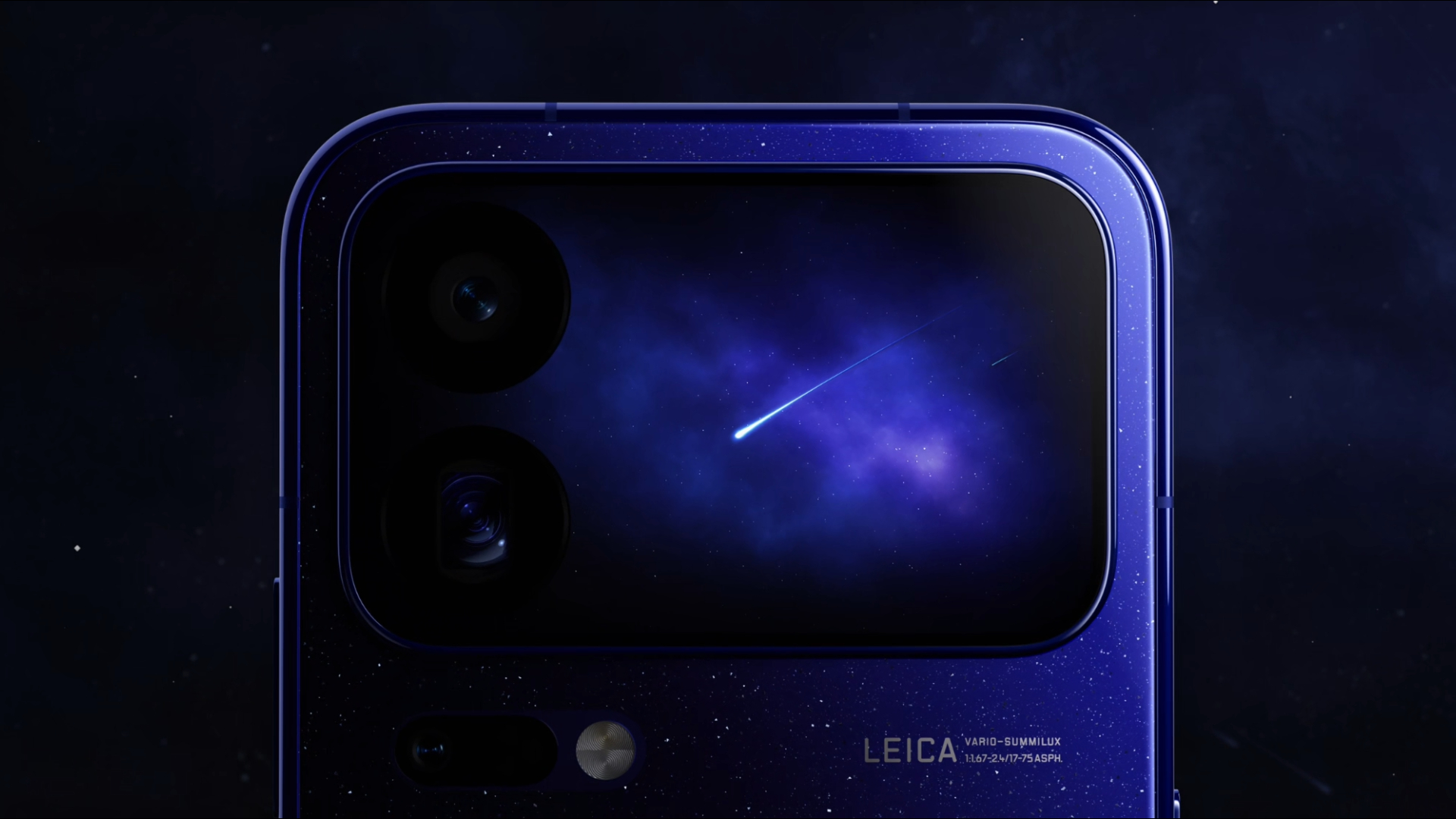
As you can probably read from our reviews, we were impressed with the Xiaomi 17 series. Like previous years, the Chinese brand knows how to make impressive flagships. Unfortunately, despite our raving, the world didn’t get the complete flagship experience because the Xiaomi 17 Pro and Pro Max were exclusive for Chinese users. This year, however, the Xiaomi 18 Pro and Pro Max will finally grace the entire world with their presence.
Recently, Xiaomi unveiled the Xiaomi 18 Pro duo. Normally, the launch of the Pro series doesn’t make waves outside of China because of the exclusive release. However, soon after the series’ debut, Xiaomi CMO Xu Fei officially confirmed that the duo will make a global debut sometime this year.
Now, the launch of the two smartphones should catch your eye. While the regular Xiaomi 18 series belongs to the more traditional form factors for smartphones, the two Pro models feature a smaller 2.7-inch (or a 2.9-inch) LTPO AMOLED rear screen, adding that extra bit of spice even if the phone is facing downwards. Other than that, the series comes with up to a Snapdragon 8 Elite Extreme Gen 6 chipset, up to 16GB of RAM, and up to 1TB of storage. It also features a trio of rear cameras including a 200-megapixel main sensor, a 200-megapixel periscope lens, and a 50-megapixel ultrawide sensor. In front, it has a 50-megapixel selfie shooter. Finally, the series goes up to an 8500mAh battery.
To be clear, there is a chance that the global version won’t match these specs. Regardless, it’s surely an impressive phone when it does launch elsewhere.


Now Playing: ACE Combat 8: Wings of Theve
A refreshing change of pace

TECNO POVA 8 Pro Tonino Lamborghini review
Truly a rare gem in 2026


DJI Lito X1 review: Is this the best lightweight drone for creators?
Making a strong case as a travel companion and a capable B-cam!

BYD says that way better EV batteries are coming next year

Globe records fastest average download speed of 2026 in August
Now Playing: ACE Combat 8: Wings of Theve

Now Playing: Total War: Warhammer III – Lords of the End Times

Microsoft gives up on the Copilot+ PC

realme 16T 5G with 8000mAh battery, IP69 Pro rating launches in PH

HUAWEI Pura X View is 2026’s first WIDE slab-type smartphone

The CAMON Slim 5G is TECNO’s latest ultra-slim smartphone

iPhone 18 Pro series: Price, availability in the Philippines

DJI Osmo 360 II review: Going all-in on the ecosystem


-

 News7 days ago
vivo X500 Series launches with major imaging upgrades
-

 News6 days ago
OPPO Find X10 Pro Max is the first phone with a triple 200MP camera system
-

 Reviews2 weeks ago
REDMI Note 17 Pro Max review: A new breed born from AI greed
-

 Singapore1 week ago
Epson Lifestudio Grand Plus EH-LS970B with 4K projection, more launches
-

 News7 days ago
vivo introduces OriginOS 7 with smarter multitasking and AI features
-
Drones2 weeks ago
DJI Lito X1 review: Is this the best lightweight drone for creators?
-

 Gaming2 weeks ago
Valve unveils price of the Steam Frame
-
 Philippines2 weeks ago
REDMI NOTE 17 Series: Price, availability in the Philippines