
News
iPad Pro with M1 chip, 5G, Liquid Retina XDR display is here
Knock your socks off!


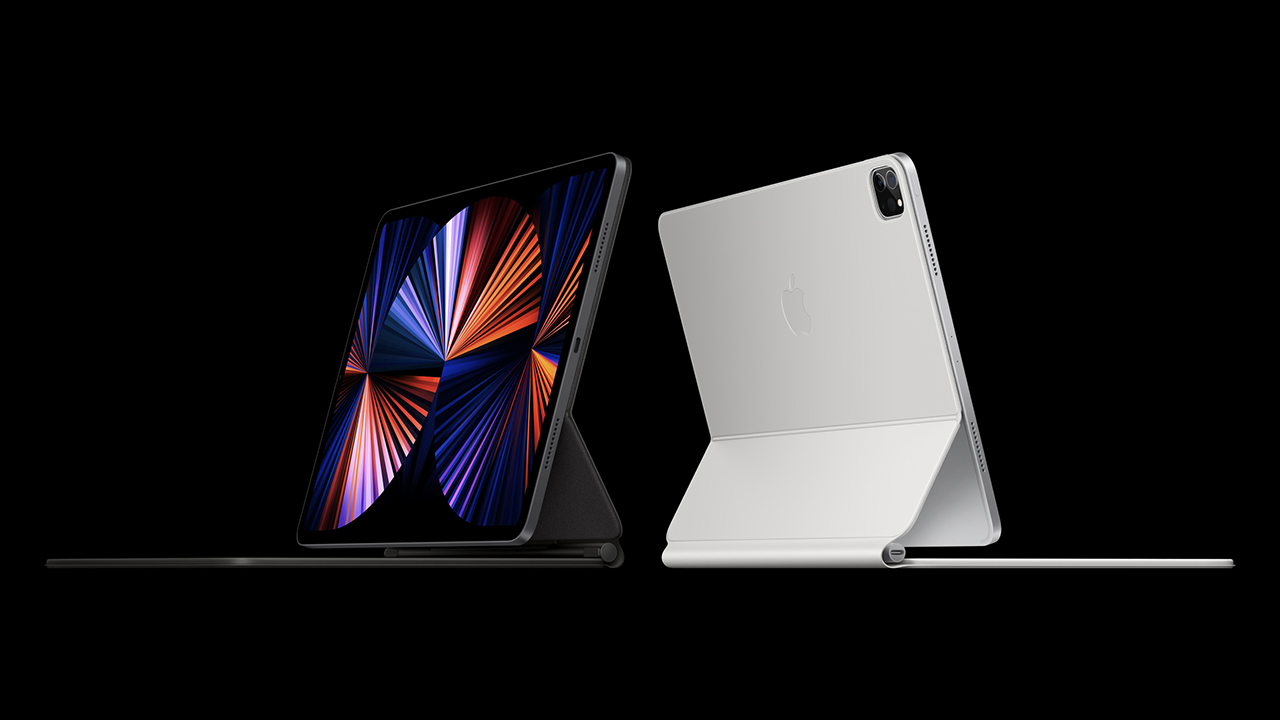
The star of Apple’s Springboard event is none other than their all-new iPad Pro. It now sports the groundbreaking M1 chip, supports super fast 5G, and with a stunning Liquid Retina XDR display.
The iPad Pro already felt like a device category all on its own with its unrivaled performance considering its form factor. Apple is upping the ante with the addition of the M1 chip famously known for improving over performance and delivering better power efficiency. It’s like Goku defying limits and rising to the ranks of the gods.

So what’s exactly inside?
Are you ready for this? Other than the aforementioned M1 chip you also have the following: 16-core Apple Neural engine, advanced image signal processor (ISP), a unified, high-bandwidth memory architecture with up to 16GB of memory, 2x faster storage, and up to 2TB capacity. Drooling yet?
It’s the kind of power usually reserved for MacBook Pros but instead you get it in tablet form. In. Sane.

12.9-inch Liquid Retina XDR Display will melt your eyes
In a good way. It’s a stunning mini-LED display. That’s over 10,000 LEDs across the entire back of the display for up to 1000 nits of full-screen brightness, 1600 nits of peak brightness, and a 1 million-to-1 contrast ratio. Eye. Melting.
It also has other display tech like ProMotion, True Tone, and P3 wide color support, and support for HDR and Dolby Vision content.
5G on a tablet
Yessir. No, it won’t get you Covid. What it will do is open you to a world of Internet connectivity that’s faster than anything (mobile) you’ve experienced thus far. It supports most 5G bands on any device of its kind including mmwave.
Superior connection
Thunderbolt and USB 4 is now on the iPad Pro. That single USB-C port enables a variety of connections to truly maximize this godsend of a tablet. Thunderbolt supports 10Gbps Ethernet, faster external storage and even higher resolution external displays, including the Pro Display XDR at full 6K resolution.
What else is there?
It has a new video call experience called Center Stage. It uses the 12MP ultra wide front cam that has the TrueDepth camera system. Its large field of view helps the machine learning kick in so as you move around, it’ll keep you centered in the frame.
The Magic Keyboard, which offers a comfortable typing experience with backlit keys, an integrated trackpad, and its floating design, now comes in a gorgeous new White color.
iPadOS 14.5 will be available to iPad customers starting next week. It comes with expanded language support for Apple Pencil features like Scribble and Smart Selection, new emoji, support for the latest gaming controllers, and the ability to share lyrics and see top songs in cities around the world with Apple Music.
Price and availability
The new iPad Pro is available to order beginning Friday, April 30 on apple.com, apple.com/sg, and in the Apple Store app in 31 countries and regions. The iPad Pro will be available in Apple Store locations in the second half of May.
The new 11-inch and 12.9-inch iPad Pro will be available in silver and space gray finishes. iPad Pro is available in 128GB, 256GB, 512GB, 1TB, and 2TB configurations.
11-inch iPad Pro Wi-Fi
- US: US$ 799
- Singapore: SG$ 1,199
11-inch iPad Pro Wi-Fi + Cellular
- US: US$ 999
- Singapore: SG$ 1,419
12.9-inch iPad Pro Wi-Fi
- US: US$ 1,099
- Singapore: SG$ 1,649
12.9-inch iPad Pro Wi-Fi + Cellular
- US: US$ 1,299
- Singapore: SG$ 1,869






News
Smart showcases cloud gaming platform in partnership with Blacknut
Play over 1,000 titles straight on your smartphones


Philippines mobile service provider Smart showcased the country’s first cloud gaming platform in partnership with Blacknut at the recent Philippine GameDev Expo (PGDX) 2026.
As the event’s main presenter, Smart highlighted its collaboration with the cloud gaming subscription service. Together with its value-packed Power All offers, the network provider is highlighting what the future of gaming can look like.
Smart and TNT subscribers can conveniently access Blacknut Cloud Gaming through a dedicated site. Here, they can play more than 1,000 premium console and PC-quality games on their smartphones.
That’s without the need for expensive gaming hardware or lengthy downloads. Weekly subscriptions start at just PhP 145 and can be conveniently charged to prepaid load following a simple OTP verification process.
To make the experience better, Smart also has Power All offers, which provide generous open-access data for today’s digital lifestyles. There’s a package for cloud and mobile gaming, streaming, content sharing, and productivity.
Gaming
Ghost of Yotei gets a story expansion in October
The Complete Edition comes with the expansion and a roguelike mode.


Ghost of Yotei is a classic RPG experience set in the same universe as its predecessor, Ghost of Tsushima. In my opinion, Atsu’s journey of revenge feels a lot more fun than Jin’s battle to save his homeland. If you’re in the same boat, Ghost of Yotei is coming back on October 1 with brand-new content.
Without delving too much into spoiler territory, Ghost of Yotei has a conclusive ending. Rather than shoehorning a forced epilogue, Echoes of Sekigahara, the title of the upcoming story expansion, explores Atsu’s past.
As with Tsushima’s expansion, Echoes of Sekigahara features a new map with new enemies, weapons, and collectibles. It will be set in two different time periods.
Besides the story expansion, the upcoming update also has a new mode called Most Wanted, which Sucker Punch Production describes as their “spin on a roguelike.” The mode explores Atsu’s experience as a headhunter, feeding her with bounties and earnable perks.
The two new content expansions will come with in the upcoming Ghost of Yotei Complete Edition. The new edition, coming on October 1, will also come with the co-op Legends mode. It also has a few perks and customization options. The edition will sell for US$ 70.
If you already have the base edition, you can grab an upgrade for only US$ 15. If you don’t want to pay for the upgrade, the game is still getting a few minor tweaks.
SEE ALSO: Ghost of Yotei review: A tale sharpened by vengeance

The HONOR Robot Phone may have officially launched, but don’t expect this version to immediately make its way to global markets.
HONOR told media in Shenzhen that it currently has no plans to bring the current Robot Phone outside China. The main hurdle isn’t the hardware. It’s the phone’s AI experience, which is currently optimized for the Chinese market.
HONOR believes a future generation of the Robot Phone would be better positioned for a true global rollout once its AI experience is ready for markets outside China.
That doesn’t mean HONOR is abandoning the idea. Quite the opposite.
More than a phone with a moving camera
The Robot Phone is HONOR’s attempt to introduce a new idea to the smartphone market. It combines a smartphone with a 4DoF mechanical gimbal, allowing its camera to physically move.
Its AI features take that concept further. YOYO Robot Mode can use voice commands, gestures, and AI tracking to control the camera. It can also automatically pan and tilt to keep a person in frame during vlogs, livestreams, and video calls.
The phone also brings selected elements of ARRI Image Science and professional cinema workflows to its camera system. Its 200MP gimbal main camera supports 10-bit ARRI LogC3 recording, while ARRI Wide Gamut 3 and ARRI Looks give creators more control over their footage.
But HONOR isn’t treating the Robot Phone primarily as a volume-driving product.
The company says its bigger goal is to introduce a new concept to the smartphone market and see what kind of effect it can have.
That makes the Robot Phone an interesting experiment for HONOR. The hardware is already here. The company now wants to learn what happens when a smartphone can physically move, respond to its surroundings, and use AI to help operate itself.
For now, though, China is where that experiment begins.


30 days later with the ASUS ExpertBook Ultra: Like seeing an ex
Felt exactly as I remembered.


ROG STRIX G16 Review: Building for the moment
Setting it up however you want to make the most out of it


realme C100: Enduring and durable in spite of entry-level realities
Enough power but needs more agility

Spotlight: MemoMind One AI Smart Glasses

Smart showcases cloud gaming platform in partnership with Blacknut

What your smartphone color choice reveals about you

New EV player XPENG to launch in the Philippines in September

Box office: Brand New Day set to surpass US$ 2 billion, drives Marvel’s Spider-Man 2 resurgence

Hands-on: Samsung Galaxy Z Fold8, Flip8, Ultra

VinFast debuts two-wheeler models, opens 21 e-motorcycle showrooms

Garmin launches its first screenless fitness band

Samsung releases teaser with Spider-Man: Brand New Day Easter eggs

Most of the world’s PlayStations will be officially useless by 2028


-
 Automotive2 weeks ago
VinFast debuts two-wheeler models, opens 21 e-motorcycle showrooms
-

 Automotive2 weeks ago
Xiaomi debuts SkyNomad Series featuring new Kunlun platform
-

 News1 week ago
OnePlus officially leaves the United States and Canada
-

 Gaming2 weeks ago
Call of Duty: Modern Warfare 4 clip shows Losing Ground 1st look
-

 Automotive2 weeks ago
GAC launches new trio of MPVs
-

 Gaming2 weeks ago
Genshin Impact opens Snezhnaya in Version 7.0 this August 12
-

 News1 week ago
Google will force Android users to use Gemini next month
-

 Gaming1 week ago
Tides of Annihilation opens first public demo at Gamescom 2026