
Apps
10 free-to-play mobile games for Android and iOS


A good mobile game could save you from getting bored out of your wits. Mobile games land their charm in the portability your consoles and PCs don’t have and the availability of games your handhelds don’t own. Granted that some of these games end up incentivising in-app purchasing or dump a crap-ton of ads, they are still fun to play.
With that, here are my top ten picks:
Magic Tiles 3
If you were playing Tap Tap Revenge when it was released around the early 2000s, Magic Tiles 3 isn’t a far cry. Magic Tiles 3 is a popular piano game that has you tap on black tiles before they reach the bottom of the screen. The game will seem simple at first but, once you get into the groove, it’ll get addictively difficult. Magic Tiles 3 has various quests that let you unlock more songs to try out and play. It even has a battle mode to compete against your friends and other players.
Vainglory
It’s one of everyone’s favorite mobile multiplayer online battle arena games. Having quickly built a community after its initial release late 2014, Vainglory manages to integrate the MOBA playing style and compact it into a snug mobile game. You can play the game on casual, quick-play, or ranked.
It makes use of touch controls, so I don’t recommend playing the game on a tiny phone, especially when you have stubby fingers. A tablet would be best for this one but, if you think your handset is big enough or has a good stylus, this is a must-install.
Hearthstone
Hearthstone is an online collectible card dueling game where you unlock cards, build decks, and duel other players. Hearthstone extends the already existing lore of the Warcraft series by using the same elements, characters, and relics.
This is one of my favorites on this list. I’ve been playing since around a year ago, and if there’s anything you should know about any card game, it’s to believe in the heart of the cards. If you want to test your deck out, you can go against bots. As for testing your skill with building decks on the fly, you might want to try out the Arena. Though Blizzard Entertainment sometimes trips out on silly tavern brawls and new card releases, the game is a whole lot of fun. Sign into your Blizzard account to play it on PC, tablet, or your phone without losing progress!
Super Mario Run
A game that simplifies the nostalgic platformer. Super Mario Run lends itself like the generic mobile platformer with taps and holds for jumping and leaping, just with a charming plumber with a red hat. You can time your taps to pull off mid-air spins, jumps, and wall jumps. You can gather coins and reach the goal just like the original Super Mario. Even if it can get frustrating because Mario is locked on running forward (you read that right: there’s no turning back in this one), it’s still a fun casual game.
Mmm Fingers
Need something to play while waiting? Don’t have mobile data? Mmm Fingers is a simple game that threatens your fingers from getting chomped on by hungry monsters. It’s a game from the creators of Small Fry and Flappy Golf. Mechanics are easy: touch and hold your finger against the screen as long as you can. Stay away from anything with teeth, and whatever you do, don’t lift your fingers. You can show off your score and compete against your friends. It’s that easy!
Eternium
Eternium is an action role-playing game resembling the awesome classics: Diablo and Torchlight. With touch and swipe cast controls, this game sticks out. Even if the game seems to be exclusively playable online, you can actually play it offline when the content download completes. The best part? In-app purchasing for this game is generally frowned upon, so playing more gets you farther than paying for it. Be careful: I’ve seen our producer get sucked into playing it non-stop. It’s a familiar game with lots of perks — definitely something you should install.
Yu-Gi-Oh! Duel
If you grew up playing the trading card game, Yu-Gi-Oh!, you’re going to lose your stuff with this mobile game. Konami stepped into mobile games with voices straight out of the anime, intuitive controls, and 3D animations on signature monsters.
Before I stop speaking coherently because of how much I love this game, let me tell you why this is something I am absolutely floored to play. During the Yu-Gi-Oh Trading Card days, it was tough to find original cards. There were too many fakes lying around; not to mention, maintaining the quality and simply not losing them were difficult. Now, a mobile game that allows you to play just like in the anime series including fancy animations? This game is god-sent.
Hungry Shark World
Hungry Shark World is perfect for when you feel like rampaging around and seeing your shark grow. In this game, you play as a shark and basically feast on everything and anything in the ocean with the probable exception of naval mines. You can upgrade your shark and customize items to give you an upper-hand on your next feasting. This is one of those games I find myself laughing maniacally to — I can’t help it. Sticking a rocket on your shark’s tail to give it a reliable boost out the water to munch on birds is a sight I’ll cherish from now on.
Last Day on Earth: Survival
Last Day on Earth is a massively multiplayer online zombie shooter survival and strategy game, where all survivors are driven by a single task: staying alive. You spawn with just your underwear and have to survive as long as you can in a zombie apocalypse. The game is simple and competitive. With lots of items you can pick up and use as weapons, it can get pretty silly really fast. If you’re up to beat up the undead, you should give this a go.
Titanfall: Assault
Titanfall is a mobile real-time strategy game where you deploy Titans, Pilots, Sim Ninjas, Boomers, and a ton more to siege the Frontier. If you think this strategy game is a walk in the park, think again. Titanfall: Assault takes the game to a whole different level because you’ll be playing against someone else in real time. You can collect and upgrade cards along the way, and have fun uniting with your guild and conquering the Front with your friends!
SEE ALSO: Best Video Games of 2017 (Q2 Edition)
[irp posts=”15643″ name=”Best Video Games of 2017 (Q2 Edition)”]





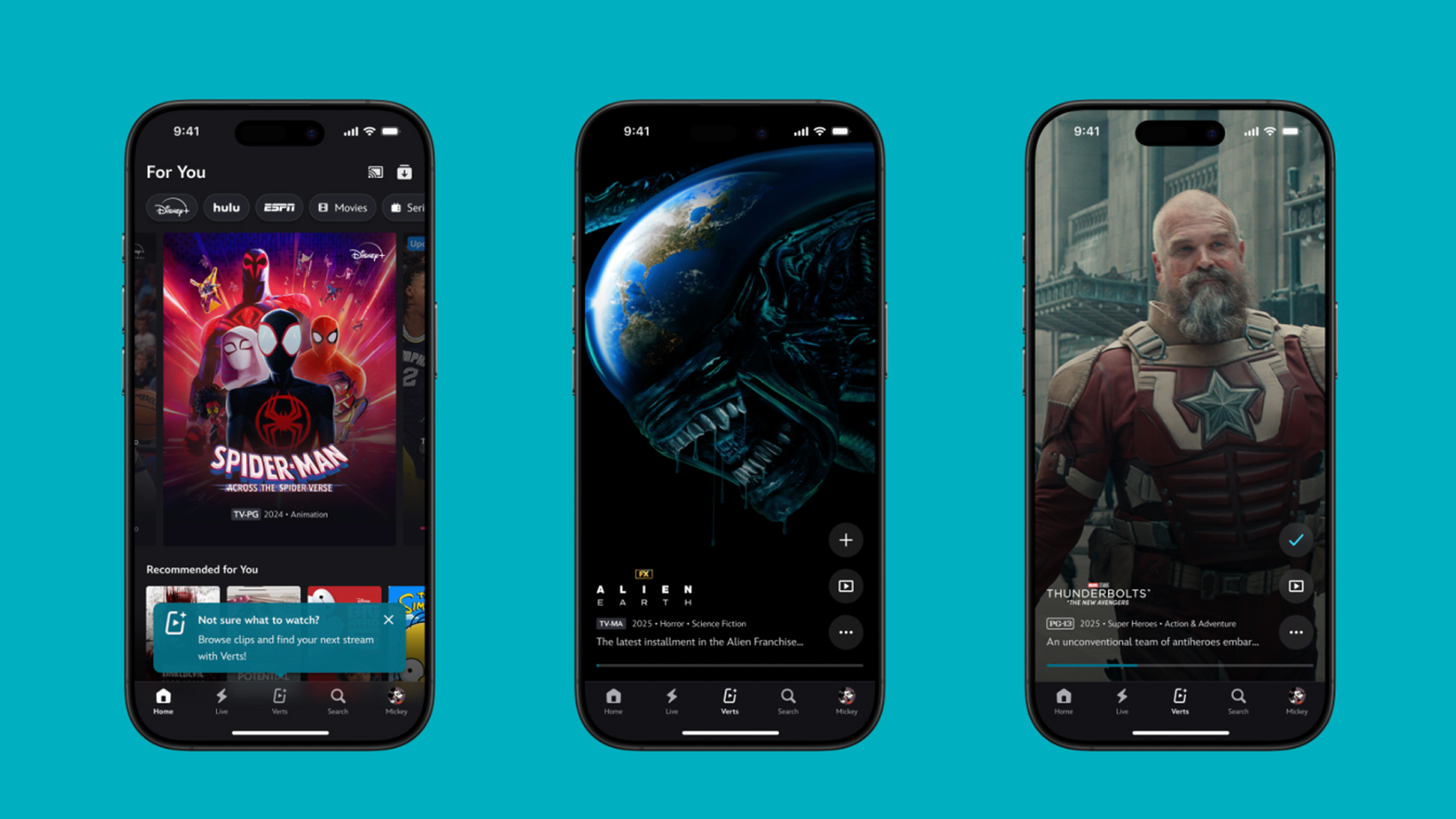
TikTok has changed how we consume media. Everything is now vertical. Even the most established streaming services, often a bastion for traditionally horizontal content, is adopting the different format. Now, Disney+ is getting a vertical feed called Verts.
Like its contemporaries, Verts presents a continuous feed of content but tailored to show the plethora of titles from the Disney+ library. This might include the first scenes of shows or notable highlights. The hope, of course, is to direct users to the longform content.
Directly from the Verts feed, users can easily add the respective title to their watchlist or go straight to the title’s page. In turn, the feed is accessible from the homepage since it has its own tab.
According to Disney, early experiments with the feature have driven engagement to available content. Right now, the feed is mostly for clipping enticing content from shows. However, the platform will experiment further with the format for new ways to tell stories.
Though Verts surely stands for “verticals” in this case, “adverts” might fit better as its full government name. Still, it might be a useful tool if you’re figuring out what to watch for the night.
Currently, Verts is available for Disney+ subscribers in the United States. Disney also has plans to expand the feature to ESPN for sports-related content.
SEE ALSO: Live NBA action on Disney Plus now available in the Philippines
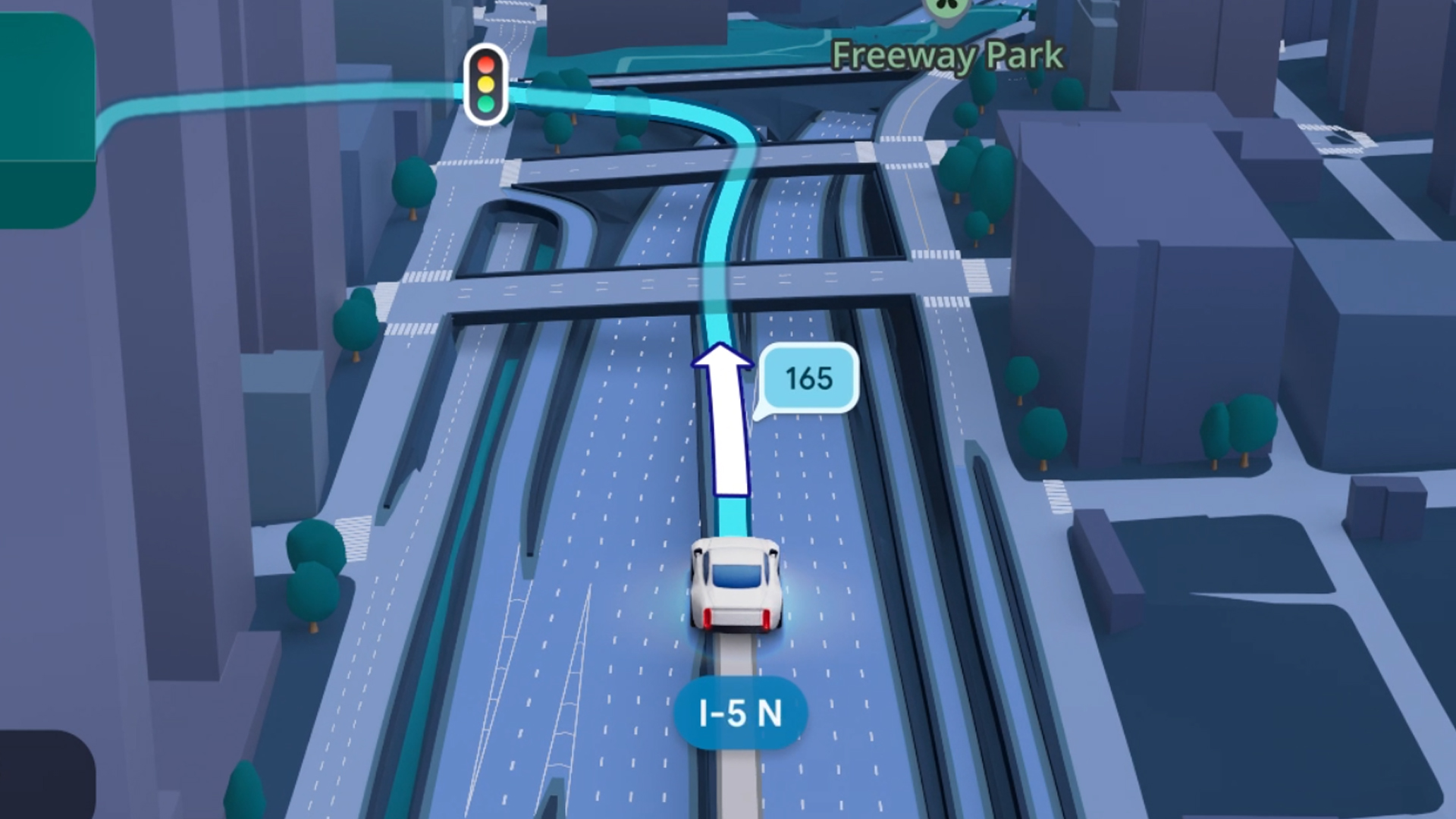
Some of today’s navigation apps are living in the future. Instead of a two-dimensional map, these apps render the user’s surroundings in 3D. It’s a nifty upgrade that helps drivers more accurately visualize directions on the fly. Finally, Google Maps is getting a much-needed upgrade and will take navigation to the third dimension.
In a new update rolling out today, the new Immersive Navigation feature will bring your surroundings to life. The 3D view creates a render of the surrounding buildings, overpasses, and terrain around the car. It takes the guesswork out of navigation by showing precisely where to turn and what landmarks to look out for.
In the same vein, you can now use Street View to preview your destination before you arrive. Google Maps will also highlight your destination’s entrance, side of the street, and nearby parking.
Outside of how the map is visualized, Google Maps is also infusing its service with Gemini. The new Ask Maps feature will let you engage with the app in a conversational manner. For example, if you’re in the middle of a long drive, you can now ask Maps where the best place is to stop over and have a coffee break. Ask Maps will provide directions, a potential itinerary, and even helpful links to book a reservation ahead of time.
Now, availability for both of these features is still a bit limited. Immersive View is rolling out today to compatible devices and vehicles in the United States. Further, availability will expand over the coming months.
Meanwhile, Ask Maps is available now in the United States and India for Android and iOS. A desktop version is coming soon.
SEE ALSO: Google Maps is finally getting a power saving mode
Apps
Apple Music, TikTok launch Play Full Song, a new music discovery experience
Rolling out worldwide exclusively through Apple Music

Ever came across a viral 15 or 30-second music snippet on TikTok that instantly became your jam on repeat?
For years, TikTok has been a regular source of songs that have become part of our playlists. And together with Apple Music, listening to the music you discover has just gotten even easier.
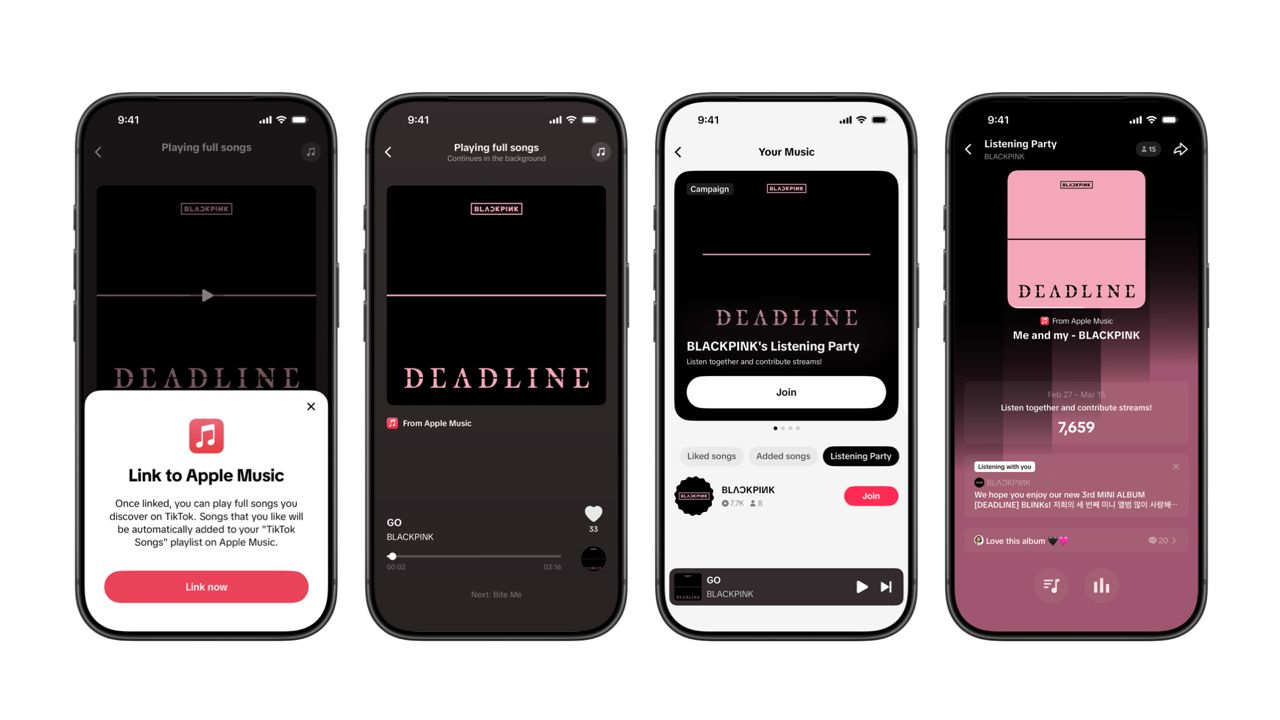
That’s through Play Full Song, a new music discovery experience, which launches exclusively though Apple Music.
With the new feature, Apple Music subscribers can now enjoy full-length tracks that they discover on TikTok. That’s without ever leaving that popular streaming app.
Fans who discover a song that they love on their For You or Sound Detail page can simply tap the Play Full Song button to open up an Apple Music player and enjoy the song in its entirety.
From there, subscribers can continue listening to a personalized stream of recommended songs. That means no more need to switch apps and search separately.
The new Play Full Song experience helps music fans move seamlessly from the moment of discovery to deeper listening. It’s also designed to be instant and all within the same environment.
Moreover, users can also save their favorite songs to Your Music and add them directly to their Apple Music playlists.
Built using Apple’s MusicKit, full-length song playback takes place on Apple Music. This way, streams are paid within the Apple Music service, supporting artists and rights holders while giving fans a smooth, uninterrupted experience.
Listening Party also launched
The feature builds on the success of TikTok’s Add to Music App. This was previously launched to help artists and fans convert discovery on TikTok to a playlist save in Apple Music and other streaming services.
To cap the announcement, TikTok and Apple Music are also introducing Listening Party. This new feature is designed to bring artists and fans together around music.
It creates a shared environment where fans can listen to songs from their favorite artists in real time, interact with each her, and engage directly with the artist during the session.




Zenless Zone Zero Version 2.7 available on March 24

Infinix expands SEA footprint with more official MLBB tourney partnerships

Samsung Galaxy S26 Ultra review: A phone you live with

DJI’s Inspire 3 Basic Package make 8K aerial filmmaking more accessible

Disney+ launches a TikTok-coded vertical feed called Verts


-

 Reviews2 weeks ago
TECNO CAMON 50 Ultra review: End of an era?
-

 MWC 20262 weeks ago
Infinix NOTE 60 Ultra makes a motorsport-inspired debut
-

 MWC 20262 weeks ago
TECNO launches the all-new CAMON 50 series
-
 MWC 20262 weeks ago
TECNO unleashes Tonino Lamborghini collection
-

 Computers2 weeks ago
AMD announces Ryzen AI 400, AI 400 PRO series at MWC 2026
-
 MWC 20262 weeks ago
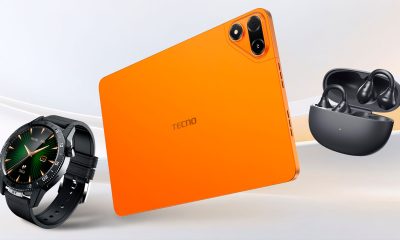
TECNO debuts latest devices, HiOS 16, upgraded Ella at MWC 2026
-

 Automotive2 weeks ago
Xiaomi Vision Gran Turismo makes global debut at MWC 2026
-

 Reviews1 week ago
The Xiaomi 17 shoots Leica dream