
Apps
Our 7 favorite iOS 10 features


Apple’s tenth version of iOS is out of beta and finally in public hands. We’ve had it for a while now, and even though it isn’t a drastic change from iOS 9, every new feature adds to the highly mature and already intuitive interface. Let’s get down to the ones that stand out most for us.
1. There are new ways to message
We love finding better ways to communicate using our phones — so much, in fact, that we were delighted to find out Apple stepped up iOS 10’s messaging game. The Game of Thrones-inspired video we published last July covers the most fascinating functions:
We love how Messages allows us to better express ourselves through larger emojis and GIFs, as well as handwritten messages and video playback within the app. We’re sure that everyone who installs iOS 10 will feel the improvements.
2. Raise the phone for instant wakeups
Apple has placed greater emphasis on the lock screen — and why not? It’s the first thing you see whenever you activate your phone. With iOS 10, your iPhone will instantly wake up when picked up, bringing you straight to your lock screen notifications. Considering how fast Touch ID brings you straight to your app grid, being able to see message previews before anything else can save time and battery power.
The feature can be turned on or off in the Display & Brightness setting, but take note, it’s only available for the new iPhone 7 series, iPhone 6s Plus, iPhone 6s, and iPhone SE. Owners of the not-that-old iPhone 6 and 6 Plus are missing out.
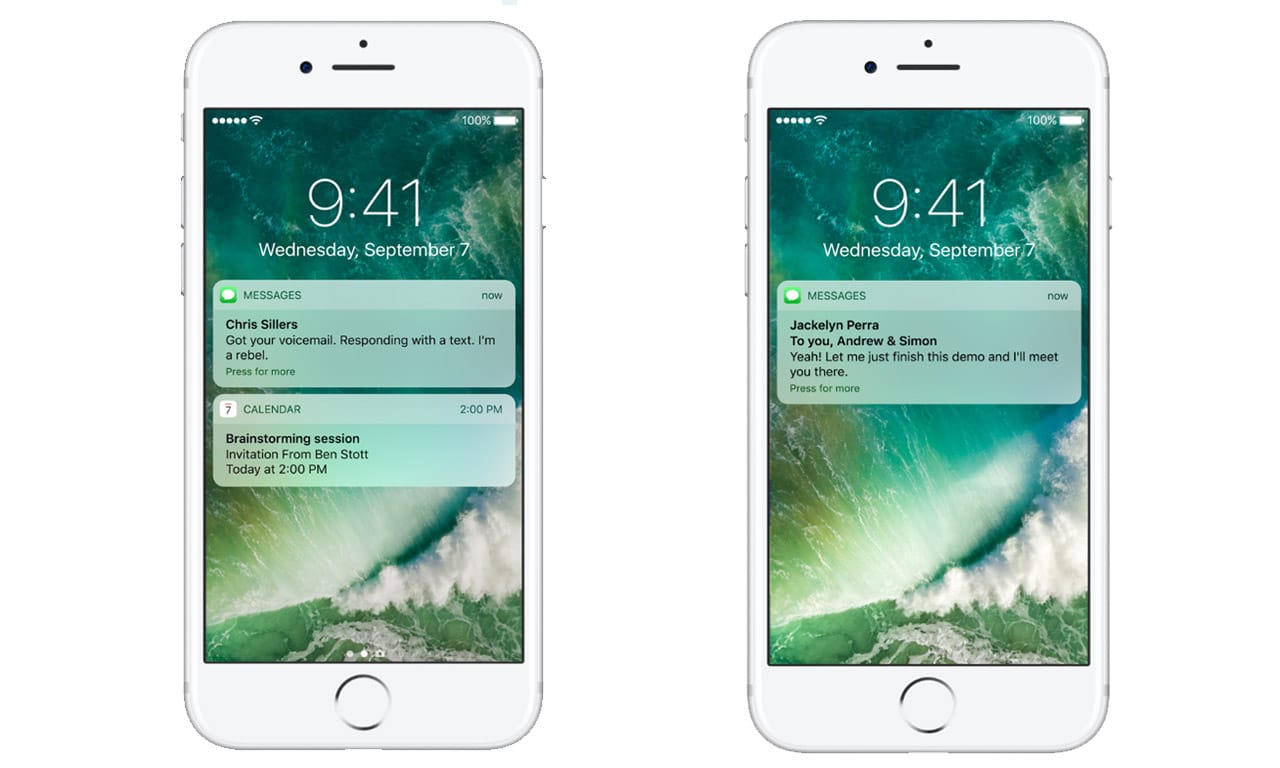
3. Widgets matter more now
Speaking of the lock screen, reaching your widgets is a lot more simple now. Not only can you enter the lock screen instantly by holding up your phone, you can also swipe to the right to enter your widgets page, where weather reports, event notices, and other information await.
Swiping the other way opens the camera app for quick shots. This is something we appreciated from the more customizable Android handsets we’ve reviewed, and it makes us wonder why we’re only getting this intuitive feature now on iOS.
4. We can finally remove a few stock apps
We’re sure a lot of you have a home screen folder dedicated to the built-in iOS apps you can’t uninstall. Apple has finally caved with iOS 10, and is now allowing the removal of some stock apps. We must place emphasis on the word some, however, since you’re limited to just a few. The Messages, Health, Clock, and Safari apps are untouchable, but we shouldn’t complain, because we can at least get rid of the Stocks app.
5. The Photos and Maps apps are much smarter
A trick we’ve seen Google Photos master has made its way to iOS 10. Apple’s own Photos app can sort your pictures by geographical location, people’s faces, landmarks, and several other categories. This makes searching through albums a lot faster; type in someone’s name, and his or her face should pop up instantly. The rejuvenated app can also intelligently gather images from a single event and present them in video form.
Similarly, the Maps app can go ahead and create route suggestions as you drive. With Waze and Google Maps creating headaches at times, it’s nice to have an alternative baked into the operating system to save you from being late.

6. Siri is branching out
Have you ever wished for apps to listen to your commands by voice? While it isn’t completely here yet, Apple opened up Siri’s code for developers to integrate the virtual assistant into their own software. You’ll soon be able to book rides on Uber, search through photos, and access app-specific information simply by asking Siri to do the work. The feature is still in its infancy stages and will need a kick from third-party software companies to make it all click, but we’re glad iOS 10 already has it natively.
7. Seamless movement between desktop and mobile work
Apple is rewarding Mac and iOS users with a universal copy-and-paste feature between the two platforms. Once you’re logged into the same Apple ID on both devices, you can move or copy images and text without the need for extra menus or apps. It’s really intuitive, and lessens the need to write things down on a notepad or app before moving from one gadget to another.
You may download iOS 10 anytime you’re ready, but beware of bugs, since all brand-new OS versions go through growing pains at the start. It’s available on the iPhone 5 and up, iPad mini 2 and up, and the sixth-generation iPod touch. If you aren’t happy with the update, check out our guide on how to downgrade to iOS 9.
[irp posts=”7354″ name=”Sorry, Apple: I won’t be getting your new MacBook Pro in 2016″]






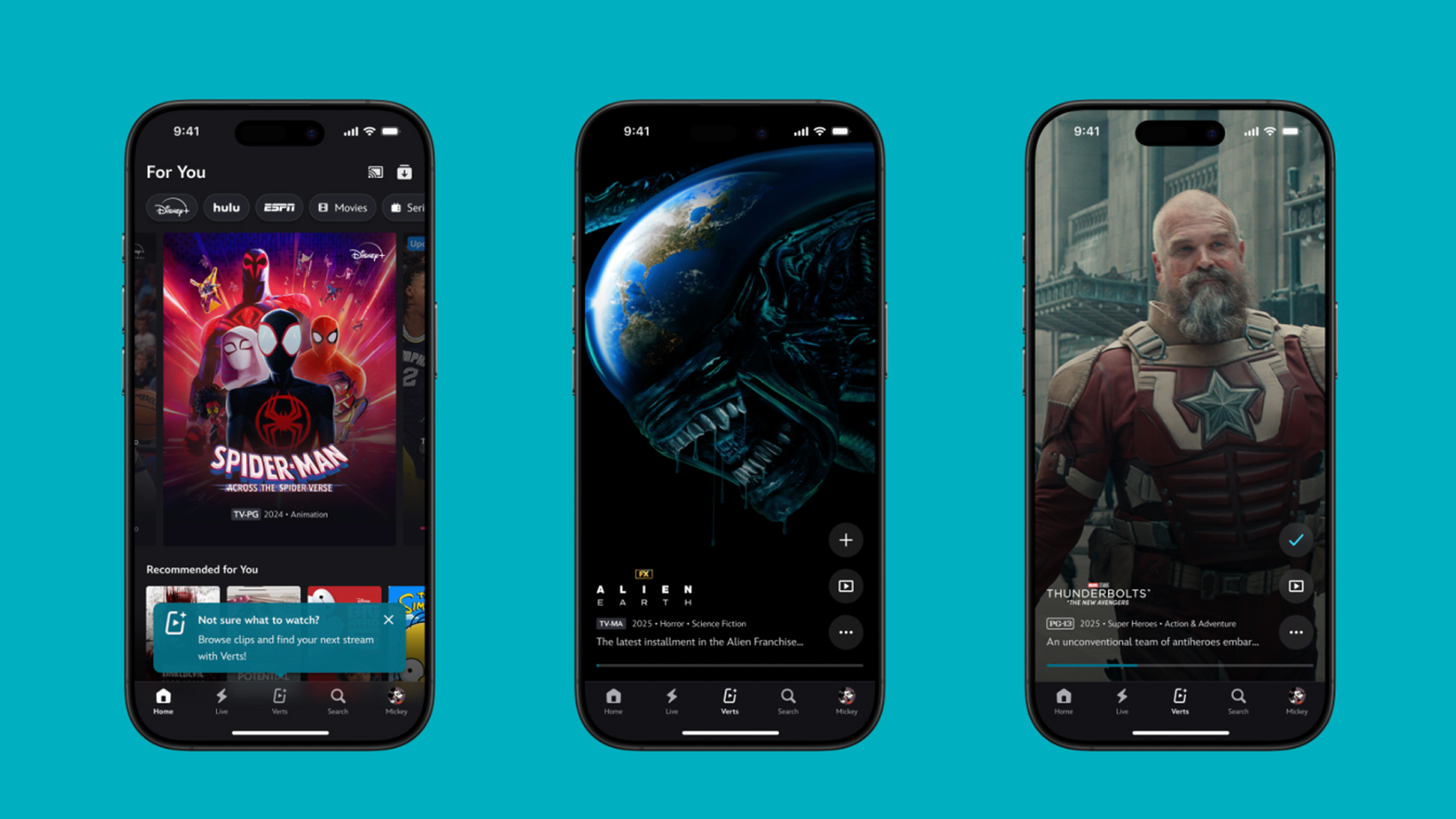
TikTok has changed how we consume media. Everything is now vertical. Even the most established streaming services, often a bastion for traditionally horizontal content, is adopting the different format. Now, Disney+ is getting a vertical feed called Verts.
Like its contemporaries, Verts presents a continuous feed of content but tailored to show the plethora of titles from the Disney+ library. This might include the first scenes of shows or notable highlights. The hope, of course, is to direct users to the longform content.
Directly from the Verts feed, users can easily add the respective title to their watchlist or go straight to the title’s page. In turn, the feed is accessible from the homepage since it has its own tab.
According to Disney, early experiments with the feature have driven engagement to available content. Right now, the feed is mostly for clipping enticing content from shows. However, the platform will experiment further with the format for new ways to tell stories.
Though Verts surely stands for “verticals” in this case, “adverts” might fit better as its full government name. Still, it might be a useful tool if you’re figuring out what to watch for the night.
Currently, Verts is available for Disney+ subscribers in the United States. Disney also has plans to expand the feature to ESPN for sports-related content.
SEE ALSO: Live NBA action on Disney Plus now available in the Philippines

Some of today’s navigation apps are living in the future. Instead of a two-dimensional map, these apps render the user’s surroundings in 3D. It’s a nifty upgrade that helps drivers more accurately visualize directions on the fly. Finally, Google Maps is getting a much-needed upgrade and will take navigation to the third dimension.
In a new update rolling out today, the new Immersive Navigation feature will bring your surroundings to life. The 3D view creates a render of the surrounding buildings, overpasses, and terrain around the car. It takes the guesswork out of navigation by showing precisely where to turn and what landmarks to look out for.
In the same vein, you can now use Street View to preview your destination before you arrive. Google Maps will also highlight your destination’s entrance, side of the street, and nearby parking.
Outside of how the map is visualized, Google Maps is also infusing its service with Gemini. The new Ask Maps feature will let you engage with the app in a conversational manner. For example, if you’re in the middle of a long drive, you can now ask Maps where the best place is to stop over and have a coffee break. Ask Maps will provide directions, a potential itinerary, and even helpful links to book a reservation ahead of time.
Now, availability for both of these features is still a bit limited. Immersive View is rolling out today to compatible devices and vehicles in the United States. Further, availability will expand over the coming months.
Meanwhile, Ask Maps is available now in the United States and India for Android and iOS. A desktop version is coming soon.
SEE ALSO: Google Maps is finally getting a power saving mode
Apps
Apple Music, TikTok launch Play Full Song, a new music discovery experience
Rolling out worldwide exclusively through Apple Music

Ever came across a viral 15 or 30-second music snippet on TikTok that instantly became your jam on repeat?
For years, TikTok has been a regular source of songs that have become part of our playlists. And together with Apple Music, listening to the music you discover has just gotten even easier.
That’s through Play Full Song, a new music discovery experience, which launches exclusively though Apple Music.
With the new feature, Apple Music subscribers can now enjoy full-length tracks that they discover on TikTok. That’s without ever leaving that popular streaming app.
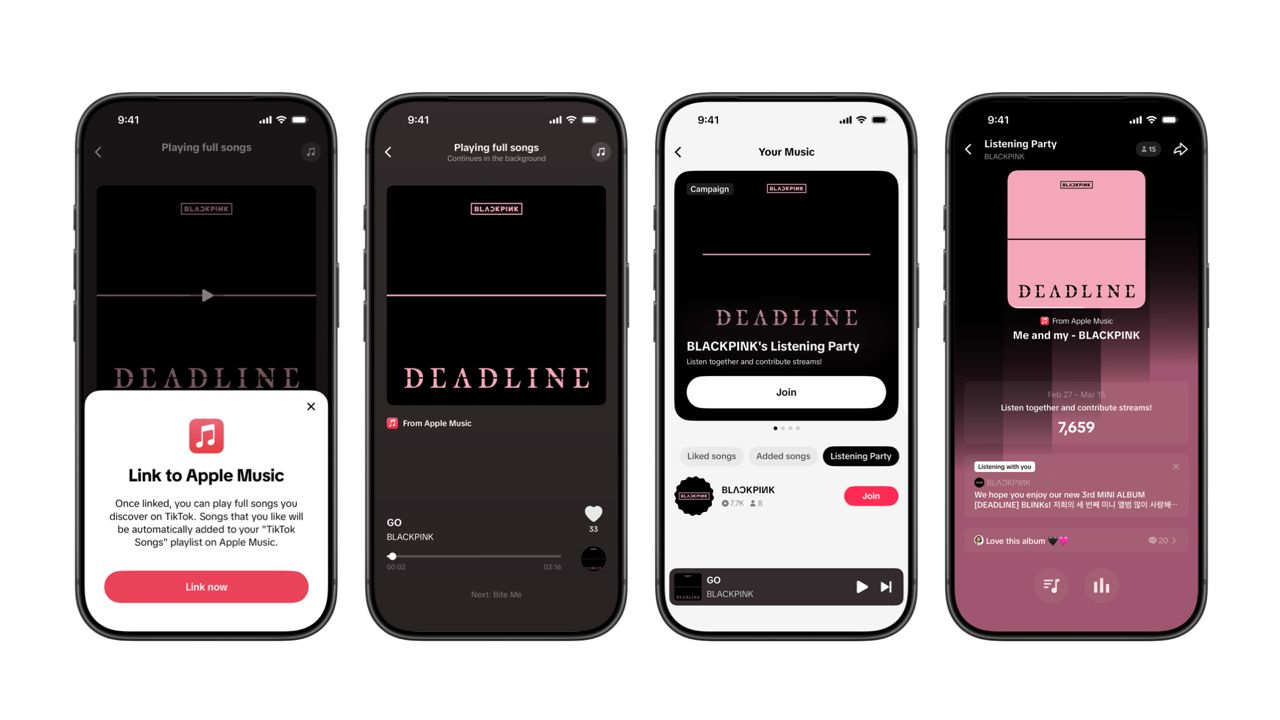
Fans who discover a song that they love on their For You or Sound Detail page can simply tap the Play Full Song button to open up an Apple Music player and enjoy the song in its entirety.
From there, subscribers can continue listening to a personalized stream of recommended songs. That means no more need to switch apps and search separately.
The new Play Full Song experience helps music fans move seamlessly from the moment of discovery to deeper listening. It’s also designed to be instant and all within the same environment.
Moreover, users can also save their favorite songs to Your Music and add them directly to their Apple Music playlists.
Built using Apple’s MusicKit, full-length song playback takes place on Apple Music. This way, streams are paid within the Apple Music service, supporting artists and rights holders while giving fans a smooth, uninterrupted experience.
Listening Party also launched
The feature builds on the success of TikTok’s Add to Music App. This was previously launched to help artists and fans convert discovery on TikTok to a playlist save in Apple Music and other streaming services.
To cap the announcement, TikTok and Apple Music are also introducing Listening Party. This new feature is designed to bring artists and fans together around music.
It creates a shared environment where fans can listen to songs from their favorite artists in real time, interact with each her, and engage directly with the artist during the session.





Now Playing: Hoppers

Jackery SolarSaga series: Free power for small devices

UGREEN adds new Nexode Pro power bank, charger to lineup

nubia to launch new Neo 5 series gaming phones on March 28

SHINOBI: Art of Vengeance’s SEGA Villains Stage out on April 3


-

 Reviews5 days ago
POCO X8 Pro Max review: A new beast from the far east
-

 News5 days ago
POCO X8 Pro Series: Price, availability in the Philippines
-

 Laptops2 weeks ago
Apple MacBook Neo Review
-

 Computers2 weeks ago
GIGABYTE collaborates with Capcom for RE Requiem custom PC
-

 Apps1 week ago
Google Maps is finally getting a 3D mode
-

 Entertainment2 weeks ago
The internet is thirsting over the One Piece Season 2 cast
-

 Features1 week ago
Galaxy AI on the Samsung Galaxy S26 Ultra
-

 Automotive2 weeks ago
BYD is reportedly considering an F1 team