

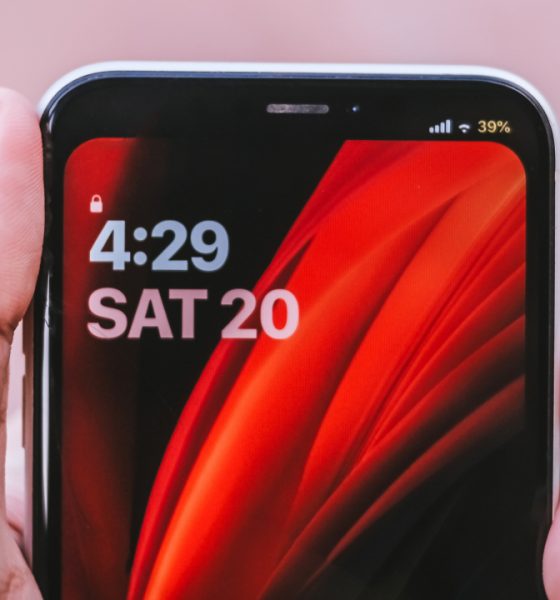

It’s been a month since the jailbreaking community got hyped over the latest jailbreak tool for iOS. At the same time, Apple’s iOS 14 announcement is just around the corner.
Jailbreaking was introduced way before the early releases of iOS through iPhone and iPod Touch. Coined from the word itself, jailbreaking is “breaking free” from the restrictions of iOS, Apple’s proprietary operating system.
This isn’t new to me. In fact, I was able to do it on my first ever iPhone 3Gs nearly seven years ago — back when I was just a high school student. As far as I can remember, it was risky yet successful.
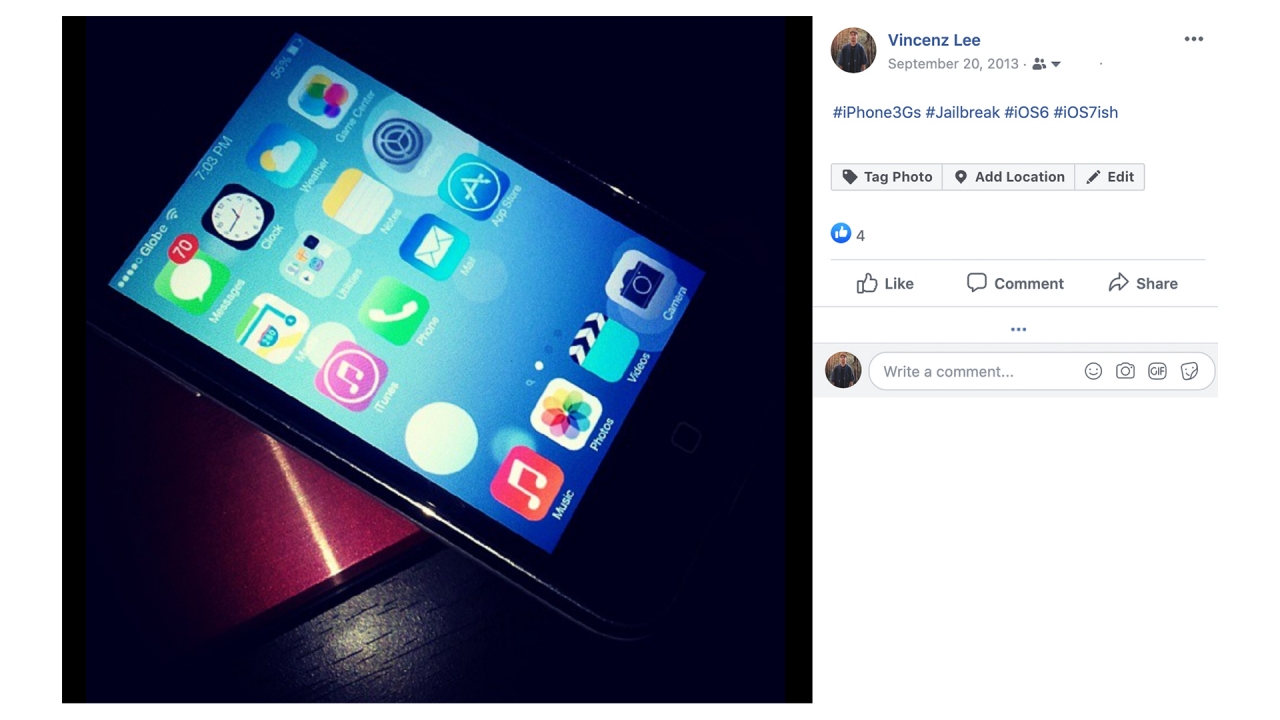
Around that period, it’s when Apple announced a major design change through iOS 7. Unfortunately, devices older than the iPhone 4s are not supported. But with the power of jailbreaking, I was able to make my phone look like one. I even kept a single Instagram post as a remembrance.
Some of the iPhone users out there might not be contented with what iOS has to offer. And for someone (like me) who needs iOS services but wants to get more “Android-like” features, jailbreaking your iPhone is the closest answer.
Installation
This isn’t mainly a tutorial on how to jailbreak your iPhone. There’s a step-by-step installation video that helped me throughout the jailbreak process. Just make sure your phone is running iOS 13.5 or below. This method uses the unc0ver jailbreaking tool.
For devices running the patched iOS 13.5.1 or the latest iOS 13.5.5 Beta, you can still jailbreak your device through a different method with checkra1n‘s tool. If you have the latter version, watch this video instead.
Customization through jailbreak tweaks
If your iPhone shows Cydia on your home screen and runs without errors, it’s a sign that your iPhone is already jailbroken. If you’re not yet familiar, Cydia is the less intuitive (and cluttered) version of the App Store where you can find tons of tweaks that make your jailbroken iPhone magical.
Some jailbreak tools use Sileo as a substitute for Cydia with a refined UI. Only downside is that it still has incompatibilities in most tweaks.
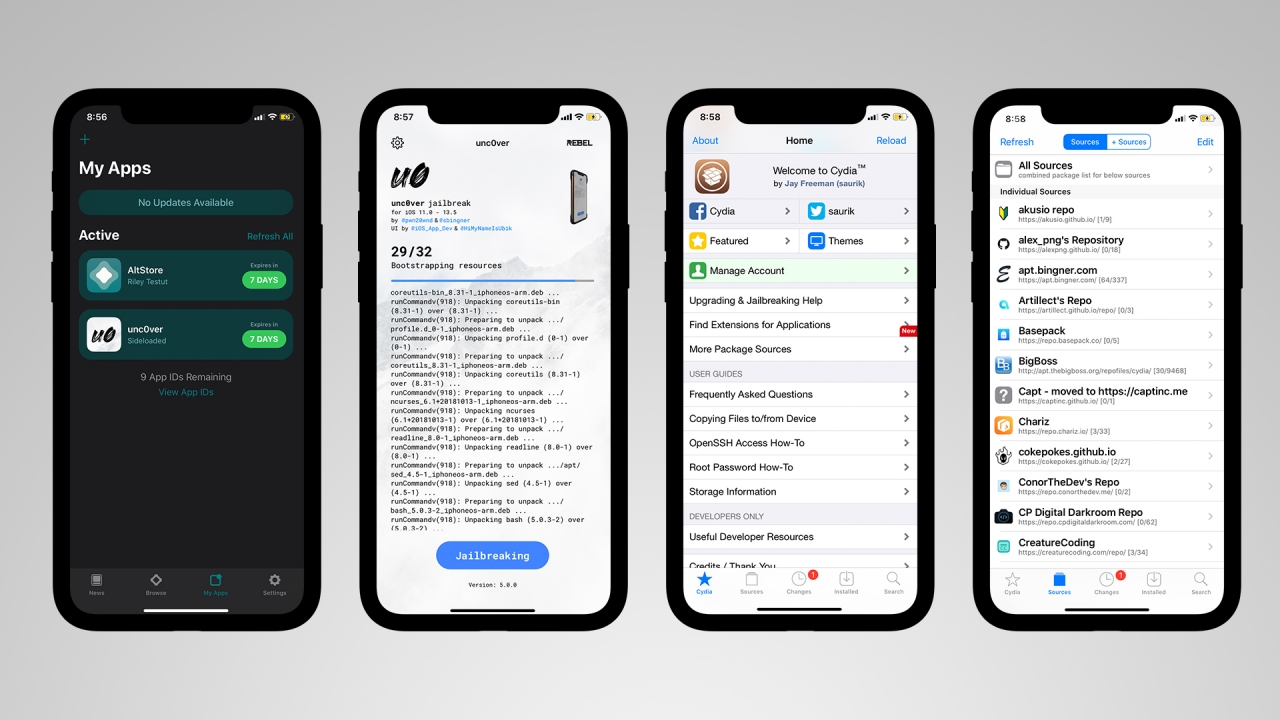
By adding more repositories (or repos), you can gain more access to limited and exclusive tweaks that cannot be found through default tweak sources (such as BigBoss).
As most of these tweaks were made by several developers, most of them are free of charge. You should take note that advanced tweaks are paid.
Lock screen, Home Screen, and App Switcher

First thing you’ll notice is the different look of the lock screen. These are the tweaks I used:
- Jellyfish is a tweak that completely overhauled my lock screen. It’s mostly compatible to music player tweaks. A free alternative would be April but it’s incompatible to other tweaks (which causes a crash then resprings into safe mode).
- AOD allows you to add Always-On Display functionality in your OLED-powered iPhones (such as the iPhone X, XS, XS Max, 11 Pro, and 11 Pro Max).
- Tap Tap Lock is a simple tweak that lets you lock your iPhone by double tapping anywhere on the home screen.
- AutoUnlockX, from the word itself, it automatically unlocks your Face ID-powered iPhone without the hassle of swiping up. This is fast and convenient for users who are always in a hurry when unlocking their phones.
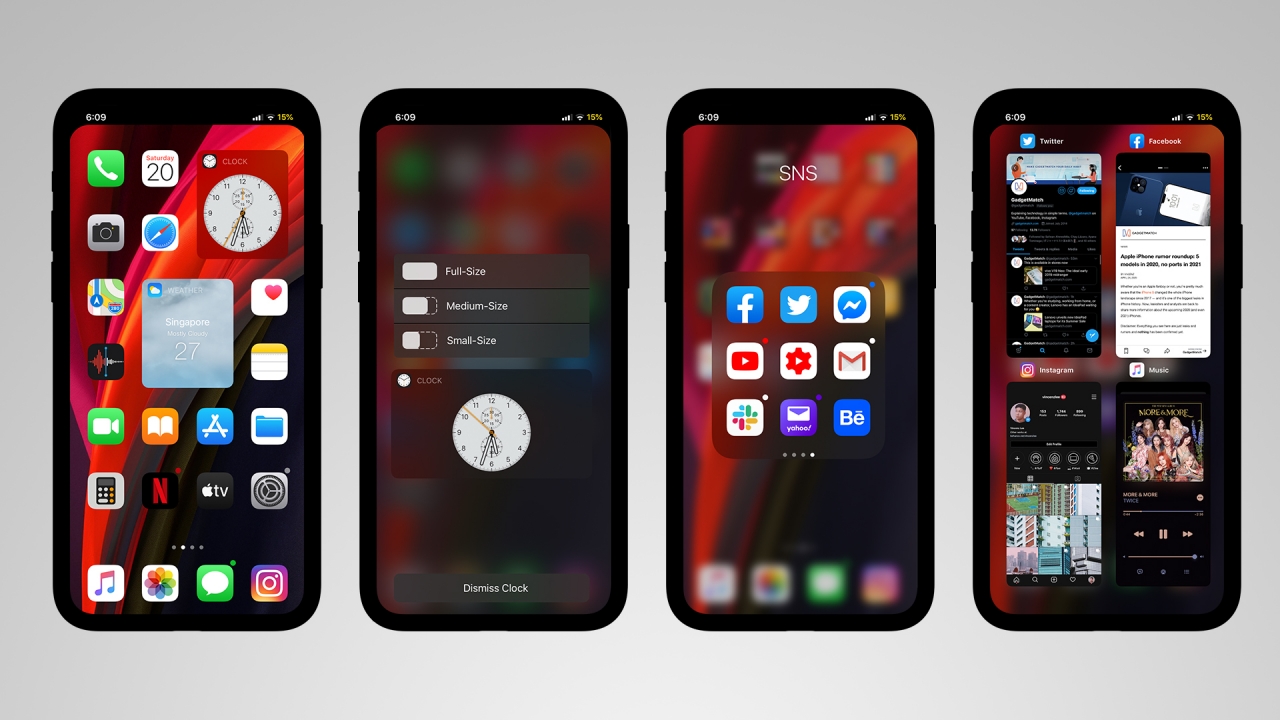
For years, iOS’ home screen has been stuck with a grid of app icons with the plain red notification badges. But with jailbreaking, customization is possible.
- Velox Reloaded lets you transform home screen icons into widgets. This was rumored to be an iOS 14 feature but is possible through jailbreak.
- dotto+ is a replacement tweak for iOS’ default notification badges. It adapts the color of the app’s icon and eliminates the notification count for a simpler appearance.
- CastSwitcher is a tweak that replaces your old stacked card-style switcher into a grid, iPad-like switcher.
- Dockify either lets your dock look transparent or hides the dock icons completely.
Other small tweaks you can install for your home screen:
- AwesomePageDots makes those simple page dots more lively with the option to choose your preferred animation style.
- HideLabels13 simply hides texts of apps on your home screen for a cleaner, minimalist look.
- iconvibe adds haptic feedback whenever you open apps.
- Manila is a simple tweak that reveals the apps found inside the folder through 3D/Force Touch menu.
- No3DLines is a non-configurable tweak that hides lines whenever you activate 3D/Force Touch.
Notifications and Control Center
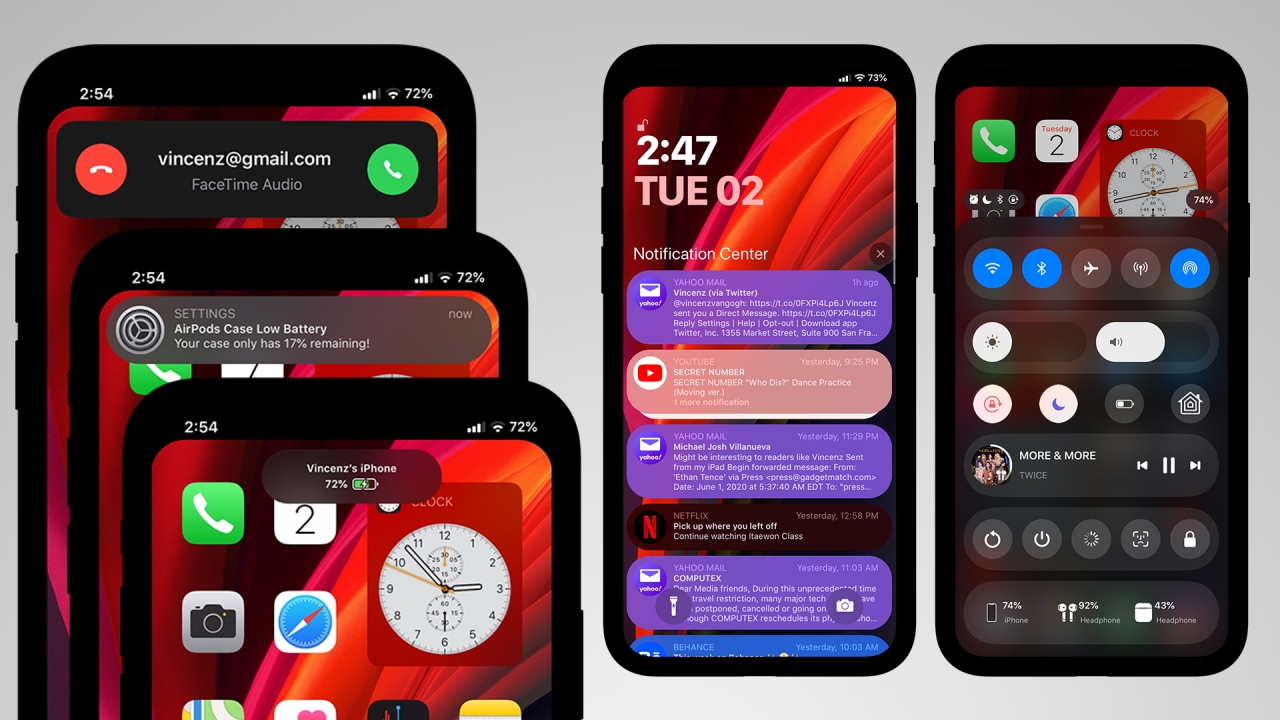
If some of you miss the bottom-style control center, Prysm brings back that nifty feature. Although it’s not a total rip-off of the iOS 10 control center, it still includes the rounded look of the latest Control Center in a less-cluttered order.
Other than the added power options (such as reboot, shutdown, respring, lock, and safe mode), it even displays the battery percentage of your Apple devices such as the AirPods and Apple Watch.
Other tweaks that are useful for Control Center:
- RealCC lets you completely turn off Wi-Fi and Bluetooth toggles in Control Center.
- CCModules adds more module options (and even app shortcuts) in your default iOS 13 control center.
And here’s a list of tweaks I installed that revamped my iPhone’s notification appearance:
- Quart completely changes the overall look of your phone’s notifications. It has customizable rounded corners, header and content text sizes, and circular icons that go well with iOS 13’s rounded look.
- ColorMeNotifs adds color to your notifications. Just like dotto+, it also adapts color based from the app’s icon.
- NoDNDBanner is a tiny tweak that completely removes Do Not Disturb banner when activated.
- PencilChargingIndicator replaces your old charging icon in favor of the Apple Pencil-like charging banner alert.
- AirPods Case Low Battery is convenient if you carry an AirPods or AirPods Pro with you. It lets you prompt whenever the case is below the charged level.
- Scorpion replaces the full call window into a less intrusive banner. You can now accept or decline calls without blocking what’s currently on your screen.
- SilentRecorder hides the annoying red status on the time bar when the screen is recording.
Settings
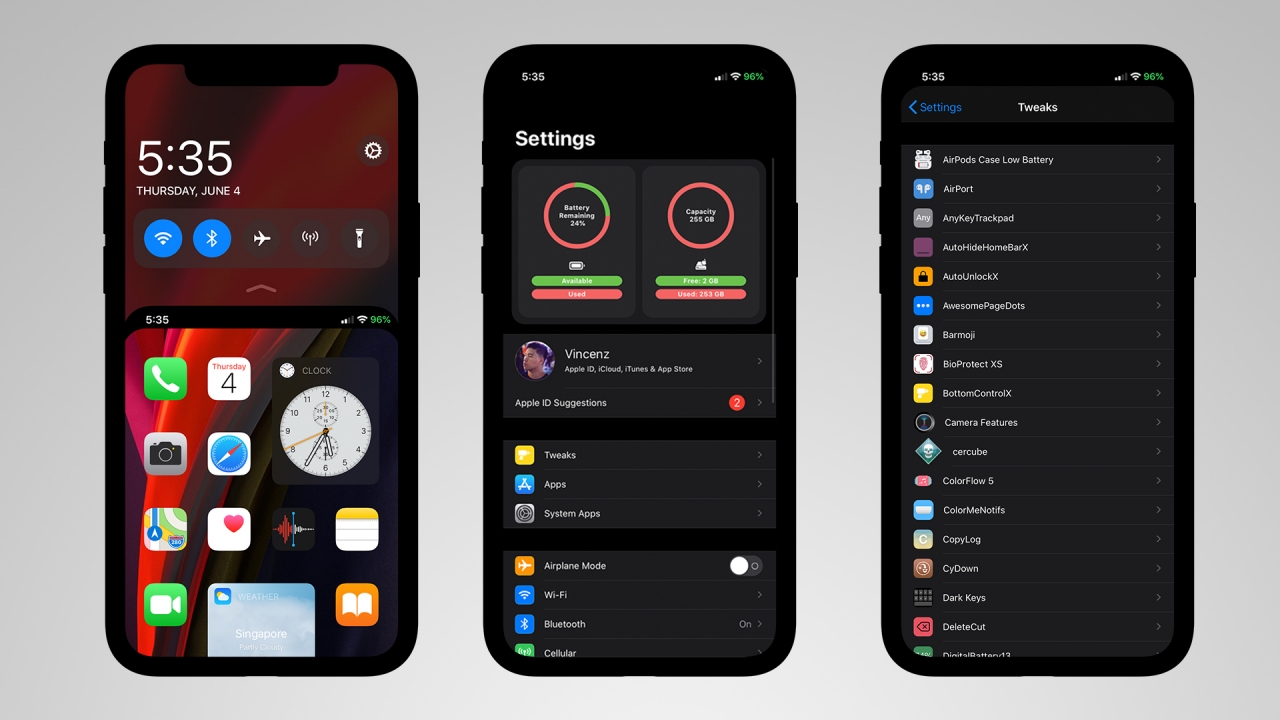
Three tweaks are responsible for the changed look of the top and bottom bar:
- noNotch completely hides the notch through a black bar and makes the app windows rounded. It gives the illusion of an iPhone without a notch.
- DigitalBattery13 replaces the battery icon with a battery percentage symbol.
- Saw maximizes the look of your app screen by removing the home bar and the bottom padding altogether.
For settings, here are two important tweaks:
- shuffle categorizes setting list based on where they belong. Originally, the settings and tweaks list are both cluttered.
- ModernSettings adds a visual graphic of your phone’s battery and storage information as well as basic details of Wi-Fi, Bluetooth, and even the phone itself.
There are also optional tweaks you can install to configure reachability:
- Carbonite adds quick toggles whenever you activate reachability.
- StayDown lets reachability stay as it is without coming back from its original position.
Apps
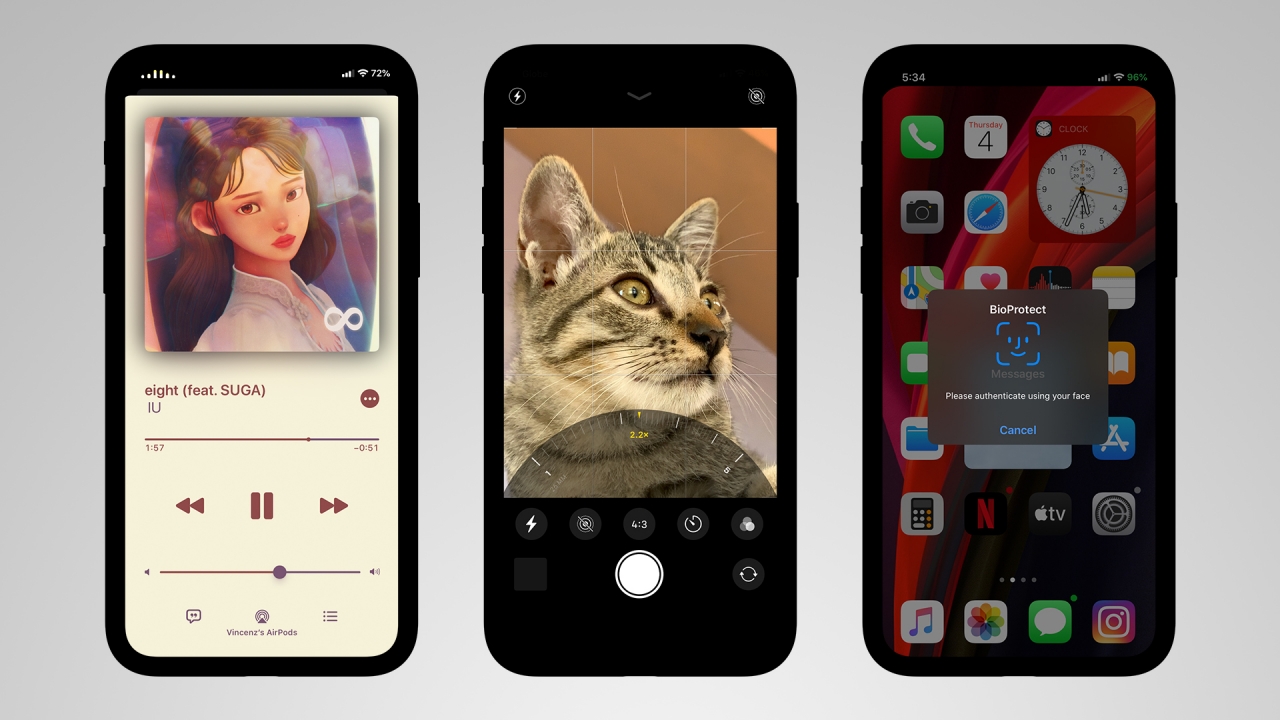
For music apps such as Apple Music and Spotify, these tweaks are helpful enough to make your playback more appealing:
- StatusViz adds a little visualizer at the upper left corner of the screen whenever you play music — which replaces the time status.
- ColorFlow 5 beautifies your music player by adapting the color of the album art as the background (instead of white).
For the camera app, here are tweaks that can imitate the look of iPhone 11 series’ camera UI on older devices:
- Camera Features lets you change the camera layout of your old iPhones. It brings the exclusive camera UI of the iPhone 11 series — including the zoom slider, QuickTake, and the ability to tap and change video resolution and frame rate in video mode. Other than that, you also have the option to choose an iPad-style camera UI plus show/hide certain camera elements and modes.
- PortraitXI is a tweak that lets you take portrait mode shots even if your iPhone only has a single lens.
- Enlighten brightens most of shots taken in low-light. However, this isn’t a complete imitation of the Night Mode found on the iPhone 11 series.
For security, BioProtect XS is a helpful paid tweak that uses Face ID (or Touch ID on older devices) to lock specific apps — including system apps such as messages, photos, videos, Safari and more.
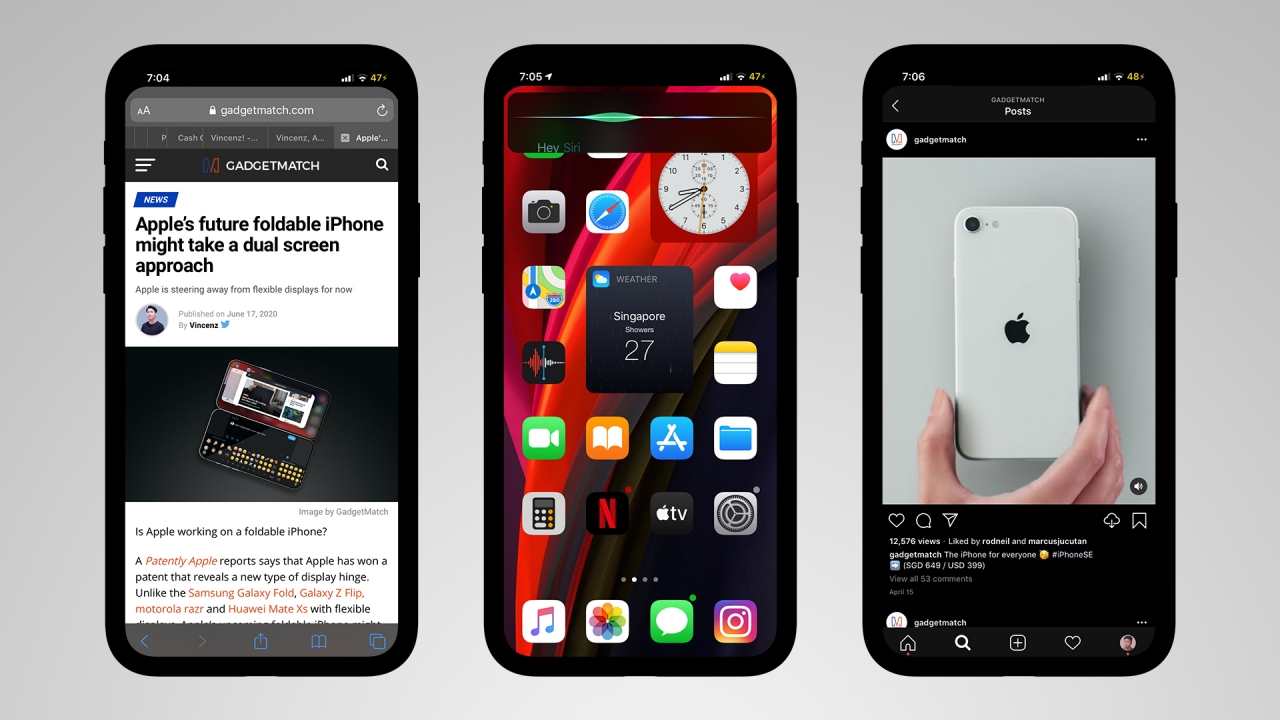
- Safari Features completely enhances your Safari experience by adding a tab bar and even show a 2×2 grid switcher.
- SmallSiri shows Siri through a small banner, instead of the usual full window prompt.
- InstagramPlus is a handy paid tweak that lets you control your Instagram completely. Features include saving photos, videos on feed and through IG stories, follow status, anonymously see stories of other people, and the inclusion of Instagram Music even if your region isn’t supported.
Keyboard
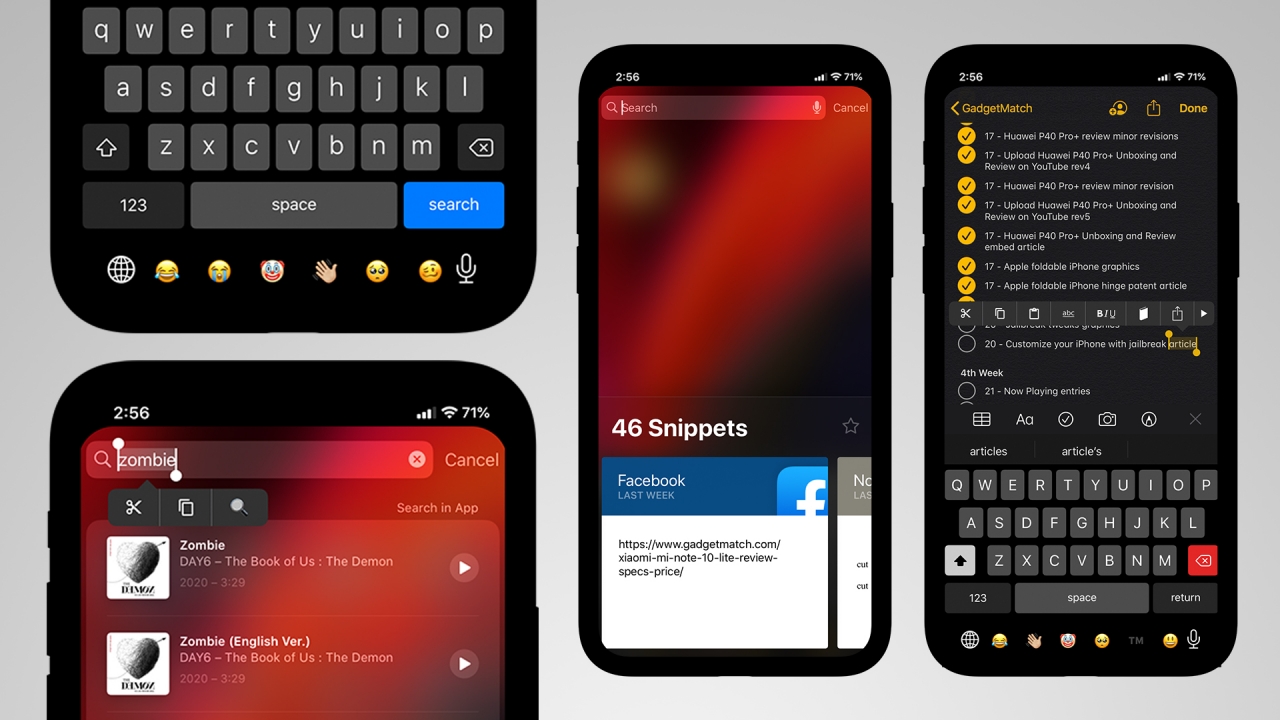
The default keyboard in iOS is intuitive yet lacks certain features that make it stand out. Here are some tweaks to maximize your typing experience.
- BarMoji lets you add your frequently used emojis at the bottom of the keyboard between the global keyboard switch and voice control icons.
- Dark Keys enables a system-wide dark keyboard, which goes well if you’re in Dark Mode. Default iOS Dark Mode doesn’t darken the keyboard.
- RealKeys adds a haptic (or taptic) feedback whenever you type. This makes typing more tactile and responsive.
- AnyKeyTrackpad lets you swipe over texts and words by pressing any key on the keyboard. It’s not limited to the spacebar anymore.
- DeleteCut is a helpful keyboard tweak that deletes words faster. Just click the shift key and it will delete multiple words instead of characters one by one.
- For people who use different keyboards, Keyboard Accio is a tool that lets you switch between your first two input methods. Don’t worry, long press still works for other keyboard input.
- MenuSupport replaces the text-heavy menu into a menu of icons when editing texts.
- Finally, CopyLog is a wonderful tweak that lets you save all your copy-pasted texts (or paragraphs) through a snippet log.
Stability
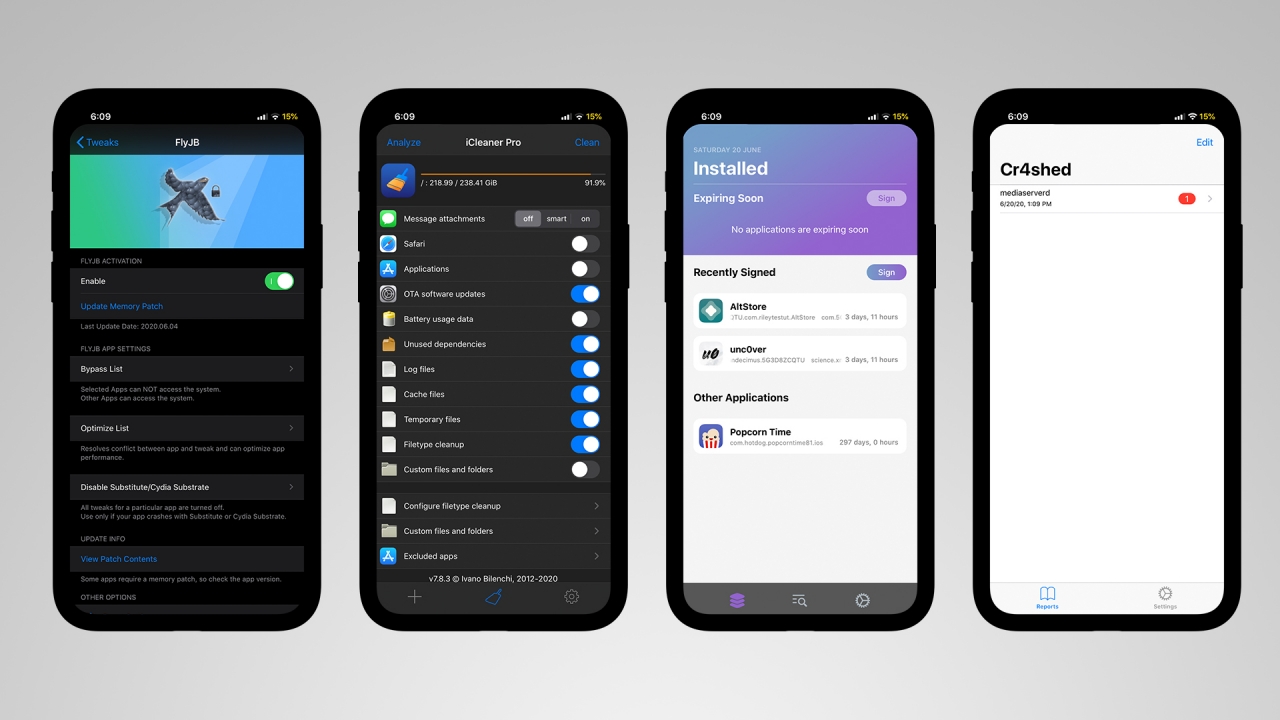
Some tweaks may not run properly due to certain iOS and jailbreak version limitations or overlapping and incompatible tweaks installed. You can still prevent this from happening, use these utility tweaks:
- FlyJB lets you bypass certain apps that detect jailbreak status. In that way, you can continue using your apps you need (such as Snapchat, McDonald’s, Pokémon Go) without worrying about complete removal of the jailbreak. Another similar tweaks are KernBypass and Unsub.
- Flame is a specified tweak for Cydia which enables the user to batch add repos and auto resprings/reboots after a tweak download.
- ReProvision is a tweaked app that prompts you to sign your jailbreak utility apps three days before they get revoked. This is helpful just in case you forgot to re-sign your jailbreak app or else, you’ll do the tedious process again from the beginning.
- KeepMyJB removes the software update setting on Settings. Automatic updates won’t install, keeping your jailbreak alive and kicking.
- iCleaner Pro lets you delete temporary files and tweak settings. These settings usually remain even after tweak uninstallation from Cydia.
- Cr4shed is another tweak that lists and reports any app or task that caused a UI crash. This is helpful if ever one of your installed tweaks always gives your iPhone an error before it resprings into Safe Mode.
Misconception
Some users might think that jailbreak could “unlock” their factory-locked iPhones. In that case, jailbreaking isn’t the solution. If that’s what you’re after, you should bring your iPhone to a technician to get it unlocked.
Other accessible methods are the use of GPP sim chips that “partially” unlocks sim-locked iPhones from countries like US and Japan.
Legality
Although some countries might have certain laws and restrictions when it comes to Digital Rights Management (DRM), jailbreaking in most countries isn’t illegal. Jailbreaking may void your device if it’s still under warranty but rest assured that there are methods to unjailbreak your phone and bring iOS back to its default state through iOS restore.
Community
Don’t limit yourself from the tweaks I’ve listed. There are tons of jailbreak tweaks from various repos and developers. There are also a plethora of jailbreak tweak videos on YouTube from different YouTubers and jailbreakers.
Other than that, you can also join this reddit community where they mostly talk about iOS jailbreaking.





Apps
Google Photos can now censor your kid’s face better
The new Redact feature can censor sensitive information.

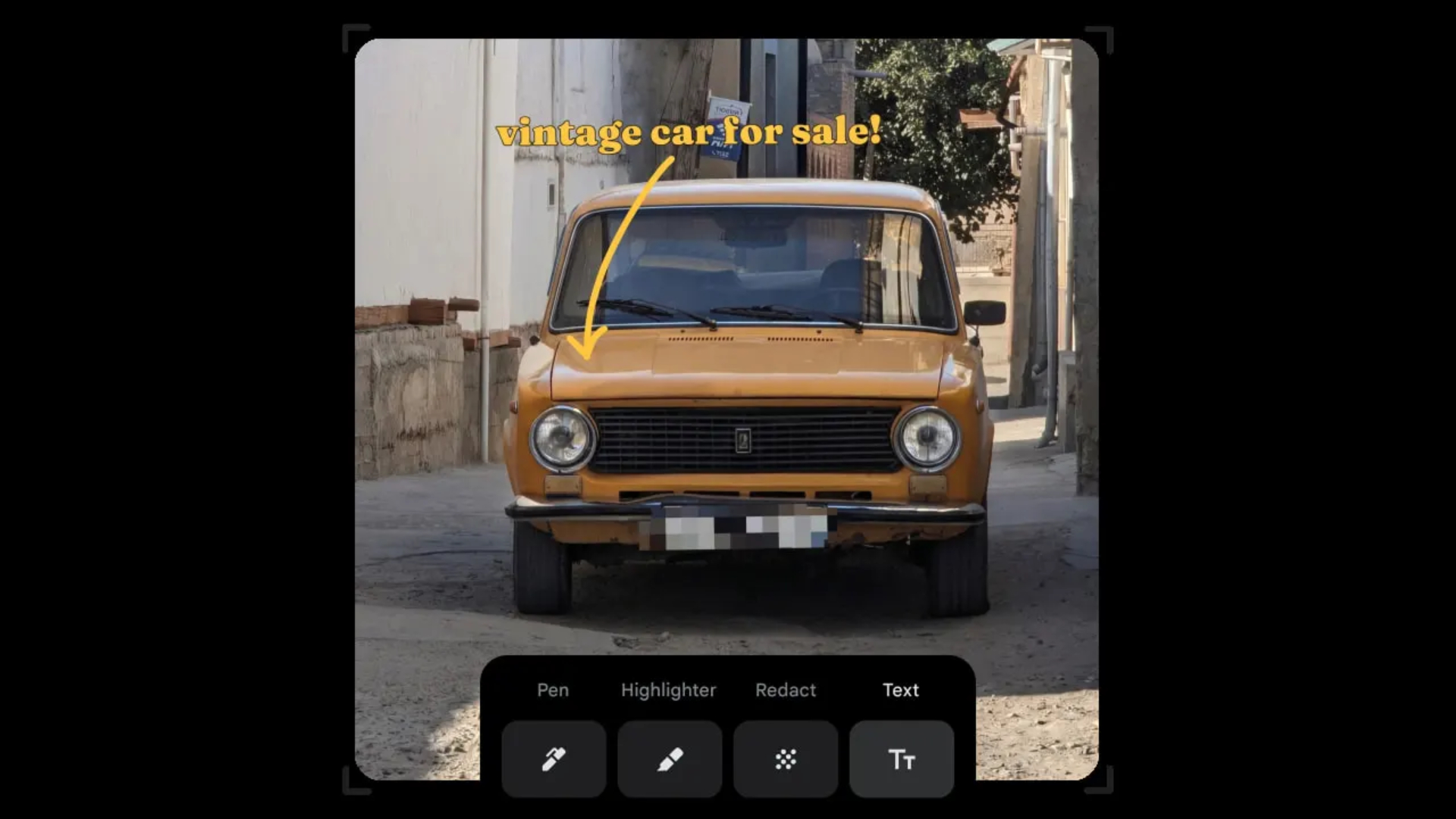
Censoring photos is heavy work. Either you stick on random emojis or draw an indiscriminate splotch of doodles to cover sensitive information. It’s an imperfect art but an essential one to protect privacy. Today, Google Photos is getting a Redact feature which can censor sensitive bits with pixelated blocks.
An addition to the Markup tool, Redact acts like a nifty pen that can hide information that you don’t want seen. Unlike a ghastly emoji or a splotch, the censored bar mixes better with the surrounding elements. In the example that Google used, a censored license plate blends well with the car it’s attached to, making the photo look more cohesive. Besides license plates, it’s the perfect tool for covering other information like phone numbers, addresses, and the faces of your loved ones.
Google Photos is also rolling out Moods, a set of filters that give photos a nostalgic look, including a 2000s night digicam vibe that’s popular today. There are also 15 new Remix templates to add more creation options.
Both the Redact and the Moods features will roll out to Android users starting today. The new Remix templates, however, will be limited to some countries on both Android and iOS.
SEE ALSO: Google will force Android users to use Gemini next month
Apps
Smart launches LiveSmart App for exclusive deals
Exclusive deals, cashback, and bill payments in one app.

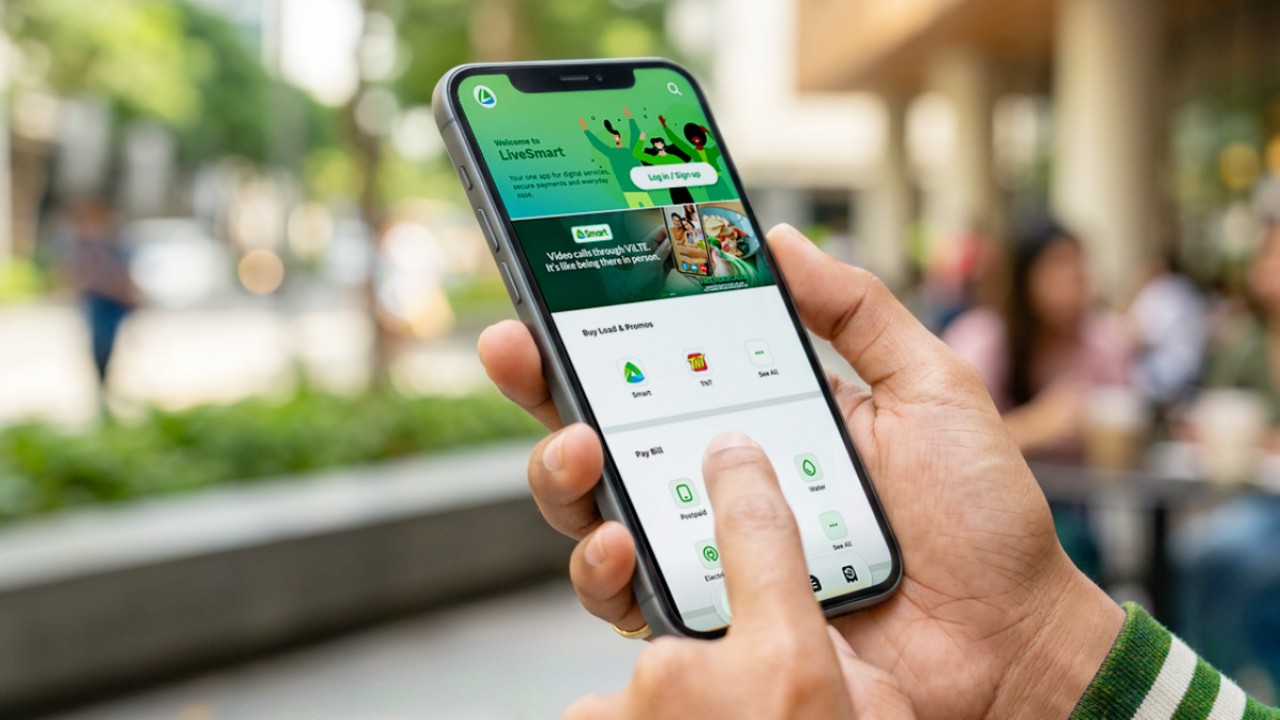
Smart Communications, Inc. (Smart) and TNT have launched the LiveSmart App, a new platform that combines loading, bill payments, exclusive offers, and other everyday transactions in one app.
The app is available on the Google Play Store and Apple App Store. It is open to Smart, TNT, and subscribers of other mobile networks.
The LiveSmart App gives users access to exclusive deals and savings. These include cashback offers, discounted Smart and TNT data packages, and limited-time access to AI.Smart.
“Filipinos are becoming more deliberate about where they spend and how they can get more value from every peso,” said Lloyd R. Manaloto, FVP and OIC for Smart. “The LiveSmart App is designed to help make those everyday decisions a little smarter, by giving users convenient ways to load, pay bills, and access exclusive savings and offers in one place.”
Exclusive deals and perks
Smart and TNT are rolling out several offers on the LiveSmart App starting September 18.
Smart and TNT subscribers can get 5% cashback when they purchase load or pay their Smart Postpaid bill through the app.
The app also offers data packages at exclusive prices. Smart Prepaid subscribers can get Power All 109 for PHP 105, while TNT subscribers can get Saya All 109 for PHP 105.
Users who download the LiveSmart App may also receive limited-time free access to AI.Smart.
AI.Smart combines multiple AI models, including AWS Nova, ChatGPT, Claude, Google Gemini, and Thinking Machines, in one workspace. Users can use it to generate images, create presentations, draft documents and spreadsheets, and get help with schoolwork, content creation, and other projects.
To claim the free AI.Smart credits, users need to tap the AI.Smart banner in the LiveSmart App. They then need to create an AI.Smart account using their Smart or TNT number.
Smart says users can also expect more exclusive deals and perks from lifestyle partners as it expands the LiveSmart App.
Powered by Smart 5G
The LiveSmart App runs on Smart’s network. Smart 5G supports activities such as video streaming, gaming, and real-time social media sharing.
The company said Ookla recently recognized its network for the Best Mobile Video Experience in the Philippines for the first half of 2026. Smart recorded a Video Score of 72.82, which it said was the highest among mobile operators in the country.
The LiveSmart App is now available on the Google Play Store and Apple App Store. Users can learn more about the app through Smart’s website.
Apps
Apple’s best feature to cure motion sickness is finally on Android
Google copies a good page from Apple’s playbook.
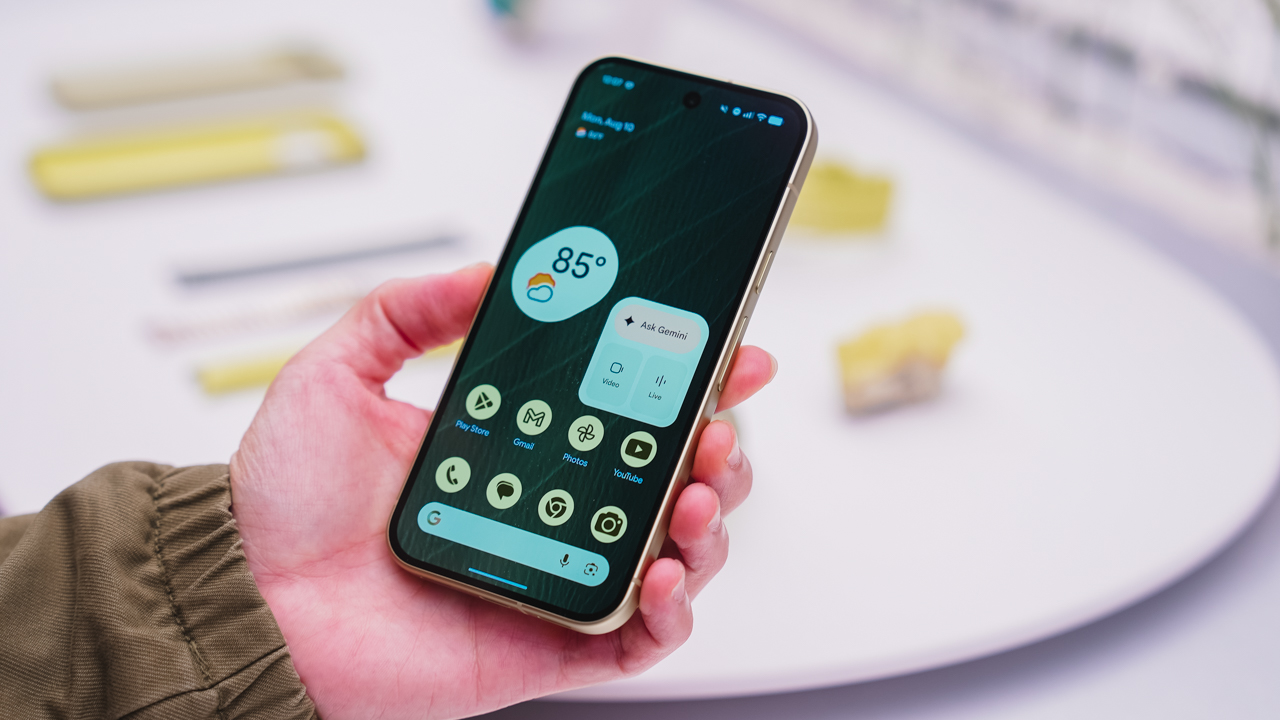
As an Android user, I’ve been jealous of iPhone users for a while now, but it’s not for the reason you might think. See, I’m ridiculously prone to motion sickness when I’m not driving. So, when I discovered that Apple has a software-based cure called Vehicle Motion Cues, I wanted it immediately. Now, Android does have third-party apps that do the same thing, but they’re not as good as a fully native version. Well, those dark, nauseating days are about to come to an end. Android 17 is finally getting a similar tool called Motion assist.
Before that, let’s rewind for a bit. What do these features do? How can they cure motion sickness?
Whenever you open Vehicle Motion Cues or Motion assist, the interface spawns a series of dots on the screen. These dots respond to movement. For example, if the vehicle turns to the left, the dots also go to the left, mimicking the movement. Without cues like this, the stationary nature of the screen clashes with our brain’s perception of movement. The disparity creates that feeling of nausea. Basically, our eyes are desperately trying to focus on the static screen, but our brains are telling us that we should be seeing motion. Having moving dots reorients our brain and places the phone inside our perception of movement.
Now, you can enable the same feature on your Android 17 device through Settings > All services > Motion assist under Personal & device safety. You can also set it so that the feature turns on automatically when the phone detects that you’re in a moving vehicle. Finally, you can also tweak the shape, color, and opacity of these dots.
Android 17’s Motion assist is rolling out now to compatible devices.
SEE ALSO: These are the best Android 17 features (if you hate AI)







Lenovo tech behind DreamWorks Animation hit ‘Forgotten Island’

Samsung joins the clip-on earbud trend with the Galaxy Buds On

vivo X Fold6 makes global debut with 200MP camera and 6900mAh battery

Smart opens iPhone 18 Series pre-orders in the Philippines

The regular PlayStation 5 is getting an AI upscaling feature

HUAWEI Pura X View is 2026’s first WIDE slab-type smartphone

The CAMON Slim 5G is TECNO’s latest ultra-slim smartphone

iPhone 18 Pro series: Price, availability in the Philippines

vivo X500 Series launches with major imaging upgrades

iPhone 18 Pro series: Price, availability in Singapore


-
 News2 weeks ago
vivo X500 Series launches with major imaging upgrades
-

 News2 weeks ago
OPPO Find X10 Pro Max is the first phone with a triple 200MP camera system
-

 Automotive5 days ago
BYD says that way better EV batteries are coming next year
-

 Singapore2 weeks ago
Epson Lifestudio Grand Plus EH-LS970B with 4K projection, more launches
-

 News2 weeks ago
vivo introduces OriginOS 7 with smarter multitasking and AI features
-
 News5 days ago
HONOR Magic9 Pro Max launches in China with ARRI-powered imaging
-
 Accessories2 weeks ago
70mai launches the A900 series with 4K front, rear recording
-
 Smartphones7 days ago
When TECNO-logy meets Tonino Lamborghini legacy