
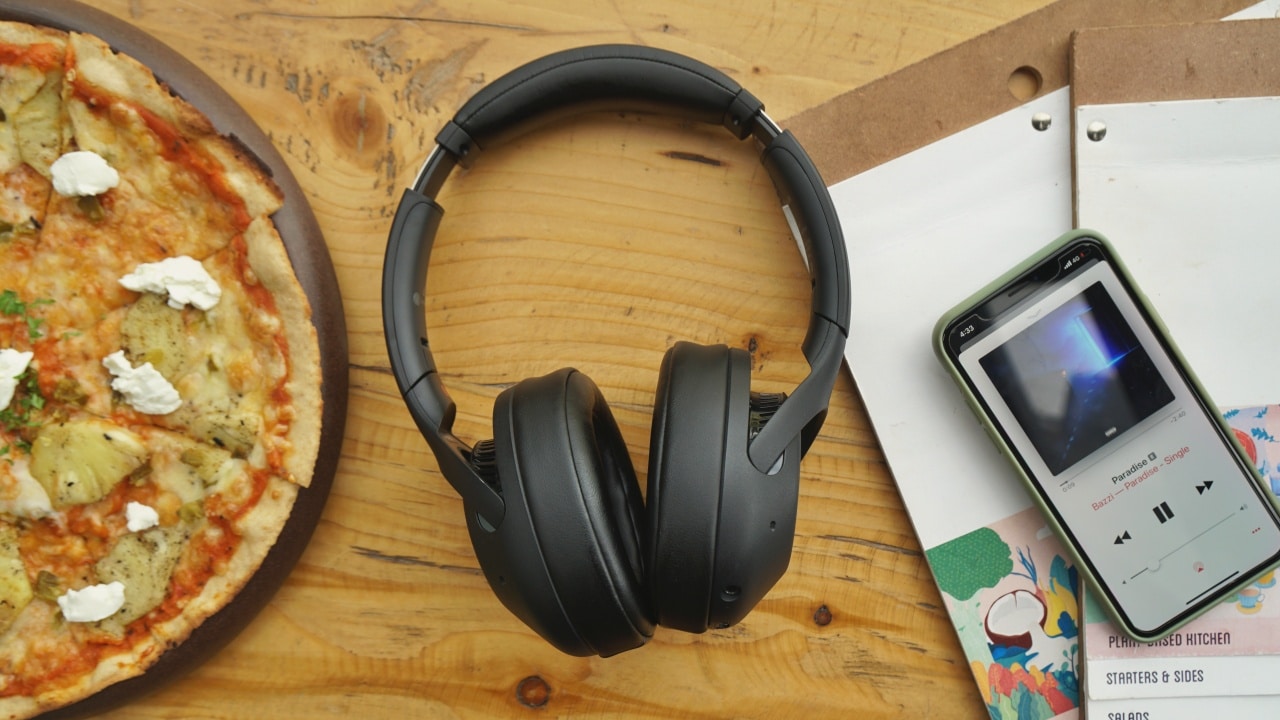


In case you’ve been keeping a watch on the whole Noise Cancelling headphones scene, you’ve probably heard the news — Sony makes some of the best Noise Cancelling headphones in the business.
Nowadays if you ask most tech people — what’s a good pair of noise canceling headphones? The answer will almost always be — The Bose Quiet Comfort series or, more recently, the Sony 1000XM3.
Now, the 1000XM series are Sony’s flagship noise canceling headphones. And flagship headphones tend to cost a premium, which they’re totally worth for sure, but not everyone can afford super premium headphones!
That’s why I was happy to see Sony announce the new XB-900N recently. The Sony XB-900N, or the 900N as we’ll call it for the rest of this review, are a much more approachable pair of noise canceling headphones.
So while they probably won’t have the same level of noise-canceling power as the 1000XM3, there’s still a lot to like here, especially at this price point.
Expensive looking without being THAT expensive
The 900N shares a lot of design similarities as the more premium XM3, which is a good thing because that means these headphones look expensive.
The exterior is mostly hard plastic, and the headband has a nice foam padding on the underside. There’s also a tiny NFC logo on the left side which you can just tap a compatible Android phone against, to pair it with these headphones, which is super convenient.
Apart from that, there’s Sony branding on both earcups as well, and you’ll notice bass vents present which look pretty cool.

On the left earcup, you’ll find two buttons and ports present, along with one of the two microphones. One button is for power and the other button can be set to trigger your phone’s voice assistant but I’ll talk about that a bit later.
On the right earcup you’ll see the second microphone, along with an entire flat surface which is touch-sensitive.
Just like the XM3, the flat outside of the right earcup has touch-enabled pads. It’s one large solid piece though, so there’s no separate sections with different features like on the XM3.
Easy navigation and control
You can swipe up or down vertically to increase or decrease your audio volume. Swipe sideways to skip tracks, and double tap in the center to pause music. You can also tap the center of the earcups to answer or end a phone call.
But my favorite feature has to be the “quick attention mode.” It automatically and instantly lowers the volume of whatever you’re listening to, in case you need to speak to someone in front of you, or listen to something going on around you. All you have to do is cover the right earcup with the palm of your hand.
This feature is really handy, especially if you’re like me and like to wear your headphones in the office, or in a cafe, and some random human comes up to you and says something.
These gestures take a little getting used to, and you’ll either find them super useful or super frustrating. Either way it’s still cool to have.
Support for a virtual assistant
Speaking of frustrating, like I mentioned earlier, Sony allows you to choose between Google Assistant or Amazon’s Alexa for a dedicated button on the 900N. But if you choose to have a digital assistant then you’ll lose the ability to use that button to cycle between noise canceling modes.
Not that there’s too many Noise cancellation modes on the 900N, there’s two – an ambient mode where the noise cancellation is less aggressive and you can hear what’s happening around you, or the full-on noise cancellation mode.

Honestly, I’m not a huge fan of digital assistants on phones. I use Google Assistant all the time on my Google Home, likewise for Alexa on my Echo, but on my phone I just never find them quick enough. So while I might not find this particular feature very useful, I understand that some of y’all out there might really like it, so here you go.
Just FYI, you can turn off the noise cancelling on these phones as well, but I’m not entirely sure why you’d want to, since it doesn’t really affect the audio quality TOO much. And while these are primarily marketed as wireless headphones, you can use them wired as well. Which will help get even more battery life out of these headphones, if necessary.

Lastly, it’s worth mentioning that the headphones also fold up for easy storage when not in use. It comes with a nice carrying case too which makes it much easier to carry around when you’re not using it.
Something you can wear for hours
Sony has done SUCH a great job on nailing comfort on the XB900N. Just like the more premium 1000XM3, there’s a cushy headband (with very prominent Sony branding), and super soft, sturdy earpads that have an around-the-ear fit.
The headband in particular has a good enough tension with the headphones feeling nice and secure around your ears. This helps give a good amount of noise isolation to help with the noise cancellation.
The headphones weigh a very light 254 grams so even after wearing them straight for a few hours, I never felt like it was pinching my brain too much.

That being said, I will mention though, that it’s been a little too humid where I live for the last few weeks and as a result if you’re in a really humid environment, there can be quite a bit of moisture built up between your eyes and the earpads so you’d want to take a break every hour or so.
But essentially the Sony XB900N is meant to be used for travel. Your daily commute to work, or a flight, or long bus or subway ride, and in these scenarios you could comfortably wear these headphones for hours.
More codec options for a better listening experience
The Sony WH-XB900N headphones are powered by 40mm dynamic drivers, with a frequency response range of 20-40,000Hz when used with Sony’s own high-quality LDAC codec at 990kbps.
They connect over Bluetooth 4.2, but there’s also support for a whole bunch of bluetooth codecs, which is something Sony does that most other headphone companies do not. There’s support for AAC, SBC, aptX, aptX HD, and LDAC codecs.
If you’re only going to use these headphones with an iPhone or an iPad, then it’ll stick to the AAC codec.
BUT if you’re using it with an Android phone, or anything with better source equipment, you’ll get to try out the additional codec support which definitely helps with a better listening experience.

Like for example, if you’re using it with the OnePlus 7 Pro, you’ll be able to use the LDAC or aptX HD codecs.
But let’s talk about how good the noise cancellation is.
No QN1 chip but still gets the job done
The Sony XB900N does not have their new QN1 noise-cancelling chip that’s used on the flagship XM3. Like most other headphones, the DAC (digital-to-analog converter) has to handle noise cancellation duties as well. It won’t be as impressive as the XM3, which also customizes the ANC for atmospheric pressure when you’re on a plane, but it still does a really good job.
Once you switch on that noise cancellation, all those annoying sounds in the background around you just fade away. Granted it’s not as silencing as the XM3, but it’s definitely one of the best at this price range.
All about that bass
Now I’m not sure if you noticed this, but the “XB” in “XB900N” stands for “Extra Bass.” The very prominent branding on the box mentally prepares you for this. As a result, the XB900N is more suited for bass-heavy music styles that have a lot more thump. If you’re a fan of EDM, Hip-hop, or bass heavy POP tracks then you’ll love the audio quality.
But if you don’t listen to a lot of bass-pounding tracks then you might find the audio quality a little exhausting. Thankfully, in this case, you can use Sony’s “Headphones Connect” app to change the default, bass heavy equalizer to a different soundstage.
The Sony Headphones Connect app also allows you to tweak more settings for the headphones, including the equalizer I mentioned, adaptive sound control, ambient sound control, Sony’s DSEE sound enhancement system, and more. You can also use them to answer phone calls, and the microphone quality is superb.

Overall though, I’m quite a fan of the audio tuning, but then I’m all about that bass. Vocals are crisp, and that thumpy bass is tight, and resonates inside those earcups. There’s clear, clean audio coming through across the frequency range. And for softer, instrumental, or acoustic genres of music, you could just tweak things in Sony’s headphones app.
Superb battery life
The Sony XB900N boasts 30 hours of battery life with Noise Cancellation switched on. Not only is this just like the more expensive 1000XM3, but it’s pretty much very accurate.
I used these during writing and video editing sessions in cafes for about three to four hours each day for about an entire week before I even got a low battery alert. That’s just freakin’ awesome.
When it comes to charging the headphones, the first positive surprise is that it charges over a USB Type-C port!

It’s really great to see Sony adopt this incredibly convenient standard, especially if you only have type-c cables around like I do.
I mean come on, it’s 2019.
Coming to charging specifically, a ten minute charge will give you about an hour worth of battery life, but a full charge can take about three to four hours depending on the charger you’re using. It’s not great but it’s not too bad either considering the kind of battery life you’re getting.
Is the Sony XB900N your GadgetMatch?
At US$ 250, the Sony XB900N is worth every penny.
It has sound quality that rivals headphones that cost a lot more. That, combined with the solid noise cancellation, make it a really great buy at the price point.
Now, remember, the audio tuning tends to be a little bass-heavy so if you like that you’re set, but if you don’t then you will have to make equalizer tweaks to handle that. But then again if you want THE BEST audio, you’ll have to spend a bit more and get the Sony WH-1000XM3.
But at the price point it sells at, there’s just no beating the Sony XB900N as an all-around package. There’s great battery life, good audio drivers and, support for a whole bunch of bluetooth audio codecs. Sony has another winner on their hands.
Definitely recommended. This is going to be THE pair of headphones I recommend in this price range for a while.
SEE ALSO: Sony WF-1000XM3: Masterclass in noise cancellation





Accessories
Jackery SolarSaga series: Free power for small devices
Portable solar panels can charge small gadgets directly


As fuel prices continue to surge as of late, one of the ways to make up for the additional expenses is to turn to alternative power sources. That’s including solar power.
And Jackery is here to help Philippine consumers, with the availability of their portable SolarSaga panels.
These solar panels are an alternative to traditional and permanently installed rooftop solar panels. They are engineered for modern and mobile life with portable, lightweight, and sleek designs. They are built primarily to be set up and put away easily, and charge small devices directly.
Simply put the Jackery SolarSaga panels where sunlight is available, and it will convert up to 25% of sunlight into usable energy.
To charge small gadgets like phones and portable fans, or even smartwatches, the SolarSaga panels come with a USB-C and USB-A port.
Another way is connecting the SolarSaga to Jackery’s Explorer power stations like the Explorer 300 Plus or 1000 Plus.
From there, users can power up devices, essentially for free. On its own, the Jackery SolarSaga panels are available in 100W and 200W variants.
The panels are also IP68 rated for water and dust resistance. This makes them usable outdoors when brought to adventures like camping, picnics, or beach trips.
The panels are already available through Jackery’s Lazada and Shopee platforms, as well as Techroom’s Lazada and Shopee accounts.
Accessories
UGREEN adds new Nexode Pro power bank, charger to lineup
Intelligent displays, fast-charging, user-focused design
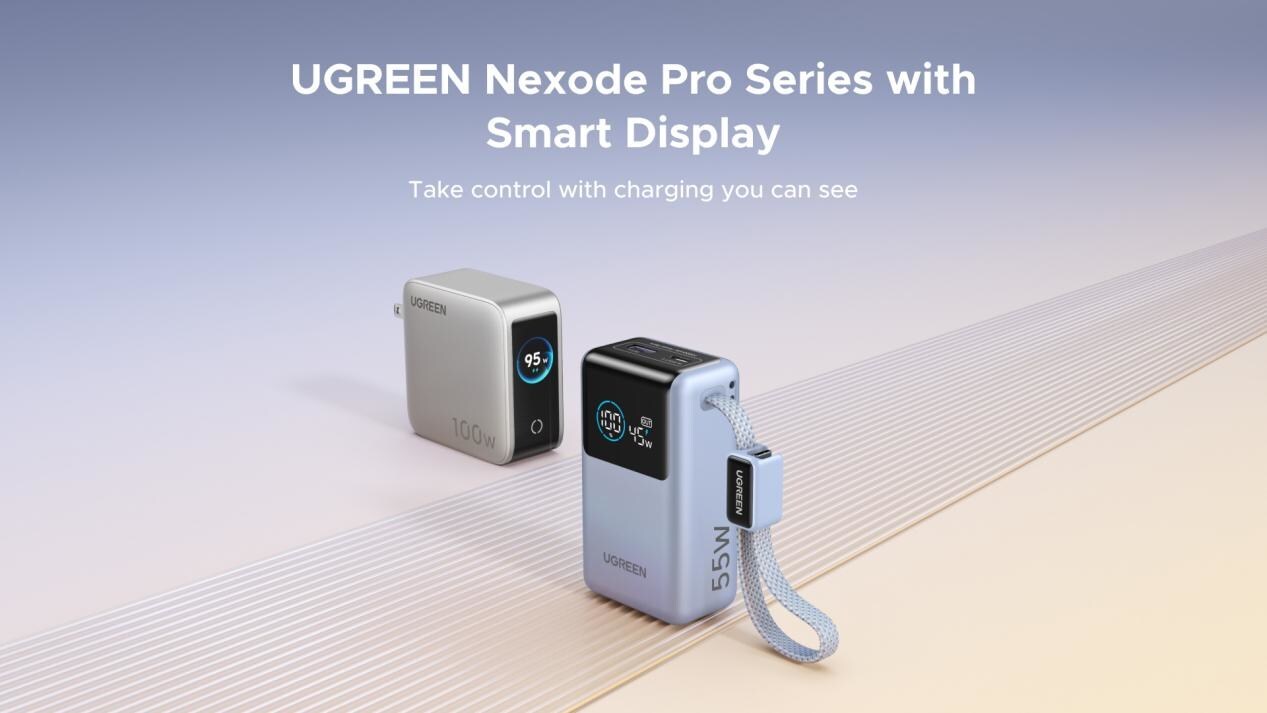
UGREEN has expanded its Nexode Pro charging lineup with two new devices designed for the modern user. They are the Nexode Pro 10000mAh 55W Power Bank and Nexode Pro 100W 5-Port Charger.
These new offerings combine intelligent digital displays, fast-charging capabilities, and user-focused designs for reliable power — whether at the desk or on the move.
The Nexode Pro 10000mAh Power Bank is the ultimate travel companion, delivering strong charging performance in a compact and travel-friendly form.
It supports up to 45W single-port fast charge, meeting the industry standard for high-speed portable charging. It can reach up to 55W as well when charging compatible Xiaomi devices.
The accessory is equipped with two USB-C ports, one USB-A port, and a built-in retractable USB-C cable. As such, it can power up to three small devices simultaneously without requiring extra cables.
With a rated capacity of 36Wh, the power bank also meets airline carry-on requirements.
Meanwhile, the UGREEN Nexode Pro 10W 5-Port Charger supports workstations. It has four USB-C ports, a USB-A port, and up to a 100W output.
It also has a built-in smart TFT display for easy power distribution monitoring.

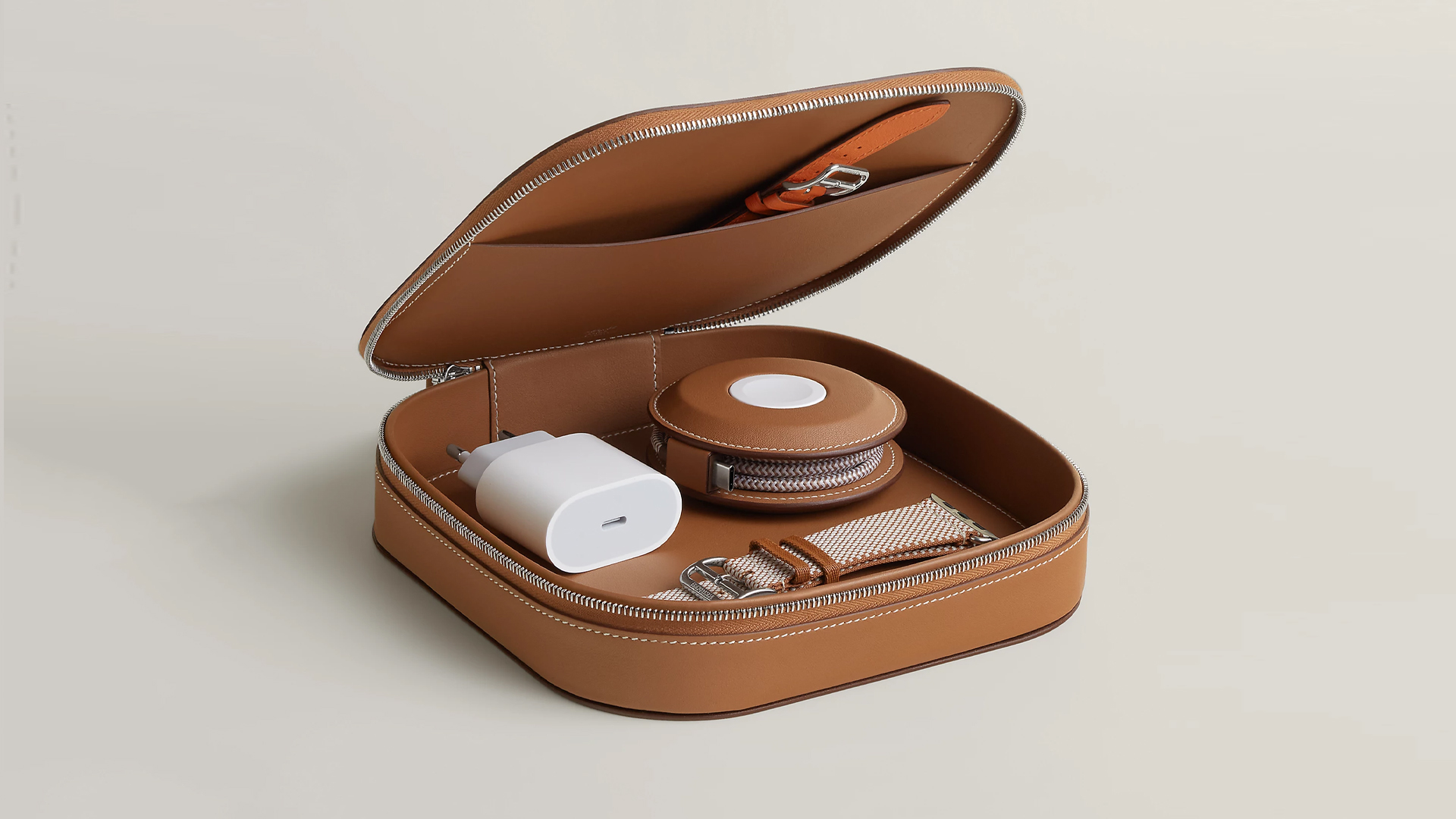
How extra are you as an Apple fan? No matter what you say, you’ll probably never be as extra as someone who buys a US$ 5,000 MagSafe charging case for their iPhone and Apple Watch. Hermès has just launched a series of leather chargers and cases specifically made for Apple fans.
Available now, Hermès has three types of MagSafe chargers for iPhone users. The cheapest one, the Paddock Solo, is a simple leather-bound puck that can charge a single device. The charger also has a braided 3.3ft USB cable. It costs an eye-watering US$ 1,250.
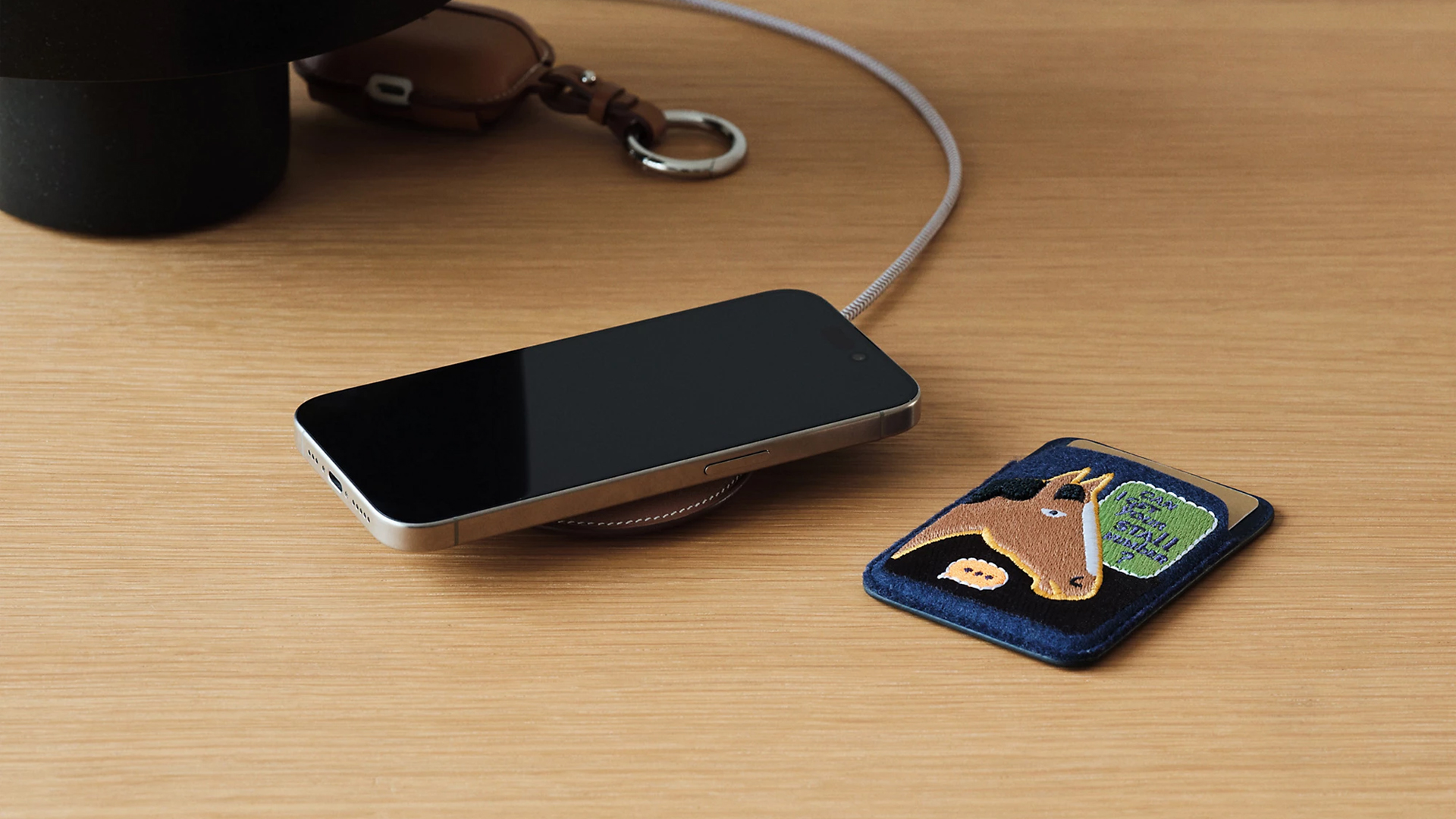
Paddock Solo charger
On the other hand, the Paddock Yoyo charger offers two charging zones for two devices simultaneously. Shaped like a yoyo (hence, the name), it allows users to roll the cable into a convenient stack. It costs US$ 1,750.
Finally, the Paddock Duo is a charging pad that allows for two devices simultaneously. It just doesn’t have a pocket for the cable. It likewise costs US$ 1,750.
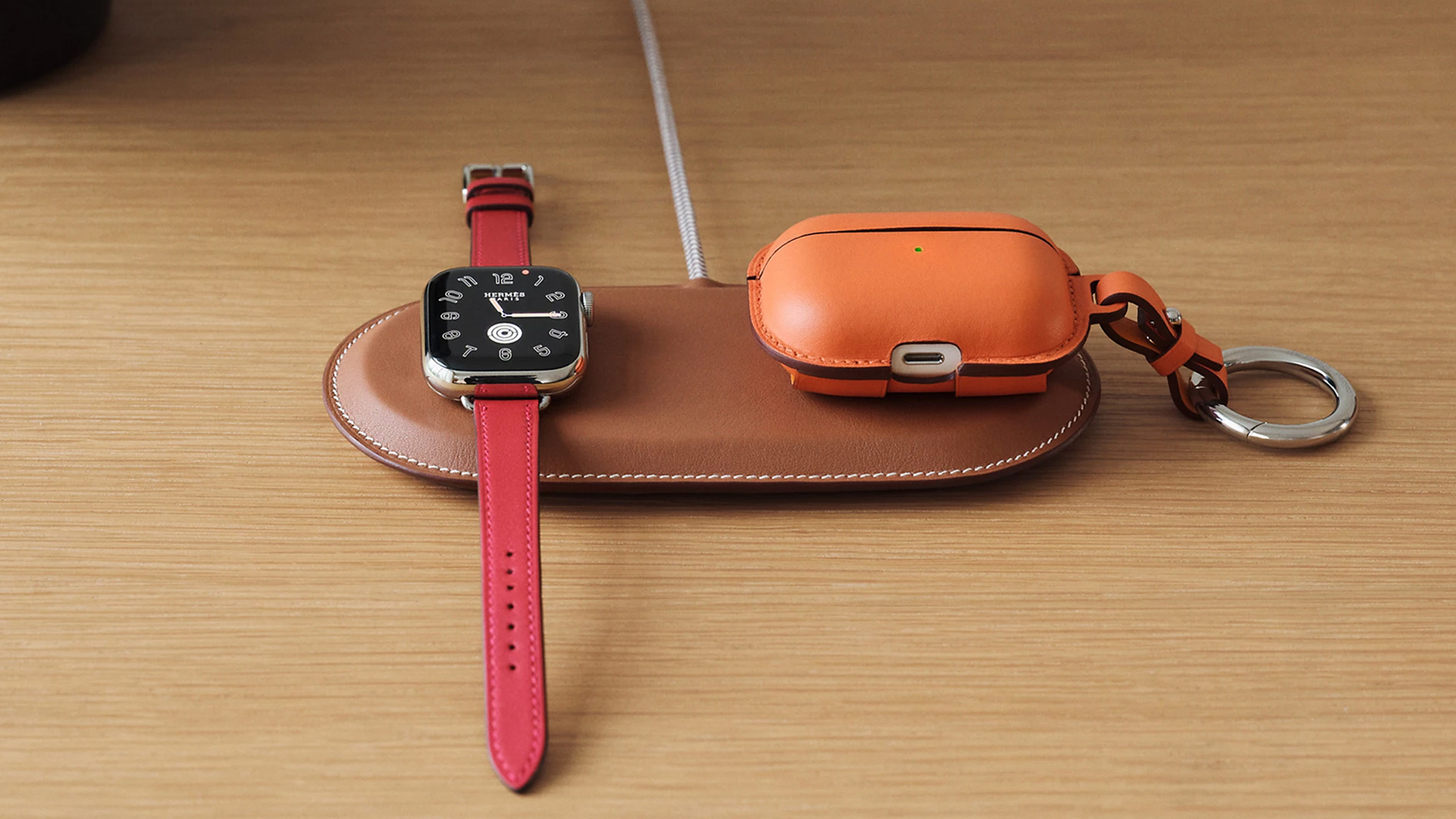
Paddock Duo charger
Now, if you want to upgrade your pricey charging kit even further, Hermès has two cases for them: the Petit Paddock case and the Grand Paddock case.
The Petit Paddock case, as the name suggest, is a snug leather case that fits only the charger (and a brick, if bundled with the Yoyo). The charger and case combo will set you back by US$ 3,725 for the Solo, and US$ 4,225 for either the Duo or the Yoyo.
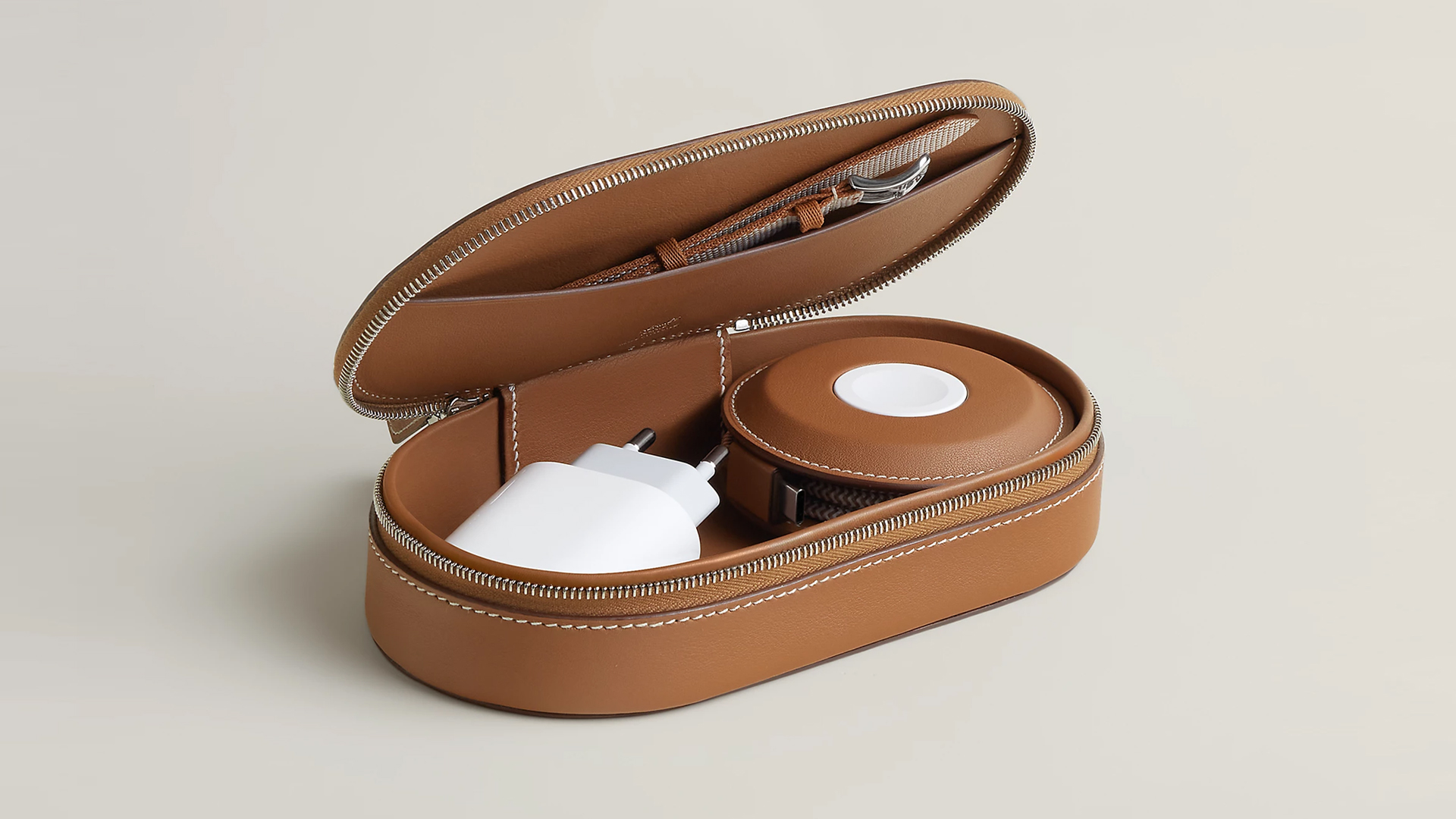
Paddock Yoyo + Petit Paddock
Alternatively, the Grand Paddock can fit much more but also costs a lot more. It costs US$ 4,650 for the Solo, and US$ 5,150 for the Duo or the Yoyo.
Of note, none of these come with a charging brick, so you’ll have to shell out a bit more to maximize the kit.
SEE ALSO: Apple unveils the iPhone 17e





Now Playing: Hoppers

Jackery SolarSaga series: Free power for small devices

UGREEN adds new Nexode Pro power bank, charger to lineup

nubia to launch new Neo 5 series gaming phones on March 28

SHINOBI: Art of Vengeance’s SEGA Villains Stage out on April 3


-

 Reviews5 days ago
POCO X8 Pro Max review: A new beast from the far east
-

 News5 days ago
POCO X8 Pro Series: Price, availability in the Philippines
-

 Laptops2 weeks ago
Apple MacBook Neo Review
-

 Computers2 weeks ago
GIGABYTE collaborates with Capcom for RE Requiem custom PC
-

 Apps1 week ago
Google Maps is finally getting a 3D mode
-

 Entertainment2 weeks ago
The internet is thirsting over the One Piece Season 2 cast
-

 Features1 week ago
Galaxy AI on the Samsung Galaxy S26 Ultra
-

 Automotive2 weeks ago
BYD is reportedly considering an F1 team