
WWDC 2025
WWDC 2025: Apple introduces biggest software update yet
Liquid Glass design, iOS 26, more finally revealed


Apple has officially introduced its beautiful new software design during the Worldwide Developer Conference (WWDC) 2025 keynote presentation.
The redesign is the broadest design update Apple has rolled out since iOS 7. The new design is crafted from a new material called Liquid Glass.
This material reflects and refracts its surroundings, while dynamically transforming to help bring greater focus to content.
This way, the OS redesign delivers a new level of vitality across controls, navigation, app icons, widgets, and more.
And for the first time, the new design also extends across platforms: iOS 26, iPadOS 26, macOS Tahoe 26, watchOS 26, and tvOS 26.
This move makes all products under the Apple ecosystem have more harmony while maintaining distinct qualities that make each unique.
The redesign makes user interaction across Apple products more personal and dynamic. It brings more harmony between hardware and software, and changes the way users interact with their devices.
Expressive new material
The new design takes advantage of Apple’s powerful advances in hardware, silicon, and graphics technologies.
Liquid Glass is translucent and behaves like glass in the real world. Its color is informed by surrounding content and intelligently adapts between light and dark environments.
Born out of a close collaboration between the design and engineering teams, Liquid Glass uses real-time rendering and dynamically reacts to movement with specular highlights.
This creates a lively experience that makes using iPhone, iPad, Mac, Apple Watch, and Apple TV even more delightful.
Users will notice the changes in their Apple devices’ OS with this new material on several elements, like buttons, switches, sliders, text, and media controls.
Larger elements like tab bars and side bars will also shine more. It will also be noticeable in system experiences like the Lock Screen, Home Screen, notifications, Control Center, and more.
Updated app designs
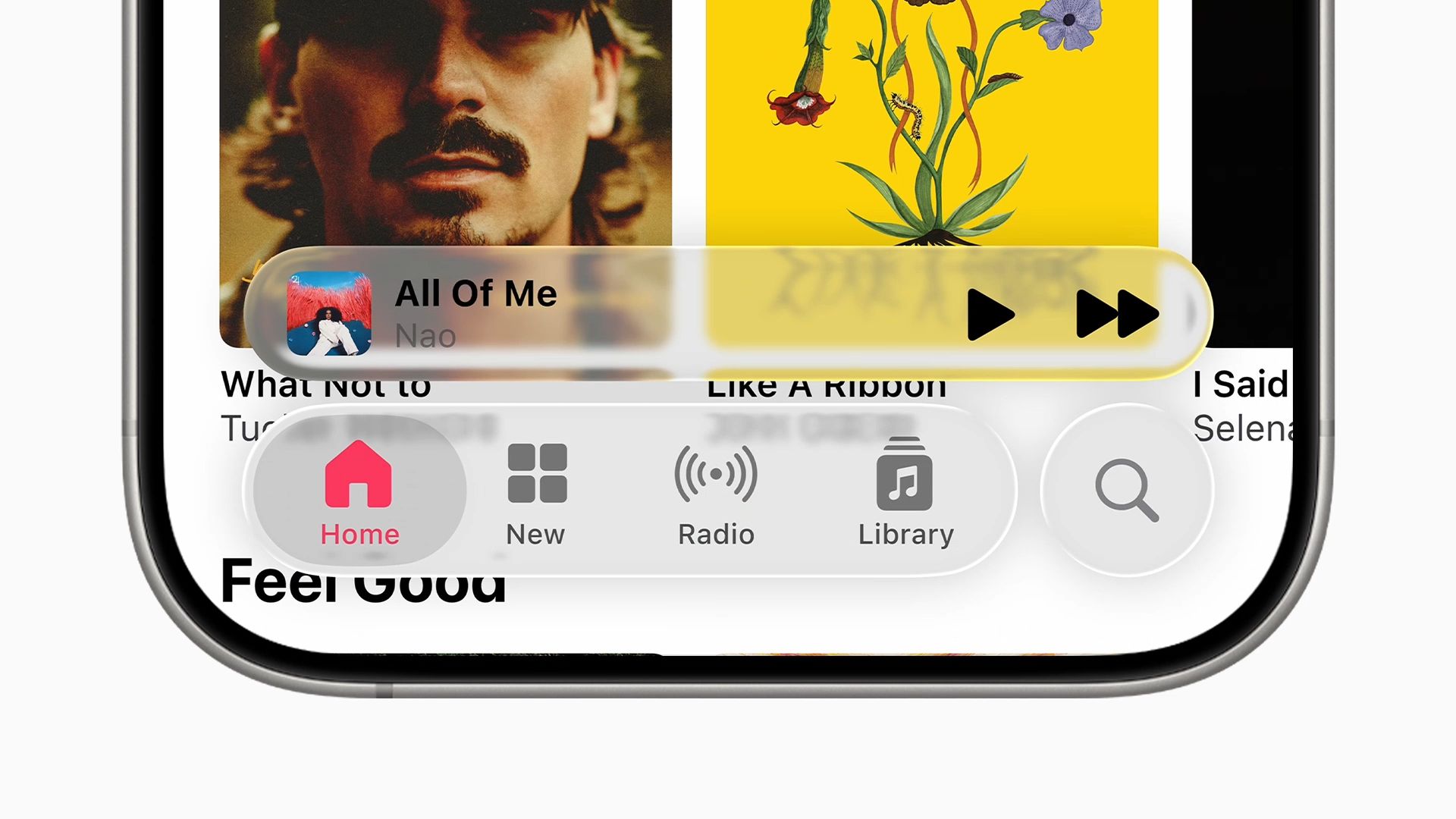
Apple’s design team considered every aspect of Apple’s platforms to identify improvements that can be made across the board.
One of the key reasonings behind the redesign was to bring greater focus to content that’s instantly familiar.
Controls, toolbars, and navigation within aps have been redesigned. They now fit perfectly concentric with rounded corners of modern hardware and app windows.
Controls are crafted out of Liquid Glass and act as a distinct functional layer that sits above apps.
They give way to content and dynamically morph as users need more options or move between different parts of an app. It’s also easier for users to find controls they need.
Tab bars and sidebars have been redesigned with the same approach. When users scroll, tab bars shrink ton bring focus to the content while keeping navigation instantly accessible. Tab bars fluidly expand when users scroll back up.
Moreover, the updated sidebars make apps like Apple TV even more immersive. They refract the content behind them, while reflecting content and the user’s wallpaper from around them.
These updated design elements apply across fresh new experiences in apps such as Camera, Photos, Safari, FaceTime, Apple Music, Apple News, and Apple Podcasts.
Enhanced experience across platforms
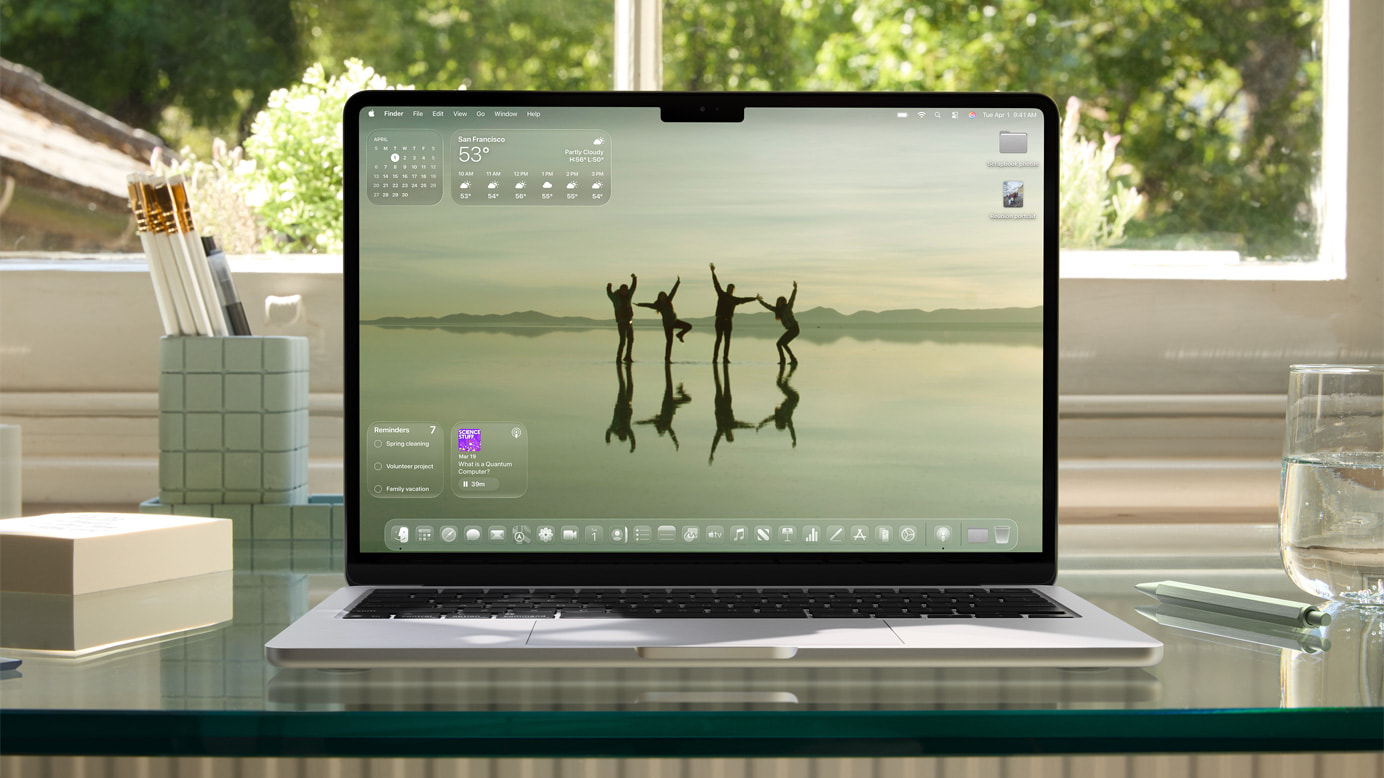
Furthermore, the new design extends across iOS, iPadOS, macOS, watchOS, and tvOS. There are updates to system experiences, including Lock Screen, Home Screen, desktop, and Dock.
For instance, for wallpapers on the Lock Screen, the time is now crafted out of Liquid Glass. It fluidly adapts to fit elegantly behind the subject.
On the Home Screen and desktop, the Dock, app icons, and widgets have all been crafted from multiple layers of Liquid Glass.
They look stunning, with spectacular highlights, and allow for greater personalization options. Yet, they still maintain the familiarity that users rely on.
For example, in macOS Tahoe 26, users can customize the desktop and Dock with widgets and app icons that come to life.
Appearances for these widgets and icons include light, dark, or the new all-clear look. There’s even a completely transparent menu bar that makes the Mac display feel even larger.





Computers
macOS Tahoe 26 transform the Mac, adds more Apple Intelligence
Liquid Glass, AI, Metal 4, more
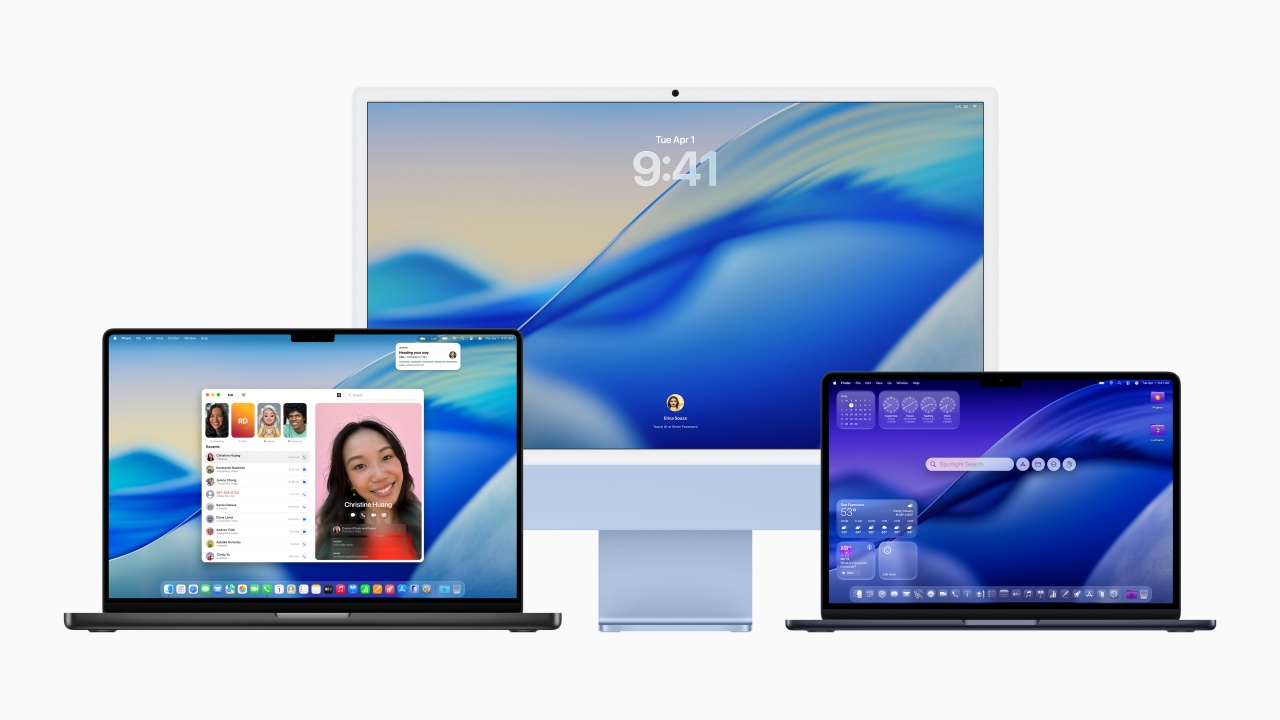
Apple officially introduced macOS Tahoe 26. The new OS for Mac brings a revamped design, advanced AI capabilities, and new features. Like the rest of the OS featured in WWDC 2025, the features are coming to core apps like Phone, Messages, Spotlight, Safari, and Apple Intelligence.
A Fresh Look with Liquid Glass
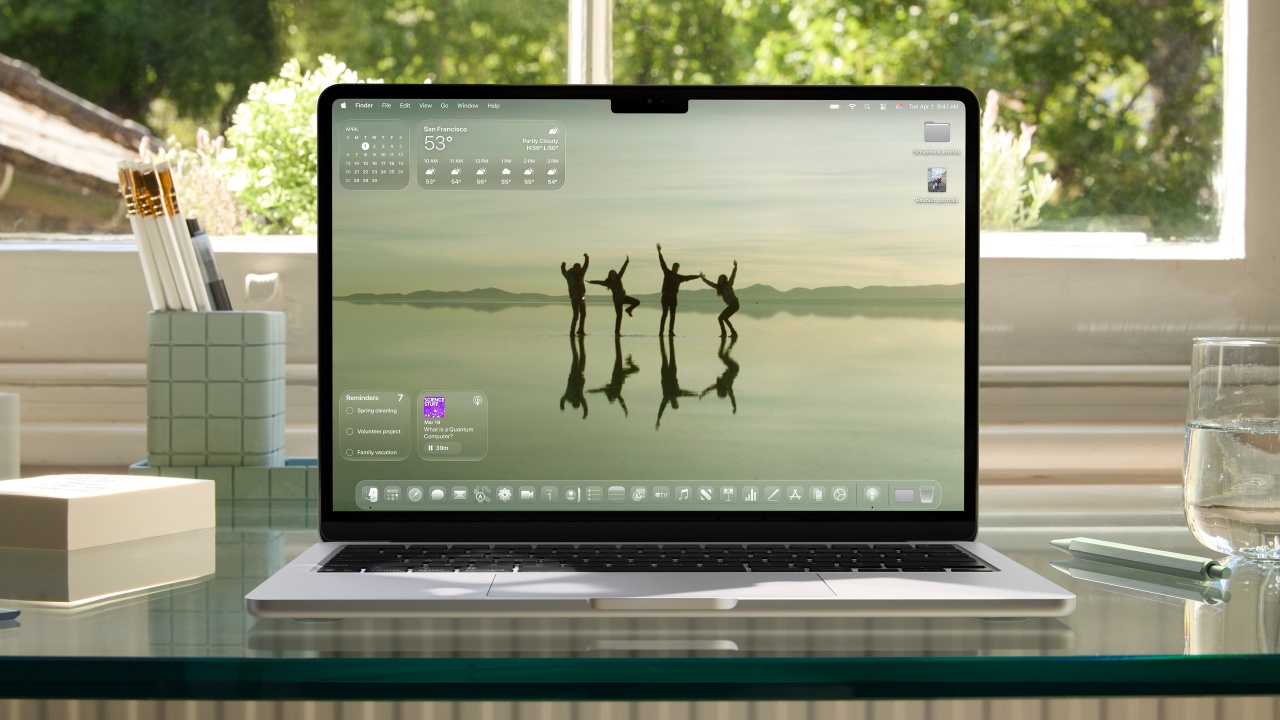
macOS Tahoe 26 introduces Liquid Glass. It’s a new translucent material that enhances the Dock, sidebars, toolbars, and menu bar. It’s coming to everything “OS 26” on Apple devices. Users can now customize app icons, folders, and widgets with new colors and symbols, creating a more personalized experience.
Apple Intelligence Gets Smarter
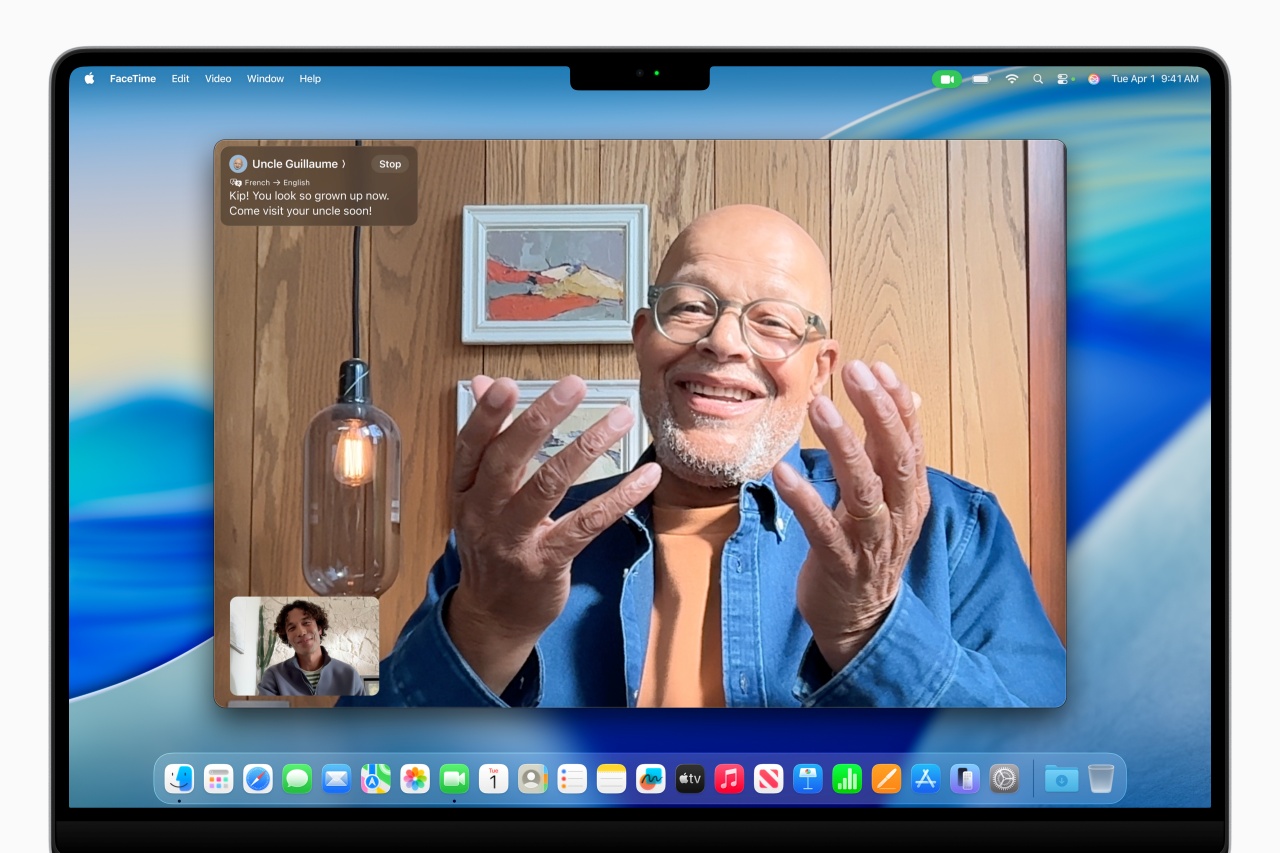
Apple Intelligence expands with Live Translation, enabling real-time multilingual communication in Messages, FaceTime, and Phone. Genmoji and Image Playground allow users to create custom emoji and AI-generated images. ChatGPT integration is optional.
Additionally, Shortcuts gains intelligent actions, allowing users to automate tasks like summarizing text or creating AI-generated images.
Spotlight’s Biggest Update Yet

Spotlight now executes hundreds of actions directly, such as sending emails, creating notes, and playing podcasts, without switching between apps. Users can also filter searches more effectively and browse through apps, files, and clipboard history with ease.
Enhanced Connectivity and Productivity

The Phone app arrives on Mac, bringing Recents, Contacts, Voicemails, Call Screening, and Hold Assist from iPhone. Live Activities now appear in the menu bar. It keeps users updated on flights, Uber rides, and live sports scores in real time.
Gaming Gets a Boost
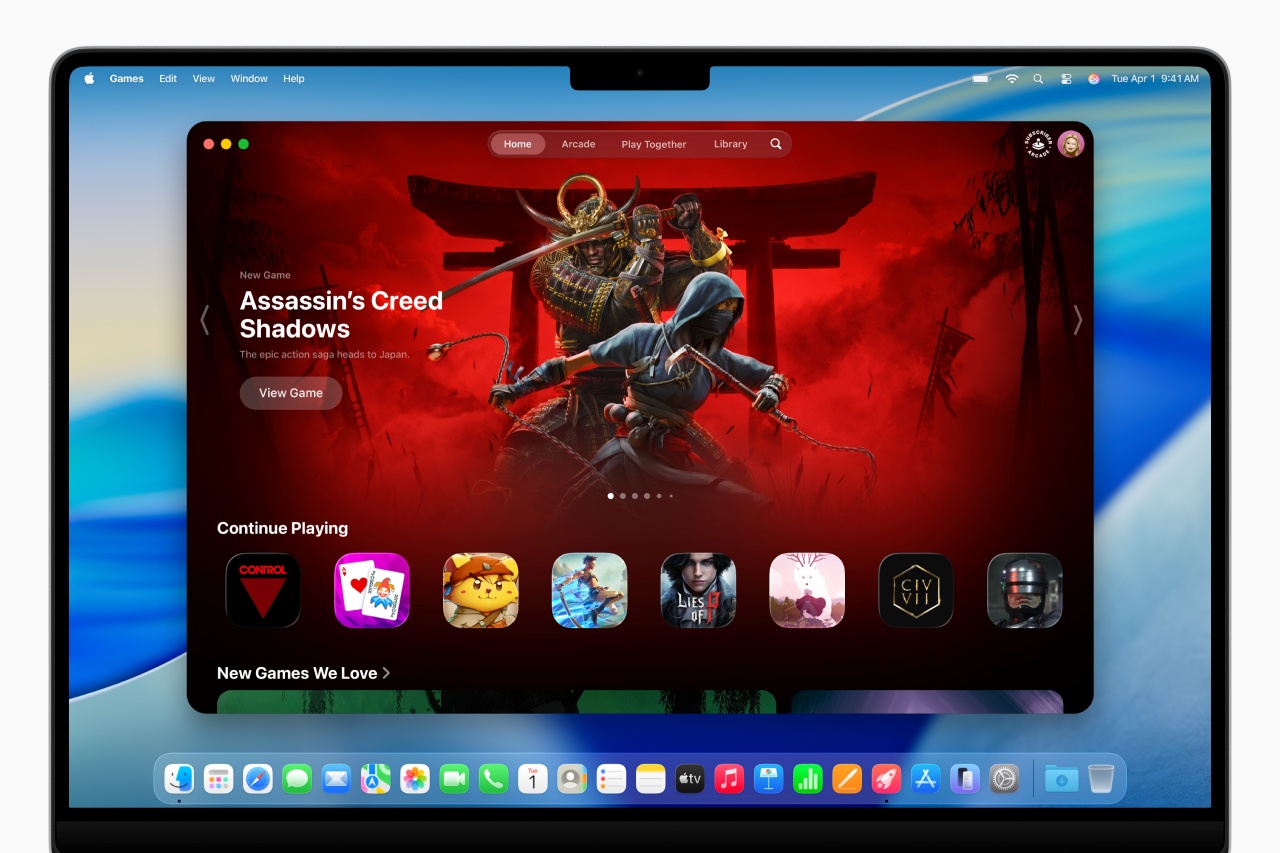
macOS Tahoe 26 introduces Apple Games. It’s a dedicated hub for gaming, alongside Game Overlay, which lets players adjust settings and chat with friends without leaving their game. Metal 4 brings advanced graphics rendering, supporting upcoming titles like Cyberpunk 2077, Lies of P: Overture, and Crimson Desert.
Availability
macOS Tahoe 26 is available for developer testing today. Public beta is coming in July 2025 and full release will come this fall. It supports Mac models with M1 and later.
For more details, visit Apple’s official macOS Tahoe 26 announcement.
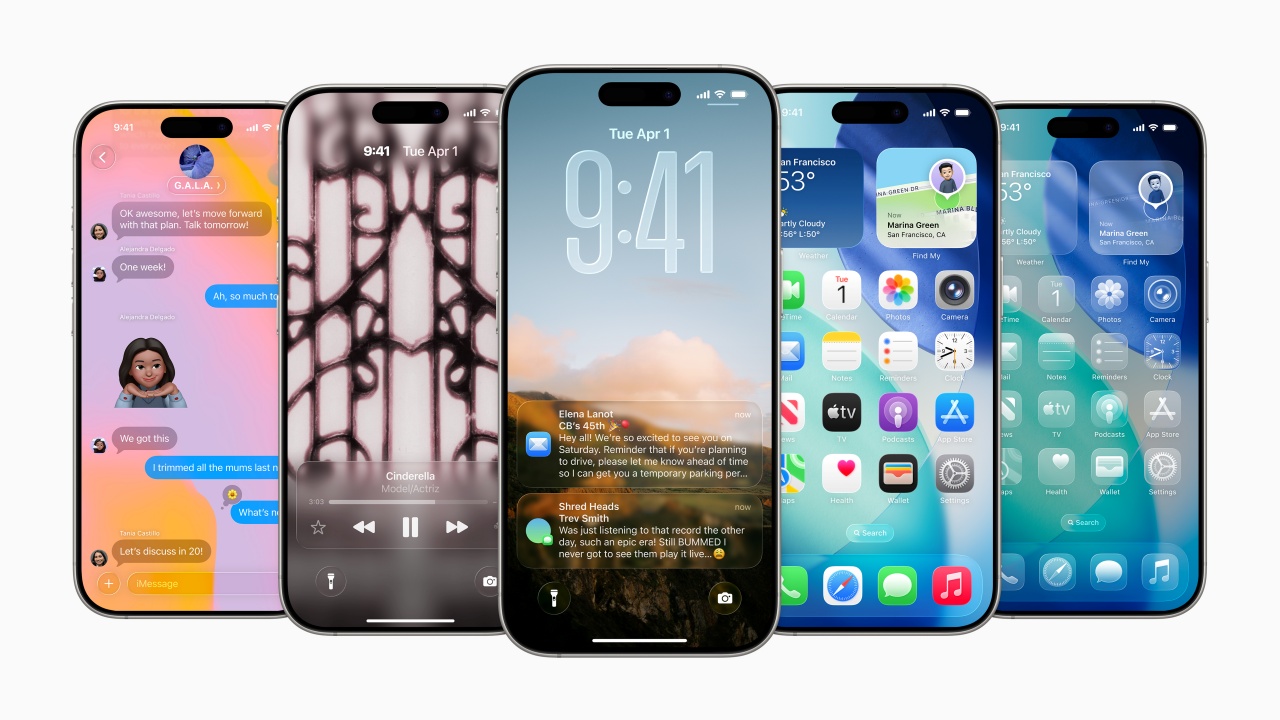
Apple has officially introduced iOS 26. It brings a revamped design, advanced AI capabilities, and more new features. These are coming to |core apps like Phone, Messages, CarPlay, Apple Music, Maps, and Wallet.
A Fresh Look with Liquid Glass
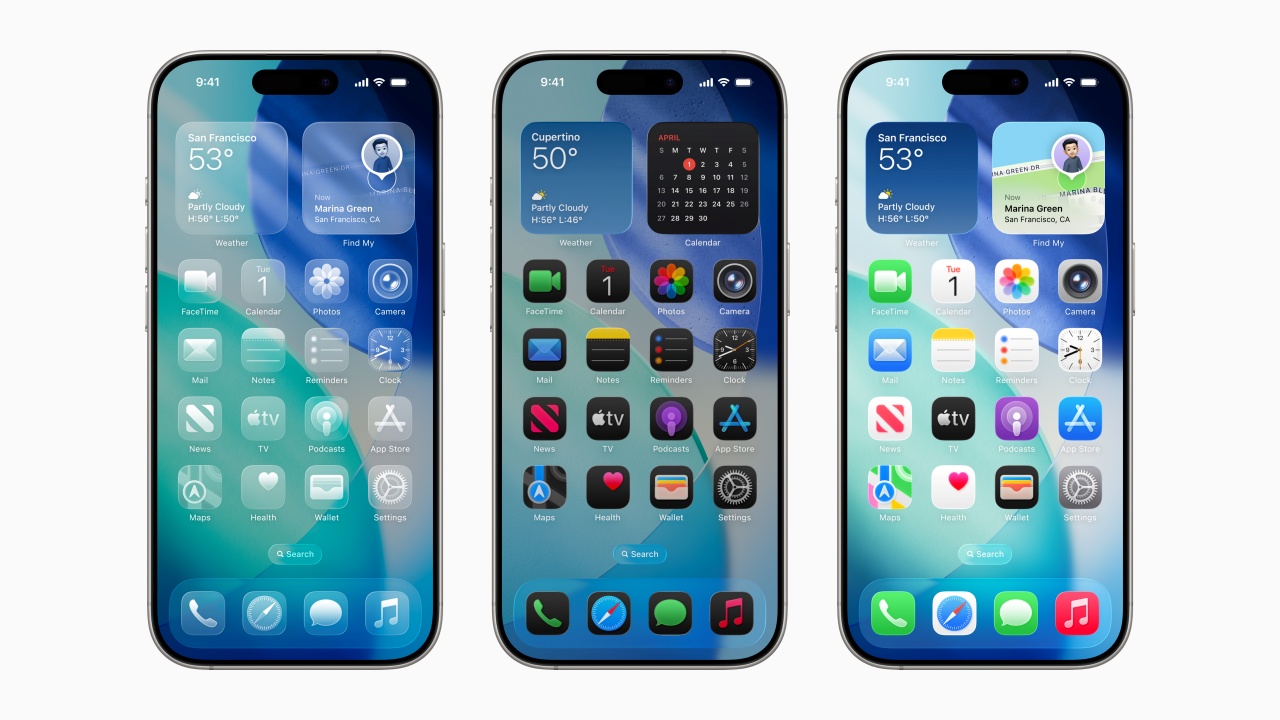
iOS 26 introduces Liquid Glass. It’s a new translucent material that enhances app icons, widgets, and navigation elements. The Lock Screen and Home Screen now offer dynamic customization, with adaptive time placement and spatial effects that respond to movement.
Apple Intelligence Gets Smarter
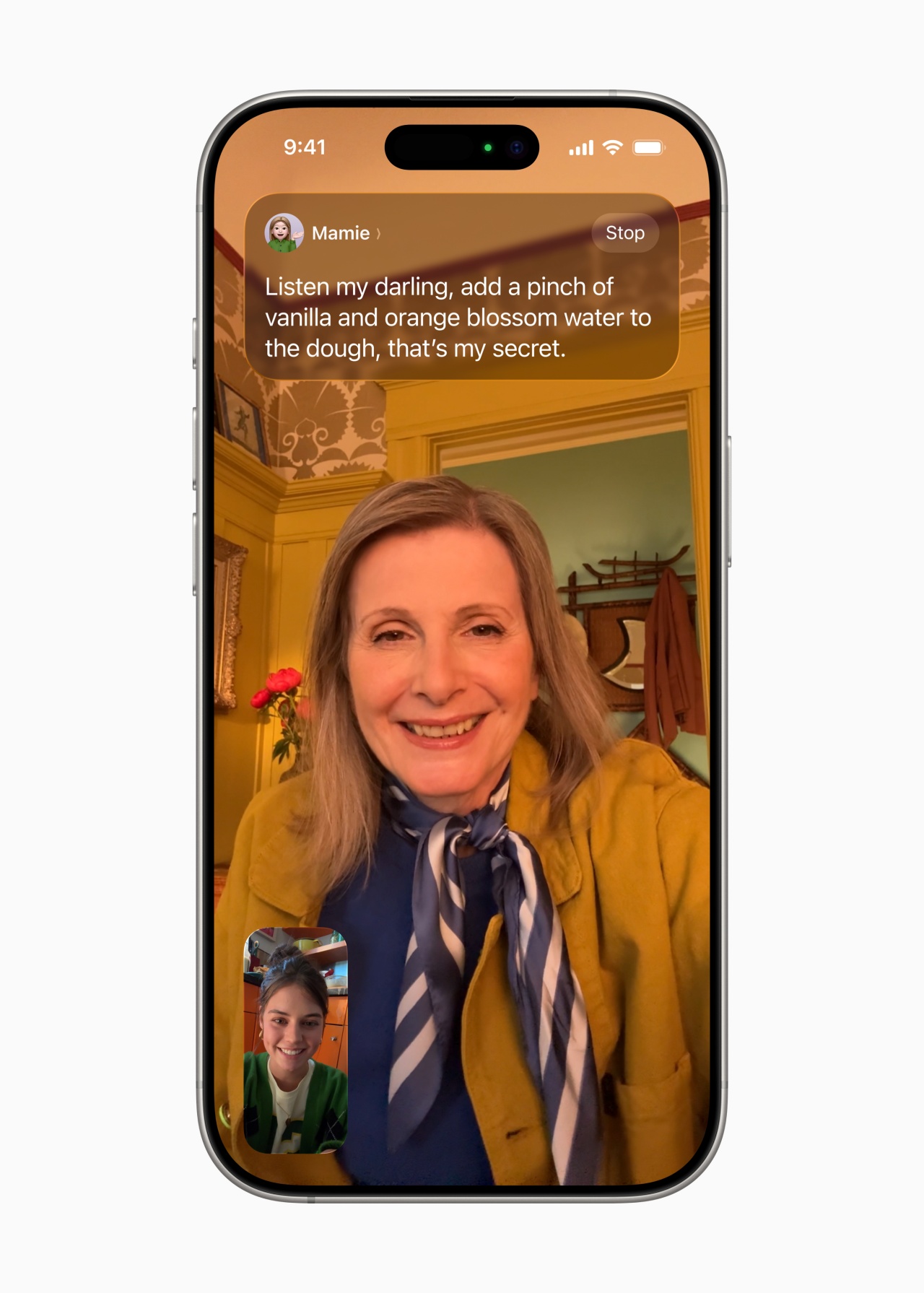
Apple Intelligence expands with Live Translation. It enables real-time multilingual communication in Messages, FaceTime, and Phone. Visual Intelligence allows users to search for products, recognize events, and integrate details into their calendars seamlessly.
Additionally, Genmoji and Image Playground let users create custom emoji and AI-generated images. There’s also an optional ChatGPT integration for more advanced styles.
Enhanced Connectivity and Privacy
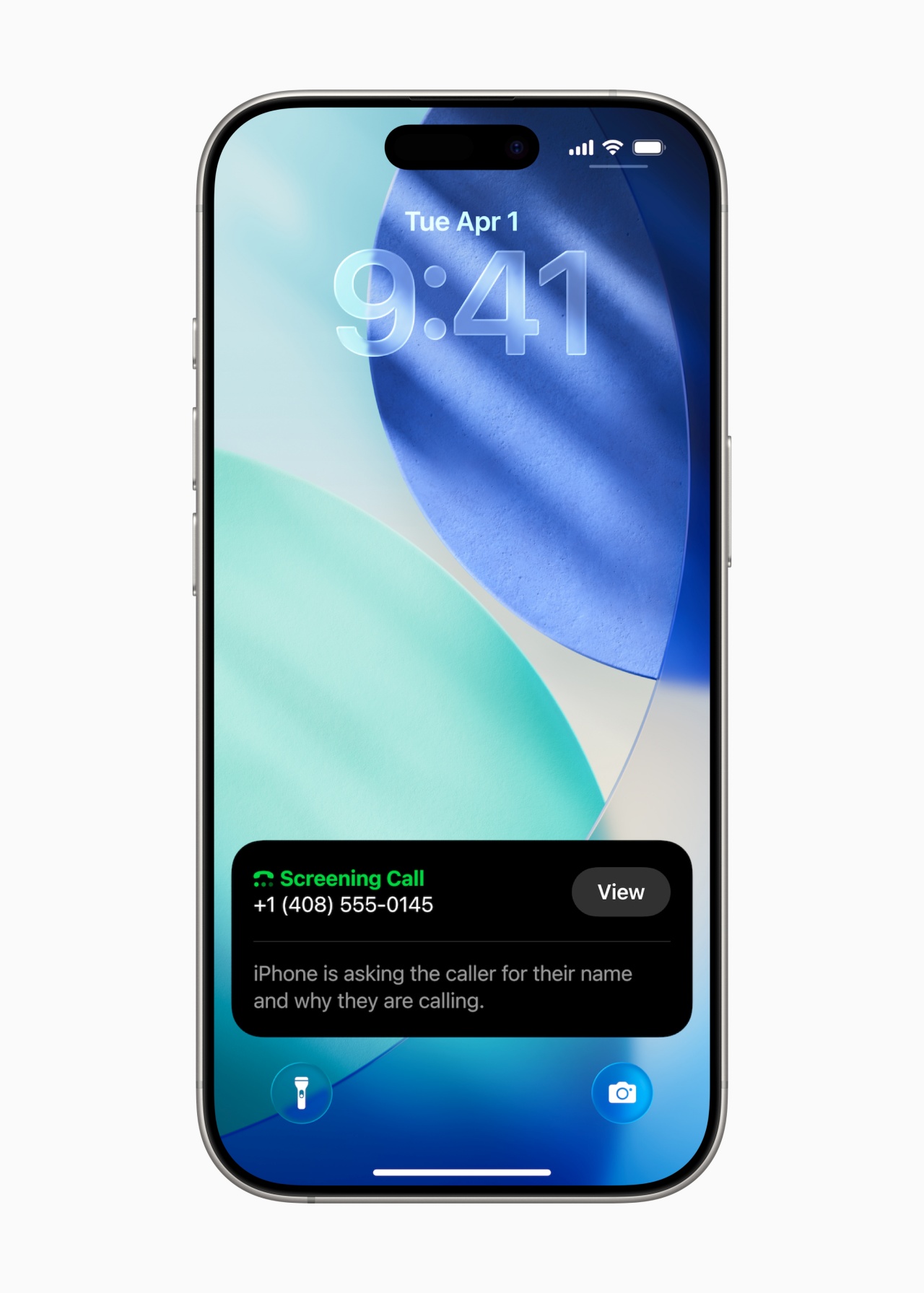
The Phone app now combines Favorites, Recents, and Voicemails into a unified layout. Meanwhile, Call Screening helps users filter unwanted calls. Hold Assist notifies users when a live agent is available, reducing time spent on hold.
In Messages, users can screen texts from unknown senders. They can also create polls and set custom backgrounds. Group chats now display typing indicators and support Apple Cash transactions.
Upgrades to CarPlay, Apple Music, and Maps

CarPlay receives a compact call view, pinned conversations, and Live Activities for real-time updates. Apple Music introduces Lyrics Translation and AutoMix. The latter seamlessly transitions between songs like a DJ. Apple Maps now tracks Visited Places, helping users recall locations while maintaining privacy with end-to-end encryption.
Availability
iOS 26 is available for developer testing today. Like the rest of the WWDC 2025 things, public beta launches in July 2025. The full release is expected this fall. It supports iPhone 11 and later models.
For more details, visit [Apple’s official iOS 26 announcement.
WWDC 2025
visionOS 26 packed with more features for Apple Vision Pro
Part of Apple’s broad redesign across its ecosystem
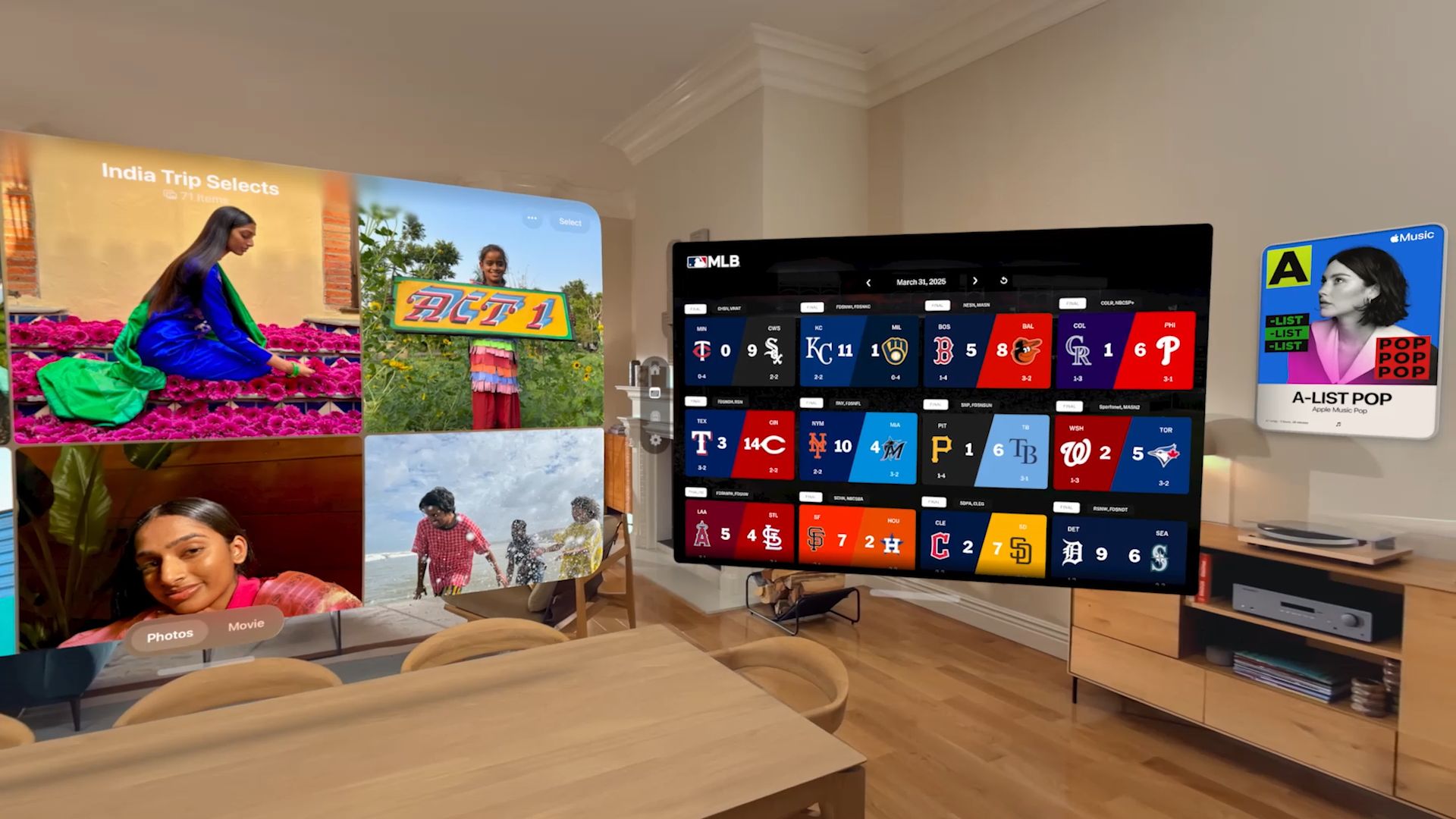
visionOS 26, part of a Apple’s across-the-board design update roll out, is packed with groundbreaking new spatial experiences and features for Apple Vision Pro.
The new OS for Apple’s mixed reality headset makes everyday interactions become more immersive and personal.
Widgets are integrated into a user’s space. Spatial scenes also use generative AI to add stunning lifelike depth to photos. These lead to Personas feeling more natural and familiar.
In addition, visionOS 26 adds support for 180-degree, 360-degree, and wide field-of-view content from Insta360, GoPro, and Canon. New enterprise APIs allow organizations to create spatial experiences unique to visionOS.
And with support for PlayStation VR2 Sense controllers, players can enjoy a new class of games on Apple Vision Pro.
Widgets become spatial

Widgets offer personalized and useful information at a glance. With visionOS 26, widgets become spatial. They integrate seamlessly into a user’s space and reappears every time they put on Apple Vision Pro.
Moreover, they are customizable, with a variety of options for frame, color, and depth. New widgets, including Clock, Weather, Music, and Photos, also offer unique interaction and experiences.
Users can decorate spaces with their favorite widgets, including panoramas and spatial photos. They can also opt for clocks with distinctive face designs, and quick access to their go-to playlists and songs on Apple Music.
The Widgets app helps users find widgets, including those compatible iOS and iPadOS apps. Developers, meanwhile, will also be able to create their own widgets using WidgetKit.
Enhanced shared spatial experiences
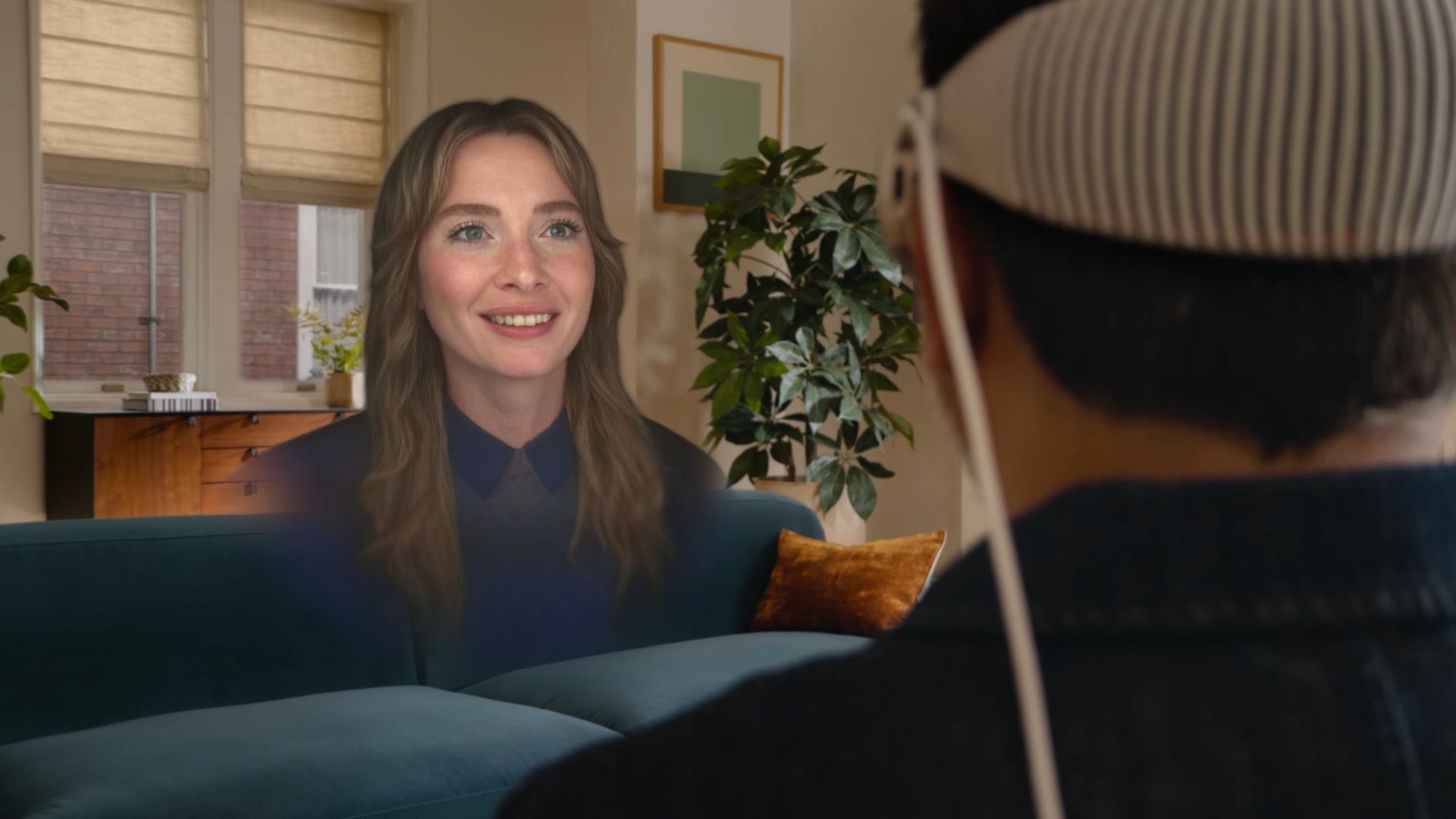
visionOS 26 also allows shared spatial experiences among Apple Vision Pro users. For instance, they can come together to watch the latest blockbuster movie in 3D.
They can also play games together or collaborate in meetings. They can even add remote participants from across the world via FaceTime.
Dassault Systèmes, a leading provider of engineering and 3D design software, is leveraging this ability with their 3DLive app.
This shall bring the ability to visualize 3D designs both in person and with remote colleagues.
Moreover, with industry-leading volumetric rendering and machine learning technology, the all-new Personas now have striking expressivity and sharpness.
They have been updated to feel more natural and familiar. They now offer a full side profile view and remarkably accurate hair, lashes, and complexion.
Of course, Personas are still created on device in seconds. New improvements to the setup process allow users to adjust and preview how their Persona looks spatially too.
Spatial scenes
Furthermore, visionOS 26 makes spatial photos more realistic. The system leverages a new generative AI algorithm and computational depth to create spatial scenes with multiple perspectives.
Users can view spatial scenes in the Photos app, Spatial Gallery app, and Safari. Zillow is one company taking advantage of the API for their Zillow Immersive app. This is so clients can see images of homes and apartments with a better level of immersion.
On the other hand, developers can use the Spatial Scene API to make their app experience even more immersive.
New ways to browse, play, watch

Apple Vision Pro users can also select spatial browsing to transform articles on Safari. This mode hides distractions and reveals spatial scenes that come alive as they scroll.
For instance, shopping for products or browsing for hotel rooms come with visuals with depth and dimension. Web developers have the ability to embed 3D models directly into web pages for such visuals.
visionOS 26 supports native playback of 180-degree, 360-degree, and wide field-of-view content from Insta360, GoPro, and Canon.
Users can enjoy their exciting 2D action footage the way it was meant to be seen. Developers can incorporate this new playback capability into their apps and websites.
Furthermore, visionOS 26 comes with support for the PlayStation VR2 Sense controller. Developers can deliver even more engaging gameplay experiences for Apple Vision Pro with high-performance motion tracking, finger touch detection, and vibration support.
Enterprise APIs and tools
For companies around the world harnessing spatial computing on Apple Vision Pro for various workflows, the new OS also provides new capabilities.
Team device sharing lets organizations easily set up and manage a shared pool of devices. Users can securely save their eye and hand data, vision prescription, and accessibility settings to their iPhone running iOS 26 and bring it to another Vision Pro.
visionOS 26 also adds support for Logitech Muse, a spatial accessory built for Apple Vision Pro. This accessory enables precise input and new ways to interact with collaboration apps like Spatial Analogue.
Additional visionOS 26 features include:
- More Apple Intelligence features, including support for new languages
- Look to Scroll: allows users to explore apps and websites with just their eyes
- Redesigned Control Center has features conveniently displayed in one view
- Ability to unlock iPhone while wearing Apple Vision Pro
- Ability to answer calls from iPhone directly from Apple Vision Pro
- Home View supporting folders



Dyson PencilWash makes wet cleaning feel effortless

Jackery portable power solutions makes appearance at Doraemon Run

OPPO Reno15 Pro: Camera Review

Capcom to hold Resident Evil Requiem launch event in Jakarta
Pokémon FireRed and LeafGreen are coming to the Switch

Breaking up with Adobe Photoshop after 20 years

TECNO will showcase the CAMON 50 and POVA 8 series at MWC 2026

PlayStation, LE SSERAFIM Chaewon team for the ‘Love of Play’ campaign

New DRAGON BALL game project “AGE 1000” for 2027 announced

VinFast updates battery subscription policy for large upfront savings


-
 News2 weeks ago
TECNO will showcase the CAMON 50 and POVA 8 series at MWC 2026
-
 Reviews1 week ago
The art of being in and behind the frame
-

 Gaming2 weeks ago
Now Playing: Yakuza Kiwami 3 & Dark Ties
-
 First Look2 weeks ago
Match Pulse: OPPO Reno15 Pro
-
 India2 weeks ago
TECNO POVA Curve 2 5G packs an 8000mAh battery
-

 Gaming2 weeks ago
God of War Greek trilogy remake in development, Sons of Sparta out now
-

 Accessories2 weeks ago
Sony WF-1000XM6 is out now: Price, availability
-

 Gaming2 weeks ago
Bandai Namco Brings Digimon Story Time Stranger, Tales of Arise to Switch 2 in 2026