
Explainers
Explaining smartphone display refresh rates
Are they really any different from PC displays?


Smartphones, little by little, are turning into mini-PCs with the features that come with it. From browsing on social media to playing video games, technology is slowly adopting a more “on-the-go” lifestyle. Recently, smartphones have acquired another feature that your own desktop or laptop already has.
Some of the recently released premium and gaming smartphones now come with displays having their own dedicated refresh rate. Refresh rates aren’t new, but to see it on a compact device has a lot of people wondering. How different or similar is it to a PC’s refresh rate? And is it actually something good to have?
A crash course on refresh rates
A display’s refresh rate, basically is the number of times your display updates every second. Your screen usually takes a few seconds to just a second to load new images, depending on that rate. For example, a 60Hz refresh rate means that in one second, any image on your display is refreshed 60 times. Your eyes wouldn’t catch it fast enough, but that’s how your display works.
For most PC displays, the default is at 60Hz with companies releasing displays that range up to 240Hz. You mostly see this in displays fit for gaming purposes, since gamers prefer the higher refresh rate for improved performance. If you’re someone who mostly likes to watch movies, it really doesn’t matter how high the refresh rate is.
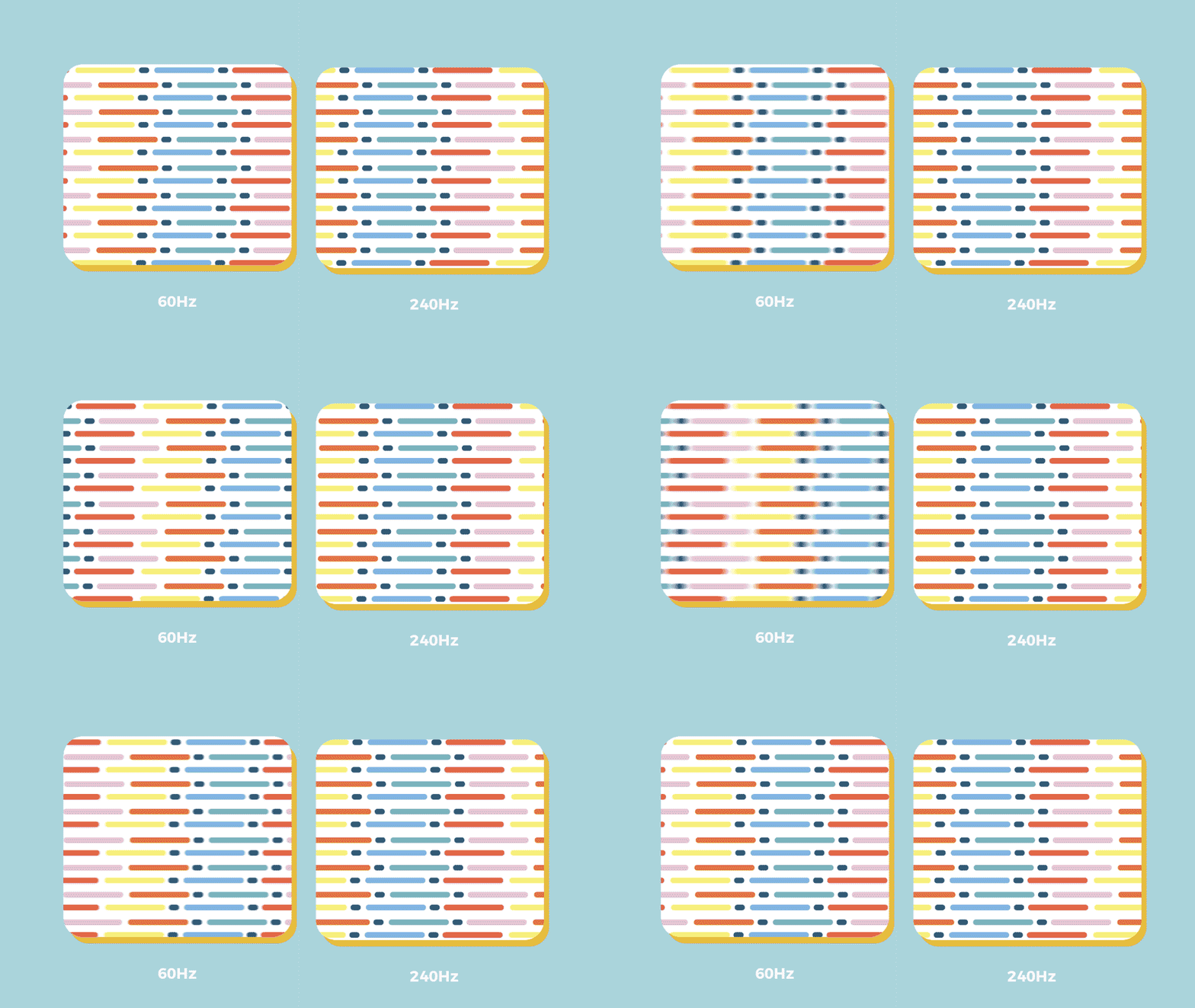
Note that this is entirely different from frame rates, in that these show how many images are produced within a second. Although, having a high refresh rate allows you to perform a lot better because it is optimized for higher frame rates. That’s why you see some gamers complain about playing on a 60Hz display.
Transitioning to a smartphone near you
Eventually, the concept of amping up a refresh rate will reach the world of smartphones. In fact, the OnePlus 7 Pro was actually the first mainstream smartphone to have a display with a 90Hz refresh rate. Most smartphones, even budget ones, have displays built with a 60Hz refresh rate. Something about it just makes you scroll through your phone without feeling too dizzy, unless you scroll too fast.
Premium smartphones mostly incorporate either a 90Hz or 120Hz refresh rate for a smoother UI experience. With higher refresh rates, scrolling through your phone feels a lot smoother without risking an eye sore. Of course, these smartphones do cost significantly more than your average, everyday smartphone.
Apart from premium smartphones, gaming smartphones have also incorporated higher than 60Hz refresh rates. Phones like the Razer Phone 2 and the ASUS ROG Phone 2 both come with a 120Hz refresh rate to suit mobile gamers, especially FPS (first-person shooter) gamers. With these higher refresh rates, mobile gamers see clearer images with less motion blur involved.

Do you really need all the hertz?
That begs the question: what do you need a high refresh rate screen for? When you use a PC, 60Hz is already good for most tasks and games. Trying to go for higher refresh rates usually means that you’re doing a lot more than the ordinary. Tasks such as heavy-duty data analytics or hardcore gaming are optimal for higher refresh rates.
The same logic works for smartphone displays, except on a smaller screen size. A lot of what you can do, you’re able to do so on 60Hz displays. If you’re just using your phone to browse social media, watch Netflix on the daily, and play games casually, you don’t need anything higher. Although, it is a premium to have if you want buttery smooth software.
If you play games competitively, you would prefer higher refresh rates just like in gaming monitors. Higher refresh rates allow you to perform at an optimal level when going for higher frame rates. We’re talking close to no image tearing or motion blur when you play PUBG Mobile or Call of Duty. While you can perform well at the default 60Hz, going for a 90Hz or 120Hz ideally makes the experience better.
Some final thoughts
Smartphone display refresh rates have always been a part of the technology. These displays were built in a way that everyone can benefit from them. It’s only fairly recently that smartphone companies came up with a way to make the experience a lot smoother. Hence, smartphones started incorporating higher refresh rates.
It almost feels like having that high refresh rate is a premium, given only select smartphones have it. But it’s a premium that you don’t really need unless you have a good reason to. Apart from the cost of experiencing it, it really depends on what you plan to do with your smartphone.
At the end of the day, it’s better to ask yourself if it’s a feature worth getting. If it’s something you feel you can’t live without, by all means, right?


With a huge change in naming scheme, Apple promises a big leap ahead.
The all-new Liquid Glass design isn’t just breath of fresh air — it’s a bold redesign ever since the iOS 7 came out.
It’s not limited just to the iPhone. It’s coming to the iPad, Mac, and even the Apple Watch!
And with latest Public Beta now available across all devices, now is the perfect time to try ’em out.
Here are our favorite features, design updates, and hidden gems in Apple’s latest OS 26 series of software updates.
Namely iOS 26, iPadOS 26, watchOS 26, visionOS 26, and macOS Tahoe.
Shopping for a new Windows laptop?
With so many choices out there, it can be tough to know where to start.
Should you prioritize performance, battery life, or portability? Can you find something affordable and premium-looking?
In this video, we break down everything you need to know about the new Snapdragon X Series laptops — a new category of Windows PCs that promise power, efficiency, and sleek design in one package.
Whether you’re a student, creative, or just looking to upgrade, this buyer’s guide will help you decide if a Snapdragon X Series laptop is right for you.

Apple dropped a ton of surprises in this year’s WWDC — and there’s more than just the Liquid Glass redesign.
From Workout Buddy, to game-changing Apple Intelligence features.
All the way to collaborative visionOS updates, and the next generation of iOS 26, macOS 26, and iPadOS 26.
Watch to see the top announcements NEED to know from the WWDC 2025 keynote!
Here are Michael Josh’s biggest takeaways from WWDC 2025 in one video — with the help of some TechTuber friends!


Galaxy Buds4 Pro review: I thought I was done with in-ears
This Buds4 you


WWE 2K26 lets you live out all the fantasy matches you could want
But you have to play for hours and hours to unlock everyone.


The HONOR X8d is serviceable
Steady but slow?

nubia Neo 5 series launches in the PH, starts below PhP 12K

Life is Strange: Reunion now available on consoles and PC

Why this AI-powered eye health exam is the only reading you need this season

DJI officially launches the Avata 360 with 8K immersive imaging

The Changan Eado Plus officially lands in the Philippines


-

 Reviews2 weeks ago
POCO X8 Pro Max review: A new beast from the far east
-

 News2 weeks ago
POCO X8 Pro Series: Price, availability in the Philippines
-

 Reviews2 weeks ago
POCO X8 Pro Iron Man Edition review: Midrange phone in superhero armor
-

 Automotive2 weeks ago
VinFast extends free unlimited charging in 3 markets amid rising fuel prices
-
Philippines1 week ago
The HONOR X8d is serviceable
-

 Reviews2 weeks ago
Samsung Galaxy S26 Ultra review: A phone you live with
-
 News2 weeks ago
POCO introduces X8 Pro Series with Dimensity 9500s
-
 Gaming2 weeks ago
NVIDIA’s DLSS 5 can turn your favorite AAA game into AI slop