
Apps
Grab rolls out new services at inaugural GrabX showcase
Grab For Family | Teens, Shared Saver, Advance Booking, Travel Pass, more

Grab has unveiled a new lineup of innovative new services designed “For Every You” during its inaugural GrabX showcase.
With the understanding that Grab app users are multifaceted and puts on different hats throughout the day, Grab’s landmark rollout of its latest products and features marks a shift in a way it intends to serve users’ everyday needs.
The new services include Grab For Family | Teens, GrabFood for One, Shared Saver, as well as Advanced Booking, Dine Out Discovery, and Grab Travel Pass.
The app has also launched a new Grab Early Access Programme, giving users the chance to try out these new services as soon as possible.
Here’s a quick rundown of each new app product:
Grab For Family | Teens
Grab For Family | Teens is a safe and reliable way for teenagers aged 13 to 17 to travel independently while giving parents and caregivers peace of mind. It will launch in May.
Grab will link a teenager’s account with a Grab for Family account, so the former can book rides on their own. Alternatively, the parent or guardian can also book on their behalf.
Extra safety features include prioritized assignment to top-rated partner drivers, ride PIN verification, and always-on AudioProtect. Soon, AudioProtect will also harness GenAI to detect in real-time if there is anything dangerous happening inside a vehicle.
Gatherings made seamless using LLM
Grab has also introduced a number of improvements behind-the-scenes to make sure large orders arrive reliably. That’s specially for special occasions like Ramadan, Chinese New Year, Tết and Christmas.
Grab bared that it uses a tailored Large Language Model (LLM) to determine if GrabFood orders coming in are considered a large order. This is done across 175 million food variations across the Grab platform.
If the algorithm determines an order is too bulky or heavy for one delivery person, the app will assign a four-wheeler instead. If there isn’t one, the order can be split to two motorbike delivery riders. Then, they’ll be dispatched in a way that both halves of the order arrive at a similar time.
This solution is now live across Southeast Asia and is continuously improving.
GrabFood for One
Meanwhile, ordering alone using Grab has been made more accessible and simpler. Grab now offers affordable meals with no minimum spend and a fixed low delivery fee.
The app works with merchant partners to curate and design a diverse list of meal options which customers can order through a quick checkout experience.
This service is now live in Indonesia, Malaysia, the Philippines, Singapore, Thailand, and Vietnam.
Shared Saver
Moreover, Shared Saver allows users to order food as if they’re in a Group Order, but with strangers.
The way this goes is Grab’s AI detects when there are multiple orders in the vicinity from the same merchant. Grab will then automatically decide to start a Shared Saver order.
Alternatively, a user can also initiate a Shared Saver order to save on fees. There’s a countdown timer to tell users how soon they need to make a decision.
Shared Saver will be piloted in Singapore this month, before Grab rolls out the service in other cities by June.
Advance Booking (Airport Pickup) expands

Furthermore, Grab has expanded its Advanced Booking (Airport Pickup) service to more locations. It was rolled out for Metro Manila airports last year initially. Now, more Grab users can benefit from its services.
The service offers passengers to book in advance for trips to the airport as early as a week ahead. Grab will assign the booking to its GrabAirport fleet.
Passengers can also adjust the booking as late as two hours prior to the original schedule. They can also communicate with the assigned driver 45 minutes in advance.
Advance Booking is now available at the following airports:
- I Gusti Ngurah Rai International Airport (Bali)
- Soekarno–Hatta International Airport (Jakarta)
- Yogyakarta International Airport
- Juanda International Airport (Surabaya)
- Kuala Lumpur International Airport 1
- Phuket International Airport
- Seletar Airport (Singapore)
More cities will benefit from the service in the coming months.
Dine Out Discovery (Powered by GrabMaps)
Grab is also leveraging its maps and food database by introducing Dine Out Discovery. This gives users an easy and intuitive way to look for dining options and deals around them.
Simply search and filter by cuisine, food preferences, ratings, price, and even walkable distance. Tap on restaurants to see details like menu, opening hours, photos, and user reviews. Finally, use the map to navigate to the restaurant, or even book a ride.
Dine Out Discovery will be available across all markets by May. Reservations will also be launched in Indonesia, Singapore, and Thailand by May.
Grab Travel Pass
Lastly, Grab Travel Pass will let tourists enjoy their getaways across the region. Users can purchase the Travel Pass in-app even before leaving their home country.
It includes various vouchers for airport rides, general transport, food delivery, and dining out. This way, users can enjoy traveling around Southeast Asia in a more affordable and convenient manner.






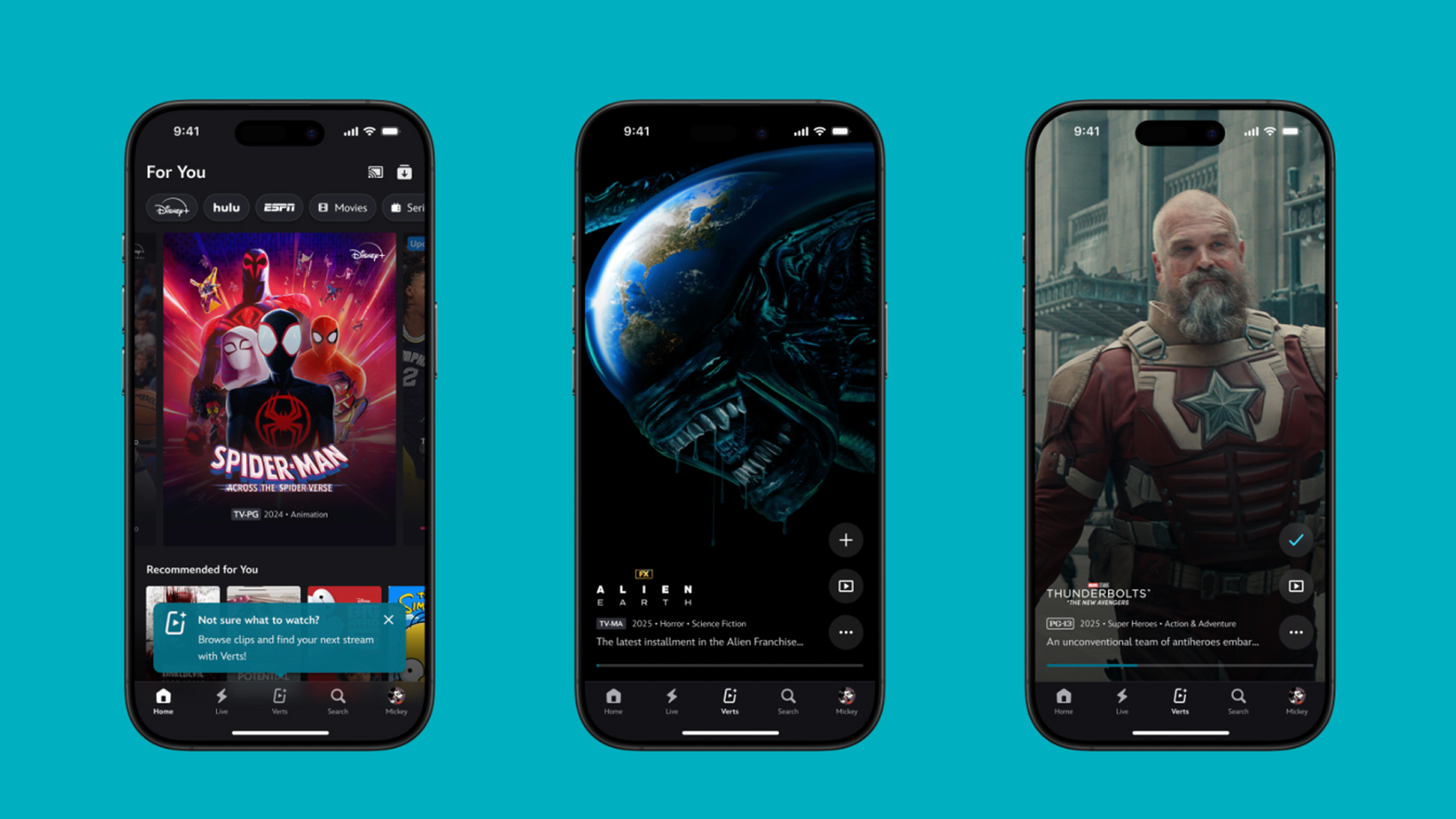
TikTok has changed how we consume media. Everything is now vertical. Even the most established streaming services, often a bastion for traditionally horizontal content, is adopting the different format. Now, Disney+ is getting a vertical feed called Verts.
Like its contemporaries, Verts presents a continuous feed of content but tailored to show the plethora of titles from the Disney+ library. This might include the first scenes of shows or notable highlights. The hope, of course, is to direct users to the longform content.
Directly from the Verts feed, users can easily add the respective title to their watchlist or go straight to the title’s page. In turn, the feed is accessible from the homepage since it has its own tab.
According to Disney, early experiments with the feature have driven engagement to available content. Right now, the feed is mostly for clipping enticing content from shows. However, the platform will experiment further with the format for new ways to tell stories.
Though Verts surely stands for “verticals” in this case, “adverts” might fit better as its full government name. Still, it might be a useful tool if you’re figuring out what to watch for the night.
Currently, Verts is available for Disney+ subscribers in the United States. Disney also has plans to expand the feature to ESPN for sports-related content.
SEE ALSO: Live NBA action on Disney Plus now available in the Philippines
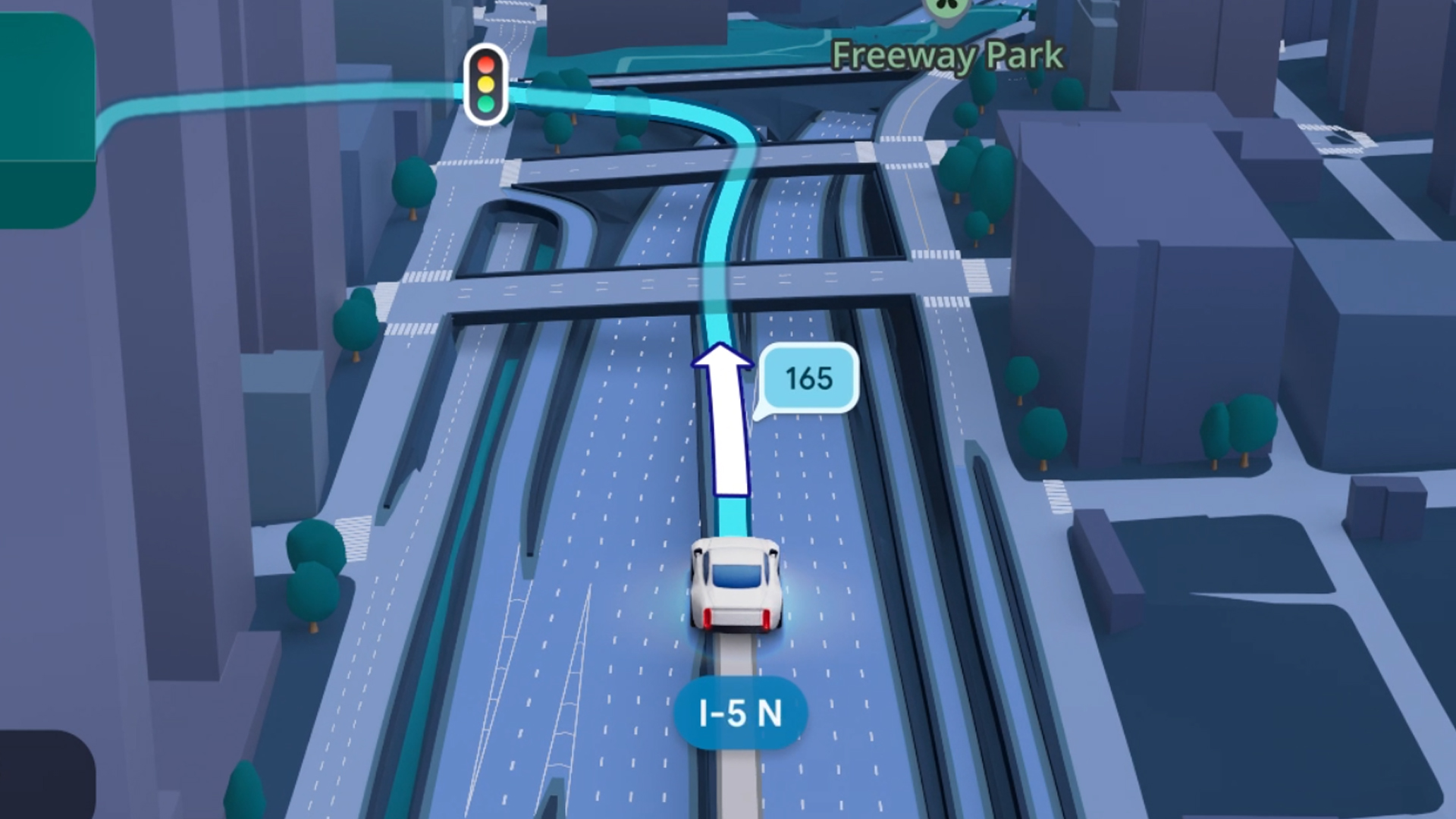
Some of today’s navigation apps are living in the future. Instead of a two-dimensional map, these apps render the user’s surroundings in 3D. It’s a nifty upgrade that helps drivers more accurately visualize directions on the fly. Finally, Google Maps is getting a much-needed upgrade and will take navigation to the third dimension.
In a new update rolling out today, the new Immersive Navigation feature will bring your surroundings to life. The 3D view creates a render of the surrounding buildings, overpasses, and terrain around the car. It takes the guesswork out of navigation by showing precisely where to turn and what landmarks to look out for.
In the same vein, you can now use Street View to preview your destination before you arrive. Google Maps will also highlight your destination’s entrance, side of the street, and nearby parking.
Outside of how the map is visualized, Google Maps is also infusing its service with Gemini. The new Ask Maps feature will let you engage with the app in a conversational manner. For example, if you’re in the middle of a long drive, you can now ask Maps where the best place is to stop over and have a coffee break. Ask Maps will provide directions, a potential itinerary, and even helpful links to book a reservation ahead of time.
Now, availability for both of these features is still a bit limited. Immersive View is rolling out today to compatible devices and vehicles in the United States. Further, availability will expand over the coming months.
Meanwhile, Ask Maps is available now in the United States and India for Android and iOS. A desktop version is coming soon.
SEE ALSO: Google Maps is finally getting a power saving mode
Apps
Apple Music, TikTok launch Play Full Song, a new music discovery experience
Rolling out worldwide exclusively through Apple Music
Ever came across a viral 15 or 30-second music snippet on TikTok that instantly became your jam on repeat?
For years, TikTok has been a regular source of songs that have become part of our playlists. And together with Apple Music, listening to the music you discover has just gotten even easier.
That’s through Play Full Song, a new music discovery experience, which launches exclusively though Apple Music.
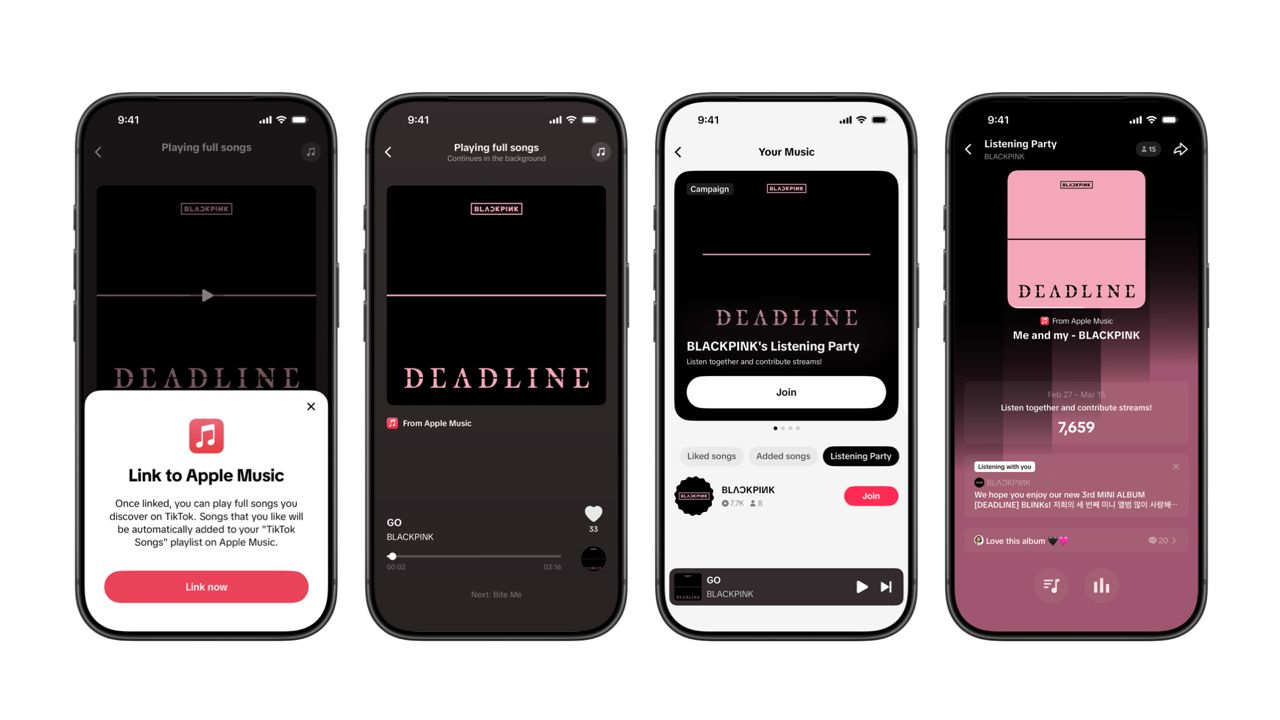
With the new feature, Apple Music subscribers can now enjoy full-length tracks that they discover on TikTok. That’s without ever leaving that popular streaming app.
Fans who discover a song that they love on their For You or Sound Detail page can simply tap the Play Full Song button to open up an Apple Music player and enjoy the song in its entirety.
From there, subscribers can continue listening to a personalized stream of recommended songs. That means no more need to switch apps and search separately.
The new Play Full Song experience helps music fans move seamlessly from the moment of discovery to deeper listening. It’s also designed to be instant and all within the same environment.
Moreover, users can also save their favorite songs to Your Music and add them directly to their Apple Music playlists.
Built using Apple’s MusicKit, full-length song playback takes place on Apple Music. This way, streams are paid within the Apple Music service, supporting artists and rights holders while giving fans a smooth, uninterrupted experience.
Listening Party also launched
The feature builds on the success of TikTok’s Add to Music App. This was previously launched to help artists and fans convert discovery on TikTok to a playlist save in Apple Music and other streaming services.
To cap the announcement, TikTok and Apple Music are also introducing Listening Party. This new feature is designed to bring artists and fans together around music.
It creates a shared environment where fans can listen to songs from their favorite artists in real time, interact with each her, and engage directly with the artist during the session.




Hermès launches a $5,000 MagSafe charger

REDMI Note 15 Series named Presenting Partner for Spartan Race Philippines 2026 season

Stylish, student-friendly HONOR X8d launches

The HONOR X8d is serviceable

Why the OPPO Reno15 5G series is a creator’s essential


-

 Reviews2 weeks ago
The Xiaomi 17 shoots Leica dream
-

 Hands-On2 weeks ago
OPPO Reno15 F 5G hands-on
-

 Reviews3 days ago
POCO X8 Pro Max review: A new beast from the far east
-

 News3 days ago
POCO X8 Pro Series: Price, availability in the Philippines
-

 Computers2 weeks ago
GIGABYTE collaborates with Capcom for RE Requiem custom PC
-

 Laptops1 week ago
Apple MacBook Neo Review
-

 Entertainment1 week ago
The internet is thirsting over the One Piece Season 2 cast
-

 Apps1 week ago
Google Maps is finally getting a 3D mode