



They say travel is the only thing you buy that makes you richer. This is definitely true. While it can give you priceless moments and unforgettable experiences, we have to admit that it often comes with a pretty steep price. We can’t put a price tag on expanding your horizons, but we can definitely help you make it a little less expensive.
I started young with traveling and my years of experience has led me to some hacks that can keep you from extra expenses. Today, I’ll be sharing with you my nine favorite apps that I use to make sure I don’t overspend and even save a pretty penny while I’m exploring a place far from home.
Skiplagged

I truly believe that booking the most convenient flights while staying within your budget should be an Olympic sport. There are so many factors to consider — from someone’s schedule, the comfort that you get, down to the layovers. I use a lot of apps for this to check for the best rates. There’s Kayak and Skyscanner which I’m sure you already know about. And then, there’s Skiplagged. This app finds hidden-city tickets and can give you even more savings if you’re only looking for a short-haul flight.
What it actually does is it books you a cheaper, long-haul flight with a layover at your actual destination. Then, you simply skip the rest of the trip, exiting at the airport of your layover. In fact, the app is so good, it was sued by some airlines.
Tip: When using flight price comparison apps, always turn on the option to “watch” a flight you’re interested in and turn on notifications on your phone to get an alert right away. Sometimes, the prices can drop and you’d want to be the first person to grab that seat.
N26

This is an online banking app that has saved my wallet one too many times while traveling. Some cities can be quite notorious for their money changers that charge commission so high, it feels like legal robbery. N26 lets me withdraw my money for free in most cities and has one of the best exchange rates out there. I have control over my money on my phone and I can also stay on top of my purchases since I get notifications for each transaction. They also make shopping fun and an absolute breeze since they give you a free Mastercard that comes in a nifty, clear design.
One thing to take note of is that this bank doesn’t have a physical branch. You apply for an account online via video chat and you’ll need your passport to prove your identity. To put money in your account, you can transfer funds from your other bank accounts. For cash deposits, you can go to their partner establishments (they’re usually supermarkets or drugstores) to put your money in.
Tip: When swiping any card while traveling, always pay in the local currency. You only go through the conversion once, saving you money.
XE

We’re often told to stop converting currencies in our heads when traveling since it hinders the fun. Well, sometimes, it’s essential to do so. For this, I use XE which gives me up-to-date rates and in more than one currency at that.
Tip: Traveling to more than one country during your trip and eyeing that really cute top from & Other Stories? Price tags in EU countries often have the prices for Euro and countries that have their own currency, making it easier for you to see whether buying that top in Berlin is cheaper compared to buying it in Copenhagen or Stockholm. Save the currencies you’ll be using throughout the trip to make comparison a whole lot easier.
Trail Wallet

Expenses during your travels can creep up at you, especially while you’re enjoying a new place. From dining out to entrance fees for museums and major attractions, small expenses can accumulate rather quickly. This is why I set a daily budget every time I’m traveling. Sticking to it might be a more difficult task if I didn’t have Trail Wallet installed on my iPhone. It’s an oldie but definitely a goodie. I just set a daily budget and enter my expenses on the app. I can classify them by category (accommodation, food, etc.) and even add notes on them should I need to. It also allows me to set my home currency and that of the place I am traveling to so I know how much I’m actually spending. After a trip, it gives me — with colored graphs to boot — a comprehensive view of my spending, making it easier to plan for next time.
Tip: Enter your expenses as you go so you don’t forget to do it later on!
Yelp

Another app that’s been around for ages but has proven that it can stand the test of time. If you’re someone like me who takes food seriously, then you’d want to eat at places that are worth your money and the calories. Yelp helps you find a restaurant that has the food you’re craving and is within your budget. Using the map function and veering away from areas that are touristy, while taking reviews and prices into consideration, can even bring you to some hidden gems that are only popular among locals. Want more savings? Download apps like OpenTable and TheFork. Not only can you make your table reservations through these apps, you can also get discounts when you dine at certain times.
Tip: Different city, different dining discount app. While OpenTable and TheFork are popular in more than one city, some countries prefer their localized version. It’s best to research in advance which dining app is the best at your destination to maximize your discount potential.
So that’s it for my money-saving, travel apps! Do you have any recommendations for me too? Would love to learn about the ones that you use in the comments section below!





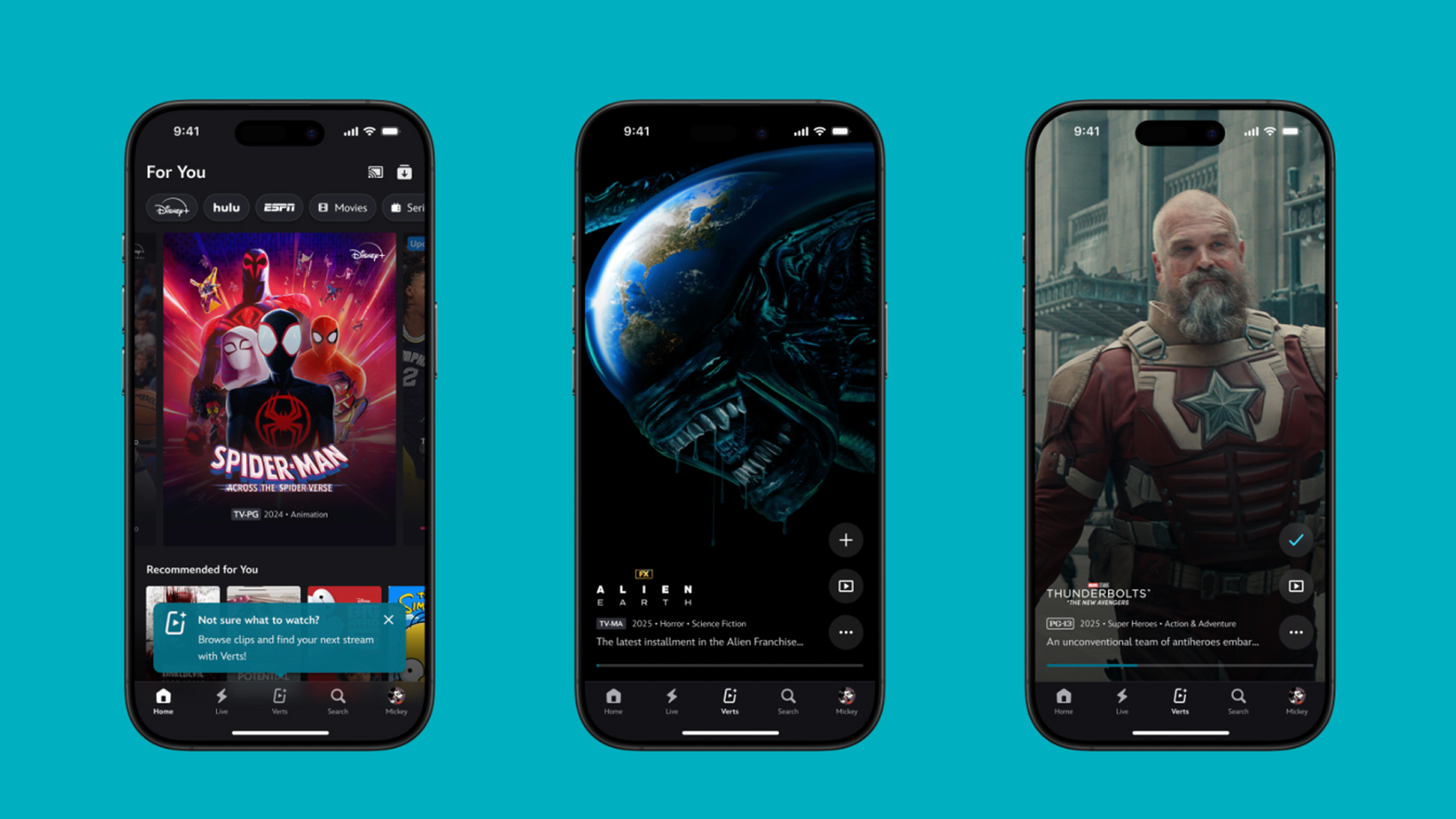
TikTok has changed how we consume media. Everything is now vertical. Even the most established streaming services, often a bastion for traditionally horizontal content, is adopting the different format. Now, Disney+ is getting a vertical feed called Verts.
Like its contemporaries, Verts presents a continuous feed of content but tailored to show the plethora of titles from the Disney+ library. This might include the first scenes of shows or notable highlights. The hope, of course, is to direct users to the longform content.
Directly from the Verts feed, users can easily add the respective title to their watchlist or go straight to the title’s page. In turn, the feed is accessible from the homepage since it has its own tab.
According to Disney, early experiments with the feature have driven engagement to available content. Right now, the feed is mostly for clipping enticing content from shows. However, the platform will experiment further with the format for new ways to tell stories.
Though Verts surely stands for “verticals” in this case, “adverts” might fit better as its full government name. Still, it might be a useful tool if you’re figuring out what to watch for the night.
Currently, Verts is available for Disney+ subscribers in the United States. Disney also has plans to expand the feature to ESPN for sports-related content.
SEE ALSO: Live NBA action on Disney Plus now available in the Philippines
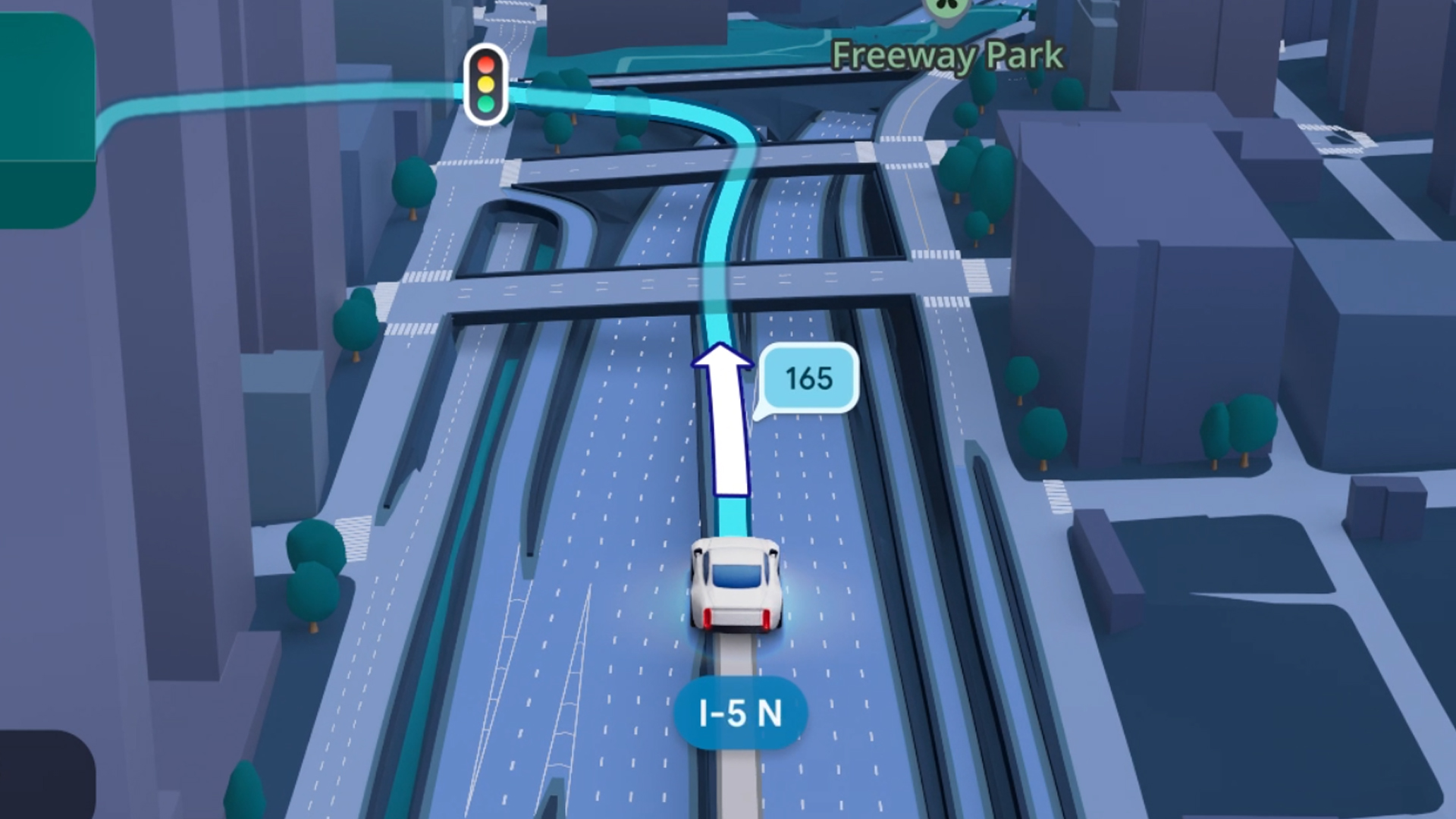
Some of today’s navigation apps are living in the future. Instead of a two-dimensional map, these apps render the user’s surroundings in 3D. It’s a nifty upgrade that helps drivers more accurately visualize directions on the fly. Finally, Google Maps is getting a much-needed upgrade and will take navigation to the third dimension.
In a new update rolling out today, the new Immersive Navigation feature will bring your surroundings to life. The 3D view creates a render of the surrounding buildings, overpasses, and terrain around the car. It takes the guesswork out of navigation by showing precisely where to turn and what landmarks to look out for.
In the same vein, you can now use Street View to preview your destination before you arrive. Google Maps will also highlight your destination’s entrance, side of the street, and nearby parking.
Outside of how the map is visualized, Google Maps is also infusing its service with Gemini. The new Ask Maps feature will let you engage with the app in a conversational manner. For example, if you’re in the middle of a long drive, you can now ask Maps where the best place is to stop over and have a coffee break. Ask Maps will provide directions, a potential itinerary, and even helpful links to book a reservation ahead of time.
Now, availability for both of these features is still a bit limited. Immersive View is rolling out today to compatible devices and vehicles in the United States. Further, availability will expand over the coming months.
Meanwhile, Ask Maps is available now in the United States and India for Android and iOS. A desktop version is coming soon.
SEE ALSO: Google Maps is finally getting a power saving mode
Apps
Apple Music, TikTok launch Play Full Song, a new music discovery experience
Rolling out worldwide exclusively through Apple Music

Ever came across a viral 15 or 30-second music snippet on TikTok that instantly became your jam on repeat?
For years, TikTok has been a regular source of songs that have become part of our playlists. And together with Apple Music, listening to the music you discover has just gotten even easier.
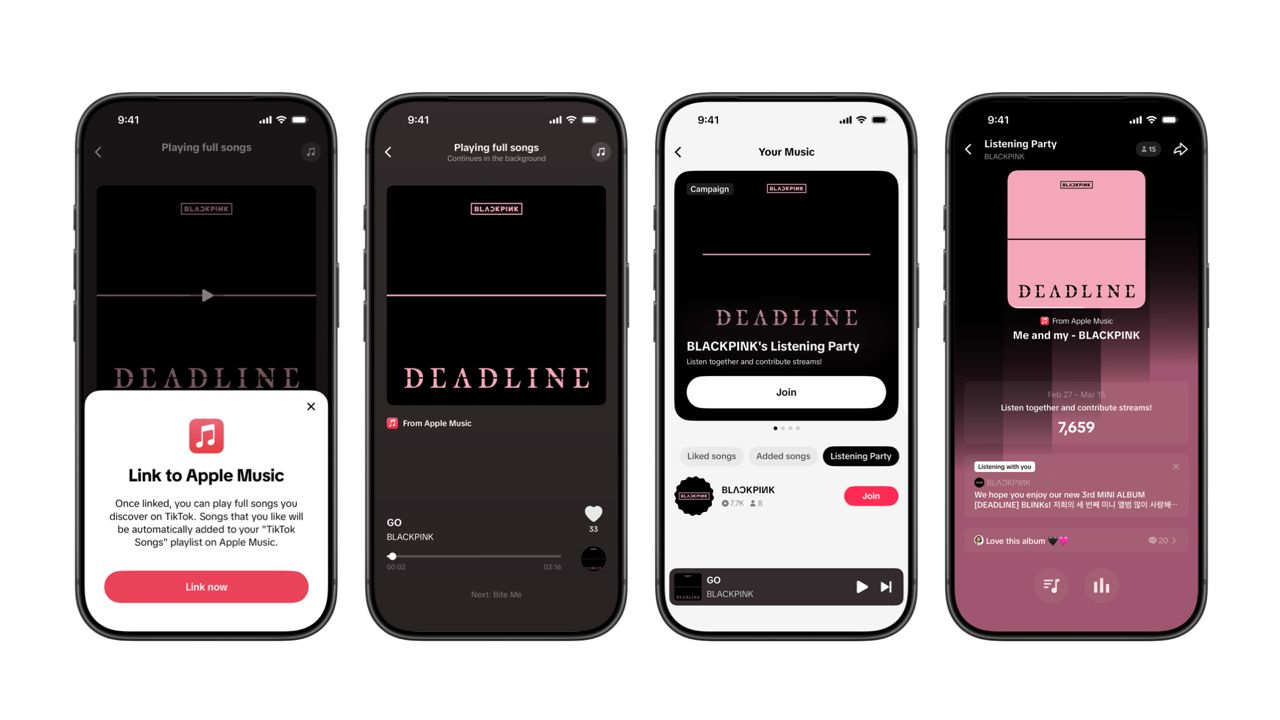
That’s through Play Full Song, a new music discovery experience, which launches exclusively though Apple Music.
With the new feature, Apple Music subscribers can now enjoy full-length tracks that they discover on TikTok. That’s without ever leaving that popular streaming app.
Fans who discover a song that they love on their For You or Sound Detail page can simply tap the Play Full Song button to open up an Apple Music player and enjoy the song in its entirety.
From there, subscribers can continue listening to a personalized stream of recommended songs. That means no more need to switch apps and search separately.
The new Play Full Song experience helps music fans move seamlessly from the moment of discovery to deeper listening. It’s also designed to be instant and all within the same environment.
Moreover, users can also save their favorite songs to Your Music and add them directly to their Apple Music playlists.
Built using Apple’s MusicKit, full-length song playback takes place on Apple Music. This way, streams are paid within the Apple Music service, supporting artists and rights holders while giving fans a smooth, uninterrupted experience.
Listening Party also launched
The feature builds on the success of TikTok’s Add to Music App. This was previously launched to help artists and fans convert discovery on TikTok to a playlist save in Apple Music and other streaming services.
To cap the announcement, TikTok and Apple Music are also introducing Listening Party. This new feature is designed to bring artists and fans together around music.
It creates a shared environment where fans can listen to songs from their favorite artists in real time, interact with each her, and engage directly with the artist during the session.


Infinix NOTE 60 Ultra: Not bad for a flagship push
It's definitely got the looks, though.


JBL Sense Pro review
My daily driver met a loud and capable rival in this quest for a superior training companion.


Shokz OpenFit Pro: Somewhere between awareness and focus
Find your balance

Acerpure Chill: Air conditioners for the summer

Match Pulse: TECNO SPARK 50 5G
Infinix NOTE 60 Ultra: Not bad for a flagship push
JBL Sense Pro review

LE SSERAFIM Chaewon flexes Galaxy S26 Ultra Privacy Display


-

 Gaming2 weeks ago
WWE 2K26 lets you live out all the fantasy matches you could want
-

 Reviews1 week ago
Galaxy Buds4 Pro review: I thought I was done with in-ears
-

 Smartphones2 weeks ago
Spotlight: OPPO Find N6
-

 Automotive2 weeks ago
How the Ford Ranger is powering community resilience
-

 News6 days ago
nubia Neo 5 series launches in the PH, starts below PhP 12K
-

 News2 weeks ago
nubia to launch new Neo 5 series gaming phones on March 28
-

 Gaming1 week ago
Razer Blade 16 (2026) packs more cores, faster memory
-

 Accessories1 week ago
Razer sharpens its competitive edge with Viper V4 Pro and Gigantus V2 Pro