
News
iOS 17 adds NameDrop, Journal, more
More personal and intuitive

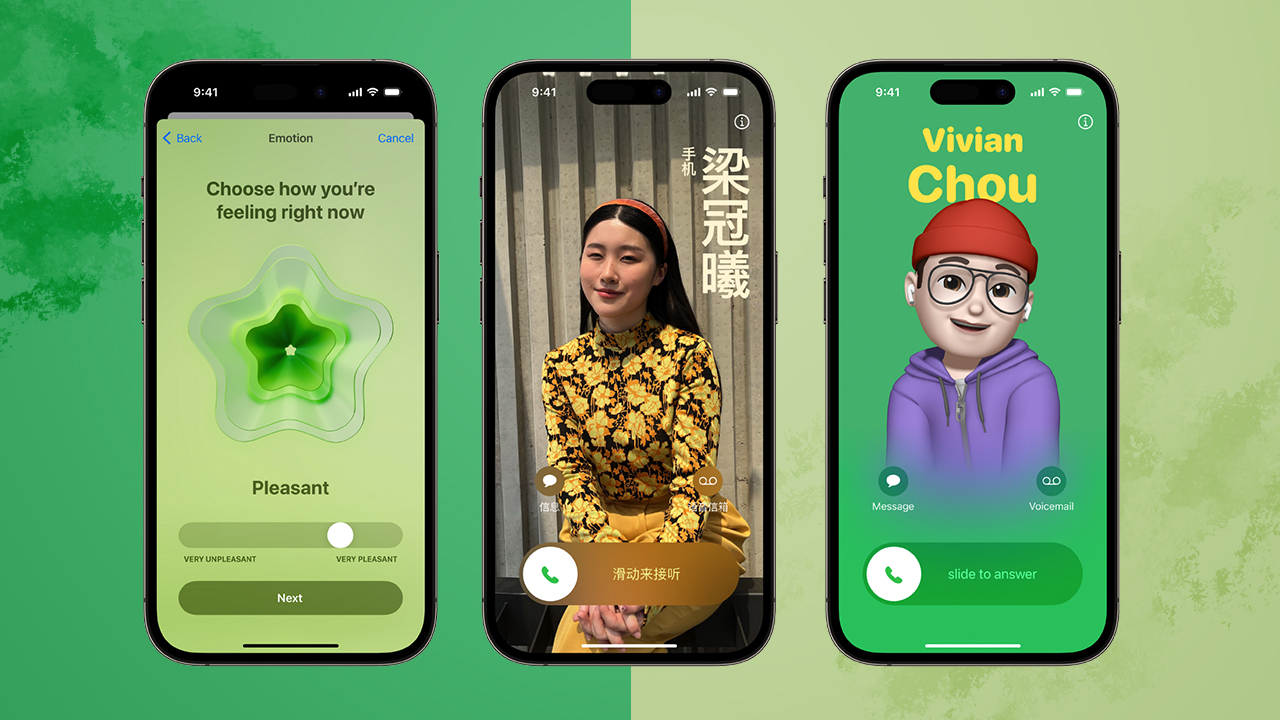
Just when you thought iOS couldn’t get any better, Apple goes out of their way to add things you perhaps didn’t immediately know you needed. Such is the case with iOS 17.
The new features range from calls and contacts upgrades, all the way to stuff for your mental health. Here are the most notable ones.
Contact Posters
Users can customize how they appear, bringing a completely new look to incoming calls. Emoji, photos, different fonts and colors are all in play. Go wild. And they will also be available for third-party calling apps.
Live Voicemail
See real-time transcription as someone leaves a voicemail. And you can still pick-up the call as they are leaving their message. Spam calls won’t appear as Live Voicemail, and will instead be instantly declined.
FaceTime Audio and Video Messages
FaceTime now supports audio and video messages. When users call someone who is not available, they can share a message that can be enjoyed later.
FaceTime Reactions
Be more expressive during FaceTime calls with hearts, balloons, fireworks, laser beams, rain, and more. The new effects can be activated through simple gestures. Also works with third-party video calling apps.
FaceTime on TV
FaceTime now extends to the biggest screen in the home. Powered by Continuity Camera, users can initiate a video call directly from Apple TV, or start the call on iPhone and then hand it off to Apple TV, to see friends and family on their television.
Live Stickers
Lift subjects from photos and add effects that bring them to life. A new drawer in the keyboard puts all of a user’s stickers in one place for easier access across iOS.
New Messages
An expandable menu that can be accessed with a simple tap to display iMessage apps gives Messages a sleeker look. Search gets more powerful and precise with search filters. A new catch-up arrow indicates where the user last left off in the conversation, and replying inline is as simple as swiping on a text bubble. If a user shares their location, it will update in real time right in the conversation.
Check In
For when a user wants to notify a family member or friend that they have made it to their destination safely. After a user initiates a Check In, their friend or family member will automatically be notified as soon as the user arrives. Device location, battery level, and cell service status will be shared with selected contact if user appears to not be moving.
NameDrop
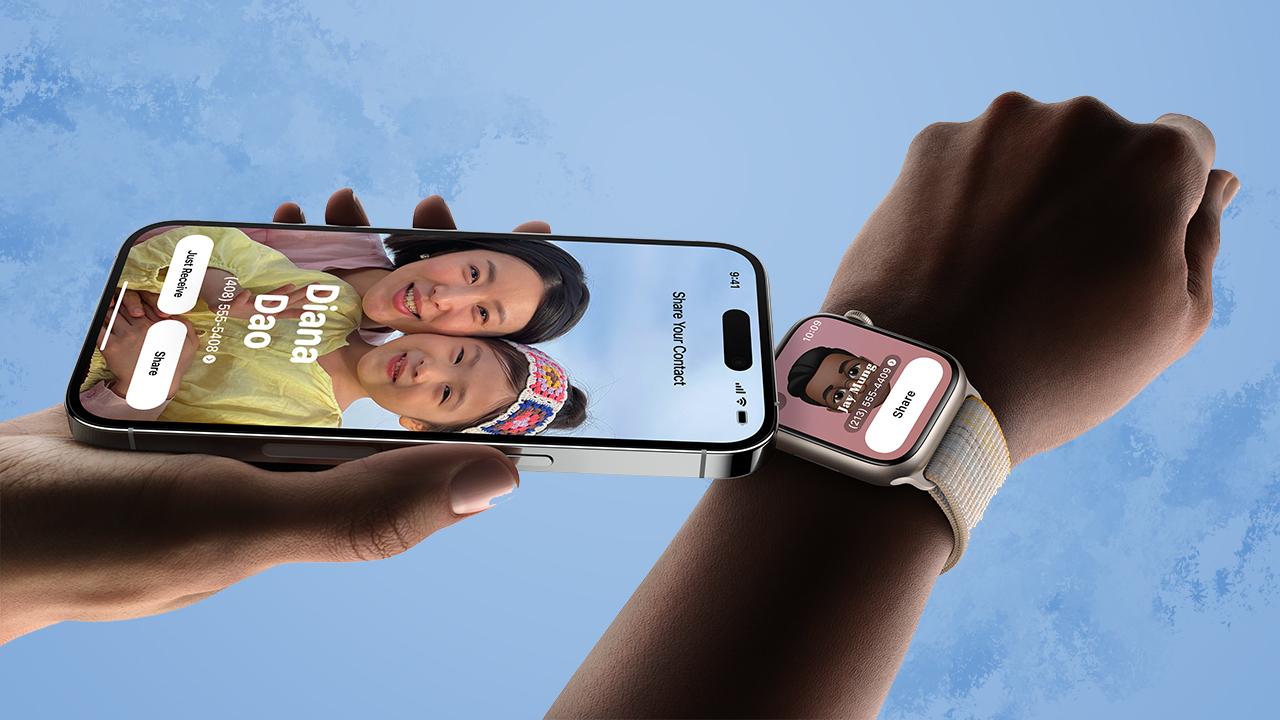
Bring iPhones together or bring an iPhone and Apple Watch together to easily share contact information.
With the same gesture, users can also share content or start SharePlay to listen to music, watch a movie, or play a game while in close proximity between iPhone devices.
StandBy
Gives users a full-screen experience with glanceable information designed to be viewed from a distance when iPhone is on its side and charging.
Journal
A new app that helps iPhone users reflect and practice gratitude through journaling. It uses on-device machine learning for personalized suggestions for the user’s journal entry. Suggestions are intelligently curated from recent activity, including photos, people, places, workouts, and more. It is built to protect a user’s privacy and ensure no one — including Apple — can access a user’s entries.





Finance
HONOR, Fidesmo partner for contactless payments across Europe, Middle East
Enabling contactless payments on the HONOR Watch 6

HONOR and Fidesmo have partnered to launch contactless payments across Europe and the Middle East on the HONOR Watch 6.
Powered by Fidesmo Pay, the integration enables users to connect an existing Mastercard or Visa card to their watch and complete contactless transactions directly from the wearable device.
This brings Fidesmo’s network of over 900 banks and financial institutions to HONOR’s customers. Users can connect an existing card to the HONOR Watch 6 instantly through the HONOR Health App, which installs a unique token directly onto the watch.
Acting as a secure reference to the payment method, this token allows customers to pay without storing their actual payment details on the device. Once installed, users can tap the watch at any
contactless terminal to pay, just as they would with a card or phone.
HONOR joins a group of device partners that already includes Swatch, Polar, and Mondaine as Fidesmo continues to build momentum across categories.
Entertainment
Max vs 100 will feature Max Verstappen race against 100 go-karters
The live event will stream at midnight on September 17.


As a child, one of my favorite thought experiments is to imagine who would win in a fight between my favorite characters at the time and a number of other random beings. For example, will Superman prevail against 100 Magnetos? Those are the ways I kept my young mind occupied. Now, as a former child, I still do the same thing but with more realistic people, like imagining if Steph Curry can win against 100 high schoolers. This week, ESPN and Disney+ are making one of those imaginary fights real: Formula 1 legend Max Verstappen versus 100 go-karters.
In an upcoming live event streaming exclusively on Disney+, Max vs 100 will pit the four-time world champion against 100 go-karters from everywhere in pop culture. This gaggle of 100 will include popular content creators such as Twitch streamer ExtraEmily, car photographer Larry Chen, and NBA shooting coach Chris Matthews.
All 101 drivers will race around one of the most iconic tracks in Formula 1 history, Silverstone in England. The track will be reconfigured to match the special race.
Of course, this is more than just a parade of go-karts. Max Verstappen will start at the back of the grid, meaning he has to overtake all 100 racers to win. Now, the Dutch driver is no stranger to winning from the back. In 2024, he won the Sao Paulo Grand Prix despite starting from P17 (out of 20 racers). Max vs 100, though familiar for the driver, presents a different challenge. Can he overtake 100 times to win the race?
Max vs 100 will stream live through Disney+ on September 17, 12:00am PHT.
Apps
Apple’s best feature to cure motion sickness is finally on Android
Google copies a good page from Apple’s playbook.
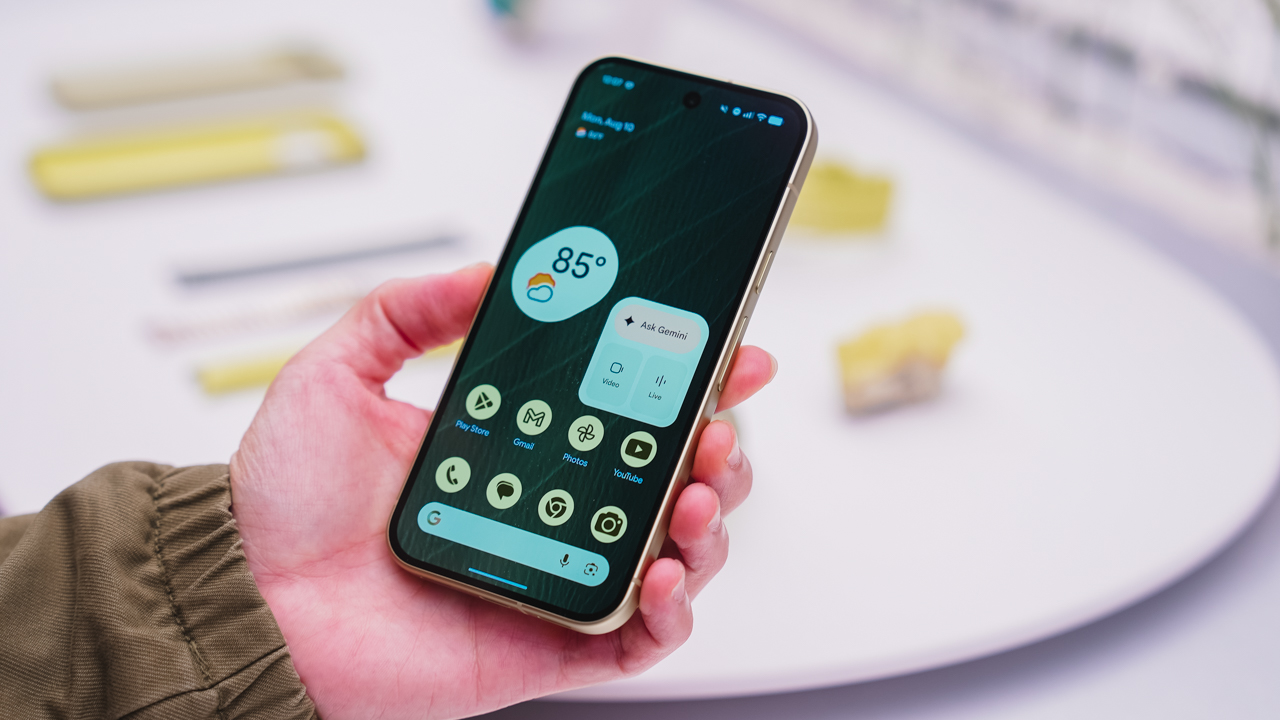
As an Android user, I’ve been jealous of iPhone users for a while now, but it’s not for the reason you might think. See, I’m ridiculously prone to motion sickness when I’m not driving. So, when I discovered that Apple has a software-based cure called Vehicle Motion Cues, I wanted it immediately. Now, Android does have third-party apps that do the same thing, but they’re not as good as a fully native version. Well, those dark, nauseating days are about to come to an end. Android 17 is finally getting a similar tool called Motion assist.
Before that, let’s rewind for a bit. What do these features do? How can they cure motion sickness?
Whenever you open Vehicle Motion Cues or Motion assist, the interface spawns a series of dots on the screen. These dots respond to movement. For example, if the vehicle turns to the left, the dots also go to the left, mimicking the movement. Without cues like this, the stationary nature of the screen clashes with our brain’s perception of movement. The disparity creates that feeling of nausea. Basically, our eyes are desperately trying to focus on the static screen, but our brains are telling us that we should be seeing motion. Having moving dots reorients our brain and places the phone inside our perception of movement.
Now, you can enable the same feature on your Android 17 device through Settings > All services > Motion assist under Personal & device safety. You can also set it so that the feature turns on automatically when the phone detects that you’re in a moving vehicle. Finally, you can also tweak the shape, color, and opacity of these dots.
Android 17’s Motion assist is rolling out now to compatible devices.
SEE ALSO: These are the best Android 17 features (if you hate AI)


REDMI Note 17 Pro Max review: A new breed born from AI greed
Welcome to the new normal


Marvel’s Wolverine review: When the claws come out
A brutal, cinematic superhero adventure

Setting your bedsheets ablaze with the Lovense Solace Pro
The closest proxy I could find where I'm guilty as sin

Now Playing: Resident Evil

HONOR, Fidesmo partner for contactless payments across Europe, Middle East

Ford revs up Truck Month with extended 5-star care offers
REDMI Note 17 Pro Max review: A new breed born from AI greed

REDMI NOTE 17 Series: Price, availability in the Philippines

TECNO MEGAPAD 2 review: Eyes on the size

realme 16T 5G with 8000mAh battery, IP69 Pro rating launches in PH

HUAWEI Pura X View is 2026’s first WIDE slab-type smartphone

REDMI reveals the refreshed Note 17 and Note 17 Pro series

REDMI Note 17 Series: Price, availability in Singapore


-
 News1 week ago
HUAWEI Pura X View is 2026’s first WIDE slab-type smartphone
-

 News1 week ago
The CAMON Slim 5G is TECNO’s latest ultra-slim smartphone
-

 Cameras2 weeks ago
DJI Osmo 360 II review: Going all-in on the ecosystem
-

 IFA 20262 weeks ago
TECNO MEGABOOK T15 360 unveiled at IFA 2026
-

 Gaming2 weeks ago
NBA 2K27 review: A two-way All-Star
-

 News7 days ago
iPhone 18 Pro series: Price, availability in the Philippines
-

 IFA 20262 weeks ago
TECNO’s POVA 8 Pro gets a stealthy makeover
-

 Automotive2 weeks ago
Ford’s new Everest lineup brings V6 engine to the top, tech down the line