
Apps
Grab launches Advance Booking feature for airport trips
Available for Manila airport trips for now

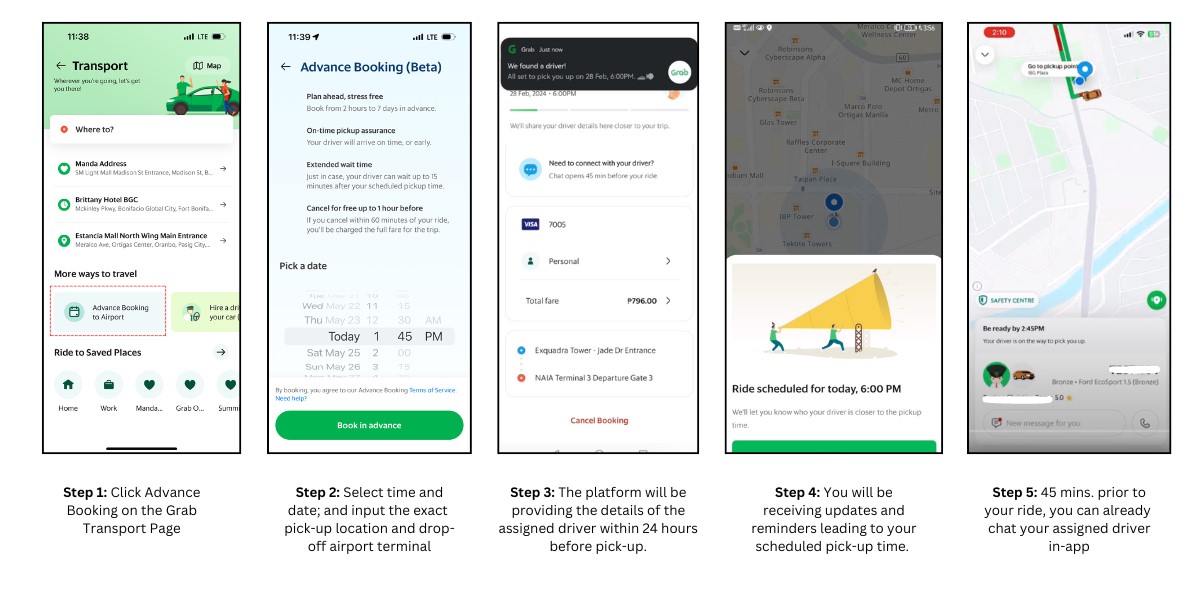
Grab Philippines has launched Advanced Booking, a new feature under its ride-hailing services that will allow clients to book trips to and from airports as early as one week ahead.
Currently in its beta phase, Grab Advance Booking guarantees on-time rides to the airport via the GrabAirport fleet. The flexible reservation window also allows customers to make changes to be made as late as two hours prior.
For now, the new service is currently exclusive to trips going to Metro Manila airports via its GrabAirport fleet. This was launched last year in conjunction with the MIAA. Its availability in cities and regions outside of the National Capital Region is expected to transpire in the second half of 2024.
Worry-free bookings
In case drivers ditching their bookings worry you, Grab Advance Booking has its safeguards in place. Drivers are guaranteed to be on time. Should there be a disruption, Grab will swiftly reassign passengers to an alternative ride to ensure successful trip completion. An addition, a PhP 100 courtesy credit will be offered if the driver arrives late for a pre-scheduled ride.
Furthermore, a 15-minute wait time is implemented for the specific service. This will give customers enough room should there be minor inconveniences or if they need more time to reach the pick-up location.
On the other hand, riders also get protection should there be sudden cancellations. Passengers cancelling with less than an hour left before the pick-up time will be charged in full. The same policy takes effect when a passenger becomes unreachable beyond the 15-minute window. However, there will be no charge for any passenger cancellation done at least one hour before the scheduled pick-up time.
To place a booking, select “Advance Booking” under the Grab transport page. Then, enter the date and time of their ride, along with the pick-up location and the specific airport terminal.
Advance Booking passengers will also receive regular updates and reminders about their ride’s status. Finally, 45 minutes prior to the scheduled trip, passengers can already communicate with their assigned driver on the app.
As a safety and convenience precaution, rides under Advance Booking will allow only a maximum of three passengers and three pieces of luggage.






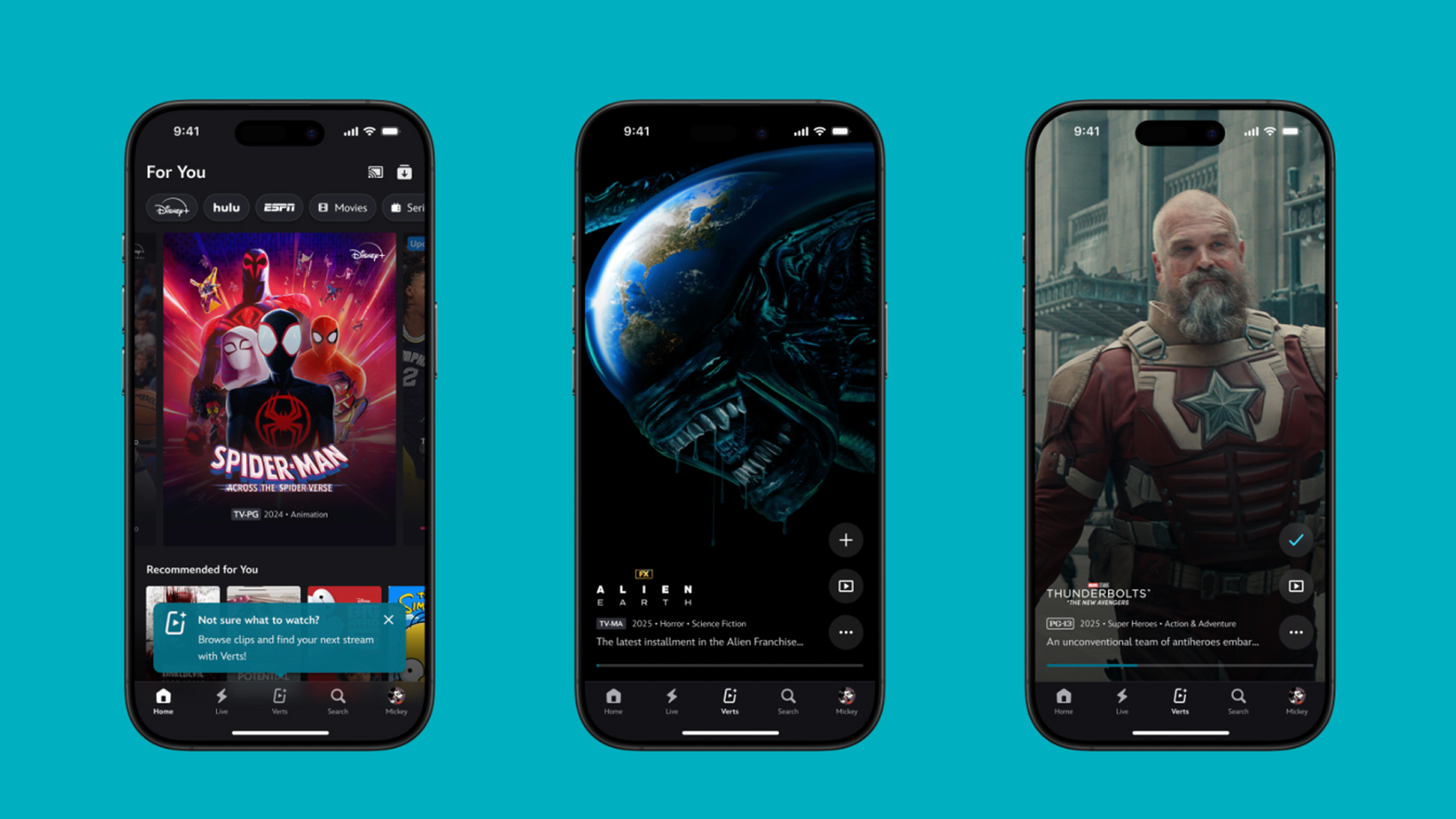
TikTok has changed how we consume media. Everything is now vertical. Even the most established streaming services, often a bastion for traditionally horizontal content, is adopting the different format. Now, Disney+ is getting a vertical feed called Verts.
Like its contemporaries, Verts presents a continuous feed of content but tailored to show the plethora of titles from the Disney+ library. This might include the first scenes of shows or notable highlights. The hope, of course, is to direct users to the longform content.
Directly from the Verts feed, users can easily add the respective title to their watchlist or go straight to the title’s page. In turn, the feed is accessible from the homepage since it has its own tab.
According to Disney, early experiments with the feature have driven engagement to available content. Right now, the feed is mostly for clipping enticing content from shows. However, the platform will experiment further with the format for new ways to tell stories.
Though Verts surely stands for “verticals” in this case, “adverts” might fit better as its full government name. Still, it might be a useful tool if you’re figuring out what to watch for the night.
Currently, Verts is available for Disney+ subscribers in the United States. Disney also has plans to expand the feature to ESPN for sports-related content.
SEE ALSO: Live NBA action on Disney Plus now available in the Philippines
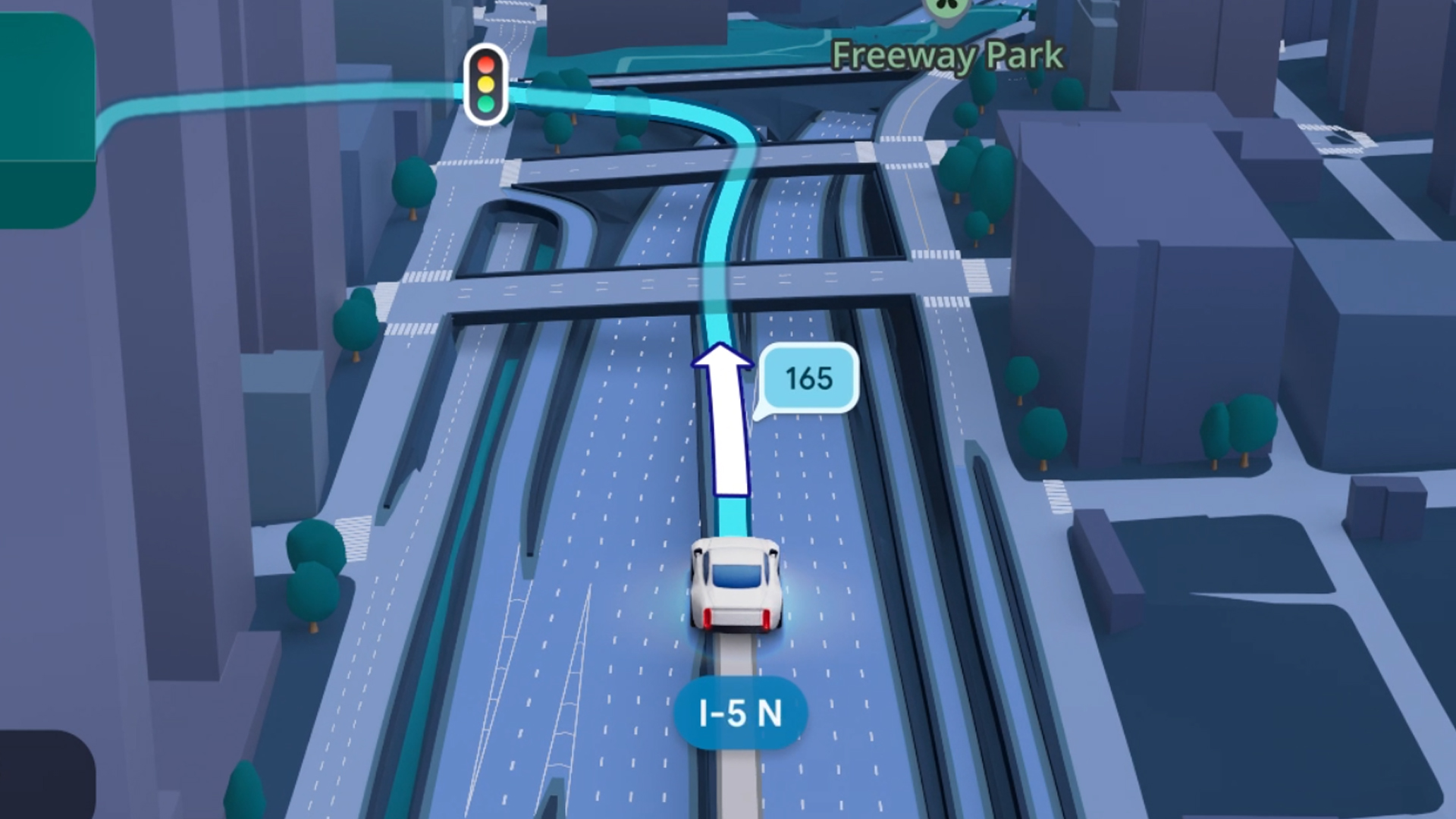
Some of today’s navigation apps are living in the future. Instead of a two-dimensional map, these apps render the user’s surroundings in 3D. It’s a nifty upgrade that helps drivers more accurately visualize directions on the fly. Finally, Google Maps is getting a much-needed upgrade and will take navigation to the third dimension.
In a new update rolling out today, the new Immersive Navigation feature will bring your surroundings to life. The 3D view creates a render of the surrounding buildings, overpasses, and terrain around the car. It takes the guesswork out of navigation by showing precisely where to turn and what landmarks to look out for.
In the same vein, you can now use Street View to preview your destination before you arrive. Google Maps will also highlight your destination’s entrance, side of the street, and nearby parking.
Outside of how the map is visualized, Google Maps is also infusing its service with Gemini. The new Ask Maps feature will let you engage with the app in a conversational manner. For example, if you’re in the middle of a long drive, you can now ask Maps where the best place is to stop over and have a coffee break. Ask Maps will provide directions, a potential itinerary, and even helpful links to book a reservation ahead of time.
Now, availability for both of these features is still a bit limited. Immersive View is rolling out today to compatible devices and vehicles in the United States. Further, availability will expand over the coming months.
Meanwhile, Ask Maps is available now in the United States and India for Android and iOS. A desktop version is coming soon.
SEE ALSO: Google Maps is finally getting a power saving mode
Apps
Apple Music, TikTok launch Play Full Song, a new music discovery experience
Rolling out worldwide exclusively through Apple Music

Ever came across a viral 15 or 30-second music snippet on TikTok that instantly became your jam on repeat?
For years, TikTok has been a regular source of songs that have become part of our playlists. And together with Apple Music, listening to the music you discover has just gotten even easier.
That’s through Play Full Song, a new music discovery experience, which launches exclusively though Apple Music.
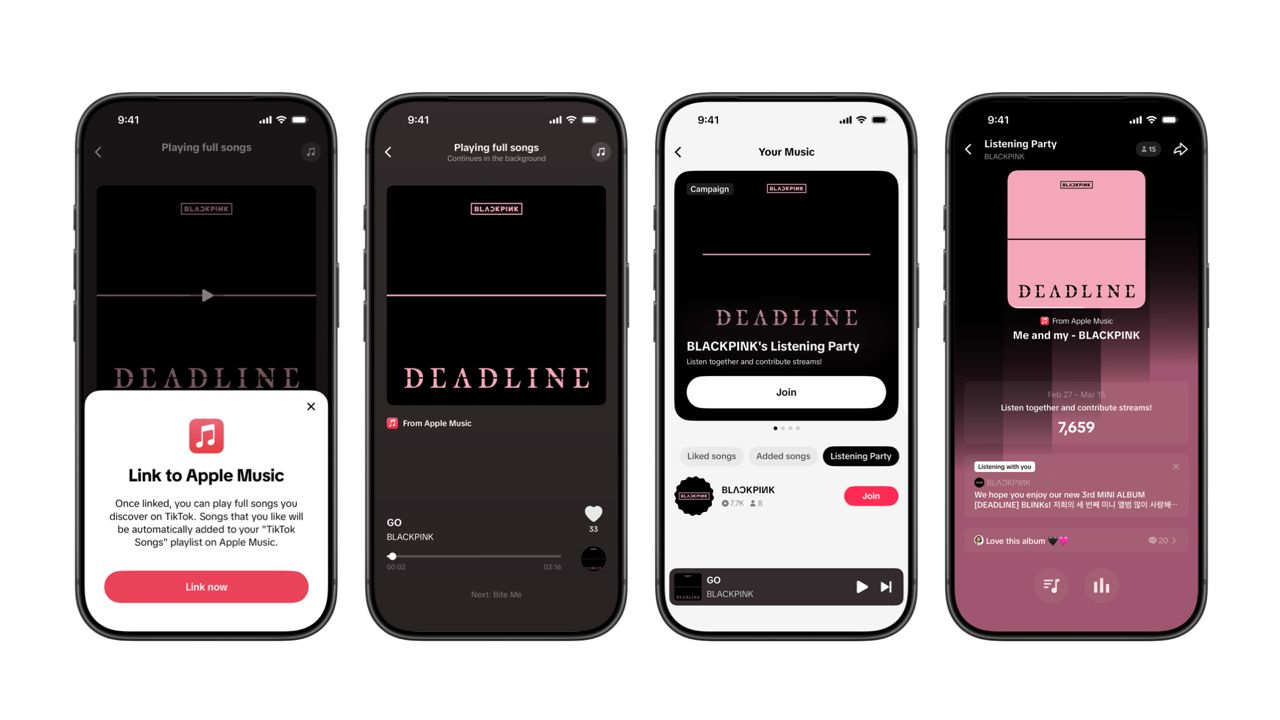
With the new feature, Apple Music subscribers can now enjoy full-length tracks that they discover on TikTok. That’s without ever leaving that popular streaming app.
Fans who discover a song that they love on their For You or Sound Detail page can simply tap the Play Full Song button to open up an Apple Music player and enjoy the song in its entirety.
From there, subscribers can continue listening to a personalized stream of recommended songs. That means no more need to switch apps and search separately.
The new Play Full Song experience helps music fans move seamlessly from the moment of discovery to deeper listening. It’s also designed to be instant and all within the same environment.
Moreover, users can also save their favorite songs to Your Music and add them directly to their Apple Music playlists.
Built using Apple’s MusicKit, full-length song playback takes place on Apple Music. This way, streams are paid within the Apple Music service, supporting artists and rights holders while giving fans a smooth, uninterrupted experience.
Listening Party also launched
The feature builds on the success of TikTok’s Add to Music App. This was previously launched to help artists and fans convert discovery on TikTok to a playlist save in Apple Music and other streaming services.
To cap the announcement, TikTok and Apple Music are also introducing Listening Party. This new feature is designed to bring artists and fans together around music.
It creates a shared environment where fans can listen to songs from their favorite artists in real time, interact with each her, and engage directly with the artist during the session.



Disney+ launches a TikTok-coded vertical feed called Verts

Google Maps is finally getting a 3D mode

KPop Demon Hunters is officially getting a sequel

Bringing Care-a-Lot to my daily carry

Galaxy AI on the Samsung Galaxy S26 Ultra


-

 Reviews2 weeks ago
TECNO CAMON 50 Ultra review: End of an era?
-

 MWC 20261 week ago
Infinix NOTE 60 Ultra makes a motorsport-inspired debut
-

 MWC 20262 weeks ago
TECNO launches the all-new CAMON 50 series
-

 MWC 20262 weeks ago
TECNO showcases cool concepts at MWC 2026
-
 MWC 20262 weeks ago
TECNO unleashes Tonino Lamborghini collection
-

 Computers1 week ago
AMD announces Ryzen AI 400, AI 400 PRO series at MWC 2026
-
 MWC 20262 weeks ago
HONOR unveils Robot Phone concept at MWC 2026
-
 MWC 20262 weeks ago
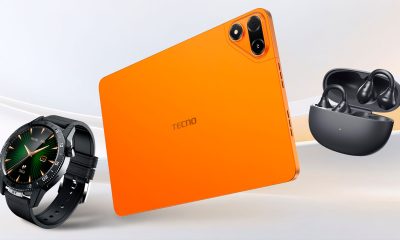
TECNO debuts latest devices, HiOS 16, upgraded Ella at MWC 2026