
News
iPhone 13 pre-orders in Singapore begin today


Are you ready? Pre-orders for the iPhone 13 lineup begin today in Singapore! Specifically, it starts at 8PM.
Apple’s latest and greatest set of iPhones are coming to Singapore and you can secure one for yourself by heading to the Apple Singapore website. This year’s lineup is pretty much an iteration of last year’s. That means we get upgrades for all four models: iPhone 13, iPhone 13 mini, iPhone 13 Pro, and iPhone 13 Pro Max.
iPhone 13 and iPhone 13 mini
New to this pair of iPhones is the A15 Bionic chip which, you already know, boosts the performance of the iPhone. You’re also getting Cinematic Mode which automatically adds background blur to your videos. It does this through an algorithm. It’s the first of its kind on smartphones.
Read more on the iPhone 13 and iPhone 13 mini.
iPhone 13 Pro and iPhone 13 Pro Max
This year’s pair of Pro iPhones are even more Pro than ever. It shares the same A15 Bionic chip as the other iPhone 13s, but it boosts performance thanks to a different, more powerful GPU. You also get the ability to shoot in Apple ProRes format. A boon for professional mobile filmmakers.
Read more on the iPhone 13 and iPhone 13 Pro Max.
Pricing
The iPhone 13 starts at SG$ 1,299. Meanwhile, the iPhone 13 mini starts at SG $ 1,149.
The iPhone 13 Pro starts at SG$ 1649 (SG$ 69 a month for 24 months) and SG$ 1799 (SG$ 75 a month/24 months) for the iPhone 13 Pro Max variant. The base storage still starts at 128GB but goes all the way to 1TB — also a first on any iPhone.







Entertainment
Max vs 100 will feature Max Verstappen race against 100 go-karters
The live event will stream at midnight on September 17.


As a child, one of my favorite thought experiments is to imagine who would win in a fight between my favorite characters at the time and a number of other random beings. For example, will Superman prevail against 100 Magnetos? Those are the ways I kept my young mind occupied. Now, as a former child, I still do the same thing but with more realistic people, like imagining if Steph Curry can win against 100 high schoolers. This week, ESPN and Disney+ are making one of those imaginary fights real: Formula 1 legend Max Verstappen versus 100 go-karters.
In an upcoming live event streaming exclusively on Disney+, Max vs 100 will pit the four-time world champion against 100 go-karters from everywhere in pop culture. This gaggle of 100 will include popular content creators such as Twitch streamer ExtraEmily, car photographer Larry Chen, and NBA shooting coach Chris Matthews.
All 101 drivers will race around one of the most iconic tracks in Formula 1 history, Silverstone in England. The track will be reconfigured to match the special race.
Of course, this is more than just a parade of go-karts. Max Verstappen will start at the back of the grid, meaning he has to overtake all 100 racers to win. Now, the Dutch driver is no stranger to winning from the back. In 2024, he won the Sao Paulo Grand Prix despite starting from P17 (out of 20 racers). Max vs 100, though familiar for the driver, presents a different challenge. Can he overtake 100 times to win the race?
Max vs 100 will stream live through Disney+ on September 17, 12:00am PHT.
Apps
Apple’s best feature to cure motion sickness is finally on Android
Google copies a good page from Apple’s playbook.
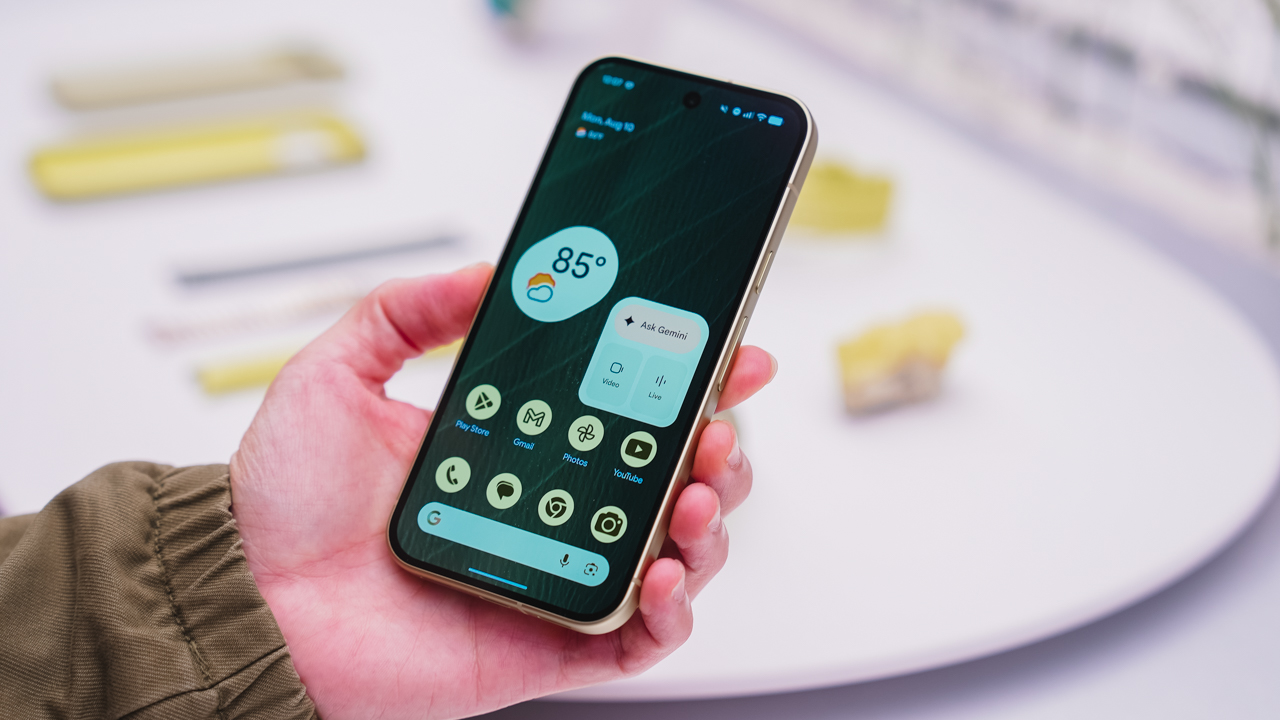
As an Android user, I’ve been jealous of iPhone users for a while now, but it’s not for the reason you might think. See, I’m ridiculously prone to motion sickness when I’m not driving. So, when I discovered that Apple has a software-based cure called Vehicle Motion Cues, I wanted it immediately. Now, Android does have third-party apps that do the same thing, but they’re not as good as a fully native version. Well, those dark, nauseating days are about to come to an end. Android 17 is finally getting a similar tool called Motion assist.
Before that, let’s rewind for a bit. What do these features do? How can they cure motion sickness?
Whenever you open Vehicle Motion Cues or Motion assist, the interface spawns a series of dots on the screen. These dots respond to movement. For example, if the vehicle turns to the left, the dots also go to the left, mimicking the movement. Without cues like this, the stationary nature of the screen clashes with our brain’s perception of movement. The disparity creates that feeling of nausea. Basically, our eyes are desperately trying to focus on the static screen, but our brains are telling us that we should be seeing motion. Having moving dots reorients our brain and places the phone inside our perception of movement.
Now, you can enable the same feature on your Android 17 device through Settings > All services > Motion assist under Personal & device safety. You can also set it so that the feature turns on automatically when the phone detects that you’re in a moving vehicle. Finally, you can also tweak the shape, color, and opacity of these dots.
Android 17’s Motion assist is rolling out now to compatible devices.
SEE ALSO: These are the best Android 17 features (if you hate AI)
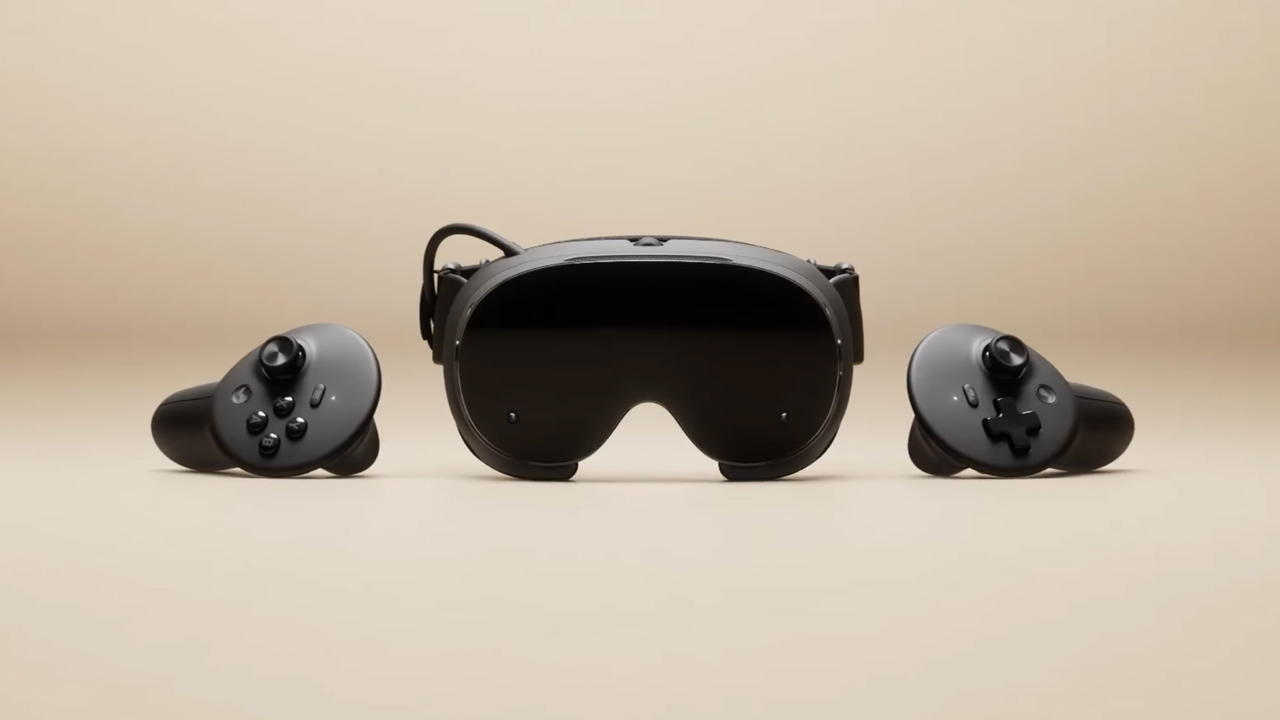
The trifecta is complete. Almost a year after announcing their new hardware, Valve has finally unveiled the price tag of the Steam Frame, complementing the Steam Machine and Steam Controller revealed a few months ago.
Whereas the Steam Machine is a console of its own, the Steam Frame is a traditional VR headset with a pair of controllers for both hands. Unfortunately, despite being in a different segment, the headset is not immune to the rising prices of technology. The Steam Frame will start at US$ 1,059 for a 256GB model and can go up to US$ 1,299 for the 1TB model. On the plus side, each box will come Half-Life: Alyx packaged along with the headset.
Here’s a more detailed rundown of what you’re getting. The Steam Frame will ship with the Snapdragon 8 Gen 3 chipset, paired with 16GB of RAM. Each eye comes with a 2160 x 2160 LCD screen, putting out images at up t0 a 144Hz experimental refresh rate. As mentioned above, the headset will start with 256GB of storage but can go up to 2TB. It will come packaged with SteamOS 3 and a rechargeable 21.6Wh battery.
This might be a hard buy for some. The industry currently has more affordable options, for one. Also, virtual reality isn’t the most thriving segment of gaming today.
If you’re still decided on buying one, however, Valve is using its lottery system. Interested customers can sign up from now until September 17. The company will then randomize the purchasing order. Those who draw the first ones in the lottery can get a purchase email as soon as September 18. Meanwhile, anyone who registers after September 17 will automatically be put at the back of the queue.
SEE ALSO: Valve announces its own console called the Steam Machine


REDMI Note 17 Pro Max review: A new breed born from AI greed
Welcome to the new normal


Marvel’s Wolverine review: When the claws come out
A brutal, cinematic superhero adventure


Setting your bedsheets ablaze with the Lovense Solace Pro
The closest proxy I could find where I'm guilty as sin

Ford revs up Truck Month with extended 5-star care offers
REDMI Note 17 Pro Max review: A new breed born from AI greed

REDMI NOTE 17 Series: Price, availability in the Philippines

Max vs 100 will feature Max Verstappen race against 100 go-karters

Apple’s best feature to cure motion sickness is finally on Android

TECNO MEGAPAD 2 review: Eyes on the size

realme 16T 5G with 8000mAh battery, IP69 Pro rating launches in PH

HUAWEI Pura X View is 2026’s first WIDE slab-type smartphone

REDMI reveals the refreshed Note 17 and Note 17 Pro series

REDMI Note 17 Series: Price, availability in Singapore


-
 News1 week ago
HUAWEI Pura X View is 2026’s first WIDE slab-type smartphone
-

 News1 week ago
The CAMON Slim 5G is TECNO’s latest ultra-slim smartphone
-

 Cameras2 weeks ago
DJI Osmo 360 II review: Going all-in on the ecosystem
-

 IFA 20262 weeks ago
TECNO MEGABOOK T15 360 unveiled at IFA 2026
-

 Gaming2 weeks ago
NBA 2K27 review: A two-way All-Star
-

 News6 days ago
iPhone 18 Pro series: Price, availability in the Philippines
-

 IFA 20262 weeks ago
TECNO’s POVA 8 Pro gets a stealthy makeover
-

 Automotive2 weeks ago
Ford’s new Everest lineup brings V6 engine to the top, tech down the line