
Hands-On
OnePlus 5 vs OPPO R11: Side-by-side Comparison

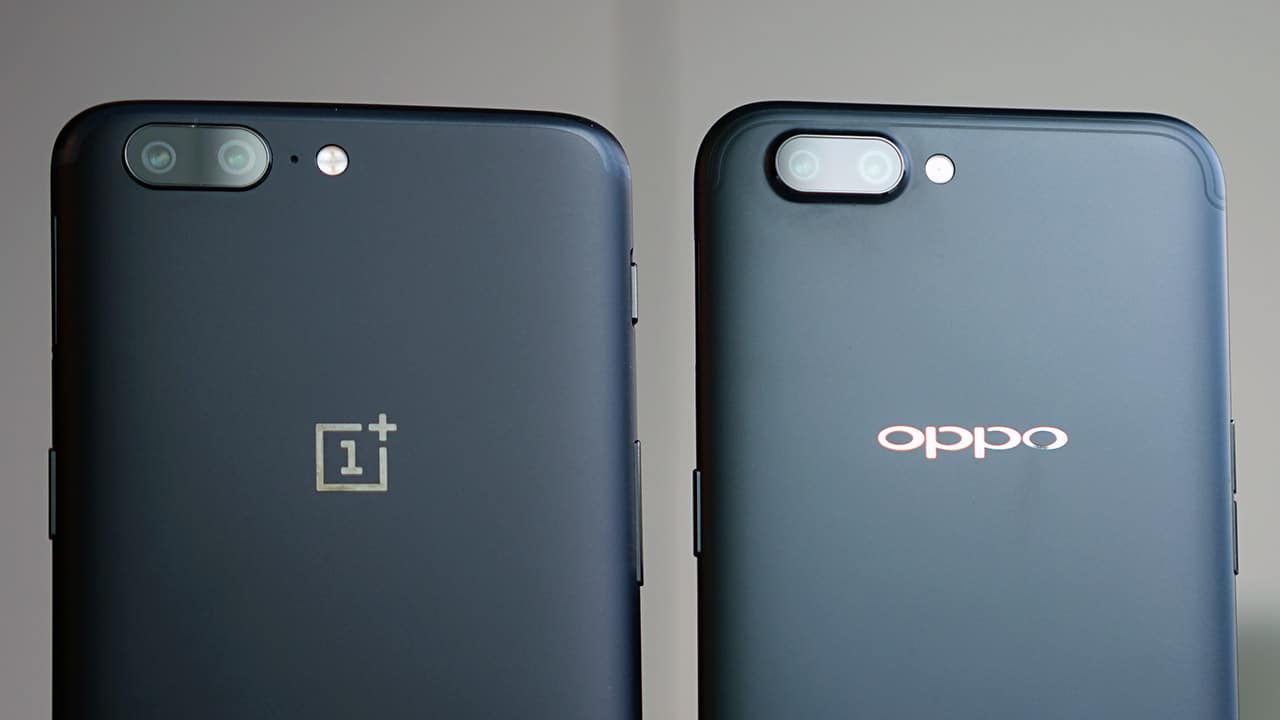
Sometimes you have to see things to believe it. For these smartphones, I not only saw — I saw double.
The much-awaited OnePlus 5 was very recently released. OnePlus, which prides itself in creating “flagship killers,” came up with a device with premium specs at a price tag that’s significantly lower. People have been quick to point out, however, that the newest flagship killer looks a little too much like the thing it wants to kill. *ehem* iPhone 7 *ehem*
But ladies and gentlemen, that’s a lie. The OnePlus 5 doesn’t look exactly like the iPhone 7 — it looks exactly like (the very recently released) OPPO R11.

The R11, launched in China earlier this month, is OPPO’s premium midrange phone. The dual-camera smartphone is a follow-up to the widely successful R9.
Side-by-side comparison
Both smartphones have 5.5-inch displays and are roughly about the same size. They also both run on Android 7.1 Nougat with the R11 on ColorOS and the OnePlus5 on OxygenOS.
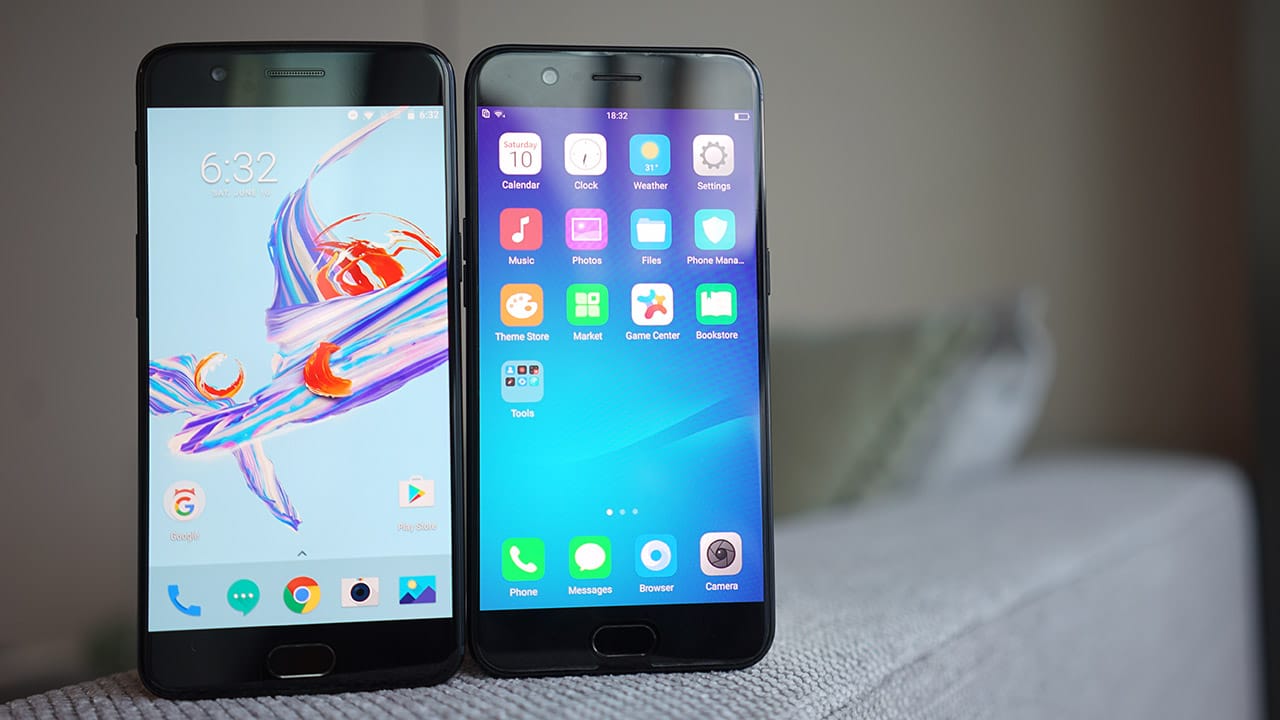
OnePlus 5 on the left (154.2 x 74.1mm) and OPPO R11 on the right (154.5 x 74.8 mm)
These smartphones come in a variety of colors: The R11 is available in gold, rose gold, black, and a special edition red version, while the OnePlus 5 comes in midnight black and slate gray.
Both matte black versions look stunning (and, well, identical).

The curved edges feel nice in your hands and both phones have a premium feel to them. Buttons and ports on both phones are similarly situated. On its side, the OnePlus 5 has what has been dubbed as the “Horizon Line” — a continuous line “casting one half in light and the other in shadow.” What this is, basically, is a continuous graceful line around the phone’s side; a small detail that isn’t on the OPPO R11 (not that you’d notice).
Beyond the surface
Though the OnePlus 5 is slightly (.5mm, to be precise) thicker than the OPPO R11, it may be well justified.
The difference between the two lies in what’s on the inside. The flagship killer is powered by a Snapdragon 835 processor (i.e., the same processor on flagships like the Samsung Galaxy S8, Sony Xperia XZ Premium, and HTC U11) while the OPPO R11 is powered by a Snapdragon 660 (the newest processor for midrange smartphones).

OnePlus 5 top, OPPO R11 bottom
Unlike the R11, the OnePlus 5 is already equipped with a USB-C port, the newest standard in Android phones (also known as that port they put on the latest MacBook Pro).
OnePlus has been widely criticized for its previous phones’ protruding camera bumps. I’m glad to report that both smartphones have minimal bulge. The R11’s seems more pronounced but at this point, to notice that slight difference is just nitpicking.
Photo shootout
Both smartphones pack 20- and 16-megapixel cameras in the rear with built-in portrait modes and automatic depth effect, or what is usually called bokeh mode.
[sciba leftsrc=”http://www.gadgetmatch.com/wp-content/uploads/2017/07/GadgetMatch-OnePlus5-2017-06-1-1.jpg” leftlabel=”OnePlus 5″ rightsrc=”http://www.gadgetmatch.com/wp-content/uploads/2017/07/GadgetMatch-OPPOR11-2017-06-1-1.jpg” rightlabel=”OPPO R11″ mode=”horizontal” width=””]
The dual-camera setup also allows for 2x zoom on photos (the better to stalk people with! Ha ha ha, I kid ?) See below:
[sciba leftsrc=”http://www.gadgetmatch.com/wp-content/uploads/2017/07/GadgetMatch-OnePlus5-2017-06-1-2.jpg” leftlabel=”OnePlus 5 2x” rightsrc=”http://www.gadgetmatch.com/wp-content/uploads/2017/07/GadgetMatch-OPPOR11-2017-06-1-3.jpg” rightlabel=”OPPO R11 2x” mode=”horizontal” width=””]
Of course, when we talk about front-facing cameras, the Selfie Expert exceeds in terms of specs. The OPPO R11 has a 20-megapixel sensor up front trumping the OnePlus 5’s 16-megapixel camera.
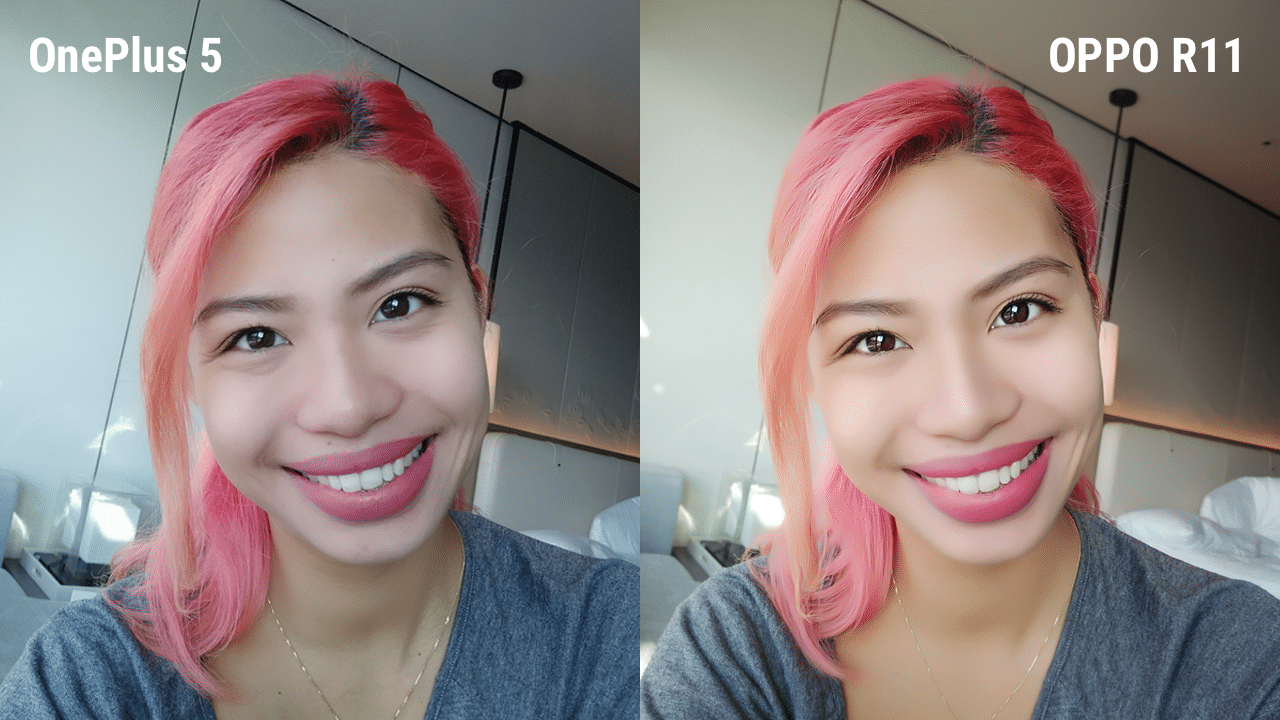
The beauty mode is built into both cameras, but the end selfies can be quite different. OnePlus’ beauty filter is more subtle than the R11’s, although these filters on both smartphones may be adjusted to your airbrushing preference.
Final thoughts
Because these two phones look amazingly similar, it’s so easy to fall into the trap of comparing the two and clumping them into the same bracket. But, it’s really what’s on the inside that counts.
These two smartphones were (not very obviously, because of their twinsie situation) designed for different markets and function well for the group they were designed for — the OnePlus 5 for the practical techie in the market for a flagship smartphone worth their buck, and the OPPO R11 for the selfie enthusiasts who value photography above all else on the smartphone they own.

We’ve always been told never to judge a book by its cover, but these aren’t books and if we were to judge the outside, these two are looking pretty sleek; choosing between them now is only a matter of where your priorities lie.
SEE ALSO: OPPO R11 hands-on and photo comparisons
SEE ALSO: OnePlus 5 hands-on and photo comparisons
[irp posts=”15283″ name=”OnePlus 5 launches in North America, Europe, and Asia”]
[irp posts=”15357″ name=”OPPO R11 Review”]





Hands-On
Apple iPhone Duo Unboxing and Hands-on
Supported apps, crease, cameras, and MagSafe all tested


Apple’s iPhone Duo is finally here!
Aside from unboxing the all-new iPhone-dable in Night Sky, we take a closer look at the display crease, check out the under-display camera quality, see which MagSafe accessories work with it.
Most of all, which apps support it (or not).
But how well does the dual-screen experience on an iPhone actually work? Watch our Apple iPhone Duo unboxing and hands-on to know more!


Moving into a new space comes with a long list of things to figure out, and lately, I’ve been paying more attention to something that’s easy to overlook: air quality.
After using the LG AeroMini for about a month, it has become a subtle but welcome addition to my space. It helps make the room feel fresher, while its compact and stylish design fits naturally into my setup. Here are the things that stood out to me most after living with it for a month.
360° purification for a fresher space
One of the things I appreciate about the AeroMini is its 360° air purification, designed to bring purified air in every direction.
For me, this is particularly useful in a new space where I’m spending a lot of time working, relaxing, and just settling in.

Combined with its True HEPA filter, which is designed to remove 99.999% of 0.01μm fine dust and allergens, it gives me added peace of mind about the air I’m breathing every day.
After a month, I can genuinely say that the space feels fresher with it running.

Surprisingly quiet
This is probably my favorite feature.
The LG AeroMini operates at just 26dB, and after using it for a month, what stands out is how easy it is to forget that it’s even running.

I can have it running while I’m working or sleeping without the noise becoming a distraction. For an appliance that’s designed to continuously improve the air around you, I think that’s a big deal.
Sometimes, the best feature is the one you barely notice.
Design that fits my space
Since I recently moved, I’ve been pretty conscious about what I bring into the space. I want things to be functional, but I also don’t want appliances that feel like they’re taking over the room.

The AeroMini’s slim and compact design makes it easy to incorporate into my setup. It doesn’t feel bulky or industrial, and I like that I can leave it out without feeling like I need to hide it away.
For me, that balance between functionality and aesthetics makes it feel more like part of the space rather than just another appliance.
Air quality at a glance
Another feature I’ve found convenient is its Smart Control. Through the app, I can monitor and control the AeroMini while getting real-time updates on the indoor air quality.
It’s a small convenience, but being able to check the air quality without having to interact with the purifier directly makes it easier to keep track of what’s happening in the room.

Easy to maintain
I also appreciate that the AeroMini is designed with an all-in-one dust and deodorization filter that makes replacement and maintenance easier.
That matters to me because the best home gadgets are the ones that don’t create another complicated chore. I want something I can set up, use regularly, and maintain without too much fuss.

After a month, would I keep it?
Yes, and mainly because it quietly fits into my everyday routine.
The LG AeroMini has helped make my new space feel fresher and more comfortable, while its compact design means it doesn’t compromise the look of the room. But if I had to pick just one thing I appreciate most, it’s still how incredibly quiet it is.

It’s one of those upgrades that doesn’t demand your attention. It simply works in the background.
If you’re also looking to make your home a fresher and more comfortable space for yourself and your family, visit https://www.lg.com/ph/ to learn more about the LG AeroMini and how it can fit into your everyday life.
Hands-On
Apple iPhone 18 Pro Series Hands-on
And everything announced during Apple’s September 2026 Event

The latest Apple event isn’t just about the shiny new Apple Duo. There’s a lot to talk about!
In this video, we break down everything Apple has announced during their September 2026 keynote.
First, there’s the updated iPhone 18 Pro and 18 Pro Max. That’s alongside their design and color changes, battery and performance improvements. Even that massive camera upgrade.
There’s even the ANC-infused AirPods 5 alongside the newer Apple Watch Series 12 and Apple Watch Ultra 4. Plus, the latest software updates coming to both these wearables.
So, are these worth the upgrade?


Apple iPad mini OLED review
Has the mini gone PRO?!


ROG G700 review: The best prebuilt PC you can get off the shelf
This PC will make you stop worrying about specs.


HP OMEN Max 16 review: Gamer-maxxing in deep black
Peripherals deemed necessary to max this out

Sony revives classic Walkman headphones with USB-C MDR-3R

IKEA, Xbox launch nine-piece YXSTABY gaming collection

Smart Infinity launches PureVoice

The Fellowship of the Ring in Concert finally arrives in Manila
Apple iPad mini OLED review

OPPO Find X10 Series launches globally October 21

Your coffee nook is getting a makeover with Starbucks’ holiday collections

vivo V80 debuts with ZEISS cameras

Garmin Enduro 4 promises up to 320 hours of battery life

Dragon’s Dogma 2: Dark Arisen launches with new Official Pawns


-
 Lifestyle5 days ago
Your coffee nook is getting a makeover with Starbucks’ holiday collections
-

 Lifestyle7 days ago
Sticker season is back, and so is the planner your ~friends~ might fill in for you
-

 Gaming5 days ago
Wild Rift Patch 7.3, celebrates K/DA comeback
-
Gaming1 week ago
ROG G700 review: The best prebuilt PC you can get off the shelf
-

 Gaming1 week ago
PlayStation unveils Prism Collection
-

 News2 weeks ago
Apple unveils its biggest iPad mini update yet
-

 Laptops1 week ago
Apple unveils MacBook Pro with PROLED XDR display and Touch
-

 Gaming1 week ago
FromSoftware’s The Duskbloods delayed to 2027