
Laptops
Samsung Galaxy Book Review: Best of both worlds?


It was exactly a year ago when I reviewed the Samsung Galaxy TabPro S, and while it was a complete Windows system inside a slim tablet, there were three drawbacks: no bundled stylus pen, overreliance on the keyboard case, and lack of ports. The newer, upgraded Galaxy Book — yes, the naming scheme changed once again — fixes one of those issues.
Before we begin, let’s clear up a couple of details.
One: Despite being part of the Galaxy series, the Book is not an Android device like the ubiquitous Galaxy S smartphones; this is a Windows 10 machine through and through.
Two: I’ve tested the 10.6-inch model which comes with an LTE SIM card slot. (There’s a larger 12-inch variant available, as well.)
It looks like a regular laptop upfront
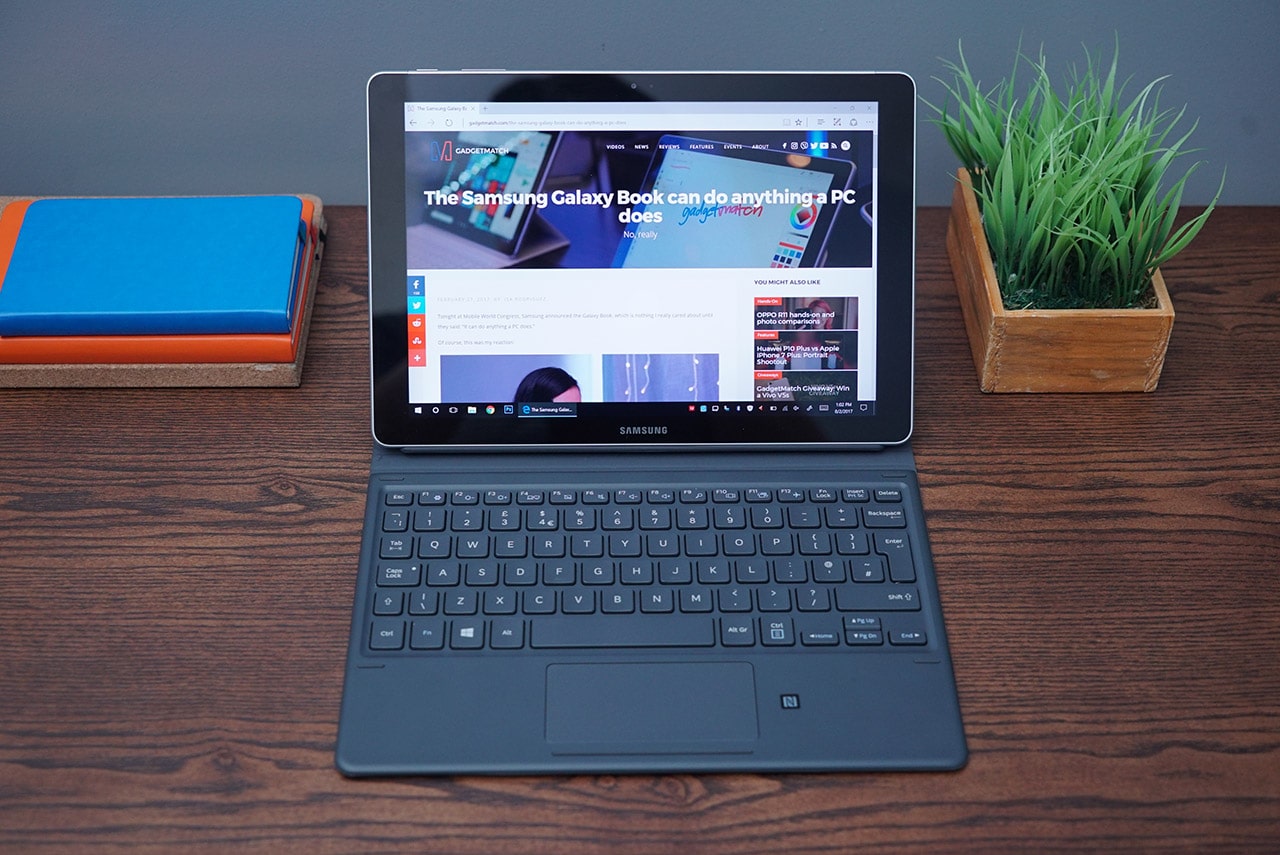
The 10.6-inch model has a 1080p resolution on its TFT LCD unlike the 1440p AMOLED of the 12-inch version
But you can fold it back into a plain tablet

Perfect for pure stylus use on the Full HD display
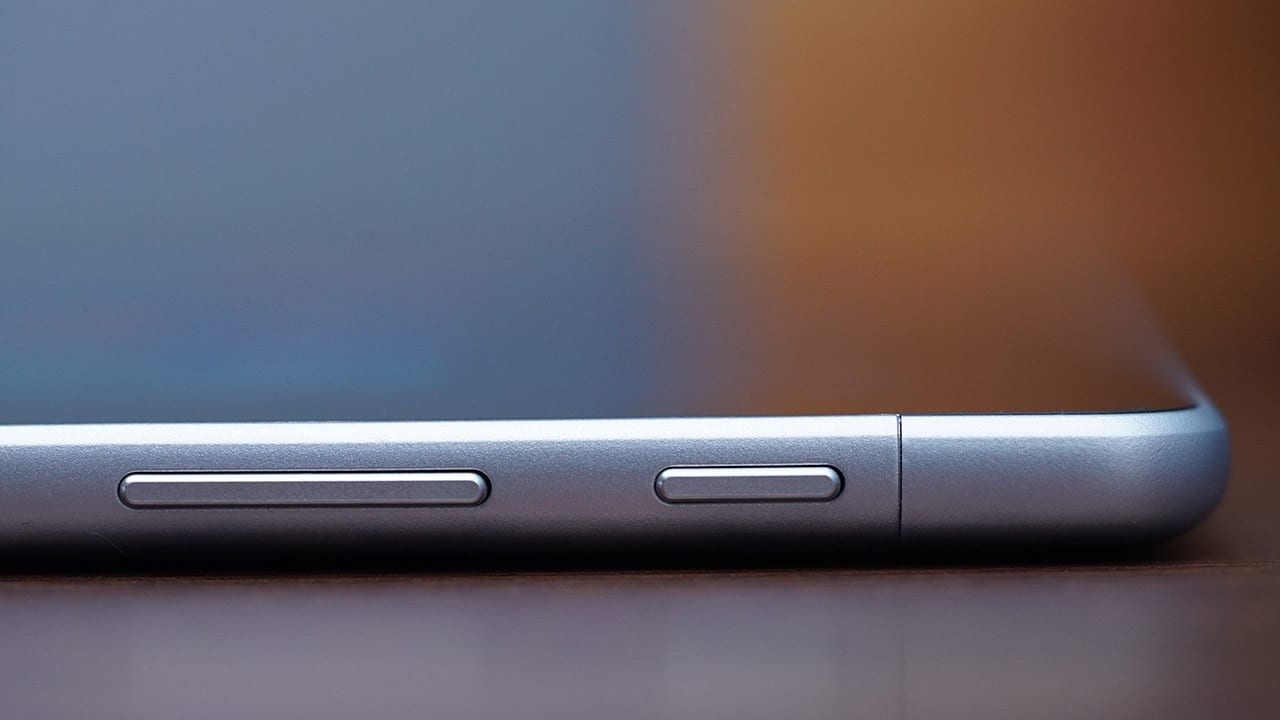
Here’s how it looks from the side
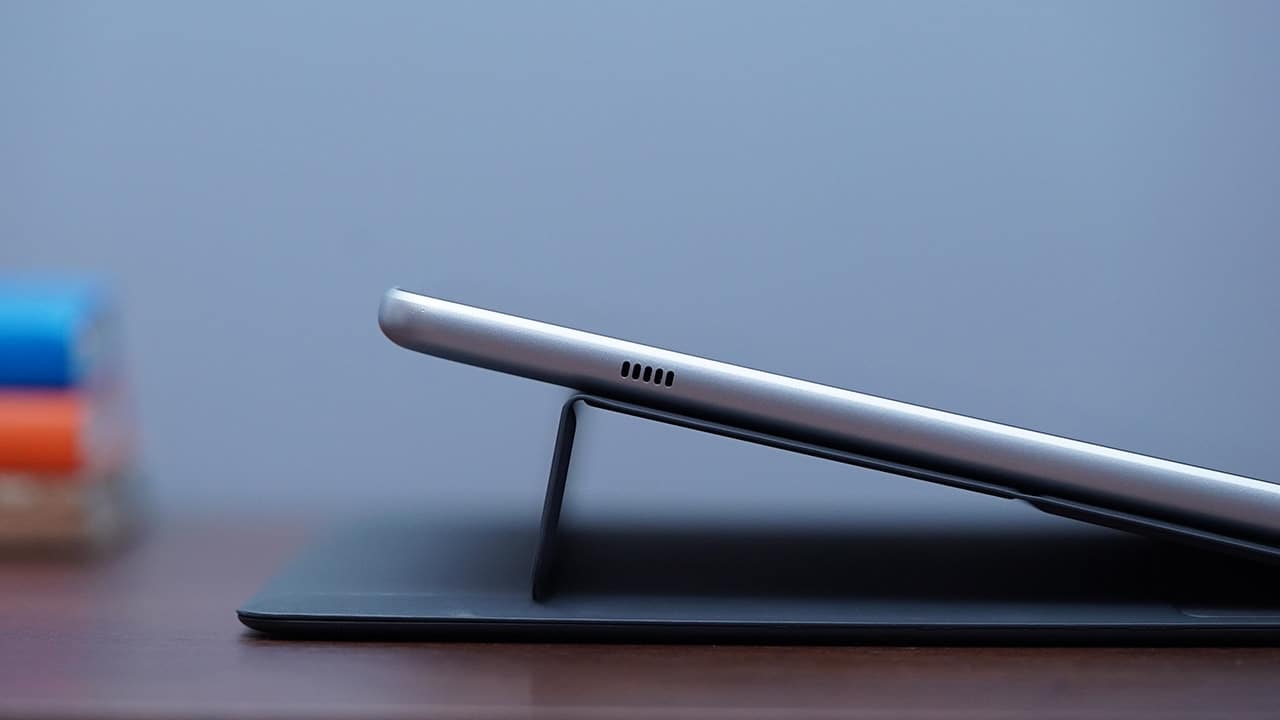
You can see one of the side-mounted stereo speakers, as well
This mode is better for typing with the keyboard, though

The keyboard case attaches to the tablet magnetically
And you can set it up at a steeper angle

I just wish I could incline the keyboard the same way
The keyboard is fun to type on

This is way better than the overly flat keys of the Galaxy TabPro S
But the trackpad isn’t as responsive
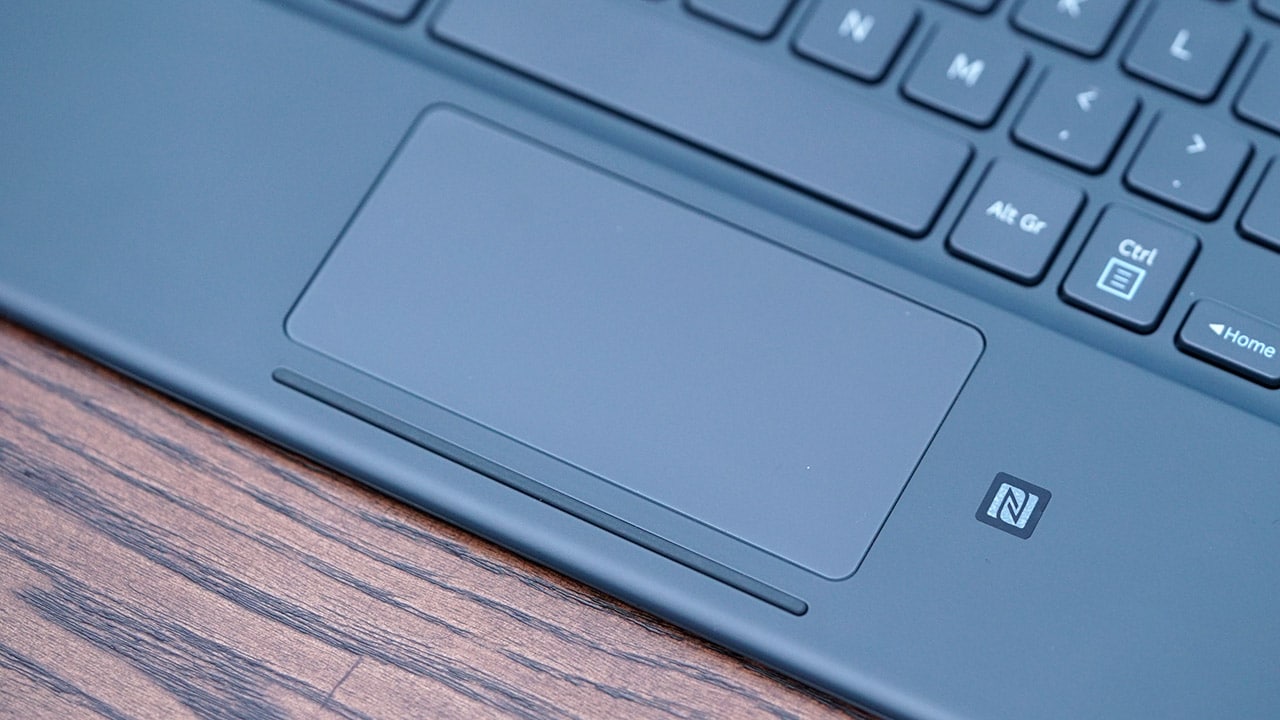
A lot of accidental taps and gestures are bound to happen
You’re better off using the touchscreen for navigation
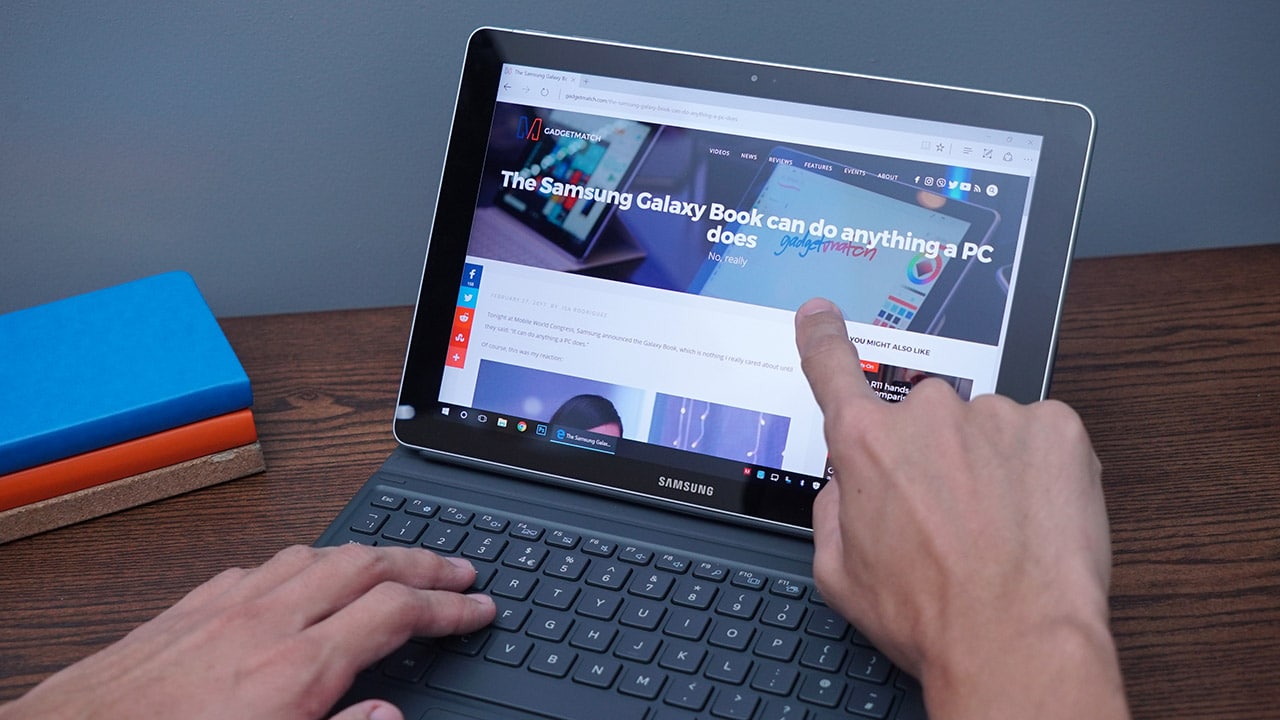
Multi-finger gestures are readily available
Or better yet, the bundled S Pen
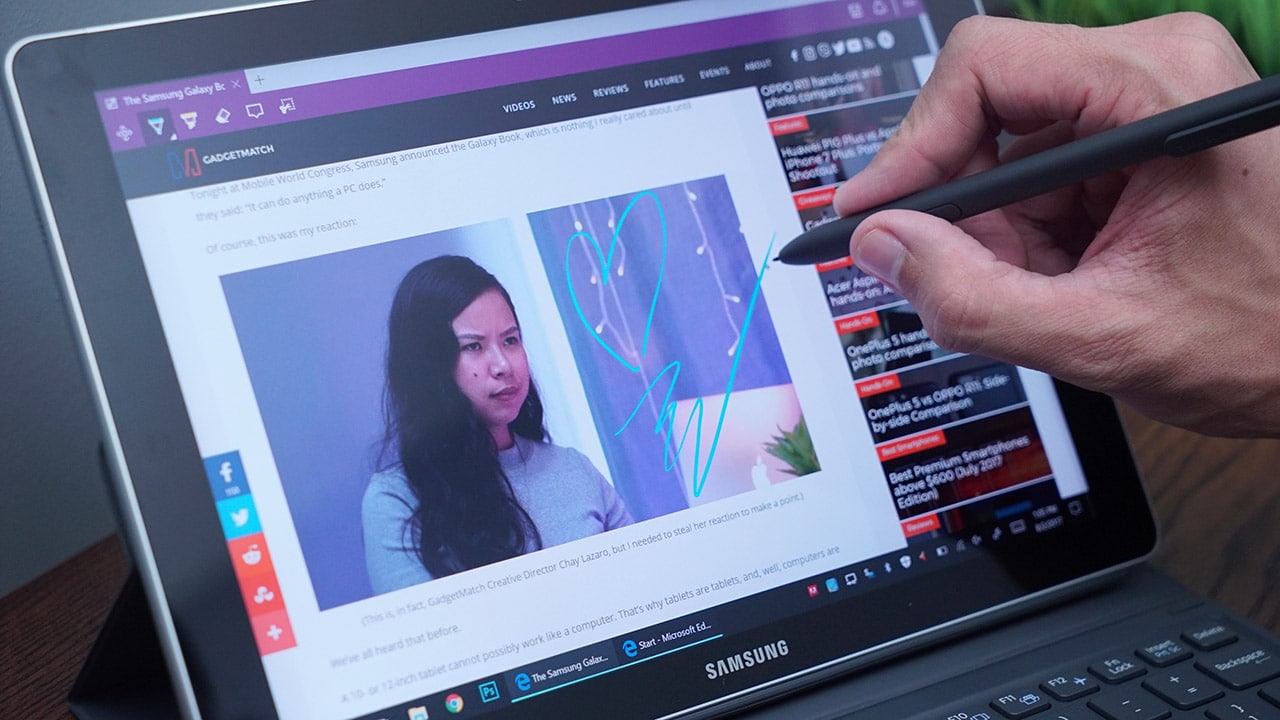
Handy for taking down notes and highlighting sections of your screen
This funny-looking tray can accept one nano-SIM and a microSD card

It doesn’t look very happy :/
How well does it perform?
Performance varies depending on which configuration you get. For my test unit, I had a low-end Intel Core m3 processor, 4GB of memory, and 64GB of storage to play with. That’s similar to the Galaxy TabPro S, but there’s one major exclusion: no rear camera for quick snaps this time around.
It’s odd for Samsung to remove a feature highlighted by the predecessor, but this can be seen as a move to make the Galaxy Book look more like a notebook and less like an all-in-one tablet. I’m honestly fine with having just the 5-megapixel front-facing webcam, since I already have a smartphone handling Instagram duties for me.

Another upgrade over the TabPro S I would’ve liked to see is an additional USB Type-C port. Updated models of USB-C-loving notebooks have already opted for two ports, making the Galaxy Book feel so left behind. You’d need an adapter to allow charging and physical data access at the same time — ugh.
Besides those setbacks, the Galaxy Book is totally capable of getting work done without taking up much space on your work desk. During my tests, it only struggled when I had more than ten tabs idle on Chrome, Photoshop running in the background, and Spotify pumping music at the same time. But like with the TabPro S, don’t expect to game or edit videos smoothly on this thing.
Can it last an entire day?
As expected of a low-powered, efficiency-over-performance gadget, the Galaxy Book can likely outlast that smartphone you have on you, but that’s only possible on one condition: you rely primarily on Wi-Fi and not use the battery-hogging LTE connectivity. Without a SIM card inserted, I could get more than six hours of mixed usage, which is two hours longer than I get on most slim notebooks.
Unfortunately, true to its tablet-like functionality, the Galaxy Book comes with a rather slow charger. Samsung promotes its Adaptive Fast Charging, but it’s the same wall charger with a short one-meter cable you’d find packaged with a Galaxy S smartphone, which has a much smaller battery. Filling up the Galaxy Book’s 4000mAh capacity takes more than three hours when the screen’s turned off; charging while working takes even longer, depending on how much load you put on it.
Is this your GadgetMatch?
The Galaxy Book is an interesting entry in Samsung’s budding convertible lineup; it’s technically the successor to the popular Galaxy TabPro S from last year, but it feels like a different product altogether — and not just in the naming convention.
First, the good: Bundling an S Pen upped the usability of the Galaxy Book by several notches, and the highly improved keyboard makes the experience so much more fluid. Whether it’s on my lap or beside my desktop PC as a secondary computer, this convertible always felt like it was part of my daily workflow despite its unconvincing size.

As for the not-too-good: I really wish Samsung added another USB-C port this time, and did something about the tablet’s reliance on the keyboard case to keep itself propped up. The first issue translates to needing a separate USB-C hub to insert your flash drives and HDMI-powered devices, while the latter means you must hold onto the tablet if it isn’t attached to the keyboard’s stand.
Most consumers might also be turned off by the lack of a rear camera, but I myself never use my tablet’s main shooter if I have my smartphone on hand, which is a hundred percent of the time.
The most affordable configuration (4GB of memory and 64GB of storage) currently retails for US$ 500 (discounted from the original US$ 630 price tag). The only variant being sold in the Philippines is priced at PhP 44,990 (4GB of memory and 128GB of storage).
Alternatively, you may consider Samsung’s more notebook-styled convertible, the Notebook 9 Pro, once it’s available. It solves most of the Galaxy Book’s issues, albeit in a much larger package.
SEE ALSO: Samsung Galaxy J7 Pro Review: Looks good, feels good
[irp posts=”16150″ name=”Samsung Galaxy J7 Pro Review: Looks good, feels good”]





Editors' Choice
GadgetMatch Awards: Best of IFA 2026
Xiaomi 18 Fold, Govee, XGIMI, ARZOPA, Cuktech and more!


We’re back at IFA 2026 in Berlin, checking out some of the coolest and most interesting tech on the show floor.
From smart home lighting and portable displays to projectors, power solutions, foldables, and more, these are some of the products and brands that caught our attention this year.
In this video, we take a look at:
- AI Lighting https://bit.ly/4xmY342
- Z3FC Portable Monitor https://bit.ly/4gRk7wD
- D14 Digital Photo Frame https://bit.ly/4qYlRJ6
- 30 Ultra Desktop Charging Station https://s.whaee.com/tXBornw
- 10 Ultra Charger https://s.whaee.com/UsWT4U2
** Use code CUKTECH09, valid until September 30
XGIMI
ASUS x NVIDIA RTX SPARK
- ProArt P16: https://asus.click/h7607_gm
- ProArt P14: https://asus.click/h7407_gm
- ProArt GR1X
Watch until the end for our favorite finds from IFA 2026!
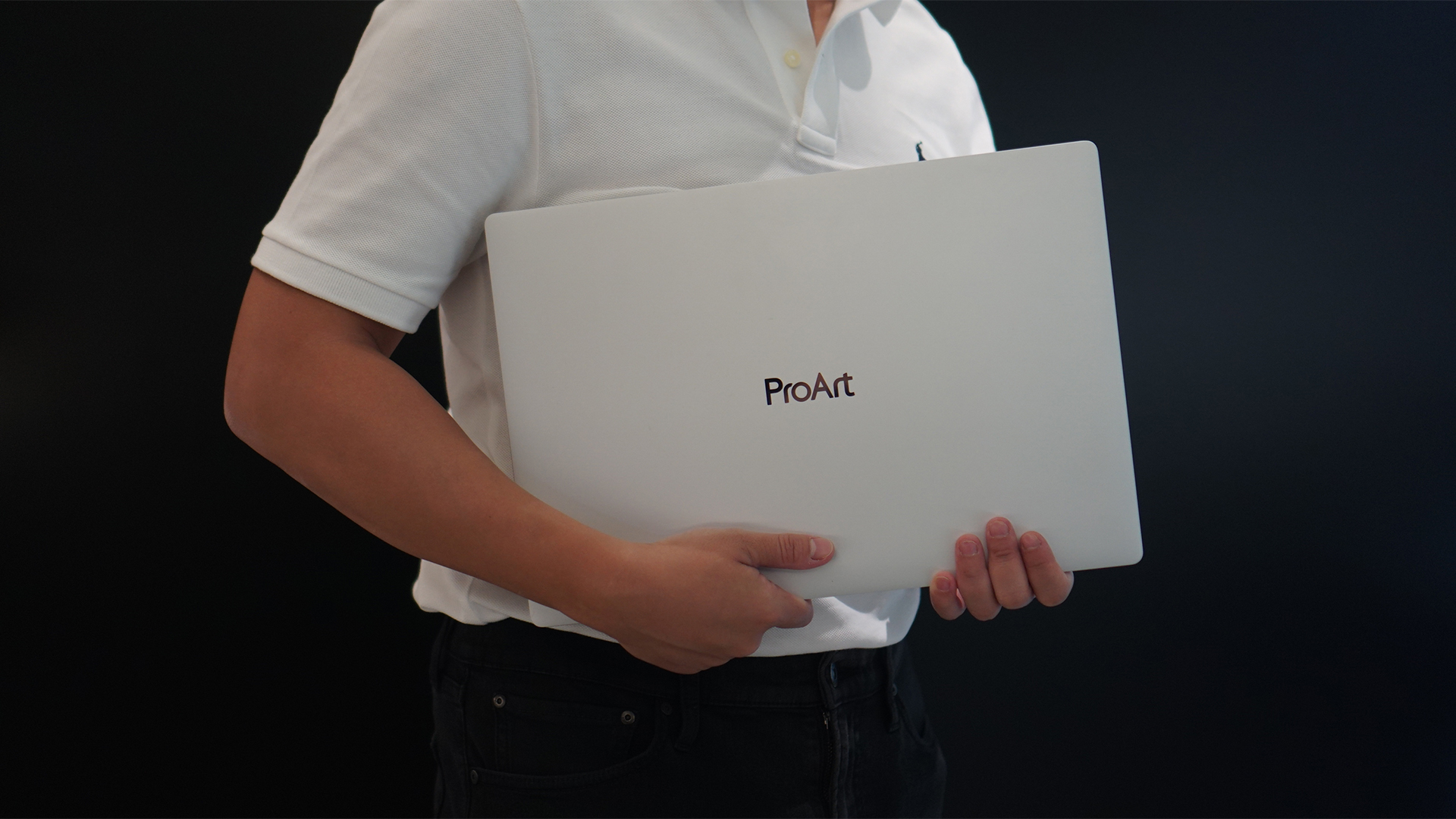
Select ASUS and ROG laptops now come with three months of Google AI Pro or Google AI Plus at no extra cost. The offer starts September 7 and covers eligible models from the 2025, 2026, and upcoming 2027 lineups.
Google AI Pro includes 5TB of cloud storage, while Google AI Plus comes with 400GB. Both plans also provide access to a range of Google’s AI-powered tools and features.
More Google AI on ASUS laptops
Eligible customers can use the Google Gemini app, Deep Research, Google Flow, Gemini in Google apps, and Gemini Notebook, among other features. Availability varies depending on the Google AI plan and supported features.
Google AI Pro offers higher usage limits and expanded access to Google’s more capable Gemini models. It also includes additional developer and agentic tools such as Google Antigravity, Jules, and AI Studio, subject to availability and plan terms.
Google AI Plus provides elevated access to Google’s AI tools alongside features for creative generation and productivity.
The offer covers more than just AI features. Google AI Pro’s 5TB of cloud storage and Google AI Plus’ 400GB give users additional space for documents, photos, videos, research, and other projects.
Available across select ASUS models
The one-year program starts September 7 and applies to selected ASUS and ROG laptops in supported markets. Eligible models span the ROG, TUF Gaming, ProArt, Zenbook, and Vivobook families, including select 2025 and 2026 models and upcoming 2027 devices.
Customers can redeem the offer exclusively through the MyASUS app. ASUS has published the full list of eligible models and the offer’s terms and conditions on its website.
Check the full list of eligible ASUS laptops
ASUS is also running its No. 1 Quality, School-Ready Deals promotion until September 15, 2026. The promo offers additional deals for students, gamers, and professionals buying select ASUS and ROG devices.
The company’s No. 1 Quality and Service package also includes up to three years of international and local warranty, service access across more than 90 countries, and over 100 ASUS Service Centers and Drop-Off Points in the Philippines. Eligible laptops also come with one year of Local Accidental Damage Protection and up to six free device cleaning claims.

TECNO is making its MEGABOOK lineup a little more flexible.
At IFA ShowStoppers 2026, the uprising tech brand unveils the MEGABOOK T15 360 with two more laptops and three phones tagging along.
One laptop, four modes
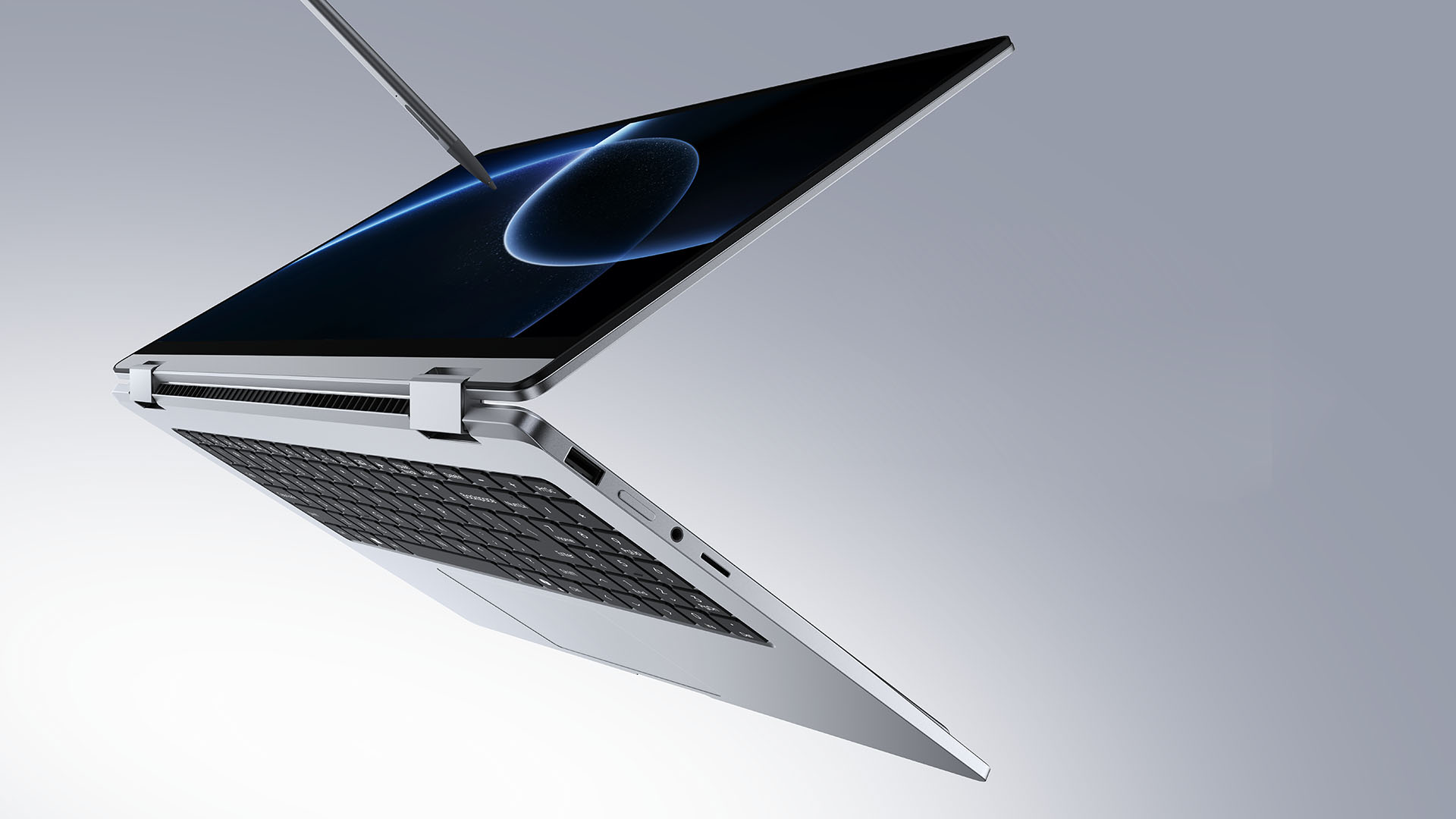
The MEGABOOK T15 360 series is the brand’s first laptop lineup with a 360-degree hinge and touchscreen display.
By that, it’s more than just a conventional laptop. It can also be a tablet or a portable display via Tent mode or Stand mode. This added feat makes everything more versatile as TECNO’s existing laptops are only limited to the clamshell form factor.
Both models feature a 15.6-inch screen with the standard 16:9 aspect ratio. As alluded earlier, it’s a touchscreen laptop consisting of 10-point multitouch points. There’s also optional MPP 2.0 active pen support if you want to write or draw directly on the display.
So what’s the difference?
Well, the regular T15 360 gets a Full HD 60Hz panel with 320 nits brightness.
Meanwhile, the Pro version takes it up a notch with a faster 120Hz refresh rate, sharper 2.5K display resolution, full 100% sRGB coverage, and higher 350 nits brightness.
Both laptops come in an all-metal chassis made using CNC machining. The convertible design doesn’t come at the expense of a more conventional laptop build.
Performance uncompromised
TECNO isn’t treating the T15 360 as a lightweight convertible that has to compromise on performance.
You can get up to an Intel Core Ultra 9 185H processor, paired with an LPDDR5X RAM. The storage is based from PCIe M.2 2280 SSD — with select models having a secondary M.2 slot for utmost expansion.
There’s also a 70Wh battery plus support for a speedy 65W PD GaN charger. Connectivity includes up to Wi-Fi 6E and Bluetooth 5.4, alongside seven built-in ports.
Practical stuff were neither forgotten. There’s a backlit keyboard with a dedicated number pad, a fingerprint reader underneath its power button, dual speakers with DTS Ultra, a webcam, and dual digital microphones.
TECNO’s OneLeap feature also rounds things out by letting the MEGABOOK work with other TECNO’s smartphones, tablets, and other PCs for cross-device collaboration.
Two more MEGABOOKs
TECNO also brought two other MEGABOOKs to IFA.
The MEGABOOK K15S WCL is the more straightforward option. It uses Intel’s newer Wildcat Lake platform with a 16:10 display, a 70Wh battery, and 65W GaN charging — all in a premium, all-metal body.
Then there’s the MEGABOOK T17 Ultra. Ultra by its name, it goes big with a massive 17.3-inch 16:9 display. It can be configured with up to an Intel Core Ultra 9 processor and LPDDR5X memory. It also features a massive 99.99Wh battery and speedy 100W GaN PD fast charging.
Wait! There’s even more…
Beyond laptops, TECNO reveals the true form of its Next-Gen Bezelless Concept Phone at IFA 2026.
As announced more than a month ago, this concept uses a redesigned display architecture, internal stacking, structural engineering, and screen packaging to eliminate the physical black border around the display, resulting in what TECNO calls a true 0mm display border.

Beside a phone prototype, there are two consumer-ready products as well.
The POVA 8 Pro 5G Tonino Lamborghini Limited Edition combines the POVA series’ performance-focused approach with Tonino Lamborghini’s design language.
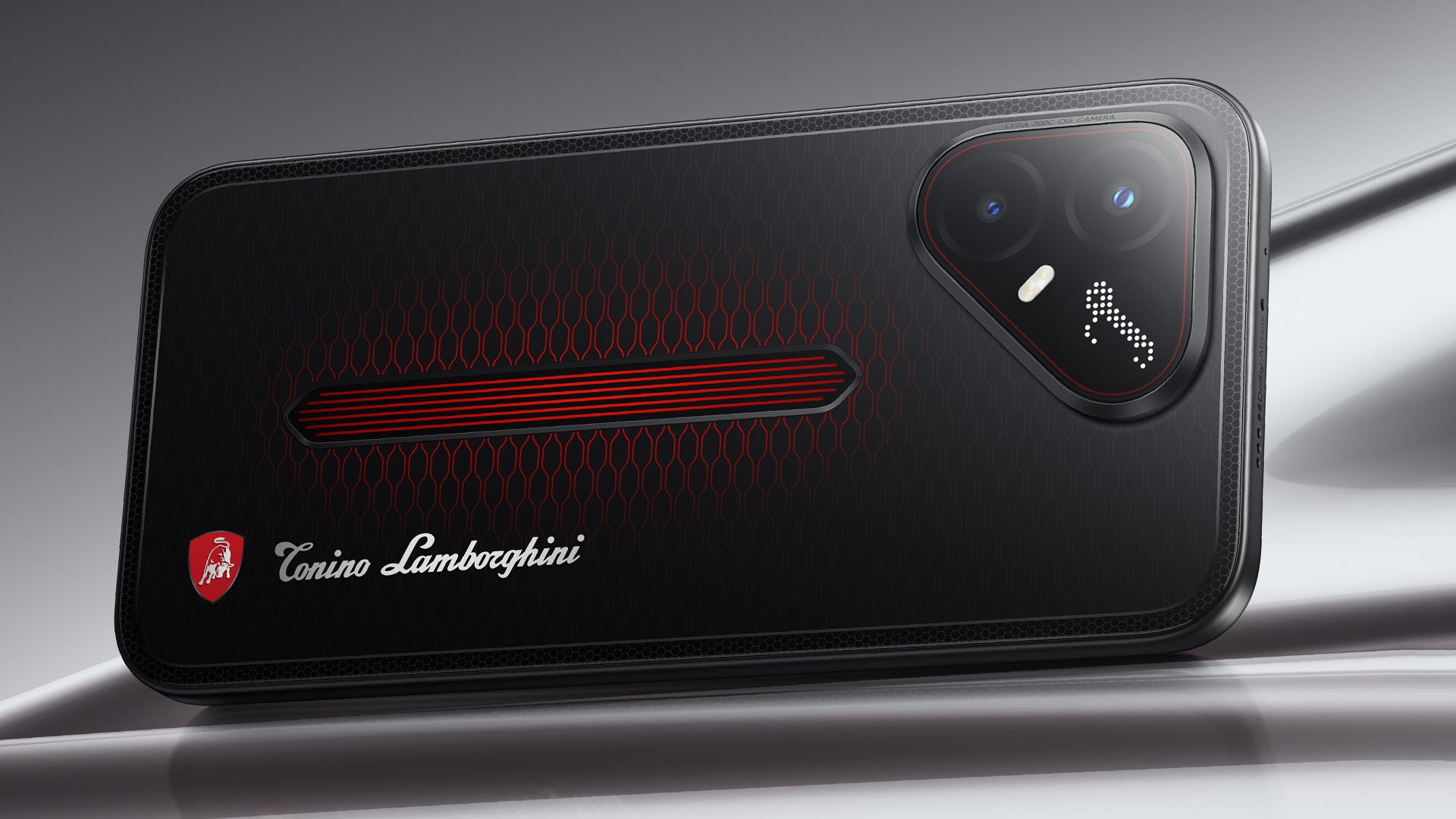
It uses a MediaTek Dimensity 7400 Ultimate 5G chipset alongside TECNO’s custom-made P1 Graphic Chip and a 5K IceShield vapor chamber cooling system. Specific details will be announced on September 4, 2026.
Meanwhile, the CAMON Slim 5G focuses on a thinner form factor, measuring just 6.39mm thick.
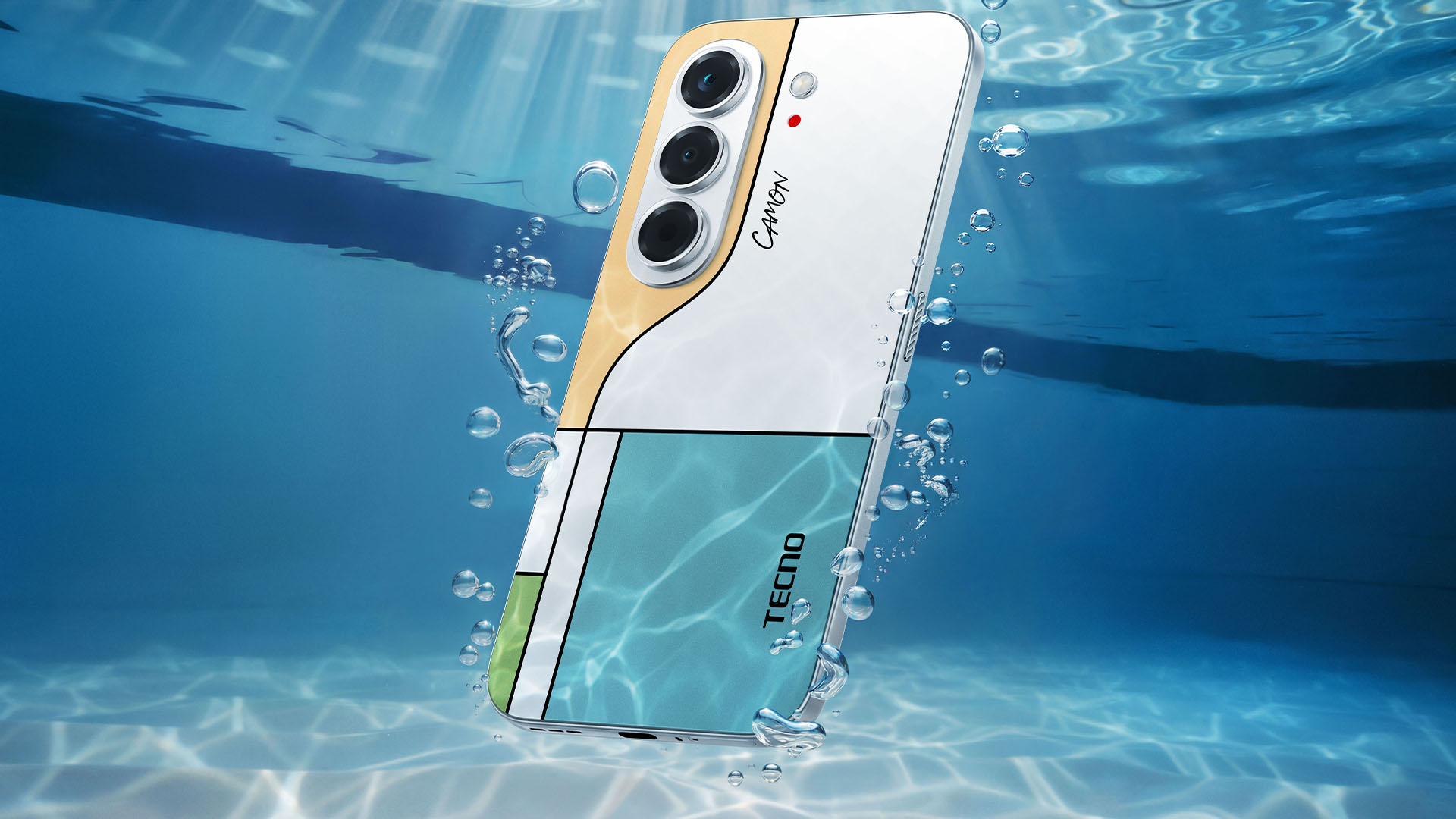
TECNO says it combines the CAMON line’s imaging features with AI capabilities and artistic colorways. More specifications will be revealed on September 7.
Pricing and Availability
The MEGABOOK T15 360 Series is expected to arrive in Europe by Q4 2026.
Depending on the configuration choice, the MEGABOOK T15 360 will start between EUR 899 ~ EUR 999. The MEGABOOK T15 360 Pro will cost as much as EUR 1099.
No pricing info were announced for the other MEGABOOKs and two phones as of writing.


DJI Lito X1 review: Is this the best lightweight drone for creators?
Making a strong case as a travel companion and a capable B-cam!


REDMI Note 17 Pro Max review: A new breed born from AI greed
Welcome to the new normal


Marvel’s Wolverine review: When the claws come out
A brutal, cinematic superhero adventure

70mai launches the A900 series with 4K front, rear recording

Dune: Awakening makes it way to the PS5 and Xbox Series X

The Kia EV3 brings gallery-worthy design in a compact electric form

vivo introduces OriginOS 7 with smarter multitasking and AI features

vivo X500 Series launches with major imaging upgrades

realme 16T 5G with 8000mAh battery, IP69 Pro rating launches in PH

HUAWEI Pura X View is 2026’s first WIDE slab-type smartphone

REDMI reveals the refreshed Note 17 and Note 17 Pro series

REDMI Note 17 Series: Price, availability in Singapore

The CAMON Slim 5G is TECNO’s latest ultra-slim smartphone


-

 News2 weeks ago
iPhone 18 Pro series: Price, availability in the Philippines
-

 Singapore2 weeks ago
iPhone 18 Pro series: Price, availability in Singapore
-
 News2 weeks ago
iPhone Duo: Price, availability in the Philippines
-

 News2 weeks ago
iPhone Duo: Price, availability in Singapore
-
 News2 weeks ago
vivo introduces refurbished versions of X300 FE, X300 Ultra for less
-

 Accessories2 weeks ago
CASETiFY upgrades iPhone 18 cases, teases iPhone Duo lineup
-

 News2 weeks ago
HONOR teases Magic9 Pro Max at Venice
-

 Editors' Choice2 weeks ago
GadgetMatch Awards: Best of IFA 2026