


Features
How to build and manage your WFH or online class setup
Manage your work and stress levels while indoors

On any other normal day, we would be preparing for several things. Some of us are off to work, dealing with the nine to five grind everyone talks about. The younger ones are off to school, with some even entering college for the first or last time. To prepare we’ll need to buy some stuff we need — from school supplies to devices that will aid in school or work.
Except well, we’re not living in a normal world — at least since 2020 started. My guess is that you’ve been stuck at home for a long time because of this pandemic. If you’ve already started working before this happened, you’re most likely still working — but, from home. If you’re supposed to be going to school, you won’t be seeing the campus for a while.
However, that shouldn’t stop you from preparing for that, as well. Of course, there will be less school supply-shopping than before. But, if you need a great setup for either work-from-home or online classes, here are some tips to keep in mind.
If you don’t have what you need yet, it’s best to plan ahead
Obviously, not all of you have a nice laptop for school yet or you prefer working from a desktop than a company laptop. In any case, it’s best to plan on what exactly kind of tech you will purchase to suit your needs. For students, you can still do this even if your school gave you a two-week notice on what kind of machine you need.
It will help to ask your family and friends, especially the tech-savvy ones on the hardware you need. It also helps to get quotations for these devices, especially if you want to build your PC but you’re running on a strict budget. However, keep in mind that shortage is a thing with some parts because of the pandemic.

This isn’t just limited to your devices, as you can also invest in other non-tech items for your setup. Things like a work table, chairs, and appliances are a few of the things you might want to look into. Remember, you’re going to be stuck indoors, possibly for a long time; might as well be comfortable in this space.
Don’t seek powerful hardware if you don’t need it
If you’re planning to buy the devices you need for your setup, I believe that you don’t need gaming PC-levels of power. There’s a reason why your school or workplace gave you a minimum PC spec sheet to begin with.
Consider this advice when you’re planning on what devices to buy. If you prefer to buy a laptop, you don’t have to go for the latest gaming laptops available. Something simple and powerful, with the latest Intel Core i5 inside and 8GB of RAM will do the trick. It’s important that your device can handle Office apps, a web browser, and video calls for 8 hours.

It’s an entirely different situation if your work actually demands a powerful machine, especially data-heavy or graphics work. But again, it’s important to plan ahead when it comes to these things because one, shortages are a thing; and two, consider your wallet’s feelings.
When you do have everything you need, make sure devices work and disinfect everything
Once you already have everything for your setup, do your due diligence and check everything. For your devices, it’s best to do a deep scan of your hard drives for any malware or irrelevant software. I also suggest doing the same on your smartphones, and even installing Office apps on it. It’s just to prepare you for the possibility of your laptop or desktop malfunctioning out of nowhere.
I also highly suggest that you put in more time into checking your peripherals, too. Do routine tests on your microphone, webcam, and headset (including their ports) and optimize according to your use case. These are important especially for those long video calls for class, or during online meetings for work.
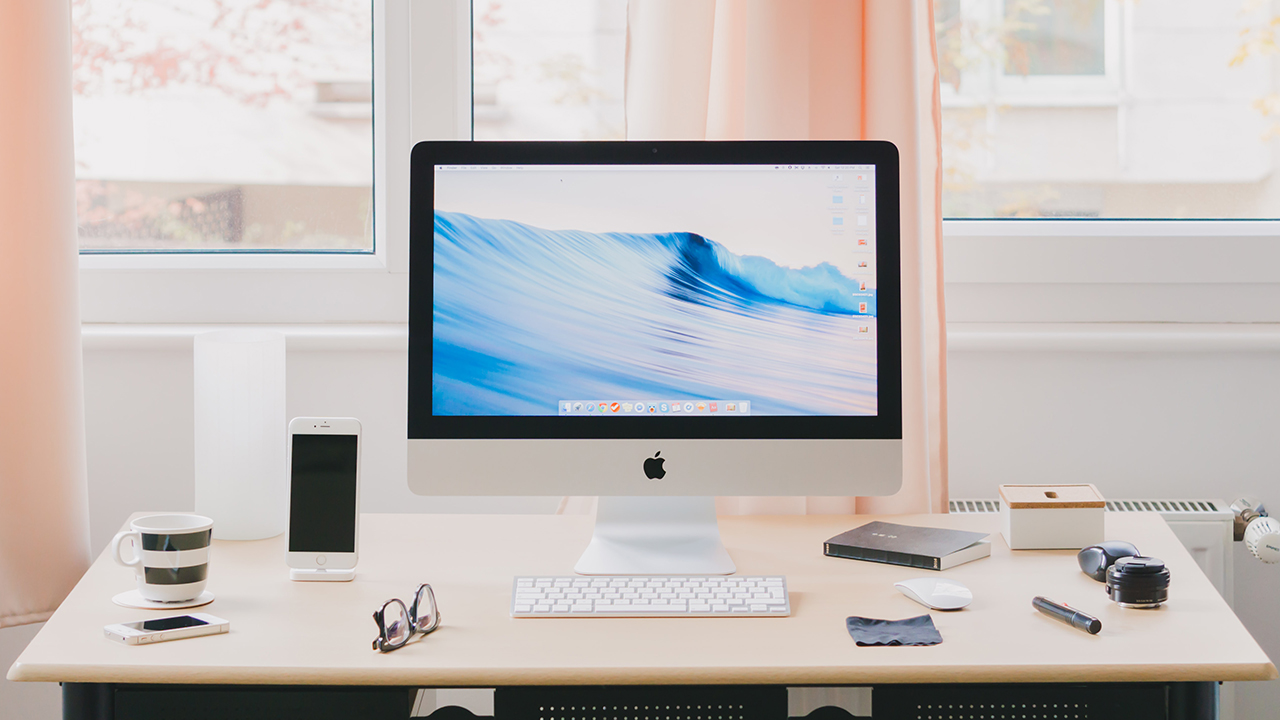
Photo by Norbert Levajsics
Finally, disinfect everything properly and diligently. At the very least, try to clean up the parts that you touch more often, like your keyboard, mouse/trackpad, and the lid. Even if it’s brand new, you’re better off safe than sorry with a virus going around. This also goes for the entire space you will be in.
Make sure your internet connection, however you get it, is strong enough
This one is pretty obvious, but it deserves to be repeated over and over again. As much as possible, your WFH setup must access the internet at a stable rate. This even applies to those who simply live off using 4G/5G mobile data, but keep your data limits in mind.
If you don’t know how to make your internet faster, it’s best to call your provider to walk you through it. If your provider is of no help, or if you don’t have the patience to call, research about it. People all over the internet have found ways to access their routers and tick the proper settings to make it work.

Now, if you’re feeling a bit more generous with your money, invest in another router or a WiFi Mesh system. Essentially, you’ll extend your existing WiFi coverage, and experience high speeds on your own. I do recommend routers that extend your 5Ghz WiFi connection to maximize your speed.
Your TV can also be a second screen, if you need one
Most modern TVs nowadays come with this standard set of ports: HDMI, S-Video, and VGA. With desktop GPUs and laptops supporting such ports, it’s safe to say that even your TV can be used as its own display. Obviously, you will sacrifice refresh rates and some level of detail, but it’s still a good alternative.

This option is open for those who really need it and/or are not willing to spend for a dedicated PC monitor. If you can work without one, that’s great; save yourself the hassle of buying extra cables. But it’s something to think about if you want to be more productive.
Have a dedicated rest space
Listen, work from home fatigue is an actual thing. At some point, you will no longer be able to tell the difference between the place you sleep in and the place you work in. Because you’re going to be indoors for a long while, that line gets more blurry.

Make it a point to have a space in your room dedicated for leisure. If you need a quick break from work or school work, you have a part of your room for that. Strap up a console there, have an entertainment system, or just Bluetooth speakers will do. For you to function properly for work or school, you need to rest.
I hope these tips helped in preparing you for what’s to come. You will remain indoors for quite a while, so it’s best to prepare and enjoy your time.





Editors' Choice
GadgetMatch Awards: Best of IFA 2026
Xiaomi 18 Fold, Govee, XGIMI, ARZOPA, Cuktech and more!


We’re back at IFA 2026 in Berlin, checking out some of the coolest and most interesting tech on the show floor.
From smart home lighting and portable displays to projectors, power solutions, foldables, and more, these are some of the products and brands that caught our attention this year.
In this video, we take a look at:
- AI Lighting https://bit.ly/4xmY342
- Z3FC Portable Monitor https://bit.ly/4gRk7wD
- D14 Digital Photo Frame https://bit.ly/4qYlRJ6
- 30 Ultra Desktop Charging Station https://s.whaee.com/tXBornw
- 10 Ultra Charger https://s.whaee.com/UsWT4U2
** Use code CUKTECH09, valid until September 30
XGIMI
ASUS x NVIDIA RTX SPARK
- ProArt P16: https://asus.click/h7607_gm
- ProArt P14: https://asus.click/h7407_gm
- ProArt GR1X
Watch until the end for our favorite finds from IFA 2026!
Tutorials
How to spot scam emails and messages before they get you
Here are the telltale signs in a potential scam.


The brazenness of scammers often goes through fits and starts. Within the last few weeks, I’ve had three separate people in my immediate circle fall for three separate scams. I’ve received similar emails myself. With the Christmas season approaching, we’re living in a particularly brazen period, and it’s time for a very important PSA. Here’s how to spot a scam email today:
Check the contents of the message
Most scam or phishing attempts today will ask you to submit sensitive information like your log-in details or bank information to a seemingly innocuous platform. Obviously, these platforms are fake, and you’re surrendering your information to a malicious party. Unfortunately, these scams are getting much better with disguising their deception. If you put them side by side with a real email or message, you might find it hard to spot crucial differences. So, how do you clock them before it’s too late?
Start with the actual message. Companies will not ask you to submit your details on an email or on a message. It doesn’t matter if the message is claiming an issue (someone allegedly using your card) or a reward (your points are about to expire). If it’s not your usual way of logging in or submitting this information, then it’s likely fake.
Some might even include a highly suspicious link that leads to a log-in page. If that link is from a link shortener (like bit.ly) or looks nothing like the company’s real site, don’t click it. If you do click, check the URL for anomalies. In the below example, “Maya” claims that someone else tried to change the email on my account. Besides how unofficial the alert looks, the button does not lead to Maya’s website. 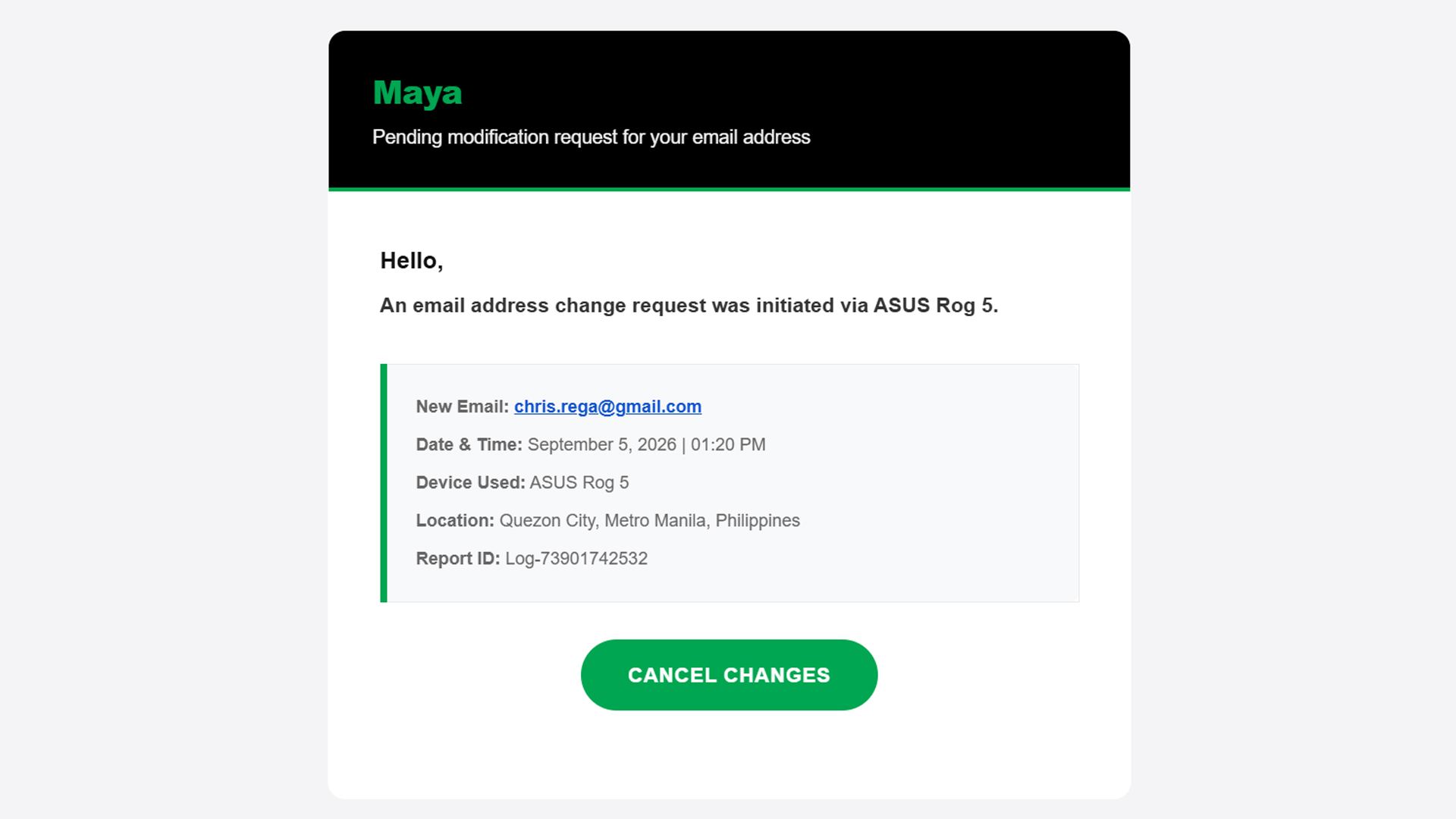
Now, on rarer occasions, the message itself has telltale signs of deception: typographical errors, missing words, extra spaces. A normal message should have already filtered these errors out, so there’s a good chance that it’s a fake message if it has any of these errors.
Basically, if something feels off straight from the get-go, cast doubt immediately and be vigilant.
Check the sender
Ensuring a fake message is clean should be easy stuff for scammers. A simple spell checker can trick a simple user into doing whatever the scammer wants. One aspect that’s way harder to change is the sender.
An email might have the cleanest copy, but one look at the sender dismantles all deception. In three of the four scam emails I’ve seen in the past two weeks, the sender was the ultimate telltale sign.
In the example below (the same one as above), the sender presents itself as “MayaPH.” If you weren’t paying attention, you would have been fooled into thinking that this is actually Maya. But, if you open the sender information, you’ll see that it’s coming from an unknown email, rather than an official Maya email address.

On a PC, this is easy to check because the email address automatically pops up beside the sender’s name when you open the email. On mobile, you’ll have to press the drop-down button below the sender’s name.
Verify the information yourself
Let’s move to the next level. What if the message looks official and seemingly comes from an official sender?
Unfortunately, scammers today can also spoof senders. Meaning, they are able to send official-looking messages and mask themselves as official senders. In the below example, “BPI” sent me an alert saying that someone tried to spend PhP 19,250 from my account. Take note: this is the same thread where I got real messages from the bank, which the scammer managed to hijack.
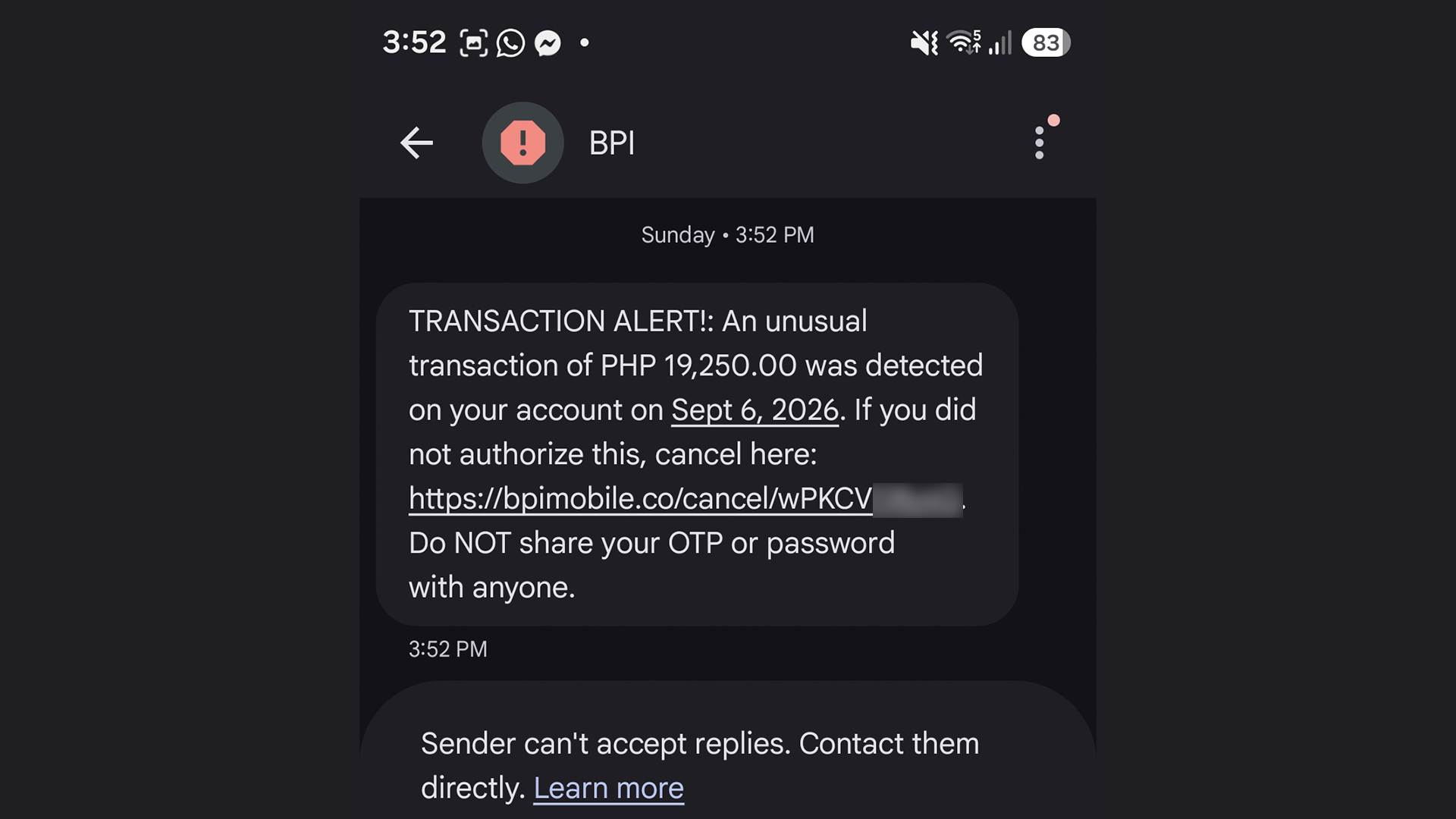
The message looks real. I can’t spot a single typo. Now, if you spotted this and thought it was real, you’d enter a state of panic and click the link out of instinct. The scammer is depending on your instinct to do so. Here’s why you shouldn’t click it: That’s not BPI’s official website. It looks like it, but it’s not.
Of course, you can’t be faulted for not memorizing official company websites. In fact, I had to Google the URL just to confirm that it was fake.
A surefire way to make sure, though, is checking the supposed information yourself. When I got the message, I checked my BPI app immediately. There was no trace of the transaction, so I knew it was fake. You can also call them yourself using their official numbers.
This isn’t limited to banks, either. Another example I’ve seen is one claiming that your Spotify subscription failed to renew. In this case, you can manually check your Spotify app to see if your subscription hasn’t been renewed.
Scammers are hopeful that you panic and run to them, rather than the official channels.
Sometimes, friends cannot be trusted
Though we can avoid falling for traps ourselves, other people still can. After an account is hacked, the hacker’s usual play is to message the account’s contact list to get other people.
Because it’s seemingly coming from a loved one’s account, a user is more likely to follow whatever the hacker wants, including clicking suspicious links.
In my experience, this type of scam is rarer these days, but it’s not completely gone. I’ve had one experience wherein a contact from Discord messaged me and tried getting me to play a game with them. The game itself was non-existent. The goal was to have me click a suspicious link and install malware on my computer. The malware can then give the hacker complete access to my PC and every account it’s logged into.
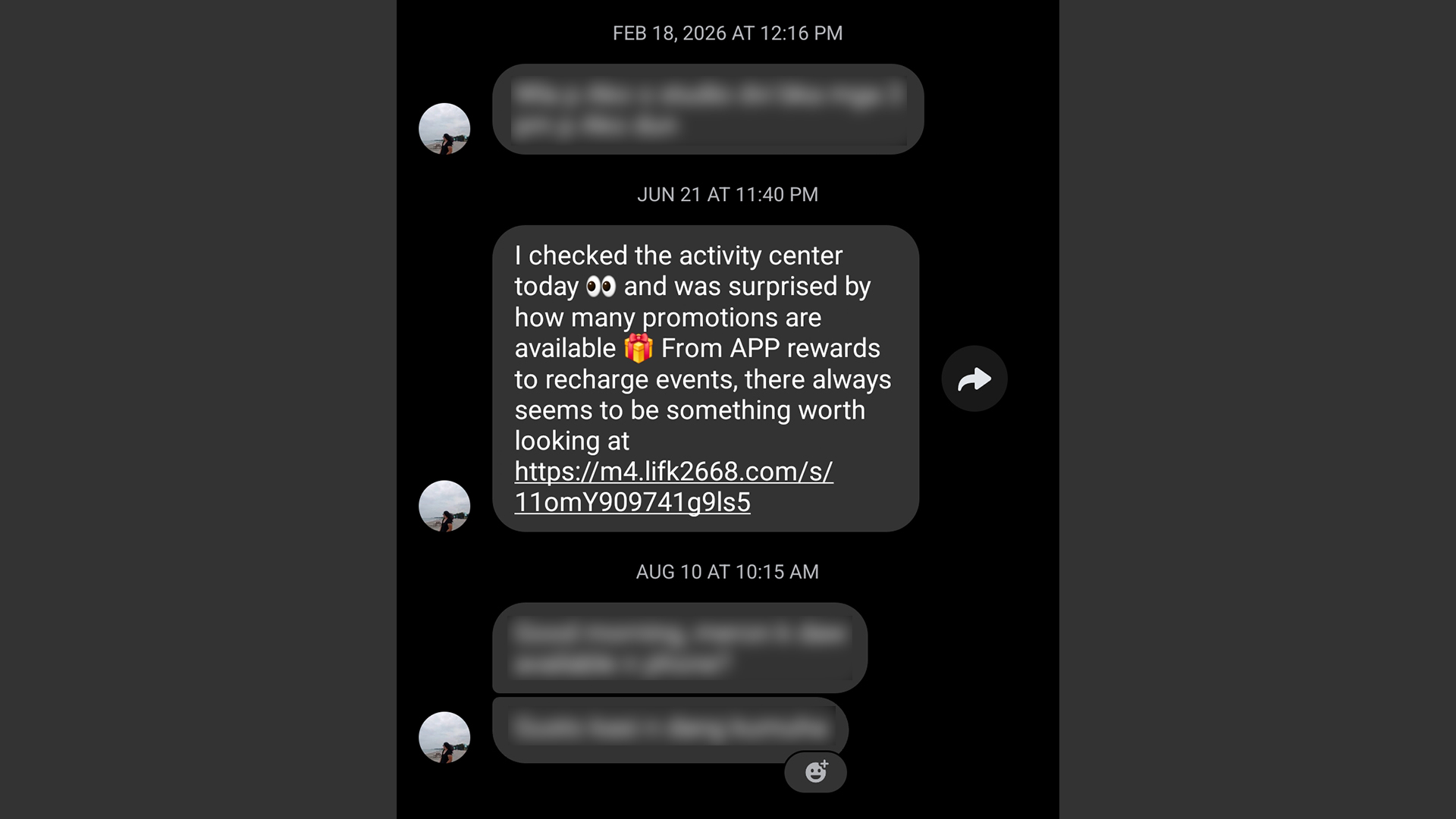
It’s a very nasty malware, but it’s fairly easy to prevent. If you get a message from a friend that isn’t their typical behavior, contact them on a separate platform, preferably on one that doesn’t rely on the net like SMS. If that’s not possible, contact someone near to them.
Address a potential hack immediately
Even with all these precautions, sometimes we can’t prevent ourselves from falling into these scams. If you find yourself victimized by scammers, respond immediately.
First of all, secure the targeted platform first. If it’s an app or a service, change passwords immediately and add two-factor authentication. If it’s a bank, call and appraise them of the situation. You might have to spend some time with a frozen account or without a card, but it beats having all your money sucked dry.
Now, if you suspect that your entire device was compromised, disconnect from the internet immediately. A hacker is toothless if they can’t connect to their prey. Then, using another device, reset every account that the hacker might have access to. If you know how, manually disconnect your accounts from the affected device. Once clear, do a clean install/reset of the device to hopefully weed out the malware.

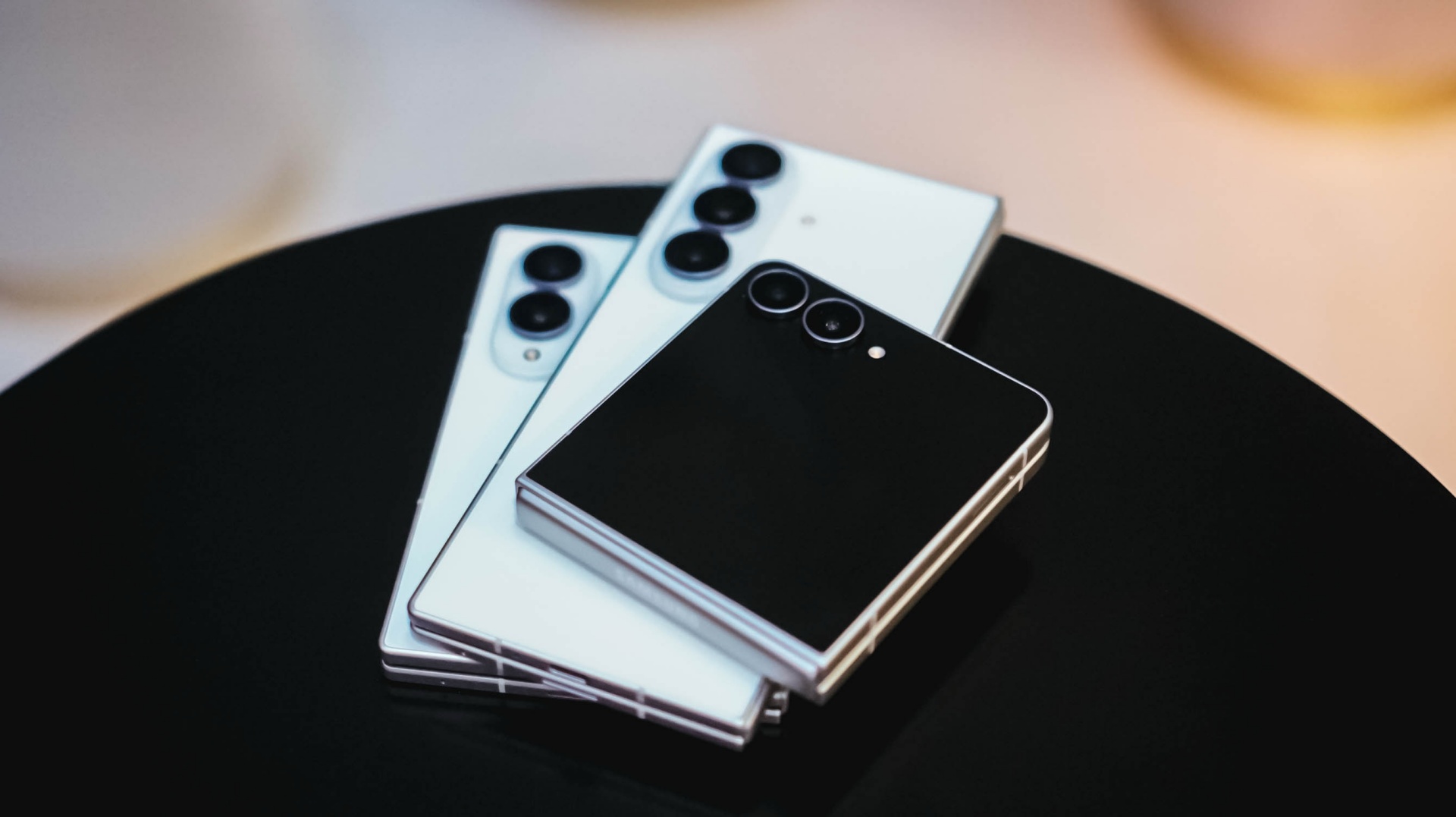
For years, the pitch for a foldable smartphone was remarkably simple: look, it folds.
That was enough when the category was new. Samsung had to prove that a smartphone could have a hinge, bend in half, and still work like a phone.
Eight years later, that is no longer the interesting part.
The question has shifted from can a smartphone fold? to what does folding actually let people do?
For Samsung, the answer increasingly seems to be about making the phone fit the person, rather than asking the person to adapt to the phone.
That shift is reflected in the latest Galaxy Z lineup. The Galaxy Z Fold8, Galaxy Z Fold8 Ultra, and Galaxy Z Flip8 don’t simply offer different specifications or screen sizes. Samsung sees them as different expressions of how people use their phones — whether that means watching, working, creating, communicating, or simply carrying the device around.
Jun Guevara, Head of Corporate Marketing at Samsung Philippines, says this reflects a broader change in how people think about smartphones.
“Before, it’s always about the specs — what the camera is like, how big or heavy it is, what’s the process, etc. But now with AI in the picture and it becomes more personal, contextual and action-oriented, people will expect their devices to adapt more closely to what they are trying to do.”
That makes the foldable form factor particularly interesting.
A foldable can be compact when portability matters, then become larger when more space is useful. It can change how you interact with the same device depending on the task at hand.
In other words, the screen doesn’t have to stay the same just because the phone does.
Eight years of listening
Samsung’s foldable journey began with a much more fundamental problem: convincing people that the concept was viable in the first place.
The company says it has spent more than seven years making thousands of engineering decisions across materials, displays, hinges, software, and overall design. But some of its most important lessons didn’t come from the lab.
They came from people actually using foldables.
Durability, in particular, became a major area of focus. Samsung says real-world usage helped inform improvements to display durability, crease visibility, the opening experience, materials, and overall device thickness and weight.
That accumulated experience has also changed what people expect from a foldable.
Consumers now judge them against the same fundamentals they expect from any flagship: can it hold up, can I carry it comfortably, is it powerful enough, and will it remain useful over time?
For Samsung, that means the foldable experience can’t be reduced to the hinge or the display. It has to work as a whole.
That sounds obvious. But it is also a meaningful shift.
The novelty of folding can get someone to try a device once. Making it a daily driver requires everything around the fold to work naturally.
That may be the biggest lesson from Samsung’s years of listening: people don’t use their phones in exactly the same way. So why should every foldable be designed to serve them the same way?
There isn’t one way to fold
Samsung isn’t trying to establish a single “best” foldable. Instead, its latest Galaxy Z lineup is built around different ways people want to use their phones.
The Galaxy Z Fold8 Ultra is positioned as the most capable option of the three. Samsung describes it as a device for people who need to do more, combining expansive multitasking and pro-level creation with its most advanced foldable design.
The Galaxy Z Fold8 takes a slightly different approach. Samsung sees it as the next evolution of the traditional Fold, balancing flagship performance with greater everyday usability and an immersive viewing experience.
Then there’s the Galaxy Z Flip8, which goes in the opposite direction. It is about portability, quick interactions, personal expression, and bringing AI experiences closer to the moments when you actually need them.
The distinction is important because Samsung isn’t arguing that everyone needs the biggest screen or the most powerful foldable.
Instead, it is arguing that there should be a foldable that makes sense for you. Your foldable match, if you will.
“We do not believe a single foldable form factor can meet the needs of every user,” Guevara says.
That idea runs through Samsung’s broader approach to the category. When evaluating new form factors, the company says it starts with real-world user value — whether a design meaningfully improves portability, productivity, content consumption, multitasking, or AI experiences.
The hardware, in that sense, is becoming a means to an end.
The right screen for the right moment
This is where Samsung’s vision for foldables starts to extend beyond simply having more screen.
Guevara describes a future where the mobile experience becomes less about having one fixed screen and more about having the right screen for the right moment.
Need something pocketable? Keep it compact.
Need more room to work? Open it up.
Want a more immersive viewing experience? Give yourself a larger canvas.
Want a quick interaction? Use the screen that’s already available.
The physical flexibility of a foldable gives AI more ways to respond to those situations, too. Samsung sees larger displays enabling deeper multitasking and content experiences, while cover screens can make interactions more glanceable and immediate.
“The mobile experience will become less about one fixed screen and more about giving users the right screen for the right moment.”
That also explains why Samsung isn’t predicting that foldables will replace traditional smartphones altogether.
Bar-type phones will remain important because they’re familiar, powerful, and portable. The point isn’t necessarily to eliminate one form factor in favor of another.
It’s to give people more choice.
And, perhaps more importantly, to make that choice feel right.
Technology in action
Samsung’s partnership with Spider-Man fits into that idea in an interesting way.
Rather than treating the devices purely as technology products, Samsung describes its cultural collaborations as “Technology in Action.” The goal is to place its products inside stories and narratives where their different capabilities can be demonstrated in context.
In the Spider-Man partnership, that means seeing a Galaxy Z Flip used for portability, a Galaxy Z Fold used for seeing the Spider-tracker map bigger, and a Galaxy Watch notifying Ned Leeds that Spider-Man is in the vicinity.
It’s a very literal demonstration of Samsung’s argument: the form factor matters because of what it lets people do.
A Flip can disappear into a pocket. A Fold can give you more room to work. A Watch can help you stay connected without reaching for your phone.
In that sense, Spider-Man becomes more than a backdrop for the latest Galaxy Z devices. It’s a way for Samsung to show its technology in action, inside a story about connection, community, and self-expression.
Making the foldable fit
There is still a perception that foldables are niche products.
Samsung doesn’t see it that way anymore.
Guevara points to repurchase rates for the previous generation — 32 percent for Fold7 and 37 percent for Flip7 — as evidence that once people adopt foldables, many choose to stay with the category. He also points to Fold7 attracting more former Ultra users, suggesting the category is expanding beyond its traditional early adopters.
Whether foldables eventually become the default smartphone remains to be seen.
Samsung isn’t betting on that, either.
Instead, it is betting on something more flexible: that people will choose devices that match how they actually live.
That’s a different proposition from the one Samsung made when the first Galaxy Fold arrived.
Back then, the company had to prove that a smartphone could fold.
Now it has to prove that a foldable can belong in everyday life.
And after eight years of engineering refinement and listening to how people actually use these devices, Samsung believes the next step isn’t making people adapt to the foldable.
“Our goal is not to make users adapt to foldables. It’s to make foldables fit more naturally into how people work, watch, create and communicate.”
It’s making the foldable match them.
Perhaps that’s where the Galaxy foldable story is heading next.
Not toward a phone that can do everything.
But toward a phone that knows when to become what you need.


Setting your bedsheets ablaze with the Lovense Solace Pro
The closest proxy I could find where I'm guilty as sin


Now Playing: Elden Ring Tarnished Edition
Is the Switch 2 port worth the price?


NBA 2K27 review: A two-way All-Star
Better ball game, same 2K?

ACMobility launches EV safety program to help drivers make the switch

Sony introduces its 1st Fisheye Zoom G Lens

vivo introduces refurbished versions of X300 FE, X300 Ultra for less

GadgetMatch Awards: Best of IFA 2026

CODE VEIN II launches Mask of Idris DLC with free Version 2.0 update

TECNO MEGAPAD 2 review: Eyes on the size

realme 16T 5G with 8000mAh battery, IP69 Pro rating launches in PH

REDMI Note 17 Series focuses on long-term reliability

HUAWEI Pura X View is 2026’s first WIDE slab-type smartphone

realme 16T to come with 8,000mAh battery, 7-year battery health guarantee


-
 News2 weeks ago
realme 16T 5G with 8000mAh battery, IP69 Pro rating launches in PH
-
 News2 days ago
HUAWEI Pura X View is 2026’s first WIDE slab-type smartphone
-
 News2 weeks ago
REDMI reveals the refreshed Note 17 and Note 17 Pro series
-
 Singapore2 weeks ago
REDMI Note 17 Series: Price, availability in Singapore
-
 Reviews2 weeks ago
REDMI Note 17 Pro review: What a rollercoaster ride!
-

 Features1 week ago
The designated photographer’s new favorite phone: OPPO Reno16 Series 5G
-

 Cameras7 days ago
DJI Osmo 360 II review: Going all-in on the ecosystem
-

 IFA 20266 days ago
TECNO MEGABOOK T15 360 unveiled at IFA 2026