
Legion Go S: Straight forward gaming on the go
AMD Ryzen™ Z2 Go chip, SteamOS-ready, and a near-perfect balance of looks and feel.







The gaming handheld market is pretty intense right now. It’s a space that’s rapidly evolving. News and rumors come out monthly if not weekly. And it’s really tough to keep up with everything.
But let’s set aside all of that for now.
Today, we’re gonna try to make a case on why the Legion Go S is the one that you should go for.
Legion Go S Quick Background
This is the Lenovo Legion Go S. It’s kind of like a half-step from the Legion Go first released in 2023. This handheld was first announced at CES 2025.
It comes in two color options – the white one that we have here which ships with Windows inside and another one that’s deep purple-ish which ships with SteamOS inside.
There are a few more differences like the processor, memory, and storage configurations.
The Legion Go 2 – the actual successor to Lenovo’s 2023 gaming handheld – was also showcased.
But the company made sure to let everyone know that it was a prototype and it isn’t coming until later in 2025. For now, let’s focus on this thing that we’re holding now.
Officially, this is the Legion Go S Windows. This particular version has the AMD Ryzen™ Z2 Go processor. In fact, it’s the first gaming handheld to release with this particular chip.
This model also has 16GB of RAM and 512GB of internal storage. I wager that’s already plenty for most people. Those are some of the more notable insides of this thing.
Now, let’s take a look at its exterior.
Look and feel
Honestly, this is what got me the most excited about the Legion Go S.
I personally think it has the best aesthetic to ergonomic ratio out of all the handhelds we’ve seen so far. Yes, including those officially announced but not readily available yet.
Aesthetically, it looks so damn clean. Buttons, triggers, and thumb sticks are where you’d expect them to be.
It comes in this pretty inoffensive and sleek looking pill shape and follows the usual asymmetrical controller layout.
The back features these honeycomb like cutouts that aren’t just for looks. This is part of the Legion ColdFront tech to keep your device cooled even as your gameplay sessions heat up. It’s the kind of functional design that we absolutely adore.
But what takes the cake is that, ergonomically, it feels amazing to hold. Your hands will naturally rest on the groove of the grips which also has this ribbed feeling making sure it doesn’t slip off your hands like the situationship you failed to hold on to.
Push my buttons, press my triggers
The face buttons feel incredibly tactile. No difference from some of the best standalone controllers out in the market now.
The Joysticks are Hall Effect. It’s magnet tech used to prevent drifting issues.
The Triggers are adjustable. You can go from deep to shallow with the latter being perfect for shooter type games. This is honestly a feature that should be present in ALL controllers… pro or otherwise.
It has a circular D-Pad that feels great for fighting games. The menu buttons are adequately placed and there’s also a tiny trackpad right underneath the right joystick for easier Windows navigation.
8-inches is the sweet spot
Sitting front and center is the 8-inch display.
Size-wise, it might just be the sweet spot for gaming handhelds. Not too big that you’ll have a headache figuring out how to carry it around. But big enough that you’re not squinting or holding the handheld too close to your precious peepers.
It’s a WUXGA display with a 16:10 aspect ratio with all the good stuff like 120Hz refresh rate, 100% sRGB, 500 nits, 10-point touchscreen – the works.
It is by no means the best display on a handheld. But it’s also not an exaggeration to say that it looks a lot better in person than what the specs on paper suggests.
Windows vs SteamOS
As mentioned earlier, this particular Legion Go S unit comes with Windows out of the box.
What does that mean for you? Access to multiple gaming platforms. There’s Xbox Game Pass which is home to some absolute bangers of games right now.
There’s the Game of the Year contender Clair Obscur: Expedition 33, first-person shooter gem Doom: The Dark Age, and many others.
Naturally, you also get access to Steam which is likely the most popular platform for PC gamers.
Other than these two major ones, you also have access to Battlenet, Epic Games, Ubisoft Connect and more.
The Windows version functions like most other Windows gaming handhelds in that they’re not just for gaming. You can connect peripherals to the handheld and turn it into a productivity device.
Since we’ve already experienced this particular setup on our Legion Go, the first thing we did upon receiving this unit was to install SteamOS–which became available just in time as we were testing the device.
With SteamOS installed, the Legion Go S transforms into a dedicated gaming handheld. Some have even called it a spiritual successor to the Steamdeck.
The biggest pros are quality of life improvements. Going from wake to sleep and vice versa just works. A single press on the power button takes you to your games. It’s literally pick up and play.
During the course of our time with the device, it’s been incredibly easy to take a break from work.
Pickup the Legion Go S and do a quick run on TMNT: Splintered Fate, a quick match on Virtua Fighter 5 REVO, progress a little bit on FF X Remastered, or do some relaxed swinging on Spider-Man: Remastered
SteamOS essentially takes you to Steam Big Picture Mode. It’s a user-interface that has great controller navigation support and is meant to feel like a true console UI.
SteamOS performance
The version of SteamOS we installed also has power profiles readily available.
Simply press the quick settings button. Pick the performance icon. And you’ll see the Performance Profile options.
Available to you are: Low-Power, Balanced, Performance, and Custom. It’s pretty straightforward.
Low-power is great for non-graphically demanding games. It helps extend your play time.
This is best suited for travel or when you’re out and about without a power outlet in close proximity. It launches by default on Balanced.
For most AAA titles, you’ll want to crank it up to Performance and be right next to a power outlet if you want to play for longer than an hour.
There’s also a cool bit where the light around the power button, which is also a Legion logo, changes depending on the power profile you’re on.
- Low-Power is Blue
- Balanced is White
- Performance is Red
- And Custom is Purple
That’s pretty neat.
AMD Ryzen™ Z2 GO
The AMD Ryzen™ Z2 Go that’s at the heart of the Legion Go S is a processor engineered specifically for gaming handhelds.
But what exactly does that mean in practice?
For our playing habits and preferences, this means more than enough power to play less-graphically demanding games.
For the games we played, these are TMNT: Splintered Fate, Final Fantasy X Remastered, and Bully. It’s the perfect machine for revisiting or finally playing some older games.
For more contemporary and relatively recent titles like Spider-Man: Remastered released in 2022, these are still playable but you’re going to have to be more selective in how you play them.
Typically, these games launch already in their most optimized settings. This happens when the game is already verified to be compatible with SteamOS.
Power Profile will automatically change to custom. And the Graphics settings, more often than not, are set to Medium.
In these settings, the AMD Ryzen™ Z2 Go is balancing performance and power efficiency to deliver gameplay that’s smooth and visually appealing without draining too much power.
However, if you happen to be near a power outlet and don’t mind playing while plugged in. You can crank things up. Put the power profile to performance and the graphics settings to high for the best possible combination of gameplay and visuals.
Understand also that the Legion ColdFront tech will kick in, so you’ll definitely hear the fans doing work. We suggest using bluetooth speakers or headphones for a better audio experience.
We also had the good fortune of testing the Legion Go S as Stellar Blade for PC launched. Like the Spidey game, it first launched on a console before coming to PC. And the performance is mostly the same. Whatever we described for Spidey applies to this game.
So if you want to really soak in Eve’s visuals, you’re gonna want to push the Legion Go S and AMD Ryzen™ Z2 Go.
All told, it’s a plenty capable processor that’s built for handheld gaming.
Battery things
Battery performance depends entirely on your usage.
Instead of doing super controlled tests, we just monitored the battery percentage on our daily use.
Playing a game like TMNT: Splintered Fate at low-power mode takes the battery down from 95% to 78% after roughly about 40 minutes of play time.
We put the Legion Go S on sleep after that for about an hour or so. When we woke the handheld up, it had 76% left.
We played FFX Remaster for close to an hour, still in low-power mode and we ended up with 65%.
We put the Legion Go S to sleep for the day after that.
The following morning, after a healthy number of hours of sleep, the handheld had 60% left when we woke it up.
This is when we switched to playing Spider-Man: Remastered at performance mode, unplugged.
The handheld lasted long enough to get through a quick story beat and some freelance swinging – about 30 minutes or so – before warning us that the battery was getting low.
But this particular game is currently experiencing some issues.
The button prompts aren’t displaying properly. What you get instead are just question marks instead of the actual button prompts.
I was only able to play through because this is a game I’ve played for countless hours already and have committed the button presses to muscle memory.
Is the Legion Go S your GadgetMatch?
The gaming handheld space is fast-moving and is evolving at a rapid pace.
But if you’re deadset on owning a gaming handheld right now, the Legion Go S (16GB/512GB) plus SteamOS configuration that we featured here offers a pretty darn good value.
It’s great for clearing backlogs on your Steam Library.
The pickup and play ability is underrated, especially if you’re the busy type who only has a few minutes or so to play. The precious seconds saved are REALLY precious.
A big consideration too is how the product looks and feels. To reiterate what we said earlier, the Legion Go S has a perfect aesthetics to ergonomics ratio. It feels good to hold without sacrificing anything from the looks perspective.
All of that along with its performance it provides makes it a pretty darn good value for the price it commands.
The versions available for purchase in the Philippines are as follows:
| Legion Go S | Legion Go S | |
| OS | SteamOS | Windows 11 |
| Price | PhP 34,995 | PhP 44,995 |
| Procesor | AMD Ryzen™ Z2 GO Processor (3.00 GHz up to 4.30 GHz) | AMD Ryzen™ Z2 GO Processor (3.00 GHz up to 4.30 GHz) |
| Graphics | Integrated Graphics | Integrated AMD Radeon™ Graphics |
| RAM | 16 GB LPDDR5X-6400MT/s (Soldered) | 16 GB LPDDR5X-6400MT/s (Soldered) |
| Storage | 512 GB SSD M.2 2242 PCIe Gen4 TLC | 512 GB SSD M.2 2242 PCIe Gen4 TLC |
| Connectivity | Wi-Fi 6E 2×2 AX & Bluetooth® 5.1 or above | Wi-Fi 6E 2×2 AX & Bluetooth® 5.3 |
| Display | 8″ WUXGA (1920 x 1200), IPS, Glare, Touch, 100%sRGB, 500 nits, 120Hz | 8″ WUXGA (1920 x 1200), IPS, Glare, Touch, 100%sRGB, 500 nits, 120Hz |
If you’re looking to dip your toes into gaming handhelds for the first time, the Legion Go S is a great place to start.







Acer is expanding its storage lineup with the PA100 Portable SSD. It’s a compact external drive designed for users who need faster storage across multiple devices.
The PA100 uses USB 3.2 Gen 1 connectivity. It reaches sequential read speeds of up to 560MB/s and write speeds of up to 430MB/s. This makes it suited for everyday tasks such as transferring large files, backing up content, managing documents, and moving media between devices.
Up to 2TB of portable storage
The PA100 comes in three capacities: 500GB, 1TB, and 2TB. This gives users options depending on whether they need extra space for documents and schoolwork or larger collections of photos, videos, and project files.
Acer also designed the drive with mobility in mind. The PA100 has a slim 9mm profile and a lightweight build, while its reinforced construction is designed to withstand everyday travel and handling.
The drive comes with a 2-in-1 USB-C to USB-C and USB-A cable. This allows it to connect to compatible PCs, tablets, smartphones, and other devices without requiring a separate adapter. It also supports major operating systems and USB-C mobile platforms.
Designed for everyday use
Power efficiency is another focus. Acer says the PA100 uses less than 3W during operation, while idle power consumption can drop to as low as 0.62W.
The drive also features an optimized thermal design to help maintain stable performance during extended transfers and daily workloads.
The Acer PA100 Portable SSD is backed by a three-year limited warranty. Pricing and availability may vary by market.
Computers
New Mac mini starts at a whopping $899, only 256GB of storage
It comes with the M6 or the M5 Pro.


Almost two decades ago, Apple was infamous for being an anti-gamer brand. Though the company’s devices touted superior protection against viruses, they couldn’t play video games, alienating a significant chunk of the population and forcing them onto PCs. For a while now, the Mac has changed the status quo, bringing in more powerful hardware that can play games. Today, Apple is championing that cause further through the newly launched Mac mini.
Compared to the chunkier Macs, the Mac mini has a lithe 5” x 5” profile, emphasizing the “mini” in its name. Despite the size, the new mini will tout two flavors of Apple silicon: the M6 and the M5 Pro.
The M6 variant delivers with up to two times faster gaming performance with ray tracing when running Cyberpunk 2077: Ultimate Edition, compared to the previous M4 version. Meanwhile, the M5 Pro version touts up to 4.5 times faster rendering performance with ray tracing in Blender, compared to the M2 Pro. It will come with macOS 27 Golden Gate out of the box.
You won’t have to worry about connectivity, either. The Mac mini comes with compatibility for Wi-Fi 7, Bluetooth 6, and 2.5Gb Ethernet (going up to 10Gb in upgraded versions). It will also have two USB-C ports, three Thunderbolt 5 ports (but only Thunderbolt 4 for the M6 version), and HDMI port, an Ethernet port, and a headphone jack.
Unfortunately, price seems to be another thing that it’s getting from PCs. The new Mac mini has an increased starting price. Specifically, the M6 version starts at US$ 899 (with only 256GB of storage), and the M5 Pro version starts at US$ 1,699 (for 512GB of storage). Preorders are open now, but they ship out on September 22.
SEE ALSO: Apple raises the prices of iPad and MacBook lineups
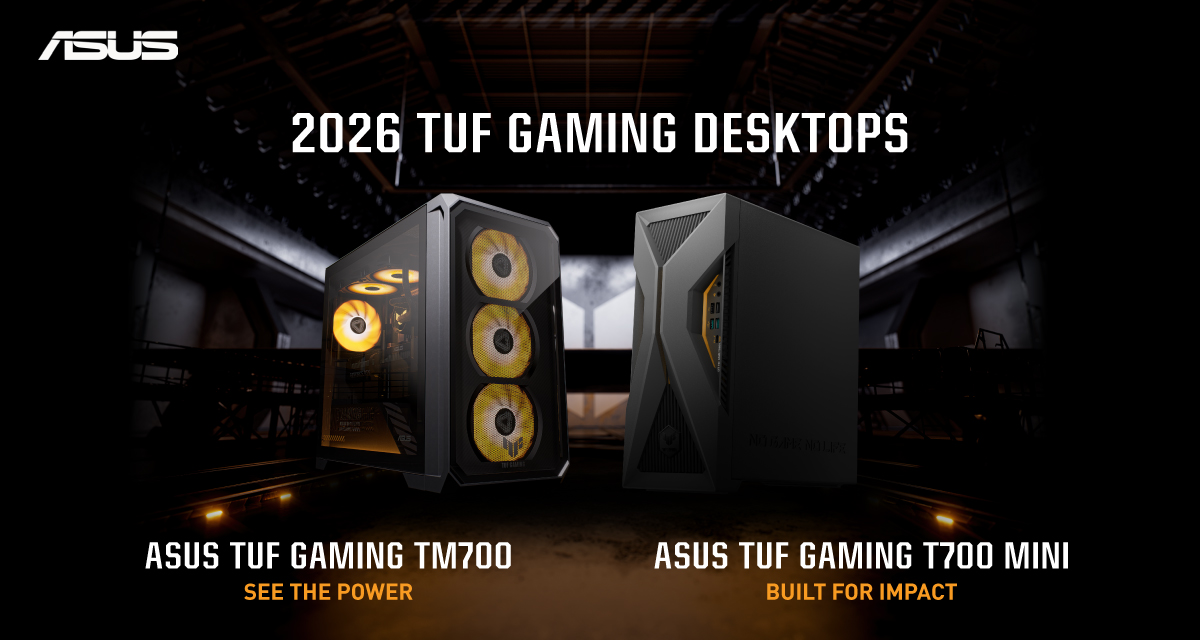
ASUS has announced the arrival of its latest TUF Gaming desktop lineup models: the TUF Gaming T700 and TUF Gaming T700 Mini.
These new offerings bring heavy-duty performance and military-grade durability to gamers, engineered to endure extreme operational demands while delivering rock-solid stability.
The new ASUS TUF Gaming T700, in particular, is engineered to take on modern AAA titles with its uncompromising performance.
It has an aggressive mecha-inspired MIL-STD chassis, including a transparent side panel to put powerful components on display. Vibrant orange ambient lighting also adds a bold finishing touch.
Inside is an AMD Ryzen 7 8700F processor and up to an NVIDIA GeForce RTX 5060 Ti GPU for high-frame rate gaming.
The T700 also features a robust thermal solution equipped with quad 65 CFM fans and a 240mm liquid cooler.
Meanwhile, the TUF Gaming T700 Mini is tailored for competitive gamers while maintaining a compact, battle-tested chassis.
It has an Intel Core Ultra 5 225F desktop processor, paired with with NVIDIA GeForce RTX 3050 graphics.
This combination provides seamless multitasking, crisp visuals, and reliable frame rates across today’s popular titles.
The internal hardware is cooled by a custom thermal matrix featuring dedicated copper heat pipes and a heavy-duty 90mm cooling fan.
True to the TUF Gaming legacy, the T700 Mini is likewise MIL-STD tested to endure extreme operational demands.


DJI Lito X1 review: Is this the best lightweight drone for creators?
Making a strong case as a travel companion and a capable B-cam!


REDMI Note 17 Pro Max review: A new breed born from AI greed
Welcome to the new normal


Marvel’s Wolverine review: When the claws come out
A brutal, cinematic superhero adventure
DJI Lito X1 review: Is this the best lightweight drone for creators?

Now Playing: Resident Evil

HONOR, Fidesmo partner for contactless payments across Europe, Middle East

Ford revs up Truck Month with extended 5-star care offers
REDMI Note 17 Pro Max review: A new breed born from AI greed

TECNO MEGAPAD 2 review: Eyes on the size

realme 16T 5G with 8000mAh battery, IP69 Pro rating launches in PH

HUAWEI Pura X View is 2026’s first WIDE slab-type smartphone

REDMI reveals the refreshed Note 17 and Note 17 Pro series

REDMI Note 17 Series: Price, availability in Singapore

-
 News2 weeks ago
HUAWEI Pura X View is 2026’s first WIDE slab-type smartphone
-

 News2 weeks ago
The CAMON Slim 5G is TECNO’s latest ultra-slim smartphone
-

 News1 week ago
iPhone 18 Pro series: Price, availability in the Philippines
-

 IFA 20262 weeks ago
TECNO’s POVA 8 Pro gets a stealthy makeover
-

 Automotive2 weeks ago
Ford’s new Everest lineup brings V6 engine to the top, tech down the line
-

 Gaming2 weeks ago
Now Playing: Elden Ring Tarnished Edition
-

 Singapore1 week ago
iPhone 18 Pro series: Price, availability in Singapore
-

 Philippines2 weeks ago
Smart cuts 5G Home WiFi price