


I’ll be honest: I’ve never finished a Yakuza game. The closest I got was Judgment, and even that’s still sitting in my backlog. Seeing the franchise’s massive catalog used to feel a little intimidating. But Yakuza 0: Director’s Cut on the Switch 2? It’s somehow the perfect reentry — and maybe even the ideal starting line — for someone like me.
A polished gem in every mode
Reviews across the board agree: this isn’t just a capable port — it’s a shining one. Whether docked or handheld, the game runs at a locked 60fps, with docked mode sometimes hitting glorious 4K territory. Even cutscenes hit 60fps, a continuity upgrade that some reviewers felt diluted the original cinematic feel — but personally, I found it made the game feel more alive.
Graphically, you won’t get PS5-level detail, but that doesn’t hurt the vibe. The neon-drenched streets of Kamurochō and Sotenbori still look sharp — gritty, atmospheric, and unmistakably ’80s. Load times? Almost nonexistent — one reviewer joked they blinked and the loading screen had gone by.

A real “certified definitive edition”
Director’s Cut isn’t just a re-release — it’s a re-lift. You get never-before-seen cutscenes that add roughly 20–30 minutes of story. There’s also a brand-new English dub, plus expanded subtitle options in several languages. The much-hyped multiplayer horde mode, Red Light Raid, lets you play as just about anyone from the series for some cooperative chaos.
Not every addition lands perfectly — some reviewers felt the new scenes feel a bit tacked on, and the raid mode can feel more like a gimmick than a lasting hook (Nintendo World Report, Nintendo Life). Still, they’re nice bonuses to the already solid core.

Why it clicked for me
For a non-completer like me, Yakuza 0 on any platform might’ve felt daunting. But the Switch 2 version made it feel manageable — accessible, even. The game keeps its depth — emotional story, ridiculous substories, dense environments — but the smoother performance and intuitive portability make it easier to stick with it in bite-sized play sessions.
Combat remains tight: three distinct styles per character, satisfying weight to the hits, and plenty of rhythm to the fights. Side content — karaoke, real estate, arcades — is still just as addictive. And the pacing is perfect: you get high-stakes drama mixed with wacky distractions, which mostly came from real experiences I’d read about and now get to enjoy firsthand.

A new favorite, maybe?
Critics across the board call it the best traditional Yakuza game and an ideal entry point. A standout Switch 2 launch, too — packed with enhancements, running great, with just enough new content to feel special.
So here’s the deal: Yakuza 0: Director’s Cut on Switch 2 isn’t only the best path for newcomers; it might also be my doorway into finally finishing a Yakuza story. And I suspect it might do the same for more people who, like me, always felt the series was a bit too big to jump into.
h/t: Nintendo World Report, RPG Site, Impulse Gamer, The Guardian, Nintendo Life, GameSpot








Annually, The Game Awards have become a sort of second Christmas for gamers. Besides a celebration of the past year in the world of videogames, the event hosts trailers for games of the upcoming year and beyond. Though it’s already free on several platforms, viewers can now tune in to Disney+ to watch this year’s Game Awards.
Hosted as always by Geoff Keighley, 2026’s The Game Awards will happen on December 10 at 7:30pm ET. Most of the event will award the best titles of various categories for the year. Several publishers and developers also use the event to announce their upcoming titles. It’s for these reasons that a lot of gamers catch the event every year.
This year, The Game Awards is streaming live on Disney+. This is in addition to its usual platforms including Twitch and YouTube. The Disney+ stream will be available in the United States and select territories internationally.
For now, gamers can also vote on their picks for various categories via the event’s website.
On the other hand, Disney+ has been pushing live events more adamantly. In the Philippines, for example, the platform is the home for live NBA coverage. Though it’s not as strong as Netflix’s gaming push with its assortment of free games, Disney+’s addition of the annual awards show is a worthy go for gamers.
SEE ALSO: Here are all the big trailers from The Game Awards 2025
Accessories
Secretlab brings Pikachu, Gengar, and Eevee to its Pokémon gaming chair collection
Pokémon-themed gaming chairs
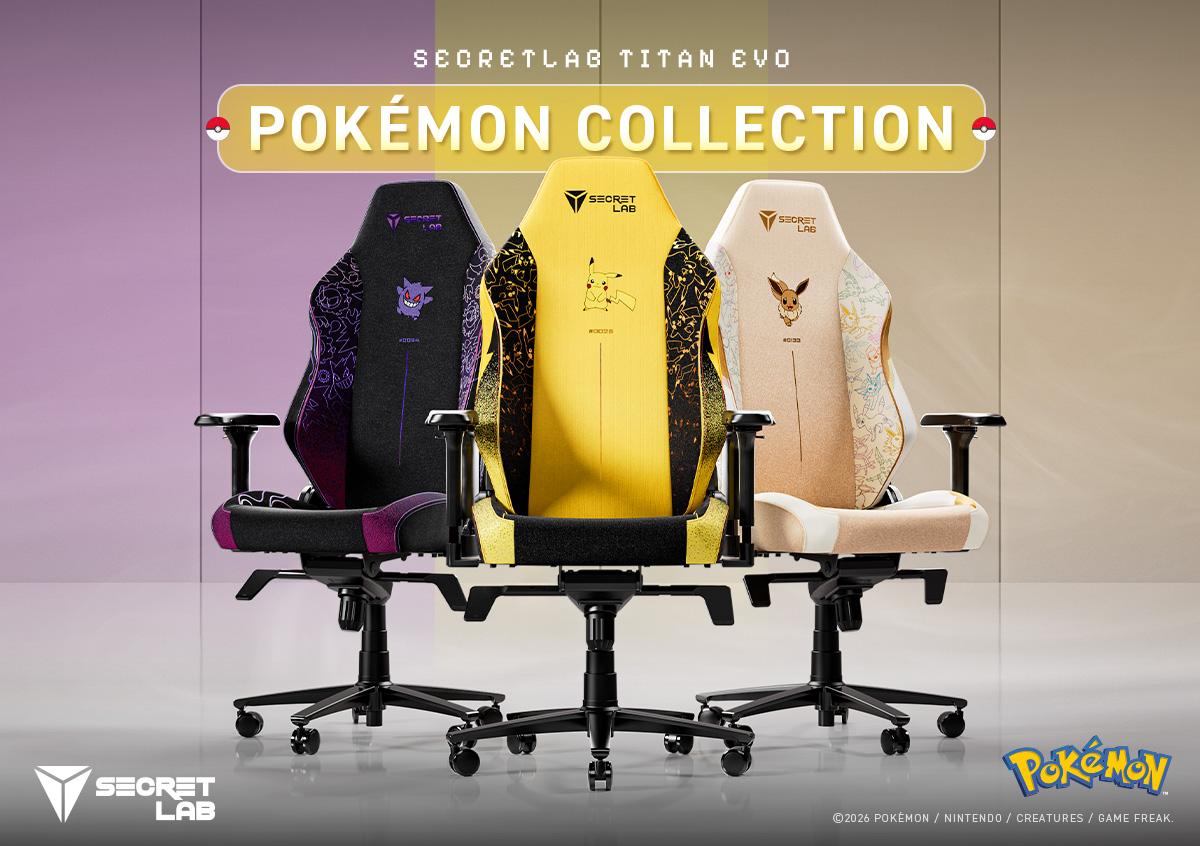
Secretlab is bringing some iconic Pokémon to your gaming setup. The Secretlab Pokémon Collection introduces three new TITAN Evo gaming chairs inspired by Pikachu, Gengar, and Eevee.
Each chair features distinct design elements inspired by its respective Pokémon. The collection also incorporates microsuede and velour detailing for added texture and depth.
Fans can find several hidden details throughout the designs. These include each Pokémon’s Type symbol and Pokédex number on the backrests. The collection also pays tribute to the original 151 Pokémon.
Three Pokémon, three distinct designs
The Secretlab TITAN Evo Pokémon Pikachu Edition puts everyone’s favorite Electric-type Pokémon front and center.
Pikachu appears in plush velour detailing against bold Electric-type symbols. The chair features 11 unique Pikachu motifs across its side wings. A black-to-yellow gradient completes its overall design.
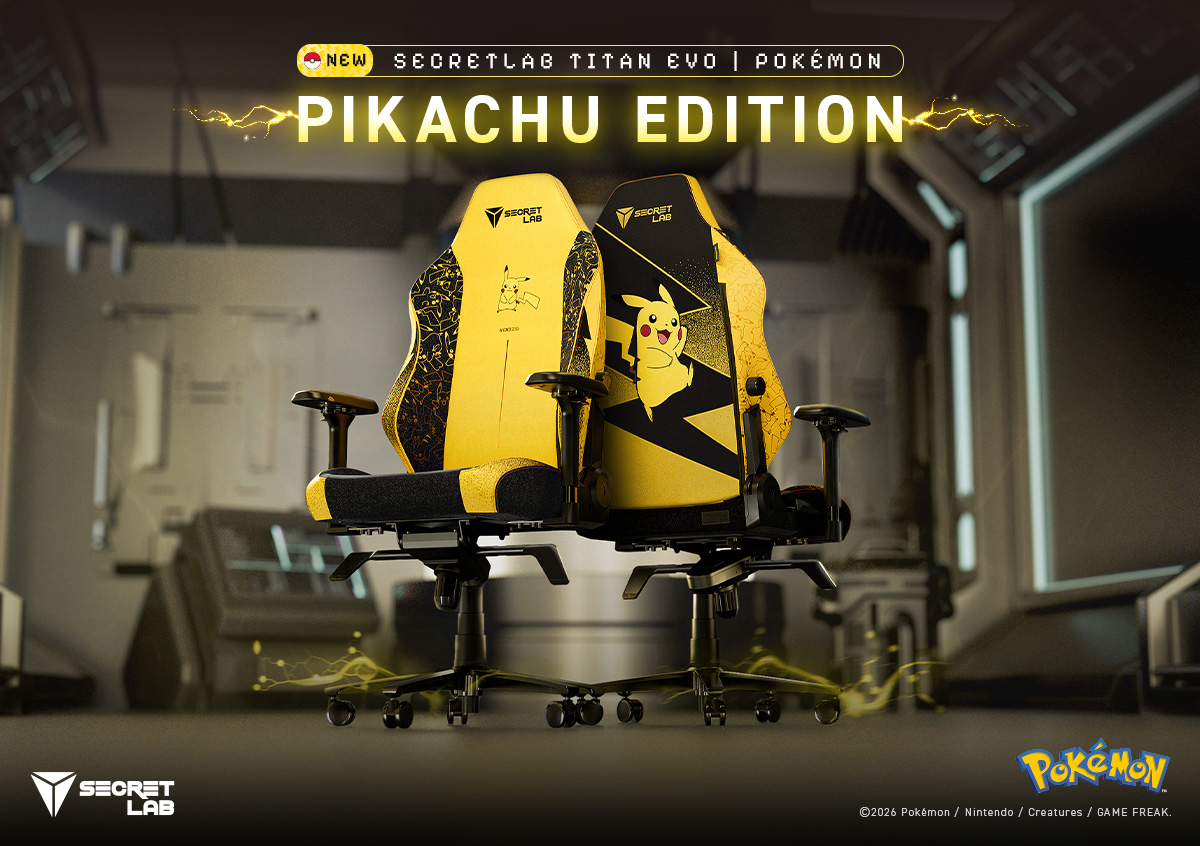
Fans can also spot the differences between male and female Pikachu.
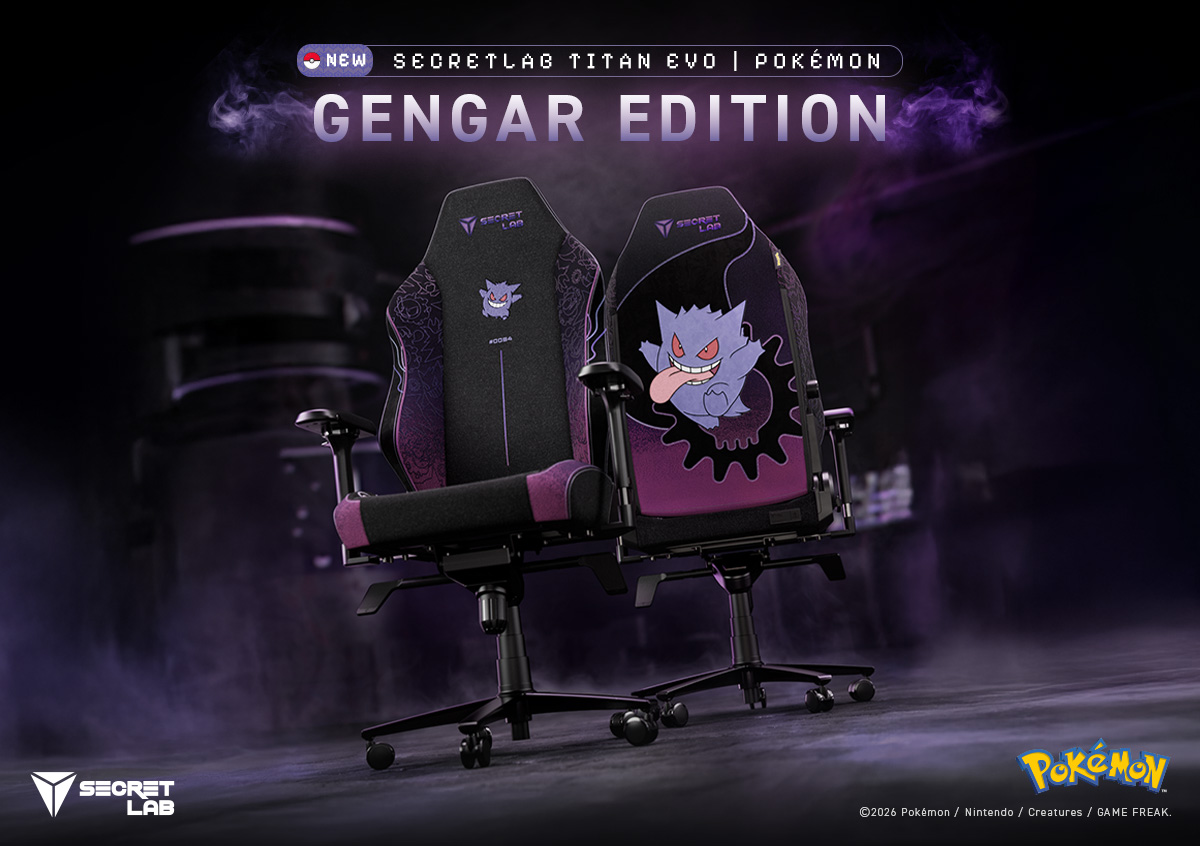
Meanwhile, the Secretlab TITAN Evo Pokémon Gengar Edition embraces a darker aesthetic. Gengar takes center stage on the backrest alongside Ghost- and Poison-type symbols.
Gastly and Haunter also appear across the side wings. A spectral purple gradient ties the entire design together.
Finally, the Secretlab TITAN Evo Pokémon Eevee Edition celebrates Eevee and its eight evolutions.
Eevee appears on the backrest with plush velour detailing. The chair features warm cream-and-brown gradients and a Normal-type symbol. Its design also incorporates all eight Eeveelutions, from Vaporeon to Sylveon.

The TITAN Evo experience
Beyond their Pokémon-inspired designs, all three chairs retain the Secretlab TITAN Evo’s ergonomic features.
The chair uses medium-firm, patent-pending cold-cure foam. This material contours to the body while providing weight distribution and pressure relief.
Its sculpted pebble seat base features gently sloping side wings. These guide users toward the middle while leaving room to switch sitting positions.
The TITAN Evo also features 4-way L-ADAPT lumbar support. It moves up, down, in, and out to accommodate the natural curvature of the lower back.
Secretlab’s SoftWeave Plus fabric provides a soft, breathable knit surface. Its construction also allows detailed Pokémon motifs to appear throughout the material.
Availability
The Secretlab Pokémon Collection features the Pikachu, Gengar, and Eevee Editions of the TITAN Evo.
Interested buyers can learn more about the collection through Secretlab’s official website, Shopee, and Lazada.
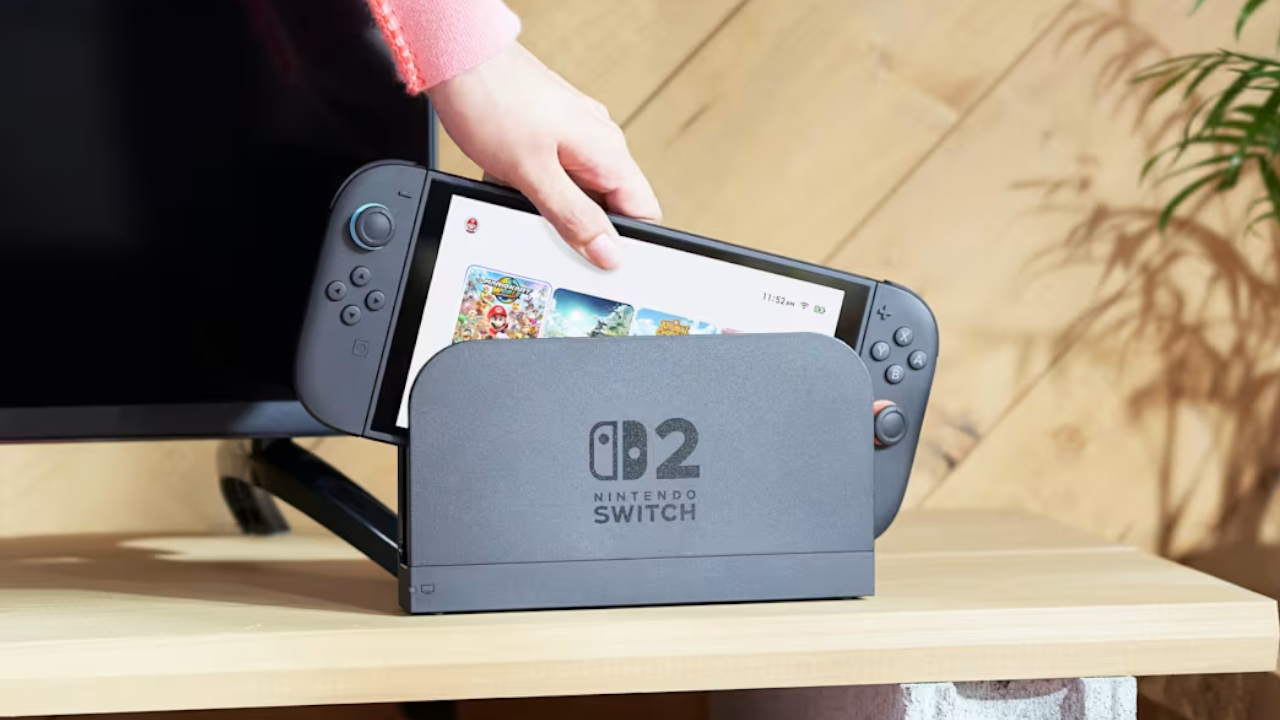
With Nintendo finally opening the eShop and Nintendo Switch Online in the Philippines, you might be wondering how you can switch your account’s region to the right country. After all, before today, you might have set your shop to the neighboring Singapore or other countries that aren’t named the Philippines. If you’re in the same boat, here’s a quick how-to, so you can enjoy paying for services in Philippine peso.
First, you need to log into your Nintendo Account. Take note: you can do this only through their website via a browser, so don’t fiddle around with your Switch or Switch 2 just yet.
Upon logging in, you’ll be redirected immediately to your profile’s information, including your country or region of residence. Just click Edit and select your desired country in the drop-down menu.
Nintendo will then present you a few notices regarding changing your region. The important bit is that you can’t carry over your account balance to the next region. So, if you have a hefty sum tucked away in your current region, it might be wise to spend it before switching. Likewise, your credit card might not work if it was issued from the current region.
Once you agree to the terms, everything’s set!
All you need to do is access the eShop on your console and sign in again. Afterwards, the corresponding services should be in your currency of choice.
For a list of detailed changes and prices, check out our coverage here.


Apple iPad mini OLED review
Has the mini gone PRO?!


ROG G700 review: The best prebuilt PC you can get off the shelf
This PC will make you stop worrying about specs.

HP OMEN Max 16 review: Gamer-maxxing in deep black
Peripherals deemed necessary to max this out

AMD, Meta deepen partnership for AI infrastructure

2026’s The Game Awards will stream live on Disney+

Secretlab brings Pikachu, Gengar, and Eevee to its Pokémon gaming chair collection

realme Christmas raffle: Win an XPENG EV, more

Avengers Endgame: Encore debuts on Disney+

Your coffee nook is getting a makeover with Starbucks’ holiday collections

vivo V80 debuts with ZEISS cameras

vivo V80 review: Good phone, tough sell

OPPO Find X10 Series: Price, availability in the Philippines

iPhone Duo Philippines: Prices, installments, and where to buy


-
 Lifestyle2 weeks ago
Your coffee nook is getting a makeover with Starbucks’ holiday collections
-

 Lifestyle2 weeks ago
Sticker season is back, and so is the planner your ~friends~ might fill in for you
-

 Gaming2 weeks ago
Wild Rift Patch 7.3, celebrates K/DA comeback
-

 News1 week ago
Sony revives classic Walkman headphones with USB-C MDR-3R
-
 Features2 weeks ago
Inside Infinix’s first global concept store in Bali
-
Reviews1 week ago
Apple iPad mini OLED review
-

 Philippines1 week ago
Lazada kicks off 11.11 Biggest Sale of the Year ahead of holiday rush
-

 Philippines2 weeks ago
LG showcases its latest AI TVs in the Philippines