


You know how you don’t really want something until you actually try it for yourself? That’s exactly what happened between me and the Samsung Odyssey G9. This beast of a monitor has been around for a few years, but I never gave it much thought until Samsung graciously let me try one.
Spoilers: I don’t know what I’ll do once they take it away.
The Odyssey G9 is billed as a gaming monitor, but I mostly used it for work. I genuinely didn’t expect a widescreen display to make a difference — but after spending a few weeks with it, I can’t imagine going back to a non-ultrawide setup. Not just for the visual real estate, but for how it quietly reshaped my workflow.
My usual PC workspace
For years, I’ve relied on the multiple desktop feature on both PC and Mac to organize how I work. One desktop is strictly for writing, research, and productivity. Another is reserved for the multiple chat apps I use on the daily: Telegram, Messenger, WhatsApp, and even Viber. And then there’s one for quick social breaks — Twitter, Instagram, or whatever flavor of distraction I need at the time.
It’s a neat, compartmentalized system that works well on smaller displays, and I was convinced this was the only way I could stay focused. Anything else, I thought, would only slow me down or break my rhythm.

Enter the Samsung Odyssey G9
To test the Odyssey G9, I had to fully rearrange my workspace just to make room for it. This thing is massive — and not in a gimmicky way. It’s a 49-inch ultrawide monitor with a 32:9 aspect ratio and an immersive 1000R curvature that wraps around your field of view. The model I tested was the LC49G95TSSNXDC, which runs on a QLED VA panel, supports HDR1000, and pushes a crisp 5120×1440 resolution at up to 240Hz refresh rate with a 1ms response time.
Specs aside, it’s one of those devices that just looks absurd… until you sit in front of it.

I didn’t even use the entire ultrawide screen for this one.
Having a larger and wider screen also rejuvenated my interest in video editing. Being able to see your canvas and timeline feels so refreshing. That’s especially true for someone who has mostly worked on a 13-inch display for the better part of a decade. Seeing everything clearly — layers, preview windows, audio tracks — without constantly zooming in and out felt like a game-changer.
I quickly discovered that with this much screen space, I didn’t need to isolate workspaces across desktops. Everything I needed could now exist in a single view. I still use multiple desktops, but not for segmentation — now they’re just extensions.
A productivity powerhouse

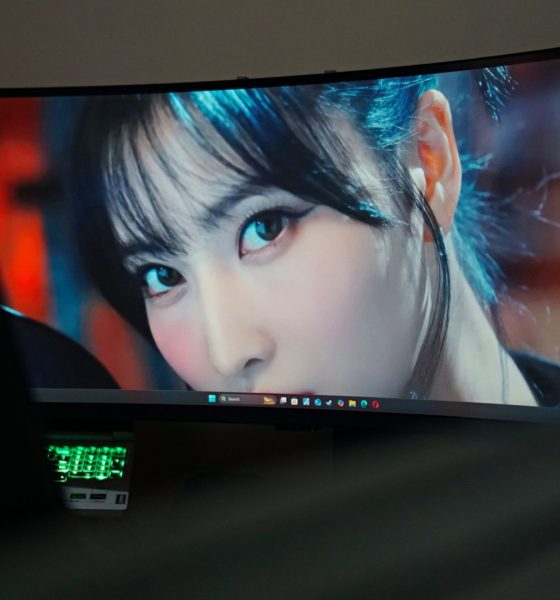
I can’t really show you what I usually work on so just think of this division as how I usually split my screen. STAYC Isa on the left for extra work things and sometimes YouTube. TWICE Momo in the middle for my main work things. And LE SSERAFIM Chaewon on the right for the multiple chat apps and socials.
Technically speaking, a 5120×1440 display is the same as having two 1440p monitors fused together — but without the physical bezels or the mess of dual-monitor cable management. That alone already makes it a more elegant solution.
Compared to a traditional two-monitor setup, the Odyssey G9 felt more cohesive and far less chaotic. I didn’t need to turn my head as much, and the 1000R curve actually helps reduce eye strain because it matches your natural field of vision.

You can split the monitor screen in many different ways.
Whether I was writing, editing timelines, cross-checking documents, or responding to messages, everything felt fluid. It’s one of those quality-of-life upgrades that doesn’t shout for attention but gradually seeps into your muscle memory — until it just feels wrong to go back.
Gaming

Stellar Blade on PC with ultrawide screen support
The Odyssey G9 was made for gaming, so of course I had to put that to the test. I primarily game on consoles, but thanks to PC ports with ultrawide support, I gave titles like Horizon Forbidden West and Stellar Blade a spin — the latter being my main obsession for a while.
At first, I didn’t know what to do with all that extra horizontal space. My attention stayed mostly in the center, and I ignored the wingspan of visuals stretching out to either side.
That changed once I loaded up RoboCop: Rogue City — a first-person shooter where I ditched the controller for a mouse-and-keyboard setup. That format, combined with the monitor’s wide field of view, took me right back to Counter-Strike LAN days. Only now, I could see so much more.
Peripheral vision matters in FPS games, and the Odyssey G9 gives you more of it. Enemies that would normally be out of sight pop into your awareness just enough to make a difference. Paired with the 240Hz refresh rate and FreeSync Premium Pro support, motion stays buttery smooth even during intense firefights.

Not a game but here’s what the pillarbox looks like. Watching Zoey from KPop Demon Hunters on Netflix.
Not all games support ultrawide, though. Some titles pillarbox to 16:9 or stretch awkwardly, so it’s worth checking compatibility if your primary use is gaming. But when games do support it? It’s like discovering an extra layer of immersion.
A second HDMI? Yes, please

Here’s what it kind of looks like with an even split of the screen. ITZY Ryujin on the left and ARTMS Heejin on the right.
One feature I didn’t fully take advantage of — but can totally see the value of — is the second HDMI port. The Odyssey G9 supports Picture-by-Picture (PBP), which means you can connect two devices and view them side-by-side on the same screen.
For most people, that could mean a PC and a console, or a laptop and a streaming box. For content creators or streamers, it might be monitoring a live chat on one side while editing or gaming on the other. And since the monitor auto-detects active inputs, it doesn’t take much fiddling to switch or toggle between them.
My workspace didn’t let me make full use of this, but it’s the kind of utility feature that can make a real difference for multitaskers and hybrid setups.
Is the Samsung Odyssey G9 your GadgetMatch?

I went into this expecting a cool gaming monitor — something flashy and impractical that I’d enjoy briefly and then move on from. Instead, I found myself rethinking how I work and how I play.
The Samsung Odyssey G9 isn’t a monitor for everyone. It’s large, pricey, and overkill for casual use. But if your time is split between work and play — especially if your work involves content creation, video editing, research-heavy tasks, or heavy multitasking — this is the kind of upgrade that can change how you see your workflow.
After spending time with it, even the idea of returning to a flat 16:9 panel feels limiting. Once you’ve had a taste of this kind of immersion, it’s hard to unsee it.
The Odyssey G9 didn’t just make gaming better. It made everything better. And now that I’ve had it in my space, I know one thing for sure: I’m going to miss it when it’s gone.






Acer is expanding its storage lineup with the PA100 Portable SSD. It’s a compact external drive designed for users who need faster storage across multiple devices.
The PA100 uses USB 3.2 Gen 1 connectivity. It reaches sequential read speeds of up to 560MB/s and write speeds of up to 430MB/s. This makes it suited for everyday tasks such as transferring large files, backing up content, managing documents, and moving media between devices.
Up to 2TB of portable storage
The PA100 comes in three capacities: 500GB, 1TB, and 2TB. This gives users options depending on whether they need extra space for documents and schoolwork or larger collections of photos, videos, and project files.
Acer also designed the drive with mobility in mind. The PA100 has a slim 9mm profile and a lightweight build, while its reinforced construction is designed to withstand everyday travel and handling.
The drive comes with a 2-in-1 USB-C to USB-C and USB-A cable. This allows it to connect to compatible PCs, tablets, smartphones, and other devices without requiring a separate adapter. It also supports major operating systems and USB-C mobile platforms.
Designed for everyday use
Power efficiency is another focus. Acer says the PA100 uses less than 3W during operation, while idle power consumption can drop to as low as 0.62W.
The drive also features an optimized thermal design to help maintain stable performance during extended transfers and daily workloads.
The Acer PA100 Portable SSD is backed by a three-year limited warranty. Pricing and availability may vary by market.
Computers
New Mac mini starts at a whopping $899, only 256GB of storage
It comes with the M6 or the M5 Pro.


Almost two decades ago, Apple was infamous for being an anti-gamer brand. Though the company’s devices touted superior protection against viruses, they couldn’t play video games, alienating a significant chunk of the population and forcing them onto PCs. For a while now, the Mac has changed the status quo, bringing in more powerful hardware that can play games. Today, Apple is championing that cause further through the newly launched Mac mini.
Compared to the chunkier Macs, the Mac mini has a lithe 5” x 5” profile, emphasizing the “mini” in its name. Despite the size, the new mini will tout two flavors of Apple silicon: the M6 and the M5 Pro.
The M6 variant delivers with up to two times faster gaming performance with ray tracing when running Cyberpunk 2077: Ultimate Edition, compared to the previous M4 version. Meanwhile, the M5 Pro version touts up to 4.5 times faster rendering performance with ray tracing in Blender, compared to the M2 Pro. It will come with macOS 27 Golden Gate out of the box.
You won’t have to worry about connectivity, either. The Mac mini comes with compatibility for Wi-Fi 7, Bluetooth 6, and 2.5Gb Ethernet (going up to 10Gb in upgraded versions). It will also have two USB-C ports, three Thunderbolt 5 ports (but only Thunderbolt 4 for the M6 version), and HDMI port, an Ethernet port, and a headphone jack.
Unfortunately, price seems to be another thing that it’s getting from PCs. The new Mac mini has an increased starting price. Specifically, the M6 version starts at US$ 899 (with only 256GB of storage), and the M5 Pro version starts at US$ 1,699 (for 512GB of storage). Preorders are open now, but they ship out on September 22.
SEE ALSO: Apple raises the prices of iPad and MacBook lineups
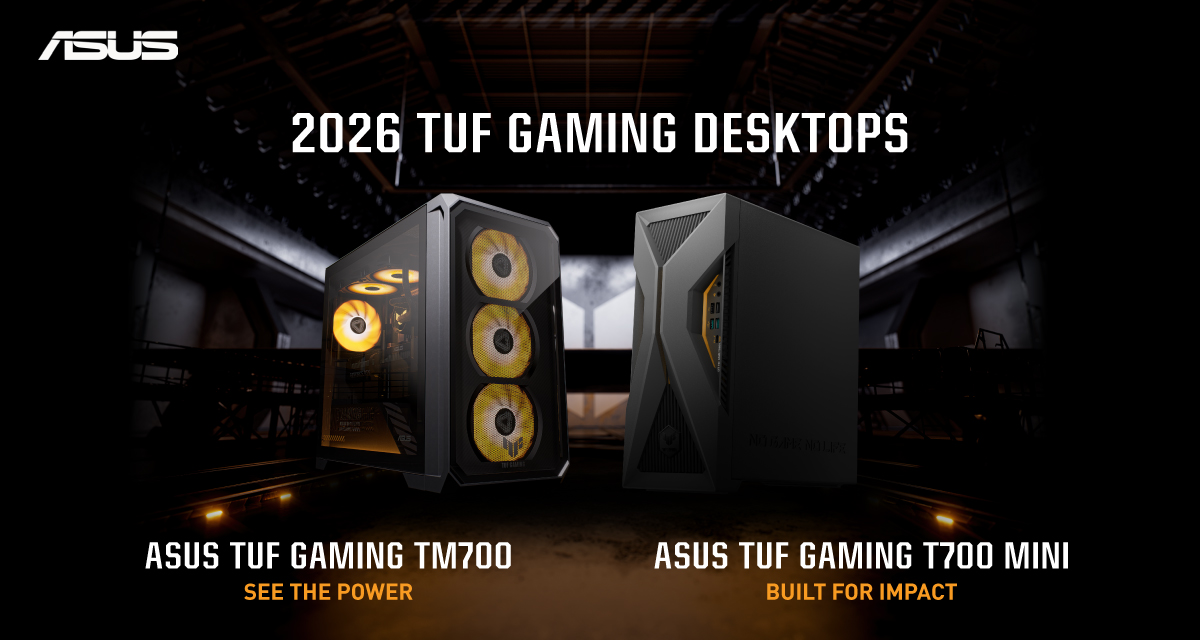
ASUS has announced the arrival of its latest TUF Gaming desktop lineup models: the TUF Gaming T700 and TUF Gaming T700 Mini.
These new offerings bring heavy-duty performance and military-grade durability to gamers, engineered to endure extreme operational demands while delivering rock-solid stability.
The new ASUS TUF Gaming T700, in particular, is engineered to take on modern AAA titles with its uncompromising performance.
It has an aggressive mecha-inspired MIL-STD chassis, including a transparent side panel to put powerful components on display. Vibrant orange ambient lighting also adds a bold finishing touch.
Inside is an AMD Ryzen 7 8700F processor and up to an NVIDIA GeForce RTX 5060 Ti GPU for high-frame rate gaming.
The T700 also features a robust thermal solution equipped with quad 65 CFM fans and a 240mm liquid cooler.
Meanwhile, the TUF Gaming T700 Mini is tailored for competitive gamers while maintaining a compact, battle-tested chassis.
It has an Intel Core Ultra 5 225F desktop processor, paired with with NVIDIA GeForce RTX 3050 graphics.
This combination provides seamless multitasking, crisp visuals, and reliable frame rates across today’s popular titles.
The internal hardware is cooled by a custom thermal matrix featuring dedicated copper heat pipes and a heavy-duty 90mm cooling fan.
True to the TUF Gaming legacy, the T700 Mini is likewise MIL-STD tested to endure extreme operational demands.


DJI Lito X1 review: Is this the best lightweight drone for creators?
Making a strong case as a travel companion and a capable B-cam!


REDMI Note 17 Pro Max review: A new breed born from AI greed
Welcome to the new normal


Marvel’s Wolverine review: When the claws come out
A brutal, cinematic superhero adventure

Epson Lifestudio Grand Plus EH-LS970B with 4K projection, more launches

Jackery Explorer 300D: Power and portability in one

Nike’s Alphafly 4 is built for the part of the marathon ~that actually hurts~

SEGA, Netflix announce Crazy Taxi film adaptation

Smart launches LiveSmart App for exclusive deals

TECNO MEGAPAD 2 review: Eyes on the size

realme 16T 5G with 8000mAh battery, IP69 Pro rating launches in PH

HUAWEI Pura X View is 2026’s first WIDE slab-type smartphone

REDMI reveals the refreshed Note 17 and Note 17 Pro series

REDMI Note 17 Series: Price, availability in Singapore


-
 News2 weeks ago
HUAWEI Pura X View is 2026’s first WIDE slab-type smartphone
-

 News2 weeks ago
The CAMON Slim 5G is TECNO’s latest ultra-slim smartphone
-

 News2 weeks ago
iPhone 18 Pro series: Price, availability in the Philippines
-

 Singapore2 weeks ago
iPhone 18 Pro series: Price, availability in Singapore
-

 News2 weeks ago
iPhone Duo: Price, availability in the Philippines
-
 News2 weeks ago
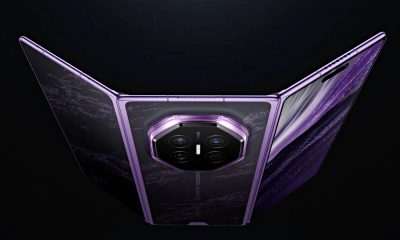
HUAWEI Mate XT 2 tri-fold launches with Kirin 9050 Pro
-

 News2 weeks ago
vivo introduces refurbished versions of X300 FE, X300 Ultra for less
-

 News2 weeks ago
iPhone Duo: Price, availability in Singapore