


With the steady popularity of e-commerce sites especially this pandemic, more and more people prefer shopping online rather than risking themselves to go out. Shopee is one of those platforms that provides plethora of items ranging from clothing to home supplies to gadgets, dry food even. Now, they also have Shopee Pay (or SPay).
Due to the continuous rise of coronavirus cases, physical contact should be avoided at all times. ShopeePay is the company’s solution for an easier way of paying the items you buy from their site. It might just be your ultimate contacless payment method!
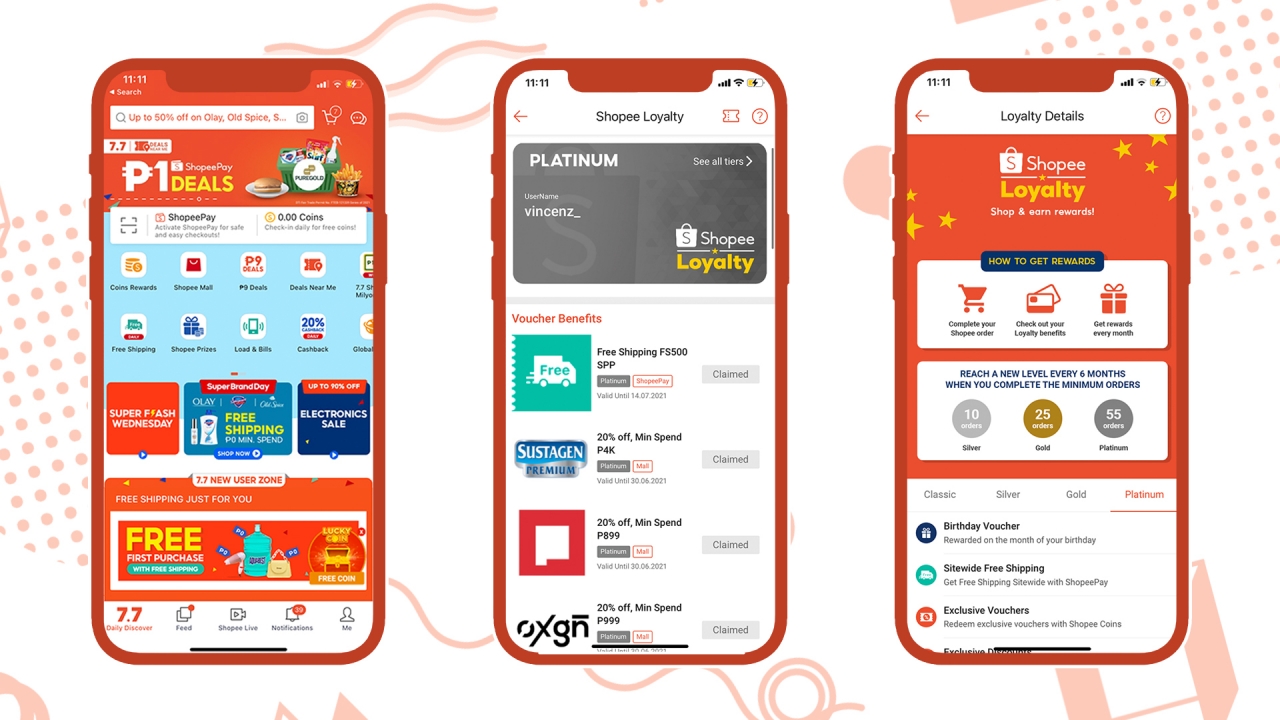
Image by GadgetMatch
I admit that I’m an avid Shopee buyer and user. Adding so many products in the cart and buying from their app even made me a “Platinum” member — well at least for the first six months of 2021. In all of my Shopee transactions, 100 percent were paid through ShopeePay. And with that, I present you six (6) reasons why you should ditch Cash on Delivery and switch your payment method to ShopeePay right away.
1. PhP 1 deals

Image by GadgetMatch
Reason number one is specially reserved for one-peso deals. Through much exploration, you’ll enjoy lots of deals (especially fast food vouchers) as low as one peso. Other deals in the roster have major slashed prices for you to enjoy. This is an exclusive feature for ShopeePay and you can’t use other means of payment for this.
2. Worry-free item checking
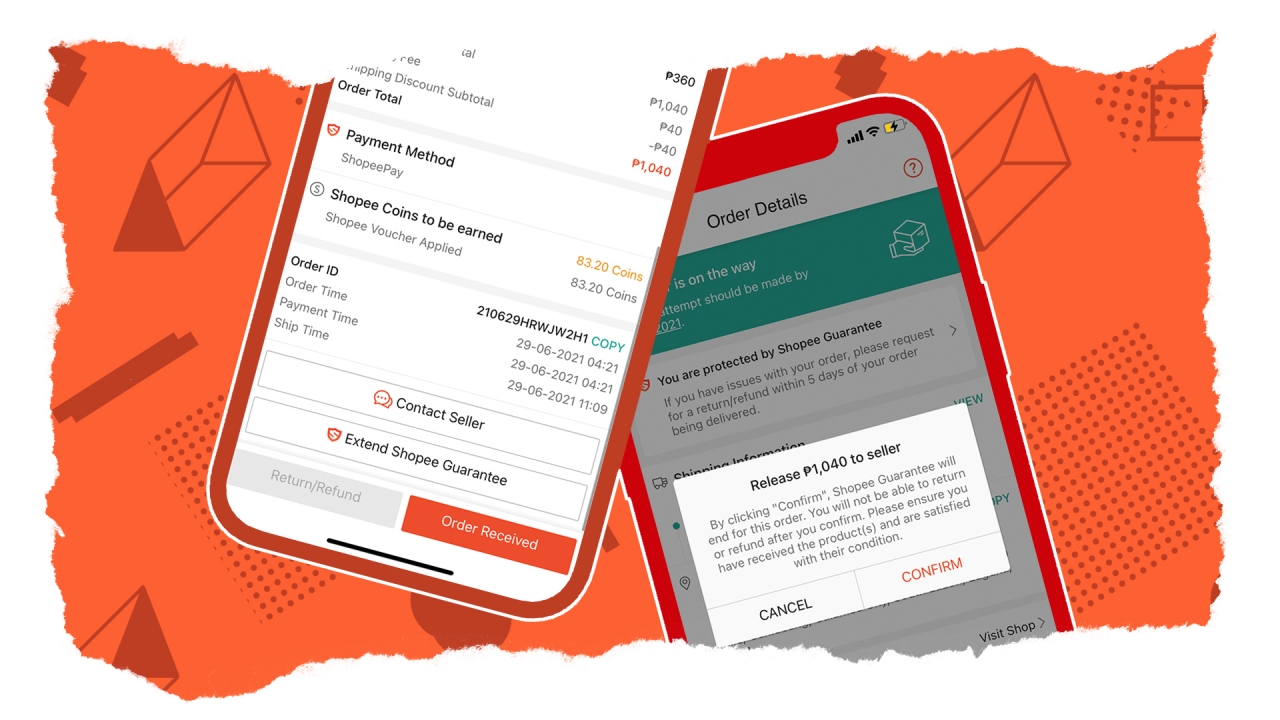
Image by GadgetMatch
The amount of users using Cash on Delivery (CoD) (not to be confused with the game Call of Duty) are still rampant over those who pay cashless. While giving and receiving parcels aren’t exempt from being risky, money is still an immediate medium for the virus to spread from one person to another.
By activating and using ShopeePay in your future purchases, not only did you prevent the spread of infection, it’s also a better way for you to release your payment without the rider waiting for you to check if the items you’ve received are in good condition. Worry-free, indeed.
3. Almost instantaneous refund process
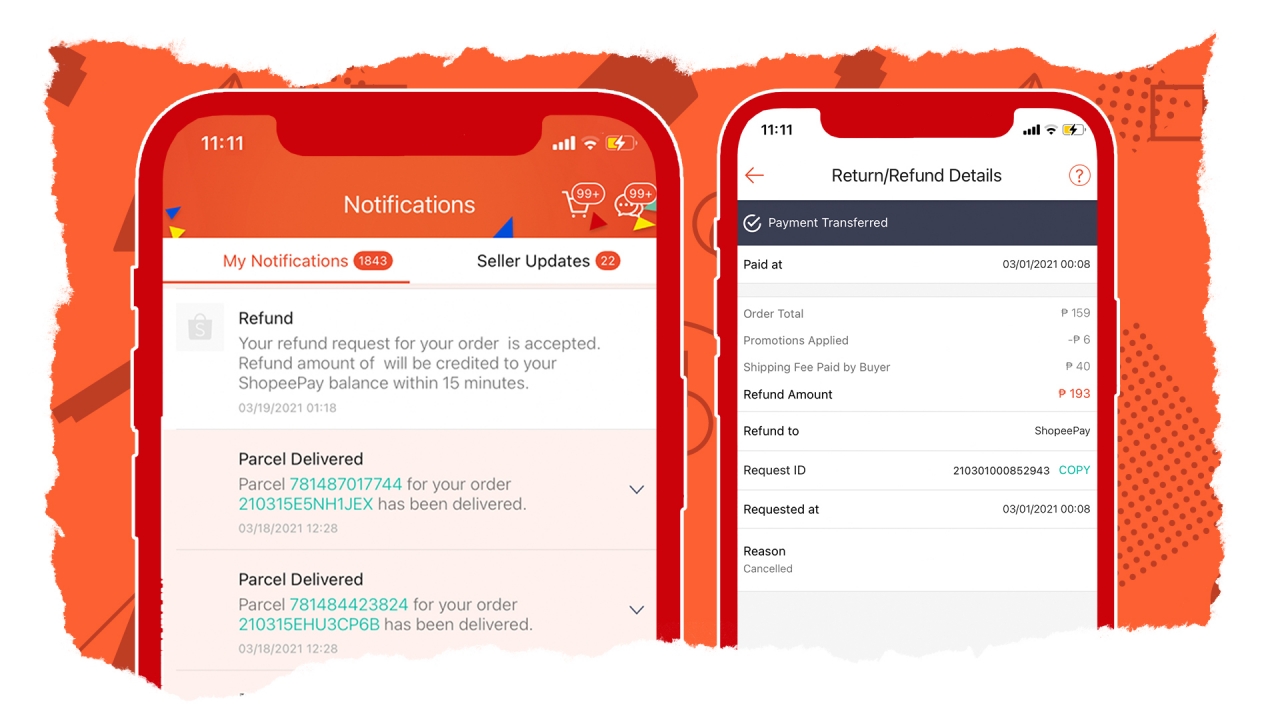
Image by GadgetMatch
In instances where the item delivered to you either looks bad, broken, or faulty at worse, you can request for a replacement of the item or a refund right away. If you chose refund, Shopee will bring back your money within 15 minutes to an hour utmost. This is something you can’t have right away if you paid through other payment channels — especially if it’s CoD.
Other than that, you’ll also have the huge peace of mind just in case a seller suddenly cancels an existing order you’ve purchased. Shopee automatically processes the refund and returns the value of the item you paid back to your ShopeePay wallet.
4. More access to free shipping and cashback vouchers
Some items have shipping fees that cost more than the product itself. One of the biggest reasons why most users keep buying from Shopee (including me) are the Free Shipping Fee vouchers. These help lower the total amount of goods or items we buy inside the platform.
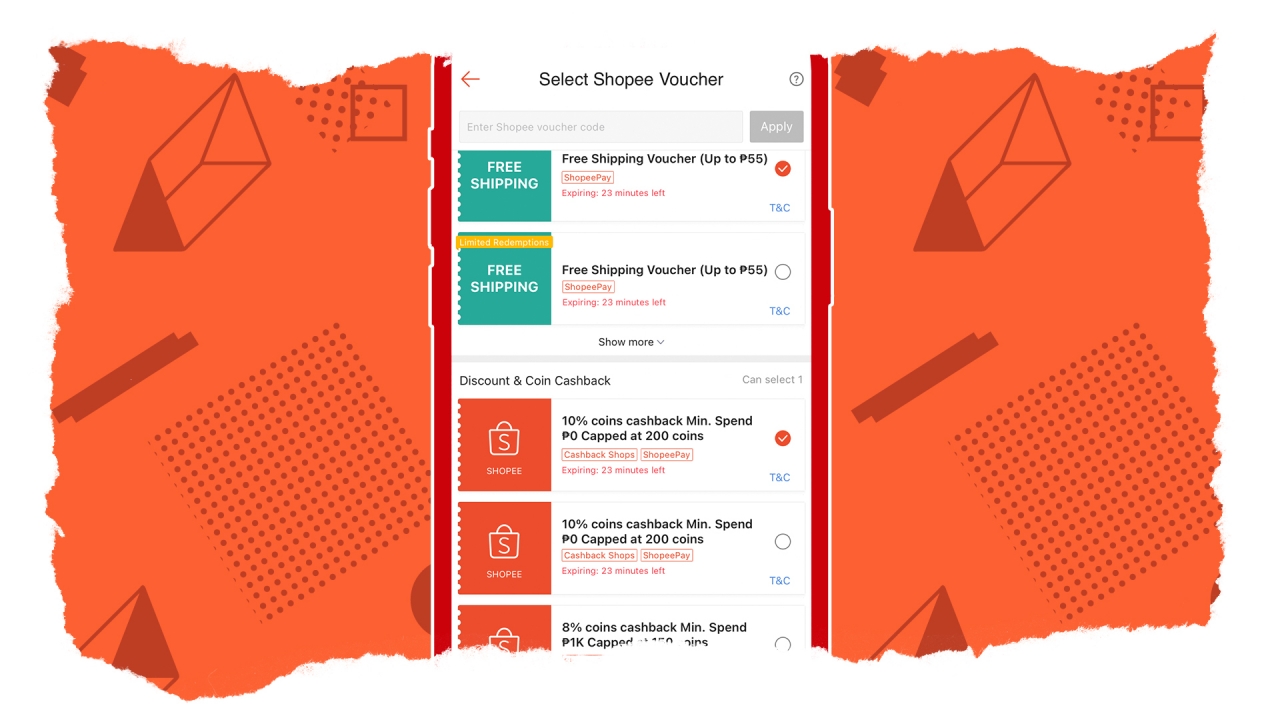
Image by GadgetMatch
Non-ShopeePay accounts still enjoy this but if you’re a ShopeePay user, you’ll get more than just the maximum PhP 55-vouchers. In my case, I was able to obtain 100 pesos less voucher in shipping.
Other than that, there are also cashback vouchers that are helpful in deducting the cost of the item/s you want to buy. Non-ShopeePay users also get this but ShopeePay users get up cashbacks with no minimum capping more often. Citing my experience, I recently ordered a PhP 10,000-worth action camera. Shopee gave me a 10% cashback voucher with no coins capping just because I’m a ShopeePay user. In return, I was able to get 1000 coins straight to my Shopee coin chest!
5. Pay bills and other services within minutes
Other than having the ability to pay cashless for your Shopee orders, you can also pay electricity, water, and internet bills as well as other services through Shopee. This is possible if you activate your ShopeePay right away.

Image by GadgetMatch
Not only will you avoid long queue lines in payment centers, you’ll also be at peace as this method can be done within minutes — whether you’re still in bed, sitting on the sofa, or even dropping the deuce inside the bathroom.
As mentioned earlier, the cashback vouchers are still helpful here. You can lower the amount of your bills by using the existing coins you got from your orders through those cashback vouchers. In return, Shopee will also give you a cashback voucher for paying your bills in the app; a win-win situation.
6. Secure AF
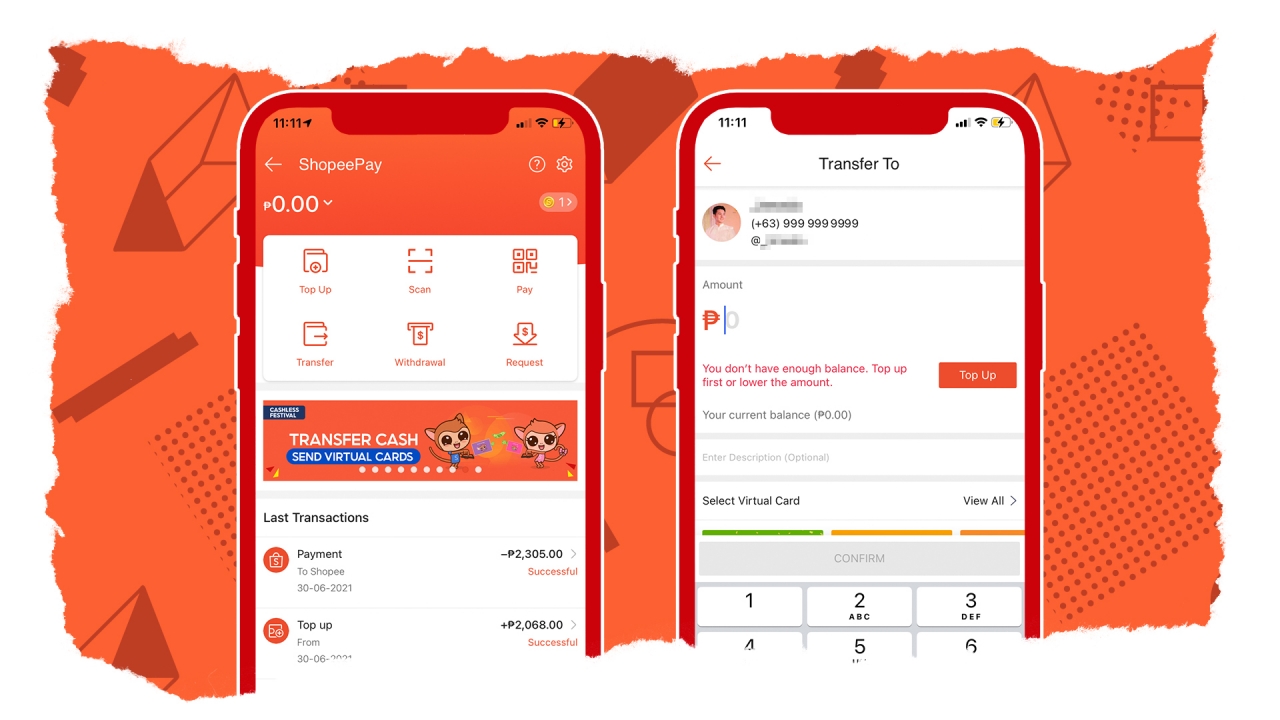
Image by GadgetMatch
Using ShopeePay isn’t only limited to top-up (cash-in). Using Shopee’s e-wallet service* also gives sellers the ability to securely withdraw (cash-out) the money they’ve earned from the items that are sold through the platform. Other than that, it also offers secure and hassle-free transfers to and from Shopee users in just a matter of taps.
ShopeePay has also gotten more secure with the use of PIN or biometric authentication (via fingerprint or face recognition). If you think about it, it’s more secure than lending out money to someone if ever you’re too busy to pay your Shopee orders that need to be paid via CoD. More so, other cashless payment methods don’t offer the same amount of authentication just in case processing of online payment through online bank transfers failed halfway.
Bonus: Buy now, SPayLater

Image by GadgetMatch
Shopee Philippines launched this new feature called “SPayLater”. Qualified buyers have options between buy now and pay later or through installment loans. As of the moment, this is only available to certain users (like me).
While this isn’t a ShopeePay-exclusive, it will be more convenient to use Shopee’s own payment method if ever you’ve decided to buy any item through SPayLater payment method. This means fast and seamless payments on the long run without worrying about additional interest charges if you suddenly forgot to pay through other payment methods.
To know more, just visit What is SPayLater.
Is it easy to activate ShopeePay?
Yes! It’s super quick and easy. All you have to do is input your phone number and a code will be sent right away. After you enter the verification code, you just have to fill-in necessary details before ShopeePay gets activated.
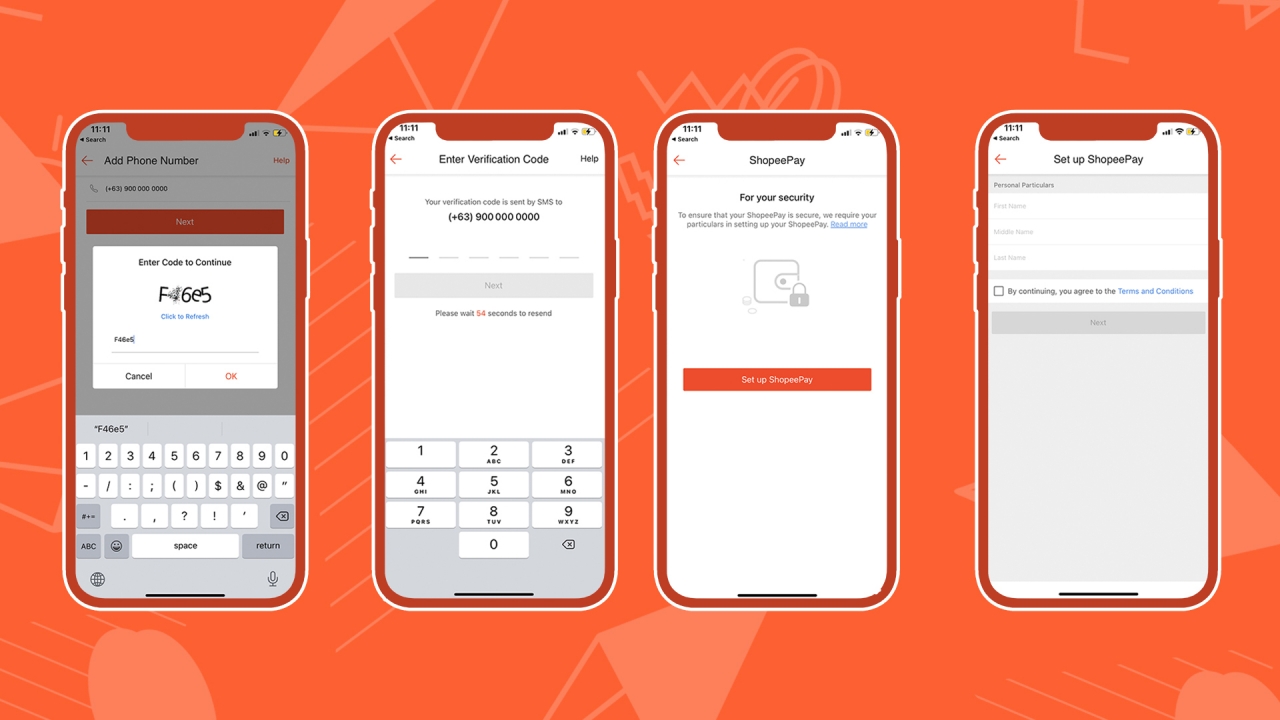
Image by GadgetMatch
In order to be verified, you need to submit a photo of you with a government-issued ID. Verified ShopeePay accounts have the advantage of sending money that non-verified users can’t do. Sellers will mostly benefit the verified badge more as they can withdraw (cash-out) the money they’ve earned from selling to their assigned bank account/s.
For more information, you can visit Shopee’s official microsites here:
How to Activate ShopeePay | How do I verify my ShopeePay account
How can I add money to ShopeePay then?
Once you’ve activated your ShopeePay, there are numerous ways on how to add money to your account (also referred as “top-up”).
The most common cash-in method is through e-wallet services such as GCash, and Coins.ph (unfortunately, Paymaya isn’t included in the list). You can also link your debit card from any bank with a minimum top-up balance of PhP 250.
Over-the-counter bank transactions from BPI, BDO, UnionBank, Metrobank, RCBC, Landbank, PNB, Robinsons Bank, China Bank, and UCPB are all supported as well. If you specifically have a BPI bank account, you can connect it through BPI online by signing-in your account inside the Shopee app.
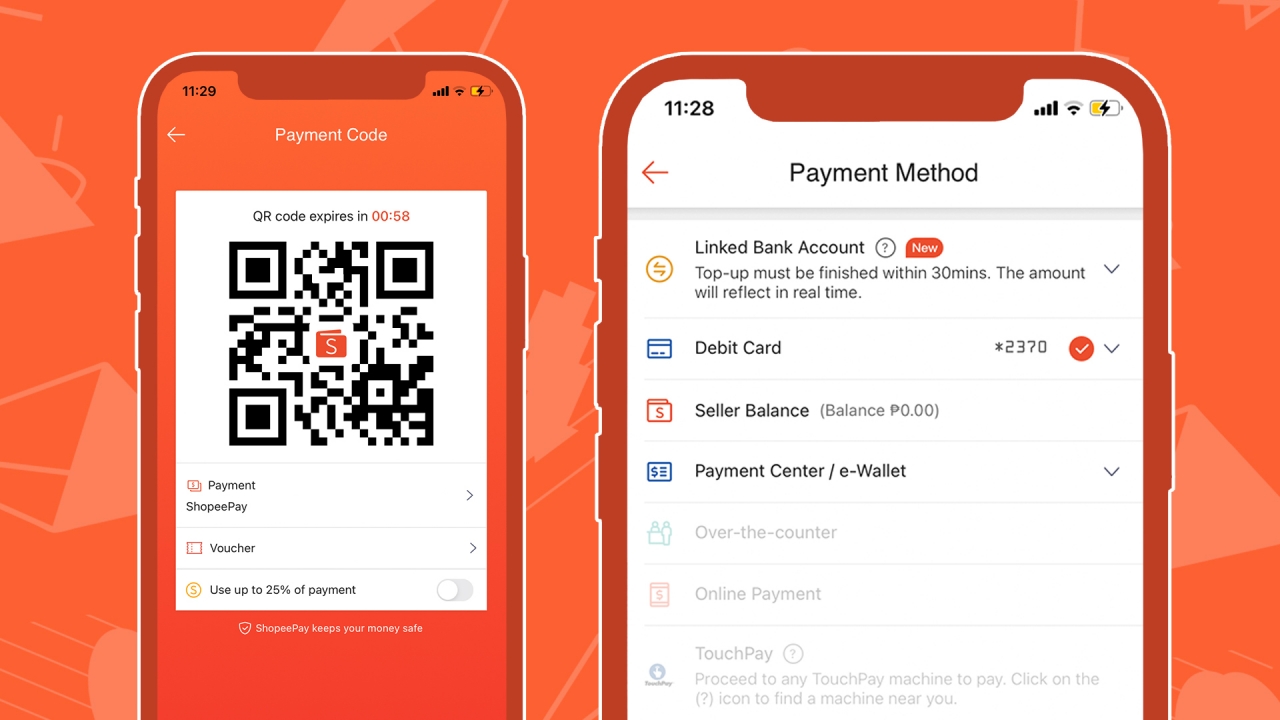
Image by GadgetMatch
For non-bank/e-wallet users, payment centers are also supported:
- 7-Eleven’s CLiQQ kiosks
- ECpay (Shopwise, Petron, All Day, Ministop)
- Bayad Center
- SM Bills
- LBC Bills Payment
- M Lhuillier
- Cebuana Lhuillier
- Palawan Pawnshop
- RD Pawnshop
You should take into consideration that there’s a minimum ShopeePay balance of PhP 50.00 before you can proceed with one of these payments. Meanwhile, cash-in via TouchPay machines (found in Alfamart, Mercury Drug, Shell, Ayala Malls) require an existing PhP 20.00 ShopeePay balance before you can use such top-up method.
If you have CoD orders but wishes to pay through ShopeePay, it’s also possible by generating or scanning a QR Payment Code. However, please do note that this feature is only applicable to orders delivered via Shopee Xpress (Standard Delivery), not orders shipped via J&T Express, Ninjavan, or GoGo Xpress.
*Disclaimer per ShopeePay Terms of Service: “The ShopeePay E-Wallet is not a deposit account and therefore, it is not covered by the Philippine Deposit Insurance Corporation (“PDIC”) and it does not earn interest. However, it is subject to the rules and regulations of the BSP and the Anti-Money Laundering Act (“AMLA”), as amended.”





Apps
Firefox ad reunites all your favorite memes from decades ago
The Numa Numa Guy, Annoying Orange, and Chocolate Rain are back!


Before Tung Tung Tung Sahur and Skibidi Toilet, the early internet was populated by charismatic personalities looking to make their presences felt in a land that didn’t have a lot of rules yet. As early users, we danced to “Dragostea din tei,” belted out “Chocolate Rain,” and copied “Shoes” word-for-word. Today, Firefox is bringing all those good memories back for a grand reunion.
In a new ad, the web browser featured ten of the biggest stars of the early internet including the aforementioned Numa Numa Guy, Tay Zonday, and Shoes’ Kelly. You can also see Annoying Orange, Chuck Testa, Overly Attached Girlfriend, Bad Luck Brian, Where the Hell is Matt?, the Apparently Kid, and the Success Kid.
Now, this isn’t just a reunion. The ad has a clear message about today’s most concerning issue: AI. Everything has “built-in AI, always asking, asking, asking,” as the Annoying Orange said.
“They make money by following us, and somehow, I’m the creepy one?” the Overly Attached Girlfriend asked.
All these famous personalities are asking what happened to the internet today. Obviously, the big takeaway is that we should all go back to Firefox.
Compared to other browsers, Firefox has a lot of built-in features that offer a lot of control for users. For one, it has its own VPN for privacy. Secondly, reflecting the ad’s message against AI, the browser has a toggle to minimize AI features.
SEE ALSO: Google illegally destroys 250,000 trees for a single AI data center
Apps
Salesforce introduces Slack Frontline for deskless workers
Simple, secure, mobile-first way for deskless teams across retail, healthcare, manufacturing, field service

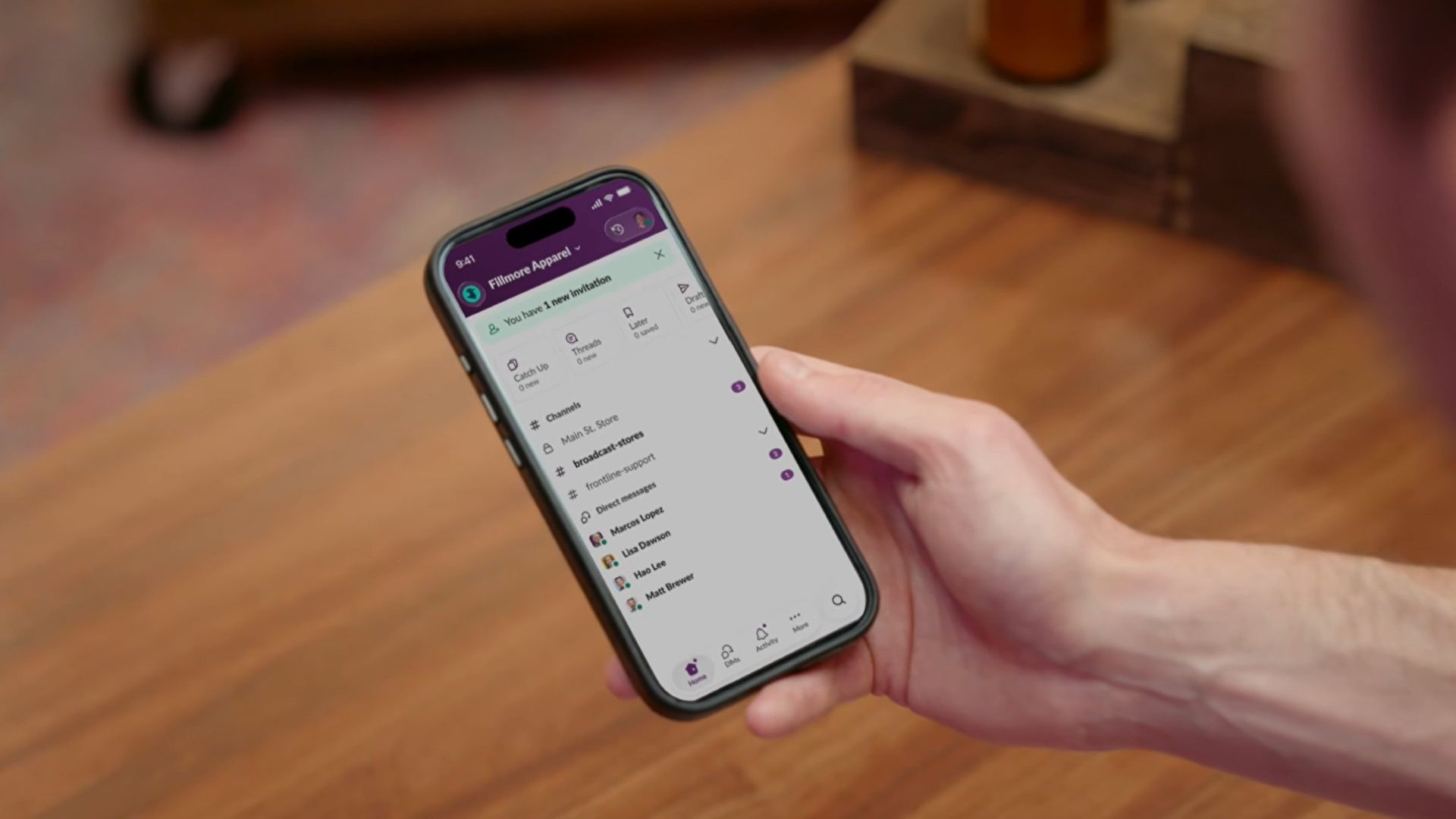
Salesforce is bridging the massive divide between corporate headquarters and deskless workers with the launch of Slack Frontline.
This new solution is designed specifically for retail associates, healthcare providers, factory workers, and field crews.
The mobile-first workspace brings communication, data, role-specific tools, and AI together in a single clutter-free app.
While frontline employees make up about 80 percent of the global workforce, they have historically been left out of workplace transformation, often relying on paper checklists, group texts, and broken communication loops.
Slack Frontline addresses these challenges by giving mobile workers up to 10 role-relevant channels, instant Huddles with headquarters, on-demand AI agents, and automated workflows.
Backed by Salesforce data and enterprise-grade security, the platform lets IT teams govern the entire workforce under one secure layer with employee ID sign-ins, multifactor authentication, and compliance configurations like HIPAA.
This ensures that critical updates, training materials, and shift handoffs reach workers directly in their pockets without needing corporate email addresses or shared terminals.
Moreover, the platform is tailored to transform operations across multiple industries, including retail, home healthcare, manufacturing, hospitality, and field services.
For instance, retail teams can instantly sync promotions and monitor inventory, while healthcare professionals can securely review patient histories and coordinate care on the go.
Manufacturing and hospitality teams benefit from drastically reduced downtime and faster issue resolution, cutting response times significantly.
Slack Frontline is available now as an add-on for businesses on the Slack Enterprise+ plan.

Apple Music is getting a revamp. In one of the tamer things going on with the brand today, Apple has introduced a new design language for its native music streaming platform.
In the midst of all the hubbub surrounding the iPhone Duo, Apple released a change in the visual identity of Apple Music. Rather than a static logo, the platform’s newest evolution offers a dynamic look that melds Liquid Glass and the power of sound together.
Confirmed through a behind-the-scenes video, Apple says that the new aesthetic was made with practical effects. Music producer Fred Again and NEST Acoustics submerged the platform’s logo in a tank of mineral oil and creating ripples with sound. The new language matches well with the chrome aesthetic typical of today’s trends and… well, Liquid Glass, of course.
Apple says that the more ripple-filled version will play before longer content like concert recordings (similar to Netflix’s startup stinger). Meanwhile, a black-and-white version will replace the app’s icon currently colored red and white. Current previews show off a simple logo, but it’s unknown whether Apple is adding a but more elements when the final version drops.
The updated version will debut for users after next week’s iOS 27.2 and macOS 27.2 updates.
SEE ALSO: Apple iPhone Duo Unboxing and Hands-on


ROG G700 review: The best prebuilt PC you can get off the shelf
This PC will make you stop worrying about specs.


HP OMEN Max 16 review: Gamer-maxxing in deep black
Peripherals deemed necessary to max this out


vivo V80 review: Good phone, tough sell
A capable travel companion

4 new nutribullet kitchen essentials to make holiday hosting easier

Inside Infinix’s first global concept store in Bali

Wild Rift Patch 7.3, celebrates K/DA comeback

LG showcases its latest AI TVs in the Philippines

Your coffee nook is getting a makeover with Starbucks’ holiday collections


-

 News2 weeks ago
OPPO Find X10 Series: Price, availability in the Philippines
-

 Cameras2 weeks ago
DJI Osmo Pocket 4P Pearl White now available globally
-
 Lifestyle2 days ago
Your coffee nook is getting a makeover with Starbucks’ holiday collections
-

 News2 weeks ago
OPPO Find X10 Series: Price, availability
-
Gaming2 weeks ago
HP OMEN Max 16 review: Gamer-maxxing in deep black
-

 Entertainment2 weeks ago
Cyberpunk: Edgerunners 2 now streaming, Cyberpunk 2077 update coming
-

 Lifestyle4 days ago
Sticker season is back, and so is the planner your ~friends~ might fill in for you
-

 Laptops2 weeks ago
ASUS ProArt P14, P16 laptops with NVIDIA RTX Spark now available