



Let’s take a break from laptops and check out this desktop PC from ASUS. This is the Zen AiO 27 and it looks so much better than any of the previous all-in-ones we reviewed from the Taiwanese company.
Coming from the iMac-like Zen AiO Pro and Vivo AiO, the Zen AiO 27 is a welcoming sight. But, is it any good?
Let’s find out in this hands-on.
This AiO has a gorgeous 27-inch UHD display

It’s also a touchscreen
The bezels surrounding the screen are slim

ASUS brings NanoEdge to desktop PCs
It has an outward notch at the bottom for the webcam

With an IR sensor for facial recognition
There are four speakers located at the back

ASUS claims it’s a 16W quad-speaker setup
Quick-access ports are on the right side of the base

L-R: USB 2.0, Thunderbolt 3, 3.5mm combo jack
The remaining ports are all at the back

L-R: Ethernet, 3x USB 3.1, HDMI-In, HDMI-Out, Power
The front has two LED indicators and an SD card reader

The LEDs show if your PC is on and functioning
The base even has a wireless charging pad

Charge your phone while you’re working
A full-size wireless keyboard comes in the box

It has all the keys but its very plasticky
There’s also a bundled wireless optical mouse

Pretty basic but it gets the job done
The Zen AiO design upgrade we’ve been waiting for
ASUS’ new Zen AiO 27 finally gets the design upgrade it deserves. It’s not an iMac copy-cat anymore and it looks even better than Apple’s desktop PC. ASUS certainly took a step forward in design; however, I’ve seen better-looking AiOs running Windows 10 like Dell’s new Inspiron desktops.
Perhaps, the best asset of the Zen AiO 27 is its display. It’s a 27-inch IPS LCD panel with a UHD resolution and multi-touch support. The display is Pantone Validated for color accuracy and it has ASUS’ NanoEdge design for slimmer bezels all around.

Although, like on smartphones, slimmer bezels come at a cost. ASUS had to put an outward notch to house a webcam and, for some reason, they placed it at the bottom. When I tested the webcam, it was showing myself from an awkward angle. As a consolation, it’s also equipped with an IR sensor for hands-free face login with Windows Hello.
The Zen AiO 27’s stand lets users view the display from multiple angles. It can tilt and swivel, plus the height can be adjusted with one finger. There’s no option for rotating the display, but that’s okay.

Design-wise, the Zen AiO 27 is a thing of beauty. I do appreciate its brushed metal-effect finish of really dark blue (darker than navy blue) with gold trims and accents. The audio and visual department of the PC delivers top-notch quality as well.
Slim and powerful, but not enough for 4K
All of the power of the Zen AiO 27 comes from beneath. The components are all housed in the base of the PC, which is neat and practical. How so? There are two storage slots and memory is user upgradeable up to 32GB.
The specs of the model I have are impressive with an Intel Core i7-8700T processor, 16GB DDR4 memory, 512GB M.2 SSD, and 2TB HDD. It also has discrete graphics using NVIDIA’s GeForce GTX 1050, which is kind of old but still very capable.
The base also has a Thunderbolt 3 port and features Bluetooth 5.0 and dual-band gigabit-class Wi-Fi. Needless to say, it runs Windows 10 Home out of the box.

I have no complaints with the general performance of the Zen AiO 27 thanks to its incredible specifications. I can easily multitask with multiple windows open and quickly render images from Photoshop. The configuration is also enough to ensure smooth video editing.
When it comes to gaming though, it doesn’t hit the mark. While the GTX 1050 GPU is good for games like Fortnite or anything with similar graphics power requirements, it’s not enough to push pixels in UHD.

This means you can’t take full advantage of the crisp display of the Zen AiO 27. It’s best to keep the game’s resolution in Full HD to have at least 60fps in not-so-demanding titles. Too bad I can’t enjoy Cities: Skylines in 4K.
I wasn’t able to try it out, but the Zen AiO 27’s can also act as an external monitor since it has an HDMI-in port. Any HDMI-connected source can use the UHD display as a second monitor.
Is this your GadgetMatch?
The ASUS Zen AiO 27 is indeed premium with an asking price of PhP 149,995 in the Philippines. It’s available through ASUS Concept Stores nationwide.

Of course, if you are to build your own desktop PC, you could get more power with the same budget. You could even still use an ASUS monitor, keyboard, mouse, and components since the company also sells those.
What you won’t get is the convenience of a plug-and-play, space-saving AiO. It’s like bringing out a laptop and plugging in the charger. If only ASUS included a better wireless keyboard and mouse, it would have been a better package.
SEE ALSO: ASUS ZenBook Pro Duo offers largest secondary touchscreen yet






Acer is expanding its storage lineup with the PA100 Portable SSD. It’s a compact external drive designed for users who need faster storage across multiple devices.
The PA100 uses USB 3.2 Gen 1 connectivity. It reaches sequential read speeds of up to 560MB/s and write speeds of up to 430MB/s. This makes it suited for everyday tasks such as transferring large files, backing up content, managing documents, and moving media between devices.
Up to 2TB of portable storage
The PA100 comes in three capacities: 500GB, 1TB, and 2TB. This gives users options depending on whether they need extra space for documents and schoolwork or larger collections of photos, videos, and project files.
Acer also designed the drive with mobility in mind. The PA100 has a slim 9mm profile and a lightweight build, while its reinforced construction is designed to withstand everyday travel and handling.
The drive comes with a 2-in-1 USB-C to USB-C and USB-A cable. This allows it to connect to compatible PCs, tablets, smartphones, and other devices without requiring a separate adapter. It also supports major operating systems and USB-C mobile platforms.
Designed for everyday use
Power efficiency is another focus. Acer says the PA100 uses less than 3W during operation, while idle power consumption can drop to as low as 0.62W.
The drive also features an optimized thermal design to help maintain stable performance during extended transfers and daily workloads.
The Acer PA100 Portable SSD is backed by a three-year limited warranty. Pricing and availability may vary by market.
Computers
New Mac mini starts at a whopping $899, only 256GB of storage
It comes with the M6 or the M5 Pro.


Almost two decades ago, Apple was infamous for being an anti-gamer brand. Though the company’s devices touted superior protection against viruses, they couldn’t play video games, alienating a significant chunk of the population and forcing them onto PCs. For a while now, the Mac has changed the status quo, bringing in more powerful hardware that can play games. Today, Apple is championing that cause further through the newly launched Mac mini.
Compared to the chunkier Macs, the Mac mini has a lithe 5” x 5” profile, emphasizing the “mini” in its name. Despite the size, the new mini will tout two flavors of Apple silicon: the M6 and the M5 Pro.
The M6 variant delivers with up to two times faster gaming performance with ray tracing when running Cyberpunk 2077: Ultimate Edition, compared to the previous M4 version. Meanwhile, the M5 Pro version touts up to 4.5 times faster rendering performance with ray tracing in Blender, compared to the M2 Pro. It will come with macOS 27 Golden Gate out of the box.
You won’t have to worry about connectivity, either. The Mac mini comes with compatibility for Wi-Fi 7, Bluetooth 6, and 2.5Gb Ethernet (going up to 10Gb in upgraded versions). It will also have two USB-C ports, three Thunderbolt 5 ports (but only Thunderbolt 4 for the M6 version), and HDMI port, an Ethernet port, and a headphone jack.
Unfortunately, price seems to be another thing that it’s getting from PCs. The new Mac mini has an increased starting price. Specifically, the M6 version starts at US$ 899 (with only 256GB of storage), and the M5 Pro version starts at US$ 1,699 (for 512GB of storage). Preorders are open now, but they ship out on September 22.
SEE ALSO: Apple raises the prices of iPad and MacBook lineups
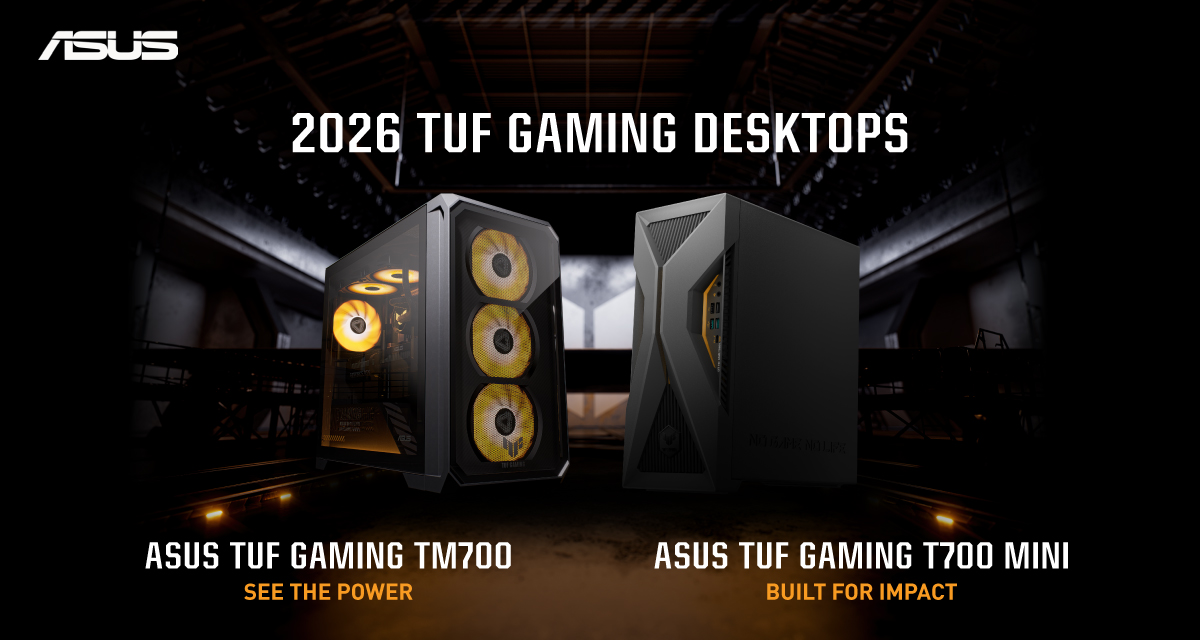
ASUS has announced the arrival of its latest TUF Gaming desktop lineup models: the TUF Gaming T700 and TUF Gaming T700 Mini.
These new offerings bring heavy-duty performance and military-grade durability to gamers, engineered to endure extreme operational demands while delivering rock-solid stability.
The new ASUS TUF Gaming T700, in particular, is engineered to take on modern AAA titles with its uncompromising performance.
It has an aggressive mecha-inspired MIL-STD chassis, including a transparent side panel to put powerful components on display. Vibrant orange ambient lighting also adds a bold finishing touch.
Inside is an AMD Ryzen 7 8700F processor and up to an NVIDIA GeForce RTX 5060 Ti GPU for high-frame rate gaming.
The T700 also features a robust thermal solution equipped with quad 65 CFM fans and a 240mm liquid cooler.
Meanwhile, the TUF Gaming T700 Mini is tailored for competitive gamers while maintaining a compact, battle-tested chassis.
It has an Intel Core Ultra 5 225F desktop processor, paired with with NVIDIA GeForce RTX 3050 graphics.
This combination provides seamless multitasking, crisp visuals, and reliable frame rates across today’s popular titles.
The internal hardware is cooled by a custom thermal matrix featuring dedicated copper heat pipes and a heavy-duty 90mm cooling fan.
True to the TUF Gaming legacy, the T700 Mini is likewise MIL-STD tested to endure extreme operational demands.


DJI Lito X1 review: Is this the best lightweight drone for creators?
Making a strong case as a travel companion and a capable B-cam!


REDMI Note 17 Pro Max review: A new breed born from AI greed
Welcome to the new normal


Marvel’s Wolverine review: When the claws come out
A brutal, cinematic superhero adventure

OPPO Find X10 Pro Max is the first phone with a triple 200MP camera system

70mai launches the A900 series with 4K front, rear recording

Dune: Awakening makes it way to the PS5 and Xbox Series X

The Kia EV3 brings gallery-worthy design in a compact electric form

vivo introduces OriginOS 7 with smarter multitasking and AI features

realme 16T 5G with 8000mAh battery, IP69 Pro rating launches in PH

HUAWEI Pura X View is 2026’s first WIDE slab-type smartphone

REDMI reveals the refreshed Note 17 and Note 17 Pro series

REDMI Note 17 Series: Price, availability in Singapore

The CAMON Slim 5G is TECNO’s latest ultra-slim smartphone


-

 News2 weeks ago
iPhone 18 Pro series: Price, availability in the Philippines
-

 Singapore2 weeks ago
iPhone 18 Pro series: Price, availability in Singapore
-

 News2 weeks ago
iPhone Duo: Price, availability in the Philippines
-

 News2 weeks ago
iPhone Duo: Price, availability in Singapore
-

 News2 weeks ago
vivo introduces refurbished versions of X300 FE, X300 Ultra for less
-

 Accessories2 weeks ago
CASETiFY upgrades iPhone 18 cases, teases iPhone Duo lineup
-

 News2 weeks ago
HONOR teases Magic9 Pro Max at Venice
-

 Editors' Choice2 weeks ago
GadgetMatch Awards: Best of IFA 2026