
Computers
ASUS Zen AiO Pro review

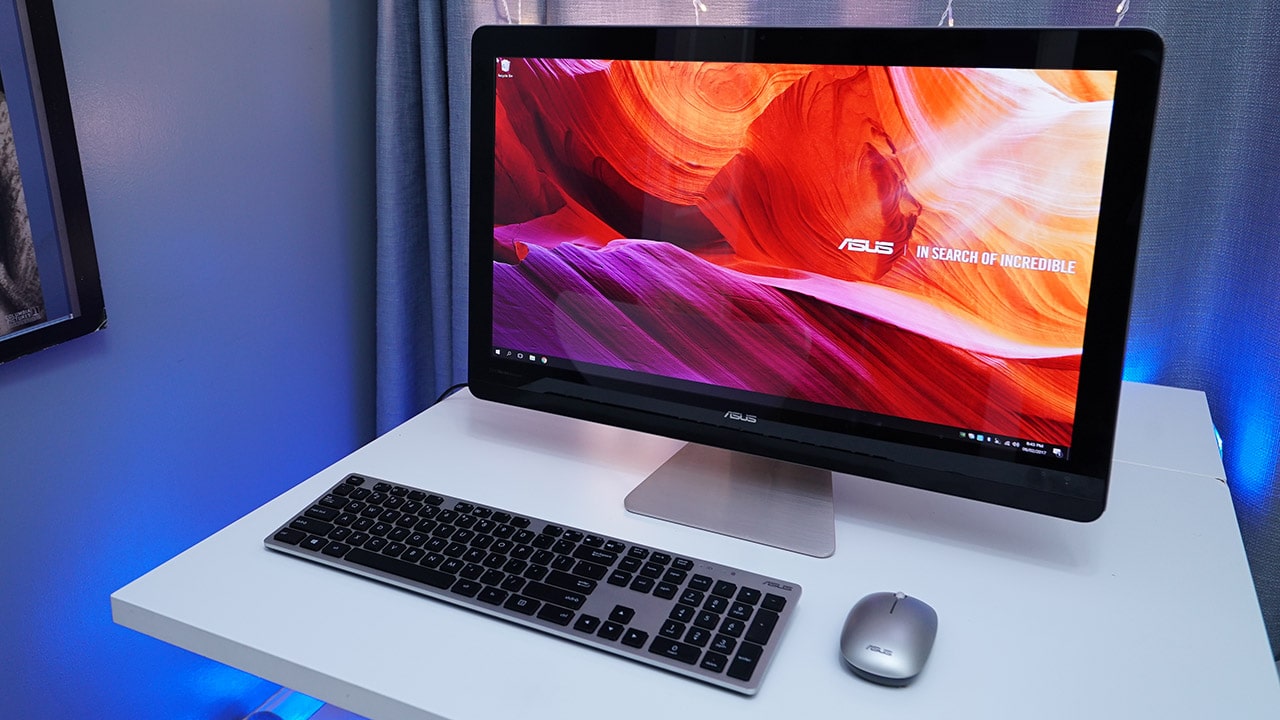
ASUS has this all-in-one desktop computer that may seem kinda expensive at first (it’s $2,000!), but it’s as easy to use and set up as a regular laptop, plus it’s much more powerful. Check it out!
This is the Zen AiO Pro, which goes by the model name Z240IC. Like its name implies, it has everything you need in the package: a full-fledged Windows 10-powered computer within a large 23.8-inch 4K monitor, and both a wireless keyboard and mouse bundled inside.
Sounds a lot like an Apple iMac or Microsoft’s new Surface Studio, right? Well, ASUS does some things better and is targeting different needs, which we’ll get into now.
Look at how big and spacious the display is!

Being made of solid aluminum and weighing 7.3kg doesn’t make this travel-friendly, though
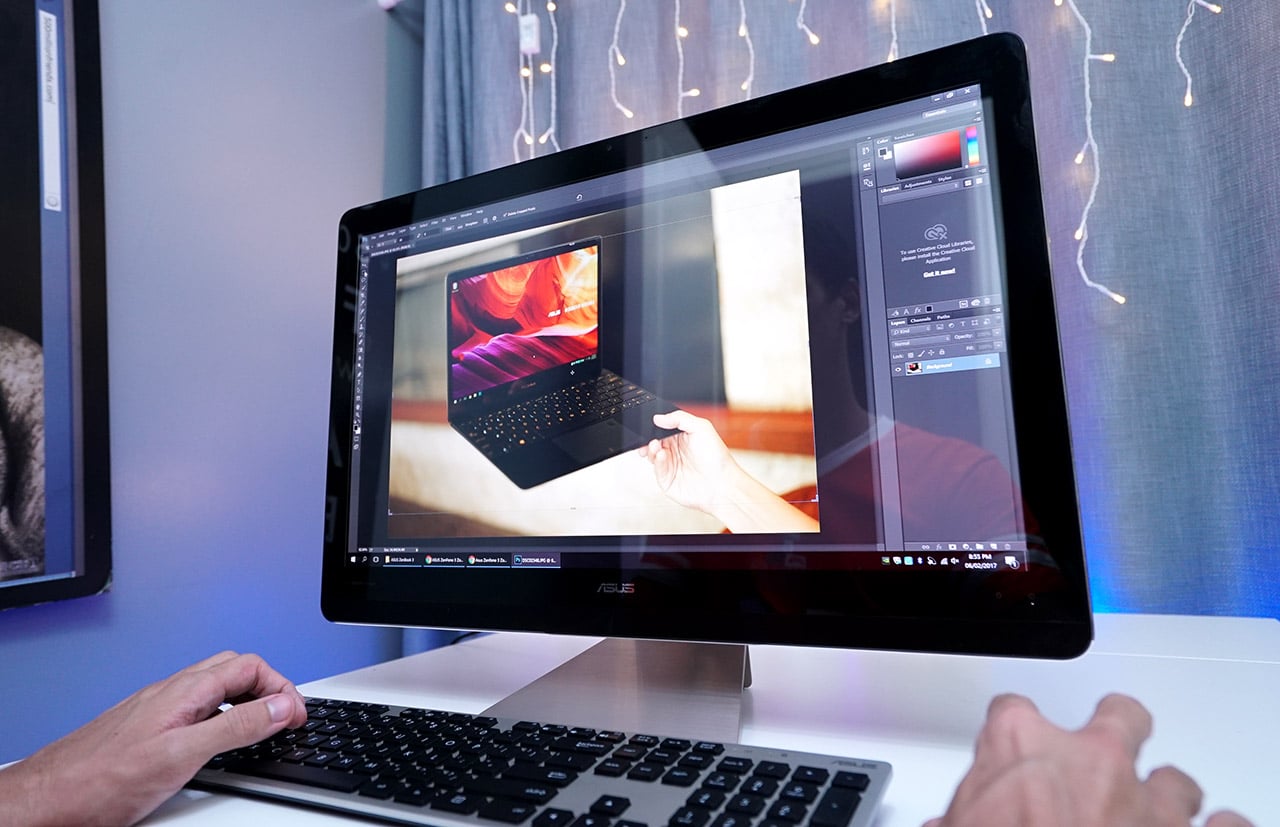
There’s more than enough room on the screen for multiple windows

A 4K resolution (3840 x 2160 pixels) on a bright 23.8-inch display is no joke!
The back is sleek too, and has all the ports you need

Let’s see: SD card reader, microphone and headphone ports, Ethernet, two HDMI ports, four USB 3.0 ports, one USB 2.0 port, and a single USB-C port — whew!
Here’s a closer look at some of the ports
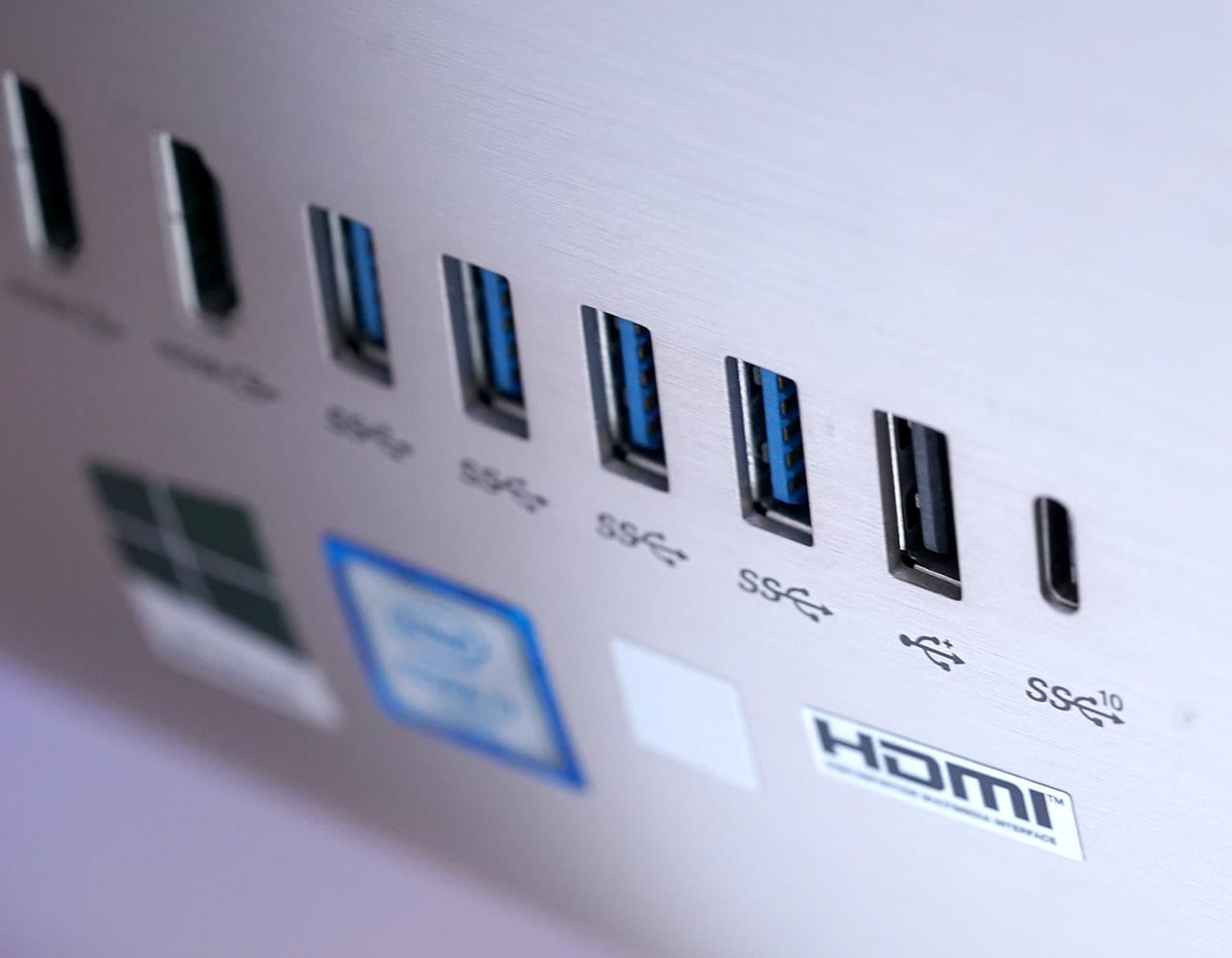
The old-school USB 2.0 port (the black one) seems out of place, but it’s perfect for the receiver of the wireless keyboard and mouse
The keyboard and mouse are as basic as they come, but get the job done

The keyboard is squishy and the mouse is bland, but you can always replace them with something better
So, what exactly is powering this thing?
Our unit came with a sixth-generation Intel Core i7 processor, 16GB of memory, and an NVIDIA GeForce GTX 960M to run everything. Not a bad setup, but the components are nearly two years old, and the newer chipsets from Intel and NVIDIA smoke their predecessors. Still, this configuration is enough to edit videos and photos, and even play visually intensive games on medium settings.
I was curious, so I ran The Witcher 3 and the new Doom game to see just how well they run on ASUS’ AiO PC. The Witcher 3 with its strong demand for processing power worked smoothly enough on medium settings with the more advanced options like shadows and hair effects toned down. Doom was a little more forgiving on medium settings, and would let me turn up some graphics options to pull off prettier visuals at around 40 frames per second. Not something a hardcore gamer would like to hear, but definitely satisfactory for casual gamers who enjoy the newer 3D games.
Do note that these games were played on a downscaled Full HD 1080p resolution to handle the intense graphics. A GTX 960M is in no way good enough to take on 4K gaming, which is better left for real desktop graphics cards like the GTX 1080. On the bright side, the downward-firing speakers have a strong punch to them, and are generous in the bass department — perfect for Netflix and YouTube watching, as well.
But the most impressive pair of components in the Zen AiO Pro are the 128GB SSD and 1TB HDD. If you read our explainer on the two storage mediums, you’d know this is the most optimized setup you can get. By having the operating system run on the faster SSD, boot-ups and navigating through the system are consistently fast, and you still have 1TB of space on the HDD for all your personal files and large apps.
Is this your GadgetMatch?
This is one of those instances when you have to think long and hard before making a purchase. On one hand, the Zen AiO Pro is built for nearly every sort of task and is complete out the box; on the other hand, it’s far more expensive than conventional desktop computers and you could easily build one for a fraction of the price with even better components.
You’re paying for the convenience here; being able to plug in this computer with a single cable and nothing more is such a relief in a small office space or tight apartment. It’s so well made too, and the fact you don’t have to go out and buy a separate keyboard-mouse combo makes the deal even sweeter.
Then again, you could buy a premium laptop like the ZenBook 3 for less than this, and it would also save space and run through apps nearly as well — you’d just have to give up the desktop-level display and gaming performance.
The model we reviewed is available in the Philippines for PhP 99,995, which matches the average international price of $2,000. There are more affordable configurations out there with slower processors and weaker graphics cards, but it totally depends on where you reside.
SEE ALSO: ASUS ZenBook 3 review
[irp posts=”10098″ name=”ASUS ZenBook 3 review”]








Acer is expanding its storage lineup with the PA100 Portable SSD. It’s a compact external drive designed for users who need faster storage across multiple devices.
The PA100 uses USB 3.2 Gen 1 connectivity. It reaches sequential read speeds of up to 560MB/s and write speeds of up to 430MB/s. This makes it suited for everyday tasks such as transferring large files, backing up content, managing documents, and moving media between devices.
Up to 2TB of portable storage
The PA100 comes in three capacities: 500GB, 1TB, and 2TB. This gives users options depending on whether they need extra space for documents and schoolwork or larger collections of photos, videos, and project files.
Acer also designed the drive with mobility in mind. The PA100 has a slim 9mm profile and a lightweight build, while its reinforced construction is designed to withstand everyday travel and handling.
The drive comes with a 2-in-1 USB-C to USB-C and USB-A cable. This allows it to connect to compatible PCs, tablets, smartphones, and other devices without requiring a separate adapter. It also supports major operating systems and USB-C mobile platforms.
Designed for everyday use
Power efficiency is another focus. Acer says the PA100 uses less than 3W during operation, while idle power consumption can drop to as low as 0.62W.
The drive also features an optimized thermal design to help maintain stable performance during extended transfers and daily workloads.
The Acer PA100 Portable SSD is backed by a three-year limited warranty. Pricing and availability may vary by market.
Computers
New Mac mini starts at a whopping $899, only 256GB of storage
It comes with the M6 or the M5 Pro.


Almost two decades ago, Apple was infamous for being an anti-gamer brand. Though the company’s devices touted superior protection against viruses, they couldn’t play video games, alienating a significant chunk of the population and forcing them onto PCs. For a while now, the Mac has changed the status quo, bringing in more powerful hardware that can play games. Today, Apple is championing that cause further through the newly launched Mac mini.
Compared to the chunkier Macs, the Mac mini has a lithe 5” x 5” profile, emphasizing the “mini” in its name. Despite the size, the new mini will tout two flavors of Apple silicon: the M6 and the M5 Pro.
The M6 variant delivers with up to two times faster gaming performance with ray tracing when running Cyberpunk 2077: Ultimate Edition, compared to the previous M4 version. Meanwhile, the M5 Pro version touts up to 4.5 times faster rendering performance with ray tracing in Blender, compared to the M2 Pro. It will come with macOS 27 Golden Gate out of the box.
You won’t have to worry about connectivity, either. The Mac mini comes with compatibility for Wi-Fi 7, Bluetooth 6, and 2.5Gb Ethernet (going up to 10Gb in upgraded versions). It will also have two USB-C ports, three Thunderbolt 5 ports (but only Thunderbolt 4 for the M6 version), and HDMI port, an Ethernet port, and a headphone jack.
Unfortunately, price seems to be another thing that it’s getting from PCs. The new Mac mini has an increased starting price. Specifically, the M6 version starts at US$ 899 (with only 256GB of storage), and the M5 Pro version starts at US$ 1,699 (for 512GB of storage). Preorders are open now, but they ship out on September 22.
SEE ALSO: Apple raises the prices of iPad and MacBook lineups

ASUS has announced the arrival of its latest TUF Gaming desktop lineup models: the TUF Gaming T700 and TUF Gaming T700 Mini.
These new offerings bring heavy-duty performance and military-grade durability to gamers, engineered to endure extreme operational demands while delivering rock-solid stability.
The new ASUS TUF Gaming T700, in particular, is engineered to take on modern AAA titles with its uncompromising performance.
It has an aggressive mecha-inspired MIL-STD chassis, including a transparent side panel to put powerful components on display. Vibrant orange ambient lighting also adds a bold finishing touch.
Inside is an AMD Ryzen 7 8700F processor and up to an NVIDIA GeForce RTX 5060 Ti GPU for high-frame rate gaming.
The T700 also features a robust thermal solution equipped with quad 65 CFM fans and a 240mm liquid cooler.
Meanwhile, the TUF Gaming T700 Mini is tailored for competitive gamers while maintaining a compact, battle-tested chassis.
It has an Intel Core Ultra 5 225F desktop processor, paired with with NVIDIA GeForce RTX 3050 graphics.
This combination provides seamless multitasking, crisp visuals, and reliable frame rates across today’s popular titles.
The internal hardware is cooled by a custom thermal matrix featuring dedicated copper heat pipes and a heavy-duty 90mm cooling fan.
True to the TUF Gaming legacy, the T700 Mini is likewise MIL-STD tested to endure extreme operational demands.


Marvel’s Wolverine review: When the claws come out
A brutal, cinematic superhero adventure


Setting your bedsheets ablaze with the Lovense Solace Pro
The closest proxy I could find where I'm guilty as sin


Now Playing: Elden Ring Tarnished Edition
Is the Switch 2 port worth the price?
Marvel’s Wolverine review: When the claws come out

PH to celebrate 1st ever National Cinema Day; movies start at less than $2

New AGON gaming monitor features up to 1000Hz refresh rate

Smart lets you go phone-free with Apple Watch

How did new CEO John Ternus do for his first Apple event?

TECNO MEGAPAD 2 review: Eyes on the size

realme 16T 5G with 8000mAh battery, IP69 Pro rating launches in PH

HUAWEI Pura X View is 2026’s first WIDE slab-type smartphone

REDMI Note 17 Series focuses on long-term reliability

REDMI reveals the refreshed Note 17 and Note 17 Pro series


-
 News2 weeks ago
realme 16T 5G with 8000mAh battery, IP69 Pro rating launches in PH
-
 News4 days ago
HUAWEI Pura X View is 2026’s first WIDE slab-type smartphone
-

 Cameras1 week ago
DJI Osmo 360 II review: Going all-in on the ecosystem
-

 Features2 weeks ago
The designated photographer’s new favorite phone: OPPO Reno16 Series 5G
-

 News4 days ago
The CAMON Slim 5G is TECNO’s latest ultra-slim smartphone
-

 IFA 20261 week ago
TECNO MEGABOOK T15 360 unveiled at IFA 2026
-

 Gaming1 week ago
NBA 2K27 review: A two-way All-Star
-

 Reviews1 week ago
Samsung Galaxy Z Fold8 Ultra review: It’s time to get a foldable