



One of my favorite things about getting to try many new gadgets is that I learn more about myself and my preferences. The ROG Zephyrus G15 (2022) GA503 – which henceforth will just be referred to as just Zephyrus G15 – did just that for me and what I want in gaming laptops.
For context, I have been sparingly using my ROG Flow X13 for most of my general Windows and PC gaming needs. It’s a great device, don’t get me wrong. But having to prop up the laptop itself along with the XG Mobile to reach its full potential can be quite cumbersome.
It’s a huge contrast to the Zephyrus G15 where I simply fire it up and it just works in a jiffy. And all the ports I normally use are right there, ready to use. I’m a big fan of convenience so I absolutely love it when gadgets just work without much friction.
But I’m getting ahead of myself. Based on this introduction, I’m sure you already have some idea on what I generally think about the Zephyrus G15. But allow me to discuss it further.
Tale of the tape
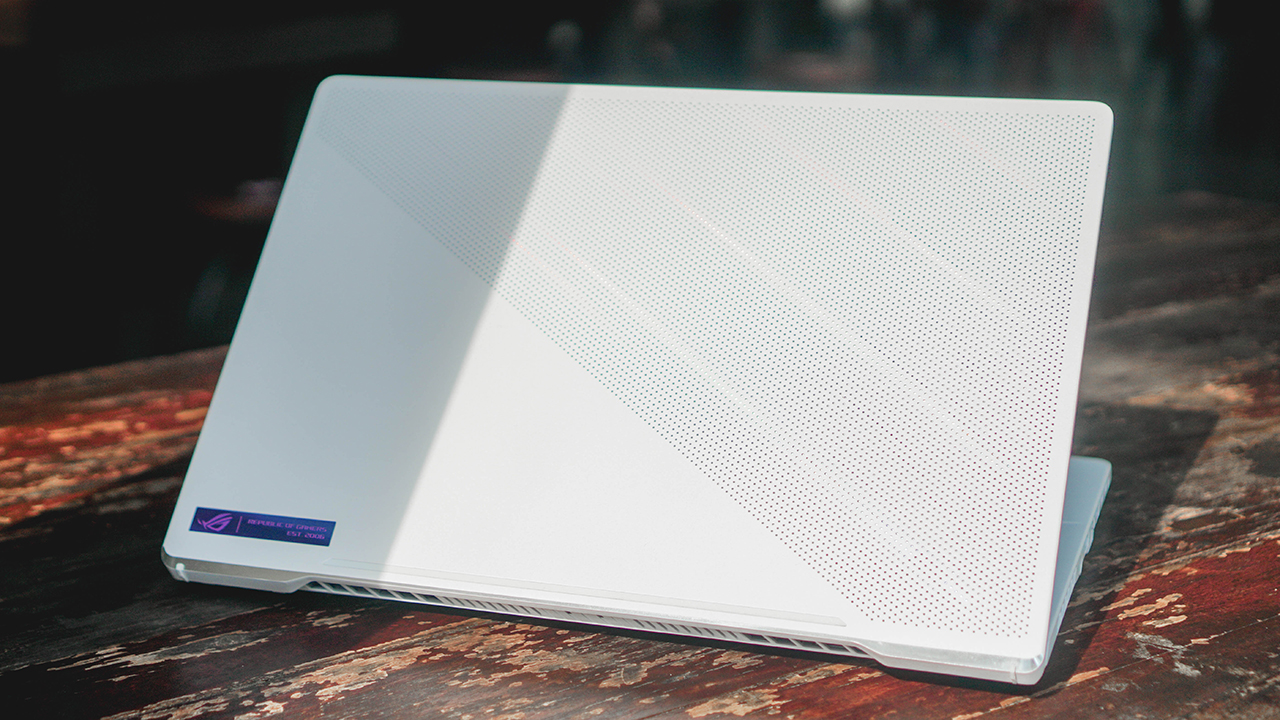
Specs and benchmarks never tell the whole story. But specs are a good place to start. Here’s what our review unit is packing:
- AMD Ryzen 9 6900HS
- 15″ WQHD (2560 x 1440) 16:9 240hz Pantone Validated 100% DCI-P
- RTX 3070 TI 8GB GDDR6
- 16GB DDR5 on board + 16GB DDR5-4800 SO-DIMM
- 1TB M.2 NVM PCIe 4.0 SSD
- Moonlight White
Some standout stuff from the information provided above are the new processor, the Pantone Validated display as well as the RAM available. This isn’t even its highest configuration. There’s a variant that runs RTX 3080. You can upgrade your RAM up to 48GB and there’s another SSD slot so you can expand your storage.

That means there’s plenty of room to up the ante down the line should you choose to do so. That’s not something that you can say for every gaming laptop.
Immaculate look and design

I love that ROG sent over the Moonlight White version for us to try. Black is great, don’t get me wrong. But it’s refreshing to see gaming laptops brimming with power come in other colorways that could appeal to people that are kind of just over with black.
The magnesium-aluminum lid and chassis also maintain the Zephyrus look giving it a sleek and tough exterior, while keeping the ROG Zephyrus identity. And you don’t have to worry too much about it picking up dust and dirt. In the few weeks I spent with it, it stayed pristine looking despite little to no wiping maintenance. That’s thanks largely to the wear-resistant coating which works exactly as advertised.

Adding to the overall functional design is the ErgoLift Hinge. This is one of my favorite things about ASUS laptops. The ergolift hinge not only allows a 180° for more flexibility, it’s also just ultra satisfying to move and look at.
It looks fresh, feels tough, and is relatively compact making it easy to carry around. It’s a looker with some bells and whistles in the right places.
Ports, keyboard, and trackpad

Speaking of those bells and whistles, the Zephyrus G15 is packed with possibly all the ports you’ll need. Whether that’s for a remote setup or one that’s neatly tucked into a home office desk.

Here’s everything it has to offer:
- USB3.2 Gen 2 Type-A (2x)
- USB3.2 Gen 2 Type-C(supports DP 1.4 & 100W PD Charger), (2x)
- LAN RJ-45 jack (1x)
- HDMI 2.0b (1x)
- Micro SD Card Reader (UHS-II), (1x)
- 3.5mm Audio combo jack (1x)
- Kensington Lock (1x)

The Stealth Type keyboard was a curious choice but one that I welcome. I was of the impression that the gaming demographic skews more towards the clickity clack of mechanical keyboards. But the one equipped on the Zephyrus G15 is about as quiet as they come. No complaints here though, as it didn’t distract my at-the-moment entanglement in slumber as I toiled away over late night labor.

One of the best trackpad experiences on a Windows Gaming laptop.
The trackpad, too, was such a pleasant surprise. Perhaps it’s also in conjunction with Windows 11 but using a trackpad on Windows now doesn’t feel as laggy as it used to. On days that I only worked using the Zephyrus G15, I never felt the need to connect a mouse. That feels like a breakthrough as I have never been able to say that for any of the Windows laptops I’ve reviewed in the past.
Plays like a console

Yes, I paired a DualSense controller with the Zephyrus G15
Alright, before any PC gaming enthusiasts come at my throat, what I mean here is mostly the quality of life things. When I got the Zephyrus G15, I didn’t tweak it very much. Heck, I even opened Armoury Crate less than five times during my time with it. Despite this, it had no trouble running the games I attempted to play. Some of which are even very demanding AAA titles.
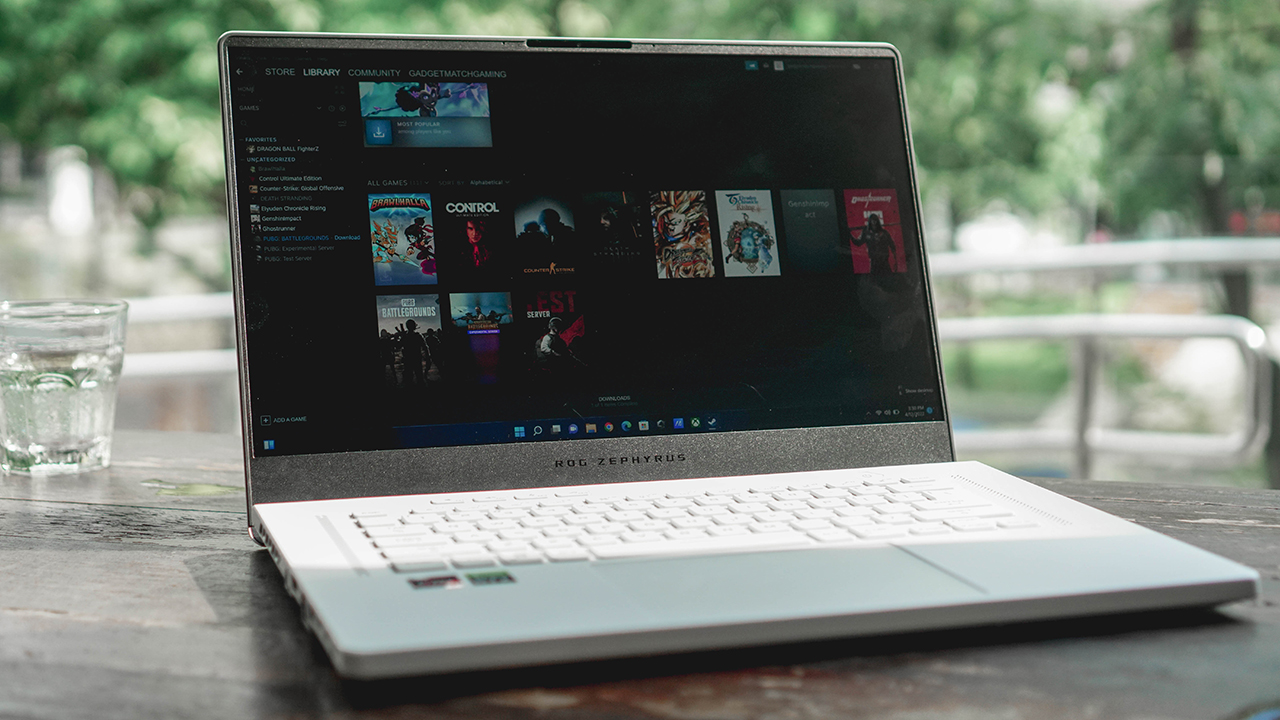
I’m a big fan of tech that just works. Especially with my current workload, the less time I have to figure something out, the better. And that’s the case with this gaming laptop. I simply fired up Steam, downloaded the games, and played to my heart’s content.

Teen Gohan vs Cell is a classic.
Naturally, I checked the settings on some of the first few games I tried like Control, Genshin Impact, and Dragon Ball FighterZ. Everything was consistently on the highest settings right off the bat. Lags and stutters? I don’t know them. Not with the Zephyrus G15 in tow.
To better understand where I’m coming from, I own an ROG Flow X13. The one that comes with the ROG XG Mobile. It’s a great machine, no doubt. But to get the most out of it, I still have to hook up the XG Mobile to the Flow X13. Whereas with the Zephyrus G15, I simply have to turn the laptop on. That’s an underrated level of convenience that may or may not mean much for some of you.
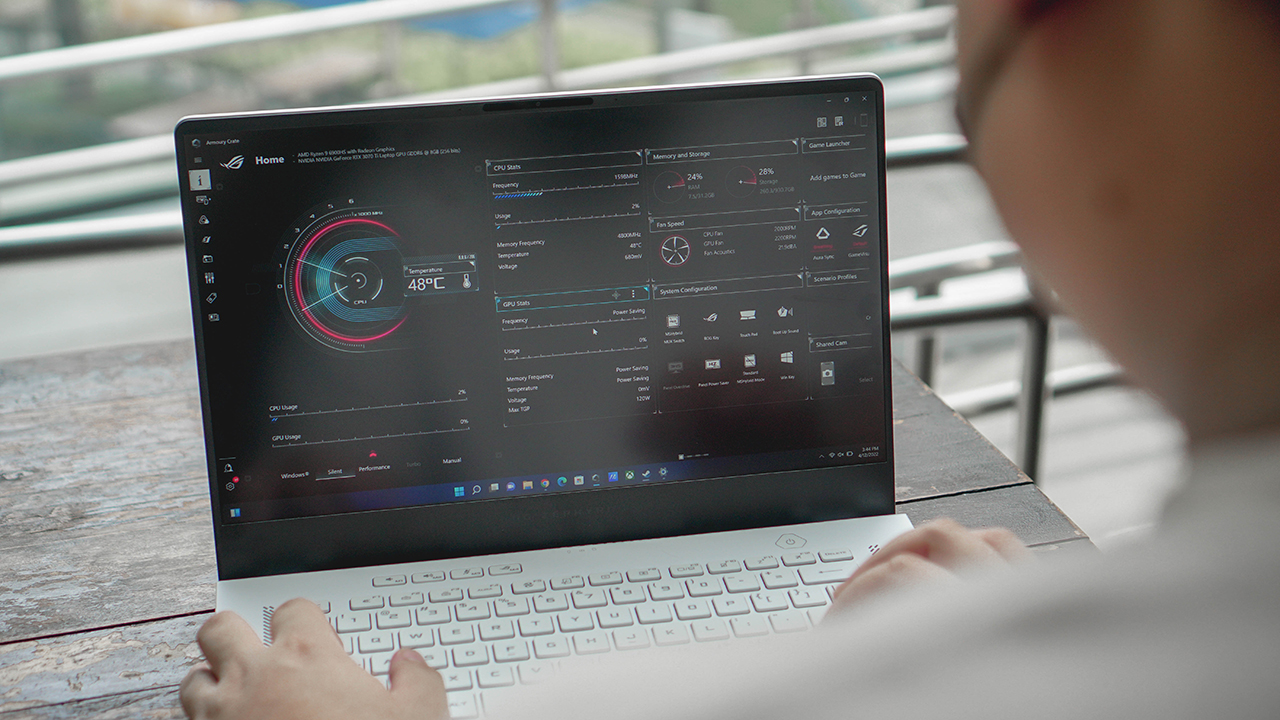
You still have Armoury Crate but I didn’t feel the need to touch it as much.
It’s seriously making me consider trading up for the Zephyrus G15. And that’s just with the raw performance of games. I haven’t even talked about how good the display and speakers are.
Eyes and ears candy

Its high-level performance is of course complemented by a stellar audio-visual experience. As indicated in the specs section earlier, this laptop sports a 15” WQHD 16:9 display with a 240Hz refresh rate. It’s also Pantone Validated which is great for color accuracy if you’re working on anything that involves visual media.
But all you really need to know is that it’s an absolute treat to the eyes. The 240Hz refresh rate on the panel is great for first-person shooters. Unfortunately, I am not great at first person shooters. I’d like to take this opportunity to whoever I played Valorant with because I totally dragged the team down.

This is a “Tomboy” fancam but listen to her album “MY” too!
It is a visual treat, no doubt. But like (G)-IDLE’s Miyeon, the Zephyrus G15 isn’t just a treat for the eyes. It also sounds hella good. I spent a good chunk of time watching Miyeon’s fancams on this thing and it’s just a fantastic overall experience.
I also watched a few episodes of Netflix’s Business Proposal at the time of writing. Really, whatever type of content you consume, it’s bound to look and sound great on this thing.

Kim SeJeong is just adorable
One thing we did learn is that the display struggles a bit under really bright environments. When taking photos of the device, we opted to step out for natural light. But if you’re using this to work or play remotely, I recommend you find some place that isn’t too bright.
Is this your GadgetMatch?

The ROG Zephyrus G15 (2022) GA503 is easily one of my personal favorite devices that I’ve reviewed so far in 2022. It’s about as close as it can get to a plug and play PC gaming experience. And that’s not something you can say for many laptops and/or PCs.
The Zephyrus G15 (2022) brings with it a distinct look, top-notch gaming performance, and a really solid audio-visual experience. As a gaming laptop, this is about as perfect as it gets and is something I can easily recommend especially if you’re willing to splurge for it.
Pricing starts at PhP 129,995/ SGD 1,755/









The trifecta is complete. Almost a year after announcing their new hardware, Valve has finally unveiled the price tag of the Steam Frame, complementing the Steam Machine and Steam Controller revealed a few months ago.
Whereas the Steam Machine is a console of its own, the Steam Frame is a traditional VR headset with a pair of controllers for both hands. Unfortunately, despite being in a different segment, the headset is not immune to the rising prices of technology. The Steam Frame will start at US$ 1,059 for a 256GB model and can go up to US$ 1,299 for the 1TB model. On the plus side, each box will come Half-Life: Alyx packaged along with the headset.
Here’s a more detailed rundown of what you’re getting. The Steam Frame will ship with the Snapdragon 8 Gen 3 chipset, paired with 16GB of RAM. Each eye comes with a 2160 x 2160 LCD screen, putting out images at up t0 a 144Hz experimental refresh rate. As mentioned above, the headset will start with 256GB of storage but can go up to 2TB. It will come packaged with SteamOS 3 and a rechargeable 21.6Wh battery.
This might be a hard buy for some. The industry currently has more affordable options, for one. Also, virtual reality isn’t the most thriving segment of gaming today.
If you’re still decided on buying one, however, Valve is using its lottery system. Interested customers can sign up from now until September 17. The company will then randomize the purchasing order. Those who draw the first ones in the lottery can get a purchase email as soon as September 18. Meanwhile, anyone who registers after September 17 will automatically be put at the back of the queue.
SEE ALSO: Valve announces its own console called the Steam Machine
Gaming
BlizzCon 2026 announces World of Warcraft: Forever and Diablo V
StarCraft, Overwatch, Hearthstone, and more also get news


Blizzard Entertainment kicked off BlizzCon 2026 with a packed Opening Ceremony featuring new games, major expansions, updates, and other announcements across its biggest franchises.
Blizzard Entertainment President Johanna Faries opened the event at the Anaheim Convention Center, celebrating the community behind the company’s games and the teams that bring its worlds to life.
World of Warcraft: Forever and Diablo V
The biggest announcement was World of Warcraft: Forever, a new World of Warcraft experience launching November 5 AEDT, with its beta beginning September 18 AEST. The new experience will feature three zones, more than 1,000 quests, nine dungeons, two raids, and a new Skyborne race.
Blizzard also officially announced Diablo V, marking the next era of the franchise. The game is set to launch in North America in Spring 2029, with Sanctuary having fallen and Diablo having won.
StarCraft is also returning with a new story-driven, open-world shooter. The game is currently planned for a Spring 2030 release in North America.
Beyond games, Blizzard revealed that an animated series set in the Diablo universe is in development with Netflix. The company says this is only the beginning of its plans to expand its universes beyond gaming.
For Warcraft III Reforged, the new Forsaken Kingdom campaign is available today. It marks the Warcraft RTS series’ first new storyline in more than 23 years and explores the fall of Lordaeron and the origins of the Undercity. The accompanying 3.0 update also brings graphical improvements and a revamped World Editor.
Heroes of the Storm is adding Xal’atath as its newest Hero. She arrives in the Nexus on September 29 AEST, with her PTR release scheduled for September 15 AEST.
Existing games updates
Meanwhile, Diablo IV is preparing for its next major content drop. Season of Hell’s Legacy begins September 16 AEST and celebrates the franchise’s 30-year history with the return of the Prime Evils and Deckard Cain, alongside themed rewards and gear.
The legendary Amazon class will also arrive in the first half of 2027 as part of Diablo IV’s first class pack. The Diablo IV: Age of Hatred Collection is additionally coming to Nintendo Switch 2 on September 16 AEST with cross-platform play and cross-progression.
For World of Warcraft, Blizzard teased the next major update for Midnight. Eclipse (12.2) will see Xal’atath move closer to her goal of claiming Azeroth’s Worldsoul. Blizzard also offered another look at The Last Titan, the next expansion in the Worldsoul Saga and a major culmination of more than two decades of Warcraft storytelling. More information is coming early next year.
Overwatch is getting a major update with Season 5. The season introduces new Support Hero Doctrine, reworks for Sombra and Roadhog, and the new Watchpoint: Grimsvötn map. It will also conclude The Reign of Talon, Overwatch’s first year-long narrative arc.
LE SSERAFIM & YOASABI
BlizzCon also featured performances from YOASOBI and LE SSERAFIM. YOASOBI will perform during the first-ever esports halftime show at BlizzCon, while LE SSERAFIM will return to the Main Stage to close the weekend. A new LE SSERAFIM in-game collaboration is available now, with another Overwatch Spotlight scheduled for February 2027.
Finally, Hearthstone is getting its first new class in more than six years. The Monk arrives in 2027, while the upcoming Reign of the Black Empire expansion takes players back to the earliest age of Azeroth. It introduces the Assemble keyword, which combines two cards into a new one. Battlegrounds is also adding Aberrations as a new minion type.
BlizzCon 2026 is now underway, with Blizzard promising more announcements and details throughout the weekend.
Gaming
Just Dance: Decades of Hits to launch on October 13
All-new Just Dance experience that brings every generation together

Just Dance: Decades of Hits will launch on modern consoles on October 13, Ubisoft has announced.
This will offer fans of the franchise a new experience across eras of music. The game will be available on PlayStation5 , Xbox Series X|S, and Nintendo Switch on the launch date.
Nintendo Switch 2 users, meanwhile, will be able to enjoy the title by November 10, 2026.
Just Dance: Decades of Hits brings together every generation to one dance floor with 25 iconic songs across six different decades:
- Mamma Mia by ABBA
- Uptown Girl by Billy Joel
- It’s Tricky by Run-DMC
- No Scrubs by TLC
- Wannabe by Spice Girls
- Bye Bye Bye by *NSYNC
- Feel Good Inc. by Gorillaz
- Turn Down for What by DJ Snake and Lil Jon
- Danza Kuduro by Don Omar feat. Lucenzo
- Manchild by Sabrina Carpenter
- NUEVAYoL by Bad Bunny
- And more!

Bringing every generation together
Songs, visuals, and an all-new Adventure Mode are all designed to immerse players in the spirit that made each decade unforgettable.
From the funky ’70s disco floors and the electrifying ’80s rock scene to the glossy 2000s pop and beyond, travel through time and share the joy of rediscovering iconic moments with friends and family.
In Adventure Mode, follow Lyra, Dr. Gigavolt’s daughter, in a playful journey through time to rescue her father.
Explore the decades through six themed worlds, enjoy fun mini activities, and unlock exclusive rewards.

For unpredictable, chaotic fun where the rules change every round, players can jump into Party Mode. Or they can get moving with the Workout Mode, which tracks calories burned with each dance.
Up to six players can dance locally in the game, with no extra accessories needed.
In addition those who own Just Dance: Decades of Hits as well as Just Dance 2023-2026 editions will be able access all their songs in one place on the same console without having to switch games or separate menus.
This also includes songs from purchased Music Packs and songs available through an active Just Dance+ subscription.


DJI Lito X1 review: Is this the best lightweight drone for creators?
Making a strong case as a travel companion and a capable B-cam!


REDMI Note 17 Pro Max review: A new breed born from AI greed
Welcome to the new normal


Marvel’s Wolverine review: When the claws come out
A brutal, cinematic superhero adventure

Epson Lifestudio Grand Plus EH-LS970B with 4K projection, more launches

Jackery Explorer 300D: Power and portability in one

Nike’s Alphafly 4 is built for the part of the marathon ~that actually hurts~

SEGA, Netflix announce Crazy Taxi film adaptation

Smart launches LiveSmart App for exclusive deals

TECNO MEGAPAD 2 review: Eyes on the size

realme 16T 5G with 8000mAh battery, IP69 Pro rating launches in PH

HUAWEI Pura X View is 2026’s first WIDE slab-type smartphone

REDMI reveals the refreshed Note 17 and Note 17 Pro series

REDMI Note 17 Series: Price, availability in Singapore


-
 News2 weeks ago
HUAWEI Pura X View is 2026’s first WIDE slab-type smartphone
-

 News2 weeks ago
The CAMON Slim 5G is TECNO’s latest ultra-slim smartphone
-

 News2 weeks ago
iPhone 18 Pro series: Price, availability in the Philippines
-

 Singapore2 weeks ago
iPhone 18 Pro series: Price, availability in Singapore
-

 News2 weeks ago
iPhone Duo: Price, availability in the Philippines
-
 News2 weeks ago
HUAWEI Mate XT 2 tri-fold launches with Kirin 9050 Pro
-

 News2 weeks ago
vivo introduces refurbished versions of X300 FE, X300 Ultra for less
-

 News2 weeks ago
iPhone Duo: Price, availability in Singapore