


Hands-On
Huawei Nova 4 Hands-on: A ‘hole’ new approach
Does the punch-hole display make a difference?

One of the reasons why Huawei is always on the news, aside from the controversies, is because they have new phones every other week. I’m still loving the Mate 20 Pro for its amazing cameras, but there’s now the Nova 4 that, in my opinion, will be an interesting option for new smartphone buyers.
The Huawei Nova 4 offers pretty much everything a premium midrange phone should: a nice display, beautiful body, and good cameras. It’s also one of the few phones in the market that has a hole in its display instead of a notch.
Is a punch-hole display more preferable than a notch? That’s what I tried to find out while using the Nova 4 for this hands-on.
First, let’s start with the basics:
It’s got a notch-less 6.4-inch display

In exchange, there’s a hole for the front camera
There’s support for two nano-SIM cards

No space for a microSD card, though
On its right are the physical buttons

They blend in well with the phone’s frame
The 3.5mm headphone jack is on top

Along with an IR blaster and noise-canceling microphone
At the bottom is the reversible USB-C port

There’s also the loudspeaker and main microphone
The back houses three cameras

And the swift fingerprint reader
The gradient color scheme is present

This has become Huawei’s signature
Can’t deny that it’s from Huawei
From its body to its color, the Nova 4 contains 100 percent of Huawei’s DNA. Gone are the days where we associate every touchscreen phone as an iPhone. Once the gradient color of the Nova 4 shifts, it instantly captivates. The usual question I get when my friends see me holding the Nova 4 is: It that a Huawei?
Personally, I wouldn’t buy a phone with an extreme persona like this Aurora Blue variant of the Nova 4 I have for review. I still prefer my discreet OnePlus 6 in black, but that’s just me. Of course, there’s a black variant of the Nova 4 available as well for those who don’t want a phone that becomes a centerpiece on a table.
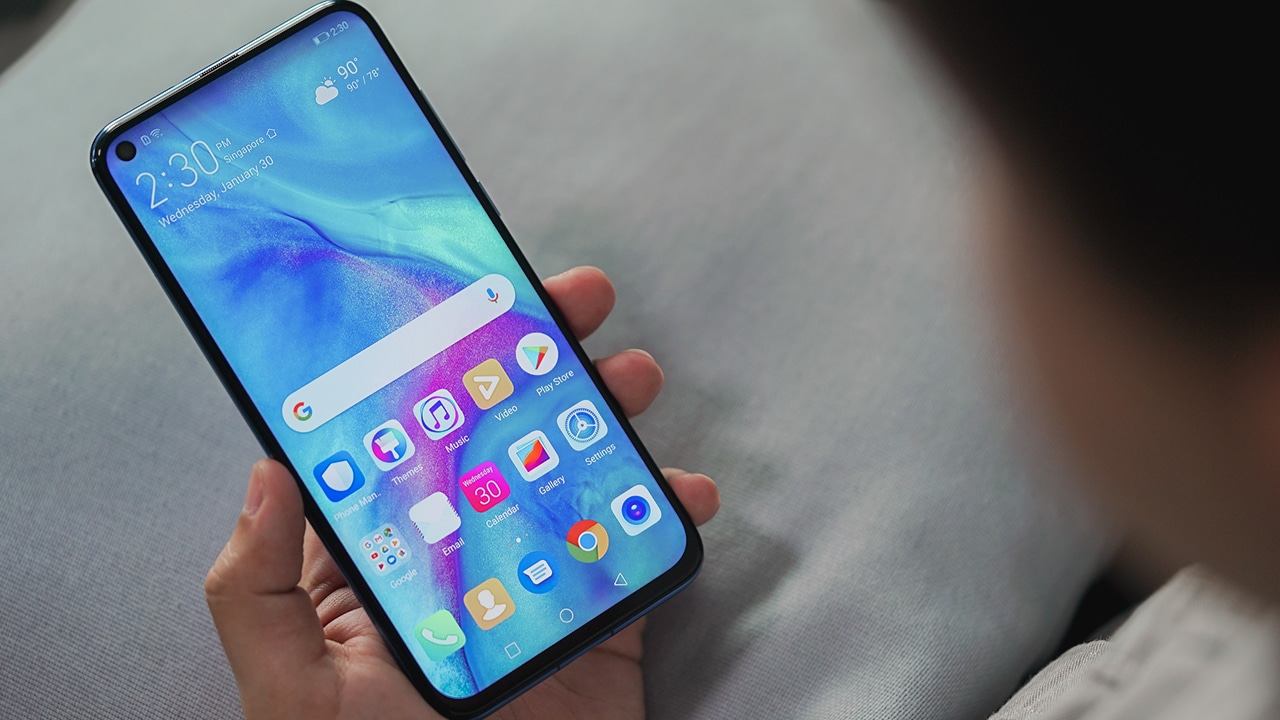
The shape and size of the Nova 4 are no different from any premium phone that came out lately. It’s got a glass front and back with a shiny metal frame and the sides of the phone curve gently, making it easier to grip. Overall, I found no issues about the build of the Nova 4, aside from it being smudgy most of the time.

At first, I found the punch-hole to be as annoying as the notch. The hole is larger than expected, but I got used to it. Most apps treat the hole like a notch, so the experience is similar to before. The punch-hole doesn’t have an advantage over the notch in terms of usability.
Where the punch-hole shines is how it’s more tolerable when watching a video in full screen. Some games are not aware of the area the hole is occupying, thus control buttons get covered. Turning off the “full screen display” switch for some games fixes this.
Flagship-grade speed and stability
Enough with the looks; let’s now dive into the internals of the phone. The brain of the Nova 4 is the Kirin 970 processor. It’s the previous flagship 10nm chipset from Huawei’s own labs. It’s also inside the Mate 10 and the P20 series. Moreover, the Nova 4 has the same processor as its predecessor.
Performance-wise, there’s no big difference. This means Nova 3 owners don’t need to upgrade, unless they want a new and different-looking phone. The advantage of the Nova 4 is its upgraded memory to 8GB, although storage remains the same at 128GB.

Android Pie comes out of the box with Huawei’s EMUI 9 placed on top. Frankly, there’s not much new about the custom interface since EMUI 6, aside from the staple features of Android Pie. The heavy skin of EMUI doesn’t affect the performance of the phone, but it’s also not the best-looking.
In terms of gaming, popular titles like Asphalt 9: Legends and PUBG Mobile are playable on high graphics settings. There’s no sign of hiccups or lag thanks to the optimizations by Huawei’s GPU Turbo.

As mentioned, the hole in the display is considered a “notch” by the system, so you can still hide the area it occupies by diving into the Settings panel. This makes the phone look hole-free, but you lose the extra screen real estate in some apps. So far, there are no issues with system and third-party apps, and I hope it stays that way.
Good cameras with ultra wide-angle lens
When it comes to taking photos, the Nova 4 doesn’t disappoint. It’s got a main 20-megapixel camera paired with an ultra wide-angle 16-megapixel shooter. There’s also a 2-megapixel depth sensor to help in taking portrait shots with bokeh effect. As for selfies, the 25-megapixel front camera can take detailed and pleasing stills.
AI scene detection is available both on the front and rear cameras, so the phone always helps in taking the best-possible photo. Check out these samples:
-

- Front
-

- Front
-

- Front
-

- Rear
-

- Rear
-

- Rear
-

- Rear
-

- Rear
-

- Rear
-

- Ultra wide-angle
-

- Ultra wide-angle
Like with most camera phones, the Nova 4 can take good-looking photos in broad daylight. Good thing the quality doesn’t drop when shooting indoors or in the evening. Generally, the Nova 4 is a capable phone for taking photos, except the ultra wide-angle lens doesn’t sport autofocus. Night mode is also available when you need to take photos in incredibly dark environments.
Is this your GadgetMatch?
The Huawei Nova 4 is a new smartphone with a fresh approach to the notch dilemma. If you dislike the notch, the punch-hole display is your next best option.
For me, the ideal best bezel-less phone doesn’t have a notch or a hole — just like the Mi Mix 3, OPPO Find X, or Vivo NEX. Those phones have their own issues about their approach, however. It’s just a matter of preference at this point because nothing is perfect — for now.

While I wait for the perfect bezel-less phone without moving parts or display cutouts, I appreciate the options given to us. In the end, it’s your choice if you want a notch, a hole, or a mechanism to house the selfie camera. There are also phones without front cameras at all, maybe that’s your cup of tea — or coffee.
SEE ALSO: How the Huawei Watch GT made me believe in smartwatches




Hands-On
Apple iPhone Duo Unboxing and Hands-on
Supported apps, crease, cameras, and MagSafe all tested


Apple’s iPhone Duo is finally here!
Aside from unboxing the all-new iPhone-dable in Night Sky, we take a closer look at the display crease, check out the under-display camera quality, see which MagSafe accessories work with it.
Most of all, which apps support it (or not).
But how well does the dual-screen experience on an iPhone actually work? Watch our Apple iPhone Duo unboxing and hands-on to know more!


Moving into a new space comes with a long list of things to figure out, and lately, I’ve been paying more attention to something that’s easy to overlook: air quality.
After using the LG AeroMini for about a month, it has become a subtle but welcome addition to my space. It helps make the room feel fresher, while its compact and stylish design fits naturally into my setup. Here are the things that stood out to me most after living with it for a month.
360° purification for a fresher space
One of the things I appreciate about the AeroMini is its 360° air purification, designed to bring purified air in every direction.
For me, this is particularly useful in a new space where I’m spending a lot of time working, relaxing, and just settling in.

Combined with its True HEPA filter, which is designed to remove 99.999% of 0.01μm fine dust and allergens, it gives me added peace of mind about the air I’m breathing every day.
After a month, I can genuinely say that the space feels fresher with it running.

Surprisingly quiet
This is probably my favorite feature.
The LG AeroMini operates at just 26dB, and after using it for a month, what stands out is how easy it is to forget that it’s even running.

I can have it running while I’m working or sleeping without the noise becoming a distraction. For an appliance that’s designed to continuously improve the air around you, I think that’s a big deal.
Sometimes, the best feature is the one you barely notice.
Design that fits my space
Since I recently moved, I’ve been pretty conscious about what I bring into the space. I want things to be functional, but I also don’t want appliances that feel like they’re taking over the room.

The AeroMini’s slim and compact design makes it easy to incorporate into my setup. It doesn’t feel bulky or industrial, and I like that I can leave it out without feeling like I need to hide it away.
For me, that balance between functionality and aesthetics makes it feel more like part of the space rather than just another appliance.
Air quality at a glance
Another feature I’ve found convenient is its Smart Control. Through the app, I can monitor and control the AeroMini while getting real-time updates on the indoor air quality.
It’s a small convenience, but being able to check the air quality without having to interact with the purifier directly makes it easier to keep track of what’s happening in the room.

Easy to maintain
I also appreciate that the AeroMini is designed with an all-in-one dust and deodorization filter that makes replacement and maintenance easier.
That matters to me because the best home gadgets are the ones that don’t create another complicated chore. I want something I can set up, use regularly, and maintain without too much fuss.

After a month, would I keep it?
Yes, and mainly because it quietly fits into my everyday routine.
The LG AeroMini has helped make my new space feel fresher and more comfortable, while its compact design means it doesn’t compromise the look of the room. But if I had to pick just one thing I appreciate most, it’s still how incredibly quiet it is.

It’s one of those upgrades that doesn’t demand your attention. It simply works in the background.
If you’re also looking to make your home a fresher and more comfortable space for yourself and your family, visit https://www.lg.com/ph/ to learn more about the LG AeroMini and how it can fit into your everyday life.
Hands-On
Apple iPhone 18 Pro Series Hands-on
And everything announced during Apple’s September 2026 Event

The latest Apple event isn’t just about the shiny new Apple Duo. There’s a lot to talk about!
In this video, we break down everything Apple has announced during their September 2026 keynote.
First, there’s the updated iPhone 18 Pro and 18 Pro Max. That’s alongside their design and color changes, battery and performance improvements. Even that massive camera upgrade.
There’s even the ANC-infused AirPods 5 alongside the newer Apple Watch Series 12 and Apple Watch Ultra 4. Plus, the latest software updates coming to both these wearables.
So, are these worth the upgrade?


HP OMEN Max 16 review: Gamer-maxxing in deep black
Peripherals deemed necessary to max this out


vivo V80 review: Good phone, tough sell
A capable travel companion


Ghost of Yōtei Complete Edition review: More of a great thing
Picking up where Atsu left off

Visa: 79% of Filipinos want to learn about stablecoins

CASETiFY Match: Finding the right case for your Galaxy Z8 Series phone
HP OMEN Max 16 review: Gamer-maxxing in deep black

Google illegally destroys 250,000 trees for a single AI data center

FINAL FANTASY RESONANCE now available across major platforms

TECNO CAMON Slim 5G review: Slim on size, big on surprise

TECNO CAMON Slim 5G: Price, availability in the Philippines

HONOR Magic9 Pro Max launches in China with ARRI-powered imaging

BYD says that way better EV batteries are coming next year

TECNO CAMON Slim 5G teases an ultra-slim design ahead of launch


-
 Wearables2 weeks ago
Garmin Enduro 4 promises up to 320 hours of battery life
-

 Gaming2 weeks ago
Dragon’s Dogma 2: Dark Arisen launches with new Official Pawns
-

 News1 week ago
vivo V80 debuts with ZEISS cameras
-
 Deals2 weeks ago
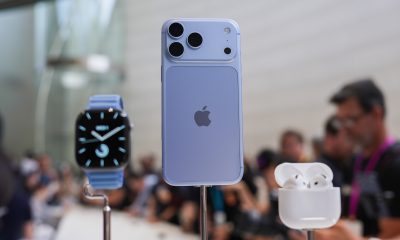
Score PhP 22,000 in guaranteed freebies when you pre-order the iPhone 18 Pro at Beyond the Box
-

 Philippines1 week ago
TECNO CAMON Slim 5G gets launch discounts, free MagBadge
-

 Wearables2 weeks ago
Garmin Approach S72 brings swing metrics, green reading to your wrist
-

 News1 week ago
Samsung: Galaxy Z Fold8 demand rose because of iPhone Duo
-
 Features1 week ago
I don’t want a phone that unfolds — the Galaxy Z Fold8 gets why